> ## Documentation Index
> Fetch the complete documentation index at: https://formhug.ai/docs/llms.txt
> Use this file to discover all available pages before exploring further.
# Form Builder
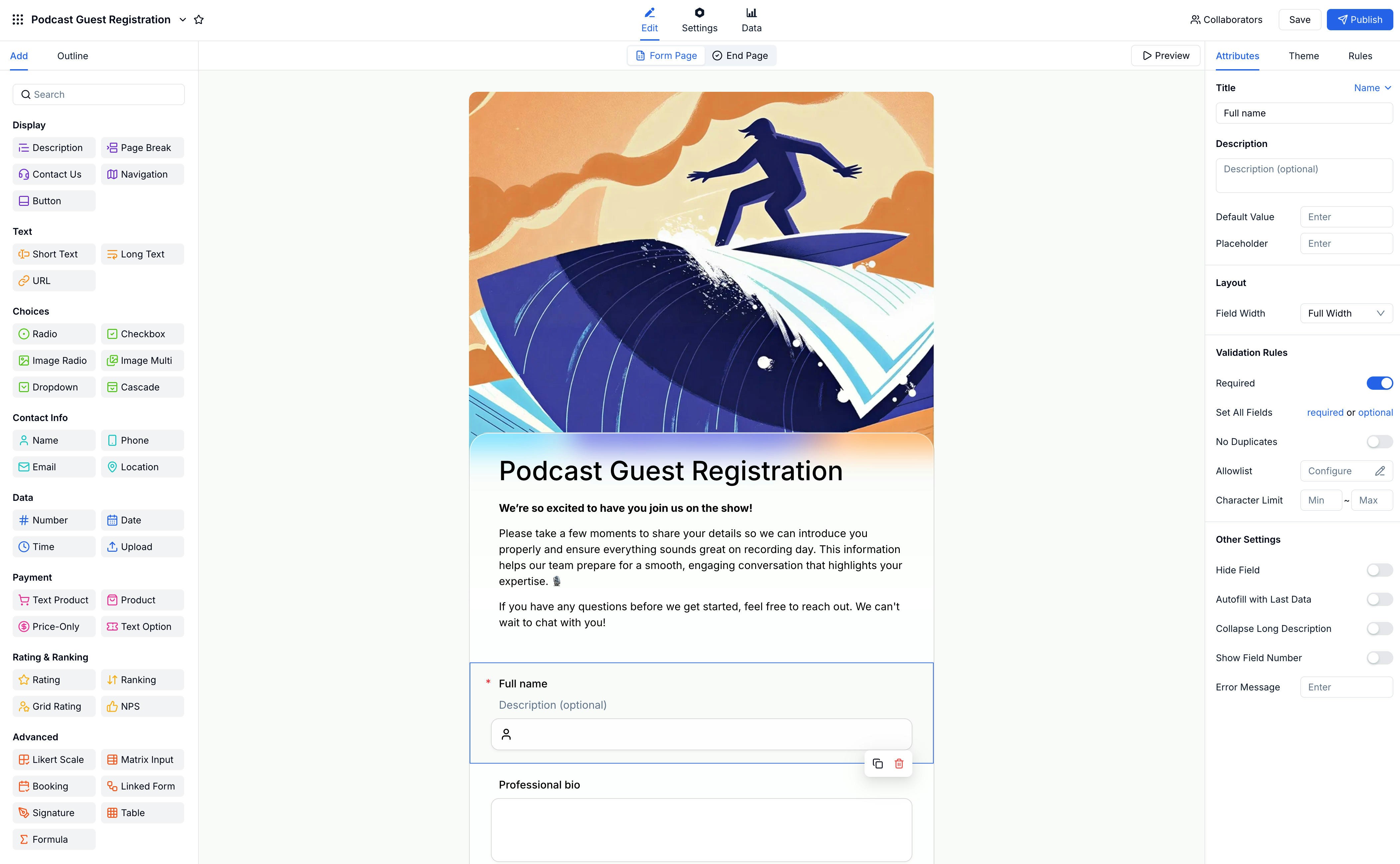
> Build and customize your form using FormHug's 3-panel WYSIWYG editor with 30+ field types
The form builder is a 3-panel WYSIWYG editor. The left panel lists available fields, the center canvas shows your form exactly as submitters will see it, and the right panel controls settings for the selected field or page.
 If you want FormHug to generate the first draft before editing manually, start with the AI form builder, the payment form builder, or a ready-made template. For a tool-level comparison, read best AI form builder 2026.
## Form Structure
Every FormHug form consists of two main parts:
| Part | Description |
| -------------- | --------------------------------------------- |
| **Form Pages** | Where you collect information from submitters |
| **End Page** | What submitters see after they submit |
You can add multiple form pages using **Page Break** fields. What submitters see after they submit is configured on the [**End Page**](/features/building/end-page).
## Field Categories
FormHug offers 30+ field types across eight categories:
Description, Page Break, Contact Us, Navigation, Button
Short Text, Long Text, URL
Radio, Checkbox, Dropdown, Cascade, Image Choice
Name, Phone, Email, Location
Number, Date, Time, File Upload
Product, Price-Only, Text Product, Text Option
Rating, Ranking, Grid Rating, NPS, Likert Scale
Matrix, Booking, Linked Form, Signature, Table, Formula
## Conditional Logic
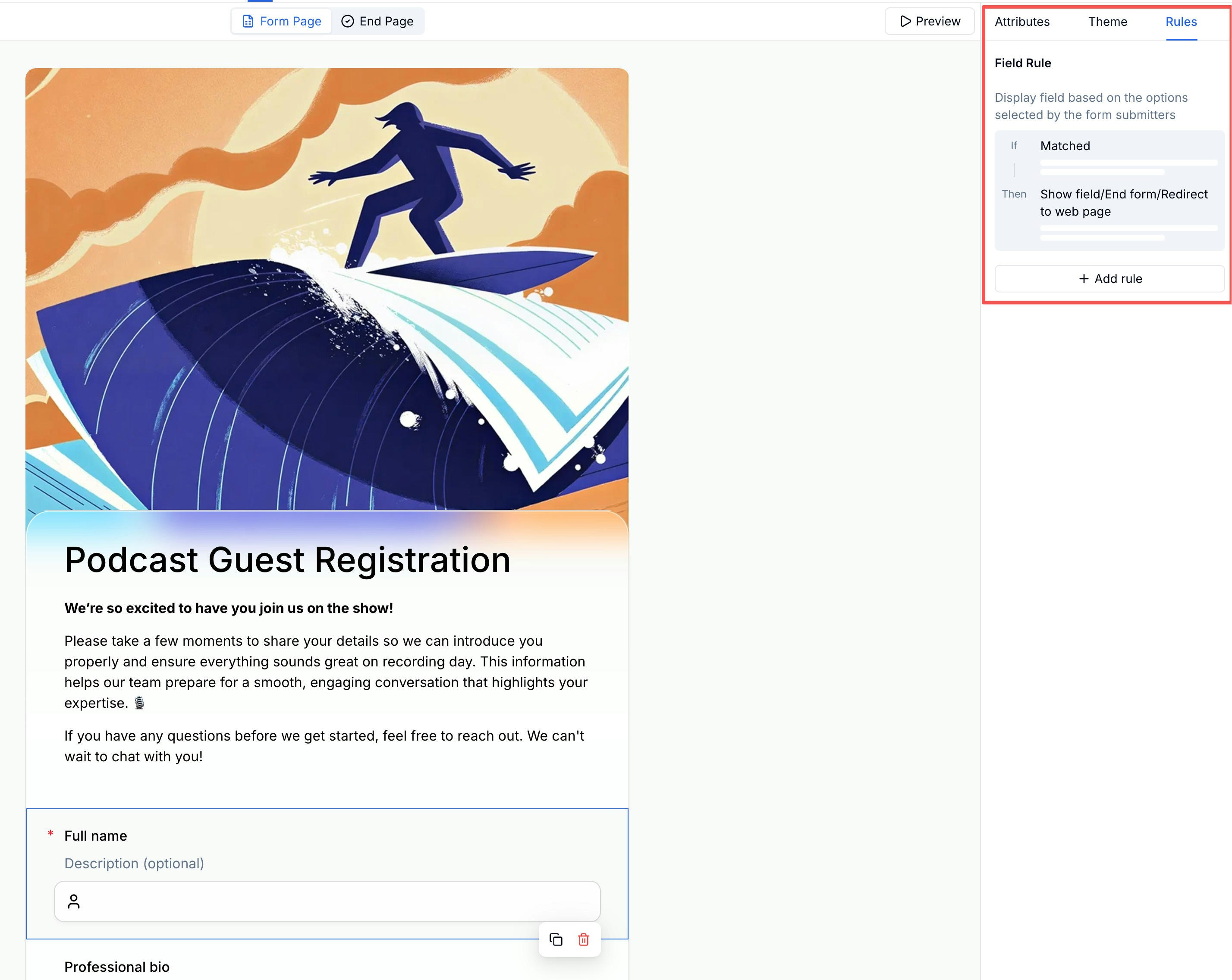
Show or hide fields based on previous answers using field rules. Create personalized paths through your form without extra pages.
If you want FormHug to generate the first draft before editing manually, start with the AI form builder, the payment form builder, or a ready-made template. For a tool-level comparison, read best AI form builder 2026.
## Form Structure
Every FormHug form consists of two main parts:
| Part | Description |
| -------------- | --------------------------------------------- |
| **Form Pages** | Where you collect information from submitters |
| **End Page** | What submitters see after they submit |
You can add multiple form pages using **Page Break** fields. What submitters see after they submit is configured on the [**End Page**](/features/building/end-page).
## Field Categories
FormHug offers 30+ field types across eight categories:
Description, Page Break, Contact Us, Navigation, Button
Short Text, Long Text, URL
Radio, Checkbox, Dropdown, Cascade, Image Choice
Name, Phone, Email, Location
Number, Date, Time, File Upload
Product, Price-Only, Text Product, Text Option
Rating, Ranking, Grid Rating, NPS, Likert Scale
Matrix, Booking, Linked Form, Signature, Table, Formula
## Conditional Logic
Show or hide fields based on previous answers using field rules. Create personalized paths through your form without extra pages.
 ## Multi-Page Forms
Split long forms into multiple pages for a step-by-step experience. Add a **Page Break** field anywhere to start a new page. Each page can have its own title and description.
## Field Attributes
Every field has flexible settings you can configure in the right panel:
* Title and description
* Placeholder text
* Required toggle
* Validation rules
* Default values
* Hidden fields
Learn about all field settings
## Related
Configure what submitters see after they submit.
Explore all 30+ field types available in FormHug.
Generate a form first, then refine it in the editor
Configure donations, products, tickets, deposits, discounts, and Stripe
Start with a proven structure before customizing fields
Compare AI-assisted form creation workflows
## Multi-Page Forms
Split long forms into multiple pages for a step-by-step experience. Add a **Page Break** field anywhere to start a new page. Each page can have its own title and description.
## Field Attributes
Every field has flexible settings you can configure in the right panel:
* Title and description
* Placeholder text
* Required toggle
* Validation rules
* Default values
* Hidden fields
Learn about all field settings
## Related
Configure what submitters see after they submit.
Explore all 30+ field types available in FormHug.
Generate a form first, then refine it in the editor
Configure donations, products, tickets, deposits, discounts, and Stripe
Start with a proven structure before customizing fields
Compare AI-assisted form creation workflows