> ## Documentation Index
> Fetch the complete documentation index at: https://formhug.ai/docs/llms.txt
> Use this file to discover all available pages before exploring further.
# Themes
> Apply a preset theme or customize colors, header, and field styles in the FormHug theme panel
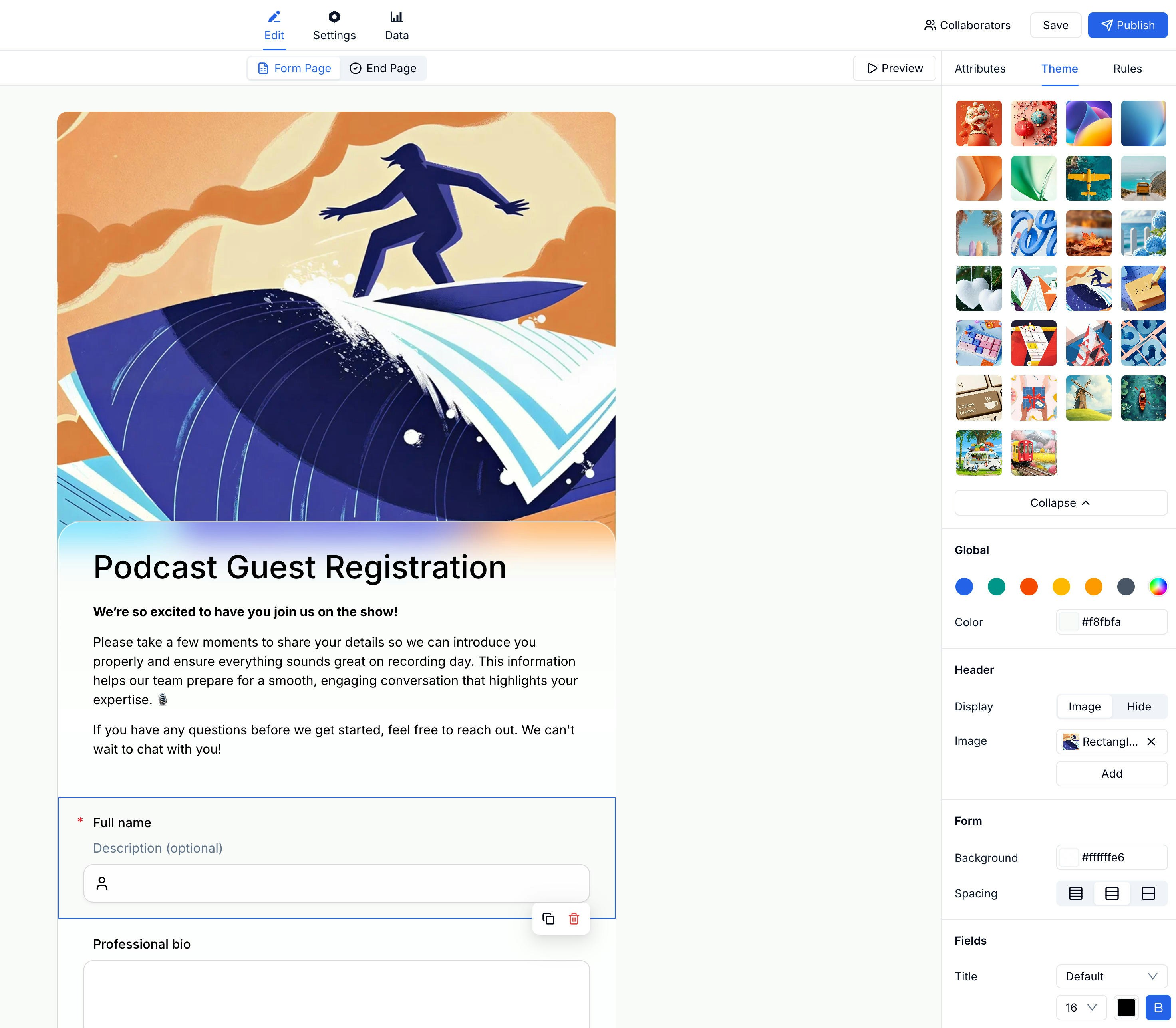
The theme panel gives you a grid of preset themes to choose from and detailed controls for colors, header layout, form background, and field appearance.
 Use themes to polish public-facing lead generation forms, branded registration forms, surveys, and embedded website forms.
## Applying a Preset Theme
In the form editor, click the **Theme** tab in the right panel.
Scroll through the theme grid and click any theme to preview it on your form.
The form updates instantly. Continue customizing below the presets if needed.
## Global Colors
Below the preset grid, the **Global** section lets you set a color palette for the entire form. Changes here affect all elements at once.
## Header Settings
Control how the form header looks:
| Option | Description |
| ----------- | ------------------------------------------ |
| **Display** | Show the header with title and description |
| **Image** | Use an image as the header background |
| **Hide** | Remove the header entirely |
## Form Background & Spacing
Adjust the form container:
| Setting | Description |
| -------------- | --------------------------------- |
| **Background** | Form background color |
| **Spacing** | Padding inside the form container |
## Fields Appearance
Style individual fields:
| Setting | Description |
| ------------- | --------------------------- |
| **Title** | Field label color and style |
| **Font size** | Text size for field content |
## Related
Add your workspace logo and brand identity
Edit form structure and content
Apply themes to campaign forms, waitlists, demo requests, and quote forms
Start from a template, then adjust visual style
Use themes to polish public-facing lead generation forms, branded registration forms, surveys, and embedded website forms.
## Applying a Preset Theme
In the form editor, click the **Theme** tab in the right panel.
Scroll through the theme grid and click any theme to preview it on your form.
The form updates instantly. Continue customizing below the presets if needed.
## Global Colors
Below the preset grid, the **Global** section lets you set a color palette for the entire form. Changes here affect all elements at once.
## Header Settings
Control how the form header looks:
| Option | Description |
| ----------- | ------------------------------------------ |
| **Display** | Show the header with title and description |
| **Image** | Use an image as the header background |
| **Hide** | Remove the header entirely |
## Form Background & Spacing
Adjust the form container:
| Setting | Description |
| -------------- | --------------------------------- |
| **Background** | Form background color |
| **Spacing** | Padding inside the form container |
## Fields Appearance
Style individual fields:
| Setting | Description |
| ------------- | --------------------------- |
| **Title** | Field label color and style |
| **Font size** | Text size for field content |
## Related
Add your workspace logo and brand identity
Edit form structure and content
Apply themes to campaign forms, waitlists, demo requests, and quote forms
Start from a template, then adjust visual style