> ## Documentation Index
> Fetch the complete documentation index at: https://formhug.ai/docs/llms.txt
> Use this file to discover all available pages before exploring further.
# Submissions
> View, manage, and export your form responses — with a per-field overview panel and submission table
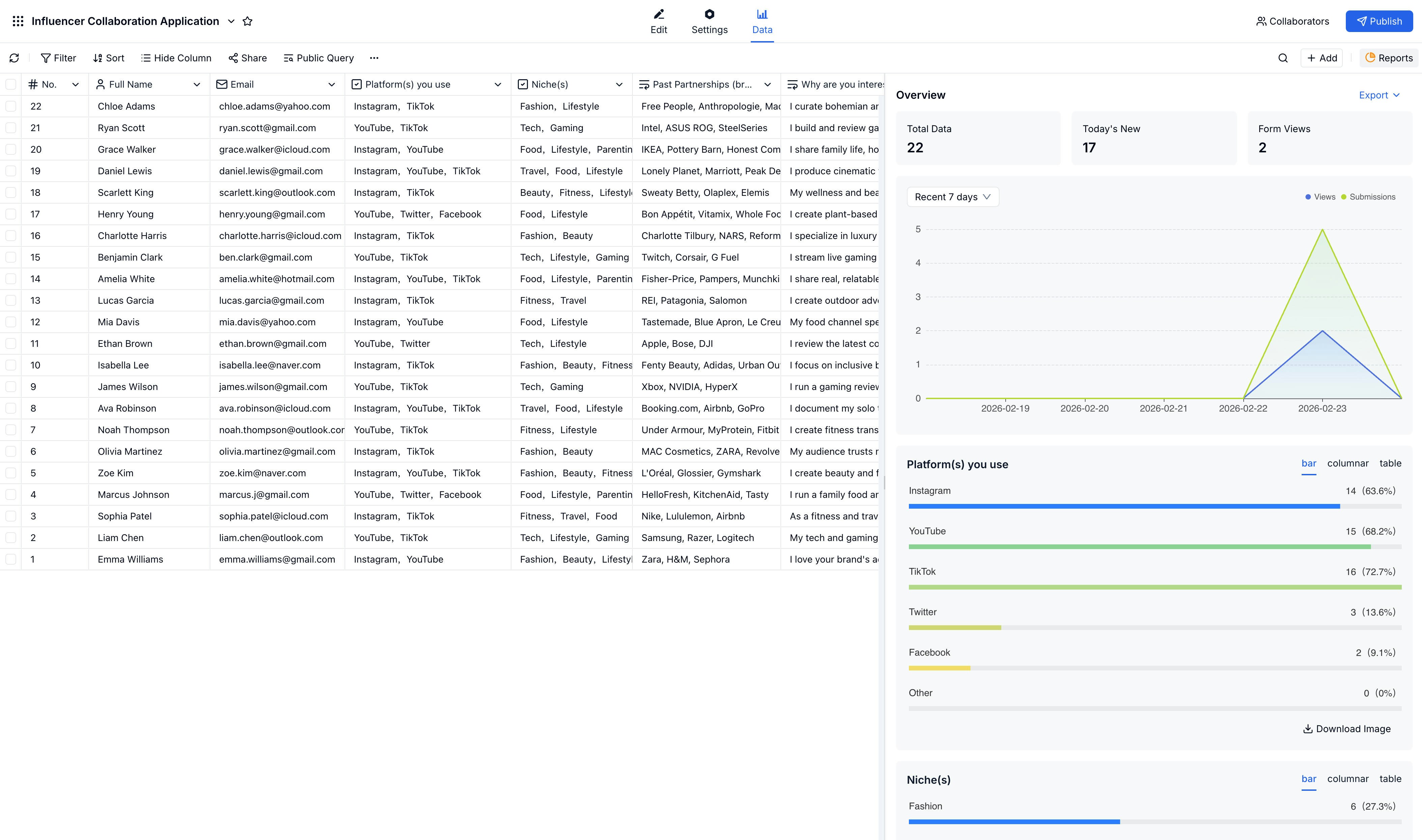
The Submissions page is where you view, manage, and export all your form responses. A submissions table shows each response, and an overview panel on the right gives you totals, a recent trend chart, and field-by-field breakdowns.
 For spreadsheet workflows, connect [Google Sheets](/integrations/google-sheets). For self-service lookups, use Public Query. If you want to publish lookup-style results without giving people dashboard access, see build a lookup page from Excel and share exam scores online.
## Overview Panel
The overview panel on the right side of the submissions page gives you a quick summary of your form's performance:
| Metric | Description |
| -------------------- | ------------------------------------------ |
| **Total Data** | Total number of submissions received |
| **Today's New** | Submissions received today |
| **Form Views** | Total times the form was opened |
| **7-day chart** | Submission volume over the last seven days |
| **Field breakdowns** | Response distribution for each field |
## Viewing Submissions
Access submissions from your form's **Data** tab. Click any row to open the full submission detail view.
**What you can see:**
* All field values for the submission
* Submission timestamp and ID
* Status and any notes or comments
## Managing Submissions
| Action | Description |
| ---------------- | --------------------------------------------- |
| **View Details** | Open full submission details |
| **Add Notes** | Attach internal notes visible to your team |
| **Add Comments** | Collaborate with team members on a submission |
| **Share** | Share an individual submission |
| **Edit** | Modify submission data |
| **Delete** | Remove a submission |
## Bulk Actions
Select multiple submissions to:
* Export to Excel or CSV
* Delete in bulk
* Send emails (if an email field exists)
## Exporting Data
Check the submissions you want to export, or select all.
Choose **Export** from the actions menu.
Select Excel (.xlsx) or CSV.
Your file downloads automatically.
## Filtering & Searching
Find specific submissions:
* Search by any field value
* Filter by date range or field values
* Sort by any column
## Related
Analyze trends across your submission data
Get alerted when new submissions arrive
Sync new submissions to a live spreadsheet
Let people search their own record without dashboard access
Turn existing spreadsheet rows into a public search page
For spreadsheet workflows, connect [Google Sheets](/integrations/google-sheets). For self-service lookups, use Public Query. If you want to publish lookup-style results without giving people dashboard access, see build a lookup page from Excel and share exam scores online.
## Overview Panel
The overview panel on the right side of the submissions page gives you a quick summary of your form's performance:
| Metric | Description |
| -------------------- | ------------------------------------------ |
| **Total Data** | Total number of submissions received |
| **Today's New** | Submissions received today |
| **Form Views** | Total times the form was opened |
| **7-day chart** | Submission volume over the last seven days |
| **Field breakdowns** | Response distribution for each field |
## Viewing Submissions
Access submissions from your form's **Data** tab. Click any row to open the full submission detail view.
**What you can see:**
* All field values for the submission
* Submission timestamp and ID
* Status and any notes or comments
## Managing Submissions
| Action | Description |
| ---------------- | --------------------------------------------- |
| **View Details** | Open full submission details |
| **Add Notes** | Attach internal notes visible to your team |
| **Add Comments** | Collaborate with team members on a submission |
| **Share** | Share an individual submission |
| **Edit** | Modify submission data |
| **Delete** | Remove a submission |
## Bulk Actions
Select multiple submissions to:
* Export to Excel or CSV
* Delete in bulk
* Send emails (if an email field exists)
## Exporting Data
Check the submissions you want to export, or select all.
Choose **Export** from the actions menu.
Select Excel (.xlsx) or CSV.
Your file downloads automatically.
## Filtering & Searching
Find specific submissions:
* Search by any field value
* Filter by date range or field values
* Sort by any column
## Related
Analyze trends across your submission data
Get alerted when new submissions arrive
Sync new submissions to a live spreadsheet
Let people search their own record without dashboard access
Turn existing spreadsheet rows into a public search page