> ## Documentation Index
> Fetch the complete documentation index at: https://formhug.ai/docs/llms.txt
> Use this file to discover all available pages before exploring further.
# Submission Rules
> Control who can submit your form, how often, and what happens when limits are reached
Submission Rules help you control who can submit your form, how often they can submit, and what happens when limits are reached.
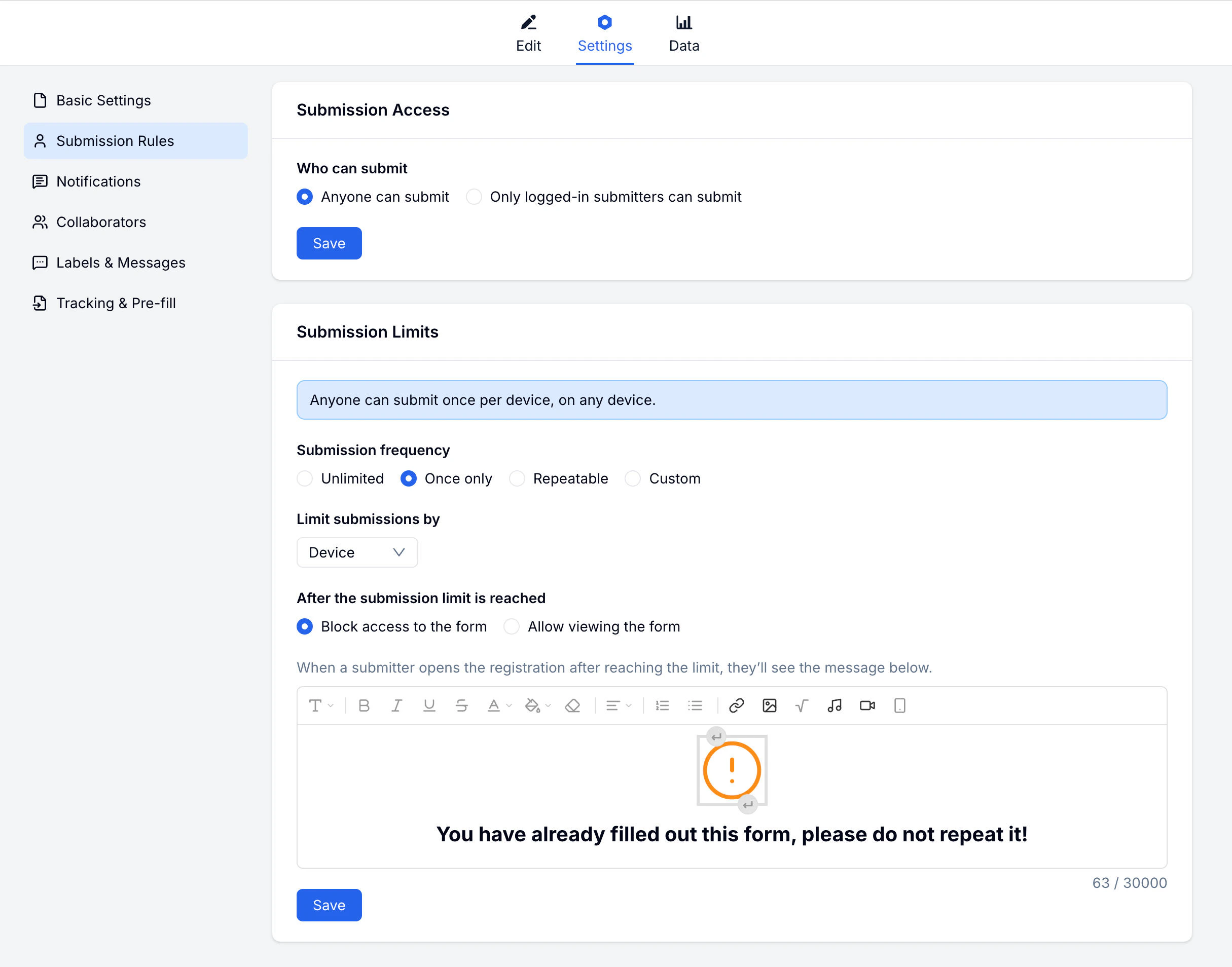 These settings are especially useful for registration forms, event signups, waitlists, applications, and limited-capacity bookings.
For event and class workflows, pair submission limits with the planning advice in event registration software and class registration software.
## Submission Access
Define who is allowed to submit the form:
| Option | Description |
| ------------------ | ---------------------------- |
| **Open** | Anyone can submit |
| **Login Required** | Submitters must log in first |
### Login Required
When enabled:
* Submitters must log in before filling the form
* You can identify who submitted each response
* Submitters can view their past submissions
* Enables user-based submission limits
## Submission Limits
Control how many times a person can submit:
| Option | Description |
| -------------------- | -------------------------------------- |
| **Unlimited** | No restrictions |
| **Once Only** | One submission per person |
| **Repeatable** | Allow multiple submissions |
| **Custom Frequency** | Set specific rules (e.g. once per day) |
### Identification Methods
How FormHug identifies submitters for limits:
| Method | Description |
| -------------- | ------------------------ |
| **Login** | Based on user account |
| **Device** | Based on browser/device |
| **IP Address** | Based on network address |
For the most reliable limits, require login. Device and IP-based limits can be bypassed.
### Custom Frequency Examples
* Once per day
* Once per week
* 3 times per month
* Custom time period
## After Limit Reached
Decide what happens when a submitter reaches their limit:
| Option | Description |
| ------------------ | -------------------------------- |
| **Block Access** | Prevent further submissions |
| **View Only** | Allow viewing but not submitting |
| **Custom Message** | Show a personalized message |
## Common Configurations
### One-Time Registration
For events or sign-ups where each person should only register once:
1. Enable **Login Required**
2. Set limit to **Once Only**
3. After limit: show a custom message
### Daily Feedback
For forms where you want daily input:
1. Enable **Custom Frequency**
2. Set to **Once per day**
3. After limit: **View Only** so they can still see their submission
### Open Survey
For surveys where you want maximum participation:
1. Keep **Open** access
2. Set **Unlimited** submissions
## Related
Set up email alerts for new submissions
Invite team members to manage your form
Use submission limits for signups, capacity, and duplicate prevention
Start from event, course, webinar, and membership registration templates
Plan capacity, confirmations, and attendee management around the form
These settings are especially useful for registration forms, event signups, waitlists, applications, and limited-capacity bookings.
For event and class workflows, pair submission limits with the planning advice in event registration software and class registration software.
## Submission Access
Define who is allowed to submit the form:
| Option | Description |
| ------------------ | ---------------------------- |
| **Open** | Anyone can submit |
| **Login Required** | Submitters must log in first |
### Login Required
When enabled:
* Submitters must log in before filling the form
* You can identify who submitted each response
* Submitters can view their past submissions
* Enables user-based submission limits
## Submission Limits
Control how many times a person can submit:
| Option | Description |
| -------------------- | -------------------------------------- |
| **Unlimited** | No restrictions |
| **Once Only** | One submission per person |
| **Repeatable** | Allow multiple submissions |
| **Custom Frequency** | Set specific rules (e.g. once per day) |
### Identification Methods
How FormHug identifies submitters for limits:
| Method | Description |
| -------------- | ------------------------ |
| **Login** | Based on user account |
| **Device** | Based on browser/device |
| **IP Address** | Based on network address |
For the most reliable limits, require login. Device and IP-based limits can be bypassed.
### Custom Frequency Examples
* Once per day
* Once per week
* 3 times per month
* Custom time period
## After Limit Reached
Decide what happens when a submitter reaches their limit:
| Option | Description |
| ------------------ | -------------------------------- |
| **Block Access** | Prevent further submissions |
| **View Only** | Allow viewing but not submitting |
| **Custom Message** | Show a personalized message |
## Common Configurations
### One-Time Registration
For events or sign-ups where each person should only register once:
1. Enable **Login Required**
2. Set limit to **Once Only**
3. After limit: show a custom message
### Daily Feedback
For forms where you want daily input:
1. Enable **Custom Frequency**
2. Set to **Once per day**
3. After limit: **View Only** so they can still see their submission
### Open Survey
For surveys where you want maximum participation:
1. Keep **Open** access
2. Set **Unlimited** submissions
## Related
Set up email alerts for new submissions
Invite team members to manage your form
Use submission limits for signups, capacity, and duplicate prevention
Start from event, course, webinar, and membership registration templates
Plan capacity, confirmations, and attendee management around the form