Class Registration Software for Workshops, Courses, and Small Programs
Create with AI
Describe the workflow and get a form draft
Use FormHug to create forms from prompts, then share, automate, and reuse the structured responses.
Class registration looks simple until the class has a limit. Ten seats, two time options, one instructor, a deposit, dietary notes, emergency contacts, and five people asking if they made it onto the list. A plain signup form collects names. It does not protect the class from overbooking or follow-up chaos.
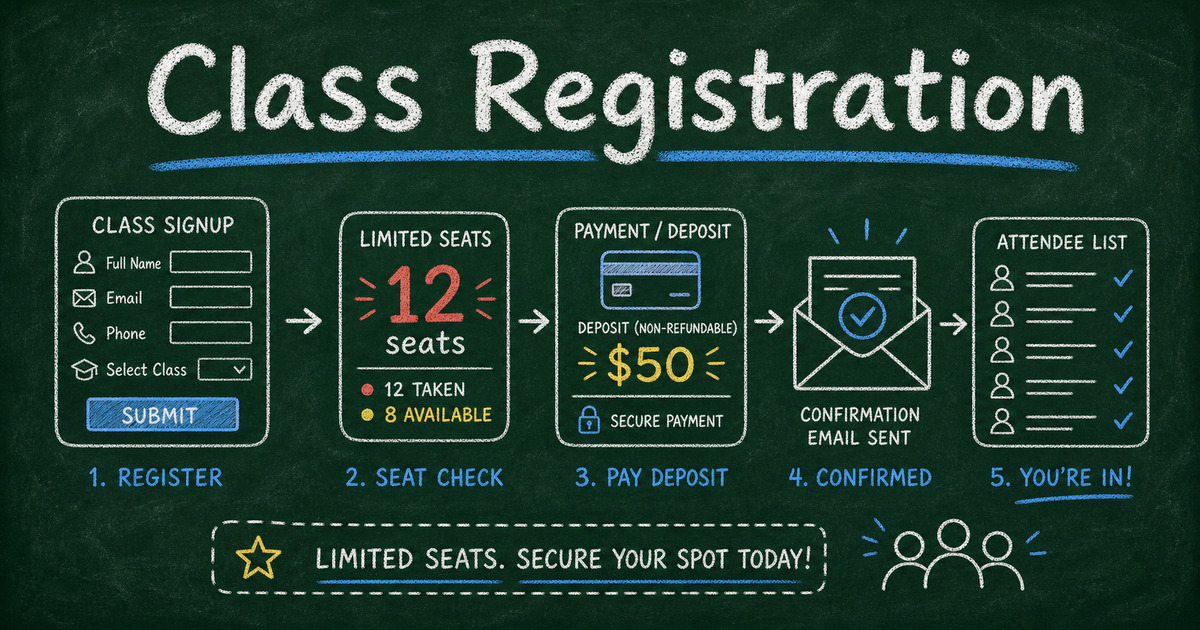
The right class registration software should do more than collect a roster. It should explain what people are joining, close full sessions, collect the fields your team actually needs, send a confirmation, and leave you with a clean attendee list instead of a spreadsheet you have to rescue.
This guide covers how to choose class registration software for workshops, courses, camps, training sessions, cohort programs, and small education businesses.
TL;DR — Class registration software collects student or participant details, manages seats, supports payments when needed, and sends confirmations after signup.
- Capacity matters most — the moment a class has limited seats, a normal form needs registration rules around it.
- Keep the form tied to the class — session choice, payment, contact details, and special notes should live in one record.
- Confirm immediately — registrants should know they are in, waitlisted, or pending review without emailing you.
- Works for: workshops, cohort courses, camps, fitness classes, tutoring groups, training sessions, and community programs.
- If the class also needs time-slot selection, compare this with an online booking form.
What Is Class Registration Software?
Class registration software is a tool for collecting signups for a class, workshop, course, camp, or training program. It usually combines a public registration form, capacity or enrollment controls, participant records, confirmation emails, and exports.
It is different from a learning management system. An LMS hosts lessons, assignments, grades, and student accounts. Class registration software handles the moment before that: who wants to join, which session they chose, whether they paid, and how the organizer should contact them.
It is also different from a generic contact form. A contact form says, “Tell me you are interested.” A class registration form says, “Choose the class, give us the required details, and reserve your spot.”
The Seat → Detail → Follow-Up Framework
Most class registration workflows break in one of three places: seat control, missing details, or follow-up.
Use the Seat → Detail → Follow-Up framework before choosing a tool:
| Step | Question to answer | Why it matters |
|---|---|---|
| Seat | How many people can join each class or session? | Prevents overbooking and unclear waitlists |
| Detail | What must you know before someone attends? | Keeps logistics, safety, and preparation data attached to the signup |
| Follow-Up | What message should go out after registration? | Reduces “did my registration go through?” emails |
If a tool only handles one of those steps, the rest of the work moves back to your inbox. That is fine for a free meetup with unlimited space. It is not fine for a paid workshop, kids program, training cohort, or any class where the organizer is responsible for attendance, payment, and communication.
What to Look for in Class Registration Software
Capacity and session control
The first requirement is capacity. A 12-person workshop should not quietly accept the 13th person unless you intentionally allow a waitlist.
Good registration software should support at least one of these models:
- A fixed class limit, such as 20 total registrations
- Multiple sessions, each with its own seat count
- Time-slot or date-based booking for recurring classes
- Manual review before final acceptance
- A waitlist or follow-up path when the class is full
If people need to choose from recurring time slots, a booking form may fit better than a standard registration form. If the class is a fixed event with one date, a registration form is usually simpler.
Custom fields for real class logistics
Class registration forms need more than name and email. Depending on the program, you may need:
- Participant age or grade level
- Parent or guardian contact
- Emergency contact
- Experience level
- Accessibility needs
- Dietary restrictions
- Equipment requirements
- Waiver or consent acknowledgement
- Payment or deposit
- Marketing source
The key is relevance. A cooking class needs allergy questions. A coding workshop needs laptop requirements. A youth camp needs guardian and emergency fields. A professional training course may only need company, role, and invoice details.
If you are collecting deeper background information, borrow the structure from how to create an intake form and keep the registration form itself short.
Payment, deposit, or invoice support
Paid classes need a clear payment decision:
| Payment model | Best for |
|---|---|
| Free registration | Community classes, internal trainings, free webinars |
| Deposit | Workshops, private lessons, classes with no-show risk |
| Full payment | Paid courses, camps, ticketed training sessions |
| Invoice later | B2B training, company-sponsored programs |
We built FormHug payment fields for the cases where a form should collect both the registration and the money in one flow. For payment workflows, FormHug uses Stripe and does not add platform transaction fees on top of Stripe processing. If your class takes deposits or full payment, compare the product path on FormHug payment forms with the setup pattern in how to create a payment form.
Confirmation and reminders
A class registration is not complete when the form is submitted. The registrant still needs a confirmation with the class name, date, location or meeting link, what to bring, payment status, and cancellation policy.
For small classes, confirmation emails eliminate most manual follow-up. For larger programs, reminders matter even more. A 24-hour reminder can include parking notes, prep materials, Zoom link, or a “reply if you can no longer attend” line.
FormHug can send confirmation emails after form submission and later reminder emails to selected submitters through Gmail. The workflow is covered in how to send confirmation and reminder emails after form submission.
Class Registration Form Fields by Program Type
| Program type | Recommended fields |
|---|---|
| Workshop | Name, email, session choice, experience level, goals, dietary restrictions, payment |
| Cohort course | Name, email, company or school, role, schedule preference, application answers, payment |
| Youth camp | Student name, age, guardian contact, emergency contact, allergies, consent, payment |
| Fitness class | Name, email, class date, health notes, waiver acknowledgement, payment or package code |
| Corporate training | Name, work email, company, role, department, session choice, manager approval |
| Tutoring group | Student name, grade, subject, availability, parent contact, learning goals |
This table is more useful than copying one generic registration form. The right fields depend on the risk and logistics of the class. A 90-minute webinar should be light. A weeklong summer camp needs guardian, medical, and consent fields.
Ready-Made FormHug Templates
If you want to start from a template, these are the closest fits. For a broader category guide, see best registration form templates for events, classes, camps, workshops, and memberships:
- Personal Workshop Registration Template — good for small workshops, hobby classes, and coaching sessions.
- Registration Form Templates — a broader library for events, classes, programs, and signups.
- Appointment Booking Form — useful when the class or lesson is tied to a time slot.
- Consultation Booking Form — useful for private lessons, coaching, and tutoring.
- Payment Form Templates — useful when registration includes deposits, fees, or add-ons.
Templates should be a starting point, not a final form. Remove any field you do not use. Add fields that affect attendance, safety, payment, or preparation.
How to Build a Class Registration Workflow in FormHug
Step 1: Describe the class and constraints
Start with the operational facts:
- What is the class called?
- Is it one session or several?
- How many seats are available?
- Is payment required?
- Who is registering: adult participant, parent, employee, student, or team lead?
- What details must be known before class day?
In the AI form builder, a strong prompt is:
Create a registration form for a 25-person weekend pottery workshop. Collect name, email, phone, experience level, session choice, dietary restrictions, emergency contact, and a $50 deposit. Send a confirmation email after registration.
The prompt does not need to be perfect. It needs to include the constraints that change the form.
Step 2: Add class, capacity, and payment logic
If the class has a single date, use a registration form with a response limit or manual review. If people choose from multiple dates or recurring time slots, use a booking-style field so availability is attached to each option. For a product-level starting point, compare registration forms and booking forms before choosing the structure.
For paid classes, add either a deposit or full payment field. If payment is optional or handled by invoice, make that explicit in the confirmation message so registrants know what happens next.
Step 3: Keep participant data clean
Use structured fields for anything you will sort, filter, or export later. “Experience level” should be a choice field. “Dietary restrictions” can be a text field. “Company” and “role” should be separate fields for B2B training.
Avoid stuffing everything into one “Notes” box. It may feel flexible, but it makes exports harder to use.
Step 4: Confirm, remind, and reuse the list
Send a confirmation immediately after signup. Before the class, filter the attendee list and send a reminder to everyone who is confirmed. After the class, send an event feedback survey or mini assessment if the program includes learning outcomes.
For training and education, that last step matters. Pairing registration with a mini exam or student perception survey turns one signup form into a full class workflow.
Class Registration Software vs Event Registration Software
Class registration software is a specialized version of event registration software. The difference is the relationship after signup.
Event registration often ends when the person attends. Class registration usually continues into preparation, learning, attendance, feedback, and sometimes results. That is why class forms often need more context: experience level, prerequisites, guardian details, equipment needs, and follow-up assessments.
For broader event tooling, see best event registration software in 2026. For classes, choose the simpler tool that handles your seat, detail, and follow-up needs without forcing you into a conference platform.
Frequently Asked Questions
What is the best class registration software for small workshops?
The best class registration software for small workshops is one that handles custom registration fields, seat limits, payments or deposits, confirmation emails, and exports without requiring a full event platform. For small programs, a flexible form builder is often lighter than conference software.
What should a class registration form include?
A class registration form should include name, email, class or session choice, participant details, any required preparation information, payment or deposit if needed, and consent or waiver acknowledgement when relevant. Youth programs should also collect guardian and emergency contact details.
Can I collect payment with a class registration form?
Yes. If the class has a fee, add a payment field for the full price or a deposit. This is useful for workshops, private lessons, camps, and training sessions where no-shows create real cost.
How do I prevent overbooking a class?
Use capacity limits at the class, session, or time-slot level. If the class is full, close the option, collect waitlist requests separately, or switch the form to manual review before confirming additional people.
Is class registration the same as event registration?
Not exactly. Class registration is a type of event registration, but classes often need learning-specific details such as skill level, prerequisites, guardian information, attendance tracking, post-class feedback, and sometimes assessments.
Can I use Google Forms for class registration?
Google Forms can work for simple interest collection, especially when the class has unlimited space and no payment. It becomes harder when you need capacity control, deposits, conditional fields, confirmation emails, or a reusable attendee workflow.
Is FormHug free for class registration forms?
You can create and publish class registration forms on FormHug’s free plan. Paid plans add higher limits and workflow features for teams running larger or recurring programs.
Related
- Best Event Registration Software in 2026 — compare tools for workshops, classes, fundraisers, and events.
- How to Create an Online Booking Form — use booking when people need to choose a date, slot, class, or service.
- How to Send Confirmation and Reminder Emails After Form Submission — close the loop after someone registers.
- How to Create an Intake Form — collect deeper background information before a class or consultation.
A class signup should not become a manual roster, payment chase, and reminder thread. Put the seat, the details, and the follow-up in one workflow. Create your class registration form →

Written by
FormHug TeamProduct, research, and form automation team
The FormHug Team brings together product builders, workflow researchers, and form automation practitioners who study how people collect, route, and act on information online. Our guides are based on hands-on product testing, template analysis, customer workflow patterns, and deep experience with forms, surveys, quizzes, AI-assisted creation, integrations, and results sharing.