Best Event Registration Software for Small Events in 2026
Compare your options
See how FormHug fits the workflow
Compare FormHug against other form builders when AI creation, quizzes, payments, templates, or agent workflows matter.
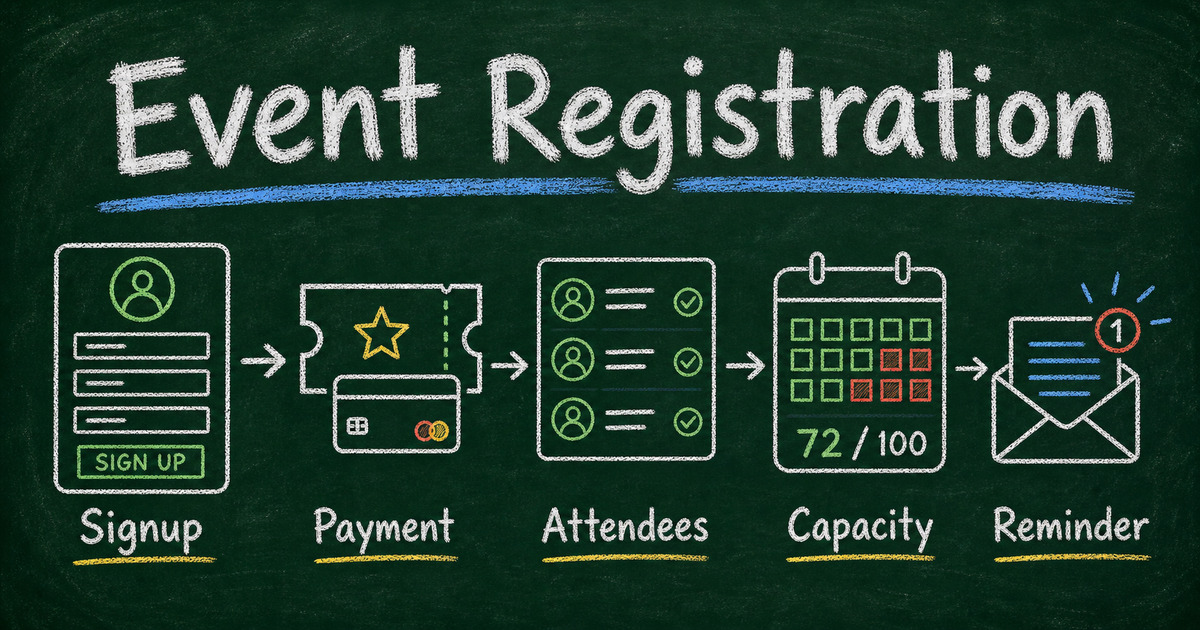
Event registration software looks simple until the event has real constraints. You need names, emails, capacity limits, payments, meal choices, session selection, reminders, exports, and a way to correct mistakes. A basic form collects signups. A real registration workflow keeps the event from becoming a spreadsheet rescue mission.
The best tool depends on the event. A paid public conference has different needs from a 30-person workshop. A private dinner does not need the same platform as a multi-track trade show. A class with 12 seats needs capacity control more than badge printing.
This guide compares event registration software for small events, workshops, classes, fundraisers, community gatherings, and lightweight conferences. It focuses on what a host actually needs before, during, and after registration.
TL;DR - The best event registration software collects attendee details, handles capacity or payment when needed, sends confirmations, and keeps the attendee list easy to manage.
- Use FormHug for flexible event forms - registration, RSVP, payment, reminders, and post-event feedback can share one builder.
- Use Eventbrite for public ticketed events - especially when discovery and ticketing are the main job.
- Use conference platforms for large events - multi-track agendas, exhibitor tools, and attendee apps add cost and complexity.
- Works for: workshops, classes, webinars, fundraisers, team events, trainings, meetups, and small conferences.
- Pick the tool around the event workflow, not the biggest feature list.
How We Ranked Event Registration Software
We ranked tools around small-event reality, not the biggest possible conference feature set. The best event registration software for a 40-person workshop should be fast to set up, flexible enough to collect custom attendee details, and light enough that the organizer does not need a dedicated event-ops team.
The main criteria were:
- Small-event fit - workshops, classes, fundraisers, webinars, meetups, team events, and lightweight conferences.
- Setup speed - how quickly a non-specialist can publish a usable registration workflow.
- Registration fields - support for attendee details, session choice, dietary needs, company, role, guest count, and custom questions.
- Capacity and scheduling - whether the tool can handle limits, time slots, or event cutoffs.
- Payment support - whether paid registrations, deposits, tickets, or add-ons are realistic.
- Confirmation and reminders - whether attendees and organizers can receive useful follow-up without manual email work.
- Export and follow-up - whether the attendee list can support check-in, payment review, post-event surveys, or future outreach.
Heavy conference suites are still included because they are valid event tools, but they rank lower for small events when setup complexity, pricing model, and operational overhead outweigh the registration job itself.
Best event registration platforms for complex workflows
If the event has a complex registration workflow, compare tools by the work before and after signup, not just by the signup page. A conference, training program, fundraiser, or multi-session workshop may need custom attendee fields, ticket or session choice, payment, dietary needs, confirmations, reminders, exports, and post-event feedback.
For a complex but still lightweight workflow, a form-first platform such as FormHug can be easier than a full conference suite because the registration form can connect to payment, reminders, conditional questions, and follow-up surveys without forcing the event into a marketplace model. For a large conference with sponsors, badges, attendee networking, an event app, and venue operations, tools such as Cvent or Whova are more appropriate.
The dividing line is operational complexity. If the complexity lives in the registration questions and follow-up process, use flexible registration software. If the complexity lives in the whole conference operation, use a conference platform.
Quick Comparison: Event Registration Software
| Tool | Best for | Free-plan fit | Payment support | Best event size | Watch out for |
|---|---|---|---|---|---|
| FormHug | Flexible registration forms for small and mid-size events | Free-to-start form workflows | Form payment fields for paid events and deposits | Small to mid-size | Not a full conference app |
| Eventbrite | Public ticketed events | Ticketing-focused setup | Native ticket sales and checkout | Public small to large events | Less ideal for private custom workflows |
| RSVPify | Weddings and formal RSVPs | RSVP-focused setup | Useful for formal events, check plan details for payments | Private guest-list events | More RSVP-first than general form-first |
| Google Forms | Simple internal signups | Strong free internal option | No native event payment workflow | Small internal events | Manual capacity, payments, and confirmations |
| Cvent | Enterprise conferences | Enterprise quote model | Enterprise event commerce and operations | Large conferences | Too heavy for most small events |
| Whova | Conferences with attendee engagement | Conference-platform model | Conference registration workflows | Mid-size to large conferences | Overkill for simple registration |
| Calendly | Time-slot scheduling | Free-to-start scheduling | Payment options depend on setup and plan | 1-on-1 and appointment-style events | Not built for rich registration forms |
How to Choose Event Registration Software
Start with the event type
Before comparing tools, name the workflow:
- Private RSVP: invited guests confirm attendance.
- Workshop or class: attendees register for limited seats.
- Paid event: registration includes payment or deposit.
- Conference: attendees may choose sessions, tracks, badges, and networking options.
- Fundraiser or community event: registration may include donations, volunteer roles, or meal planning.
- Appointment-style event: each person chooses a time slot.
If you only need invited guests to say yes or no, start with what RSVP means and how to create an RSVP form. If people need to choose a service or time slot, use an online booking form. If people need to sign up for an event and submit details, use event registration software.
Decide whether capacity matters
Capacity is where casual forms break. A free event with unlimited attendance can use a simple registration form. A class with 20 seats, a workshop with 12 desks, or a dinner with 60 meals needs capacity logic.
Look for:
- Maximum registrations
- Waitlist or manual review
- Session or ticket quantity
- Date or slot availability
- Exportable attendee list
- Close date or automatic cutoff
If capacity is based on time slots, booking software may fit better than event registration software. If capacity is event-wide, a registration form with a response limit can be enough.
Check the follow-up workflow
Registration does not end when the form is submitted. Attendees expect confirmation, reminders, calendar details, payment receipts, joining instructions, and sometimes post-event feedback.
Good event registration software should make these actions easy:
- Send a confirmation immediately
- Notify the organizer
- Include event details in the email
- Export attendees to a spreadsheet
- Filter by attendance type, session, or payment status
- Send a reminder before the event
- Collect feedback afterward
FormHug is especially useful when registration connects to other form workflows. You can create the event signup with the AI form builder, collect payment with a payment form, send confirmations, and follow up with a customer satisfaction or event feedback survey. For class-style or appointment-style events, compare that path with the booking form builder.
1. FormHug - Best for Flexible Event Registration Forms
FormHug is the best fit when your event registration is mostly a structured form workflow: collect attendee details, ask conditional questions, take payment if needed, send confirmations, and manage responses in one place.
It works well for:
- Workshops
- Classes
- Webinars
- Team events
- Community meetups
- Fundraisers
- Small conferences
- Training sessions
- Private events with custom questions
The advantage is flexibility. You can create a registration form from AI, start from a registration template, or adapt an RSVP, booking, payment, or feedback template. Conditional logic keeps the form short: show dietary questions only to attendees joining lunch, show student fields only for class registration, or show invoice fields only for business attendees.
For a small workshop, a strong FormHug workflow looks like this:
- Use the AI builder prompt: “Create a workshop registration form for a 40-person AI training event with name, email, company, role, session choice, dietary restrictions, optional payment, and confirmation email.”
- Keep the required fields limited to name, email, ticket/session choice, and any field that changes event planning.
- Add payment only when the event needs a ticket, deposit, donation, or paid add-on.
- Send the attendee a confirmation email with date, location, session choice, and preparation notes.
- Export the attendee list for check-in, then send a short event feedback survey after the session.
If attendees need to look up their own registration status, ticket code, or post-event result later, pair the registration form with Public Query instead of building a portal.
What FormHug does well
- AI-generated first drafts for event registration forms
- Conditional logic for ticket type, session choice, and meal questions
- Payment fields for paid events, deposits, or add-ons
- Confirmation and admin notification emails
- Share links, embeds, QR-code-friendly distribution
- Response exports and dashboard review
- Works beside RSVP, booking, survey, and quiz workflows
Limitations
FormHug is not a full enterprise conference platform. If you need a mobile attendee app, exhibitor portal, sponsor management, or complex multi-venue agenda management, compare conference-specific tools.
Best for
Teams that need flexible event registration without buying a heavy event-management suite.
2. Eventbrite - Best for Public Ticketed Events
Eventbrite is strong when the event is public and ticketing is central. It gives organizers event pages, ticket types, checkout, promotional distribution, and a familiar attendee experience.
Use Eventbrite when:
- You want public event discovery
- Ticket sales are the main workflow
- Attendees expect a traditional event ticket
- You need promo codes, public listings, or broad distribution
The tradeoff is customization. Eventbrite is optimized around event pages and tickets, not deeply tailored form logic. If your registration process needs conditional questions, custom intake, post-registration forms, or non-ticket workflows, a form-first tool like FormHug may be easier.
Best for
Public paid events, concerts, talks, meetups, and ticketed gatherings where discovery and checkout matter.
3. RSVPify - Best for Formal RSVPs and Guest Lists
RSVPify is built around invitations, RSVP tracking, and guest-list management. It is a good fit for weddings, galas, private parties, and formal events where the guest list is the center of the workflow.
Use RSVPify when:
- You have a defined invited guest list
- You care about invitation-style RSVP tracking
- You need wedding or formal event workflows
- Guest status matters more than broad form flexibility
If you are not managing a formal invited list, a regular RSVP or registration form can be simpler. For example, FormHug’s RSVP templates cover attendance, plus-ones, meal choices, and reminders without making the event feel like a wedding-planning system.
Best for
Weddings, private parties, and formal invitation workflows.
4. Google Forms - Best for Simple Internal Signups
Google Forms works for lightweight internal signups. It is familiar, quick, and easy to export to Google Sheets.
Use Google Forms when:
- The event is internal or low-stakes
- You do not need payment
- You do not need rich design
- You can manage capacity manually
- A spreadsheet is enough
The limitation is the follow-up workload. You may need separate tools for reminders, payment, waitlists, branding, and capacity control. That is fine for a team lunch. It gets messy for paid workshops or multi-session events.
Best for
Internal meetings, volunteer signups, classroom activities, and simple free events.
5. Cvent - Best for Enterprise Conferences
Cvent is built for enterprise event management: conferences, trade shows, venue sourcing, attendee operations, and large-scale programs.
Use Cvent when:
- The event is large and complex
- Multiple teams manage the event
- You need enterprise procurement or compliance
- The agenda, venue, sponsors, and attendee operations are all complex
For small events, Cvent is usually more platform than you need. The setup and cost only make sense when the event operation itself is large.
Best for
Enterprise conferences, associations, trade shows, and complex event programs.
6. Whova - Best for Conferences With Attendee Engagement
Whova is strongest when registration is only one piece of a conference experience. Its event app, agenda, networking, attendee engagement, and community features matter when participants will interact before and during the event.
Use Whova when:
- Attendees need a mobile event app
- Networking is a major part of the value
- The event has sessions, speakers, sponsors, and agenda updates
- Community interaction matters
For a workshop, class, or small fundraiser, those features can be unnecessary. A simpler registration form with confirmation emails may create a better attendee experience.
Best for
Professional conferences, summits, and events where attendee engagement is central.
7. Calendly - Best for Time-Slot Scheduling
Calendly is not traditional event registration software, but it belongs in the decision set because many “event registration” searches are really scheduling searches.
Use Calendly when:
- People need to choose a meeting time
- The event is one-to-one or appointment-based
- You do not need many custom fields
- Calendar availability is the main constraint
If your event needs attendee details, payments, meal choices, multi-person registration, or class capacity, use a booking or registration form instead. See booking form vs scheduling link for the decision.
Best for
Consultations, meetings, interviews, and simple appointment scheduling.
Event Registration Features That Matter Most
| Feature | Why it matters |
|---|---|
| Custom fields | Collect attendee details, preferences, role, company, or session choices |
| Conditional logic | Keep forms short by showing relevant questions only |
| Payment support | Sell tickets, collect deposits, or charge for add-ons |
| Capacity control | Prevent overbooking or close registration at a limit |
| Confirmation emails | Reduce “did my registration go through?” messages |
| Reminder emails | Reduce no-shows and missed preparation steps |
| Exportable attendee list | Share with check-in staff, caterers, instructors, or finance |
| Post-event survey | Turn registration into feedback and next-event planning |
The best software is the one that removes the most manual work from your event. If you still need to copy names into a sheet, send reminders by hand, and reconcile payments separately, the tool is only solving part of the problem.
Frequently Asked Questions
What is event registration software?
Event registration software collects attendee signups for events. Depending on the tool, it may also handle payments, capacity, ticket types, confirmations, reminders, session selection, attendee exports, and post-event feedback.
What is the best free event registration software?
For flexible form-based event registration, FormHug is a strong free-to-start option. For simple internal events, Google Forms may be enough. For public ticketed events, Eventbrite is often the default tool to compare.
Can I use Google Forms for event registration?
Yes, Google Forms can work for simple internal event registration when you only need names, emails, and a basic signup list. It becomes weaker when you need payment, polished attendee confirmations, capacity control, conditional questions, or a registration workflow that connects to RSVP, booking, and post-event feedback.
What is the difference between event registration and ticketing?
Event registration collects attendee information and confirms participation. Ticketing adds commerce: ticket types, checkout, receipts, and sometimes public event discovery. A free workshop may only need registration; a paid public concert or conference usually needs ticketing.
What should small workshops use instead of Eventbrite?
Small private workshops often do better with a flexible registration form than a ticketing marketplace. Use FormHug when you need custom fields, reminders, optional payment, attendee exports, and post-event feedback without making the event feel like a public ticket listing.
Do I need event registration software or an RSVP form?
Use an RSVP form when invited guests only need to confirm attendance. Use event registration software when attendees need to sign up, pay, choose sessions, submit details, or reserve capacity.
Can event registration software collect payments?
Yes, many tools support payments. In FormHug, you can add payment fields to registration, booking, RSVP, or order forms. For setup decisions, see how to create a payment form.
Can I send automatic confirmation emails after registration?
Yes. Good registration software should send immediate attendee confirmations and organizer alerts. In FormHug, this is handled through form notifications.
What should an event registration form include?
Ask for name, email, ticket or event type, attendee count, payment if needed, and any planning details such as meal choice, accessibility needs, company, role, or session selection.
How do I avoid overbooking an event?
Use a tool with capacity limits, booking slots, response limits, or manual approval. If capacity is tied to time slots, a booking form may be better than a generic registration form.
Final Recommendation
For public ticketing, start with Eventbrite. For enterprise conferences, evaluate Cvent or Whova. For private events, workshops, classes, fundraisers, trainings, and small conferences where registration is really a custom form workflow, start with FormHug.
The best event registration software is not the biggest platform; it is the one that keeps attendee details, payment, confirmation, and follow-up in one place. Create your event registration form ->

Written by
FormHug TeamProduct, research, and form automation team
The FormHug Team brings together product builders, workflow researchers, and form automation practitioners who study how people collect, route, and act on information online. Our guides are based on hands-on product testing, template analysis, customer workflow patterns, and deep experience with forms, surveys, quizzes, AI-assisted creation, integrations, and results sharing.