> ## Documentation Index
> Fetch the complete documentation index at: https://formhug.ai/docs/llms.txt
> Use this file to discover all available pages before exploring further.
# Assessment
> Create personality tests and soft skill assessments with multi-dimension scoring, radar charts, and personalized result suggestions.
**Assessment** is built for questions where there's no single correct answer — every option carries its own score. Participants answer honestly, and FormHug maps their responses across multiple dimensions, generates a radar chart, and delivers a personalized report with analysis and suggestions. Perfect for revealing how someone thinks, works, and grows.
 For a product-level overview, see the assessment maker. For a practical guide, read how to create an online personality test or skills assessment. For training-oriented assessments, see employee training quiz.
## What You Can Build with Assessment
| Scenario | Examples |
| -------------------------- | ------------------------------------------------------------------------ |
| **Personality & style** | MBTI-style tests, Big Five personality, work style profiles |
| **Soft skill evaluation** | Communication, leadership, emotional intelligence, adaptability |
| **Team & culture fit** | Collaboration style, decision-making approach, conflict resolution |
| **Self-discovery** | Strengths finder, learning style, entrepreneurial mindset |
| **Training & development** | Pre/post training reflection, coaching intake, onboarding profiles |
| **Engagement & fun** | Employee pulse checks, team icebreakers, "what kind of founder are you?" |
## Try a Live Assessment
See how a finished assessment feels — discover how you approach tasks, problems, and collaboration
## Create an Assessment Your Way
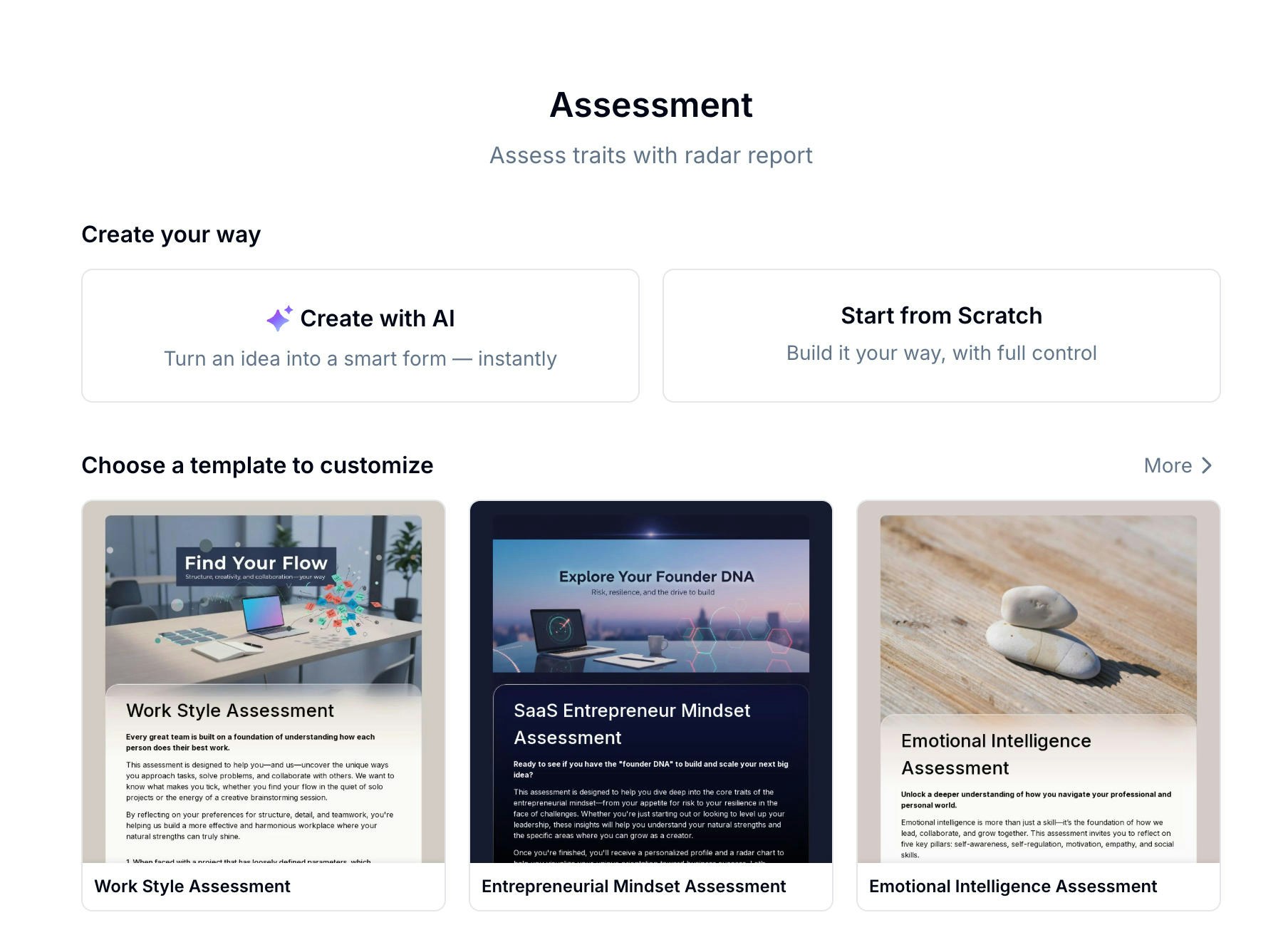
The fastest path. Describe your assessment topic in one sentence — Evan generates the questions, options, scoring, and dimensions for you.
Choose from 15+ ready-made assessment templates covering personality, leadership, EQ, and more. Customize and publish in minutes.
Add every question manually and configure dimensions, scores, and suggestions exactly how you want them.
See what's available — from personality tests to leadership and emotional intelligence evaluations:
For a product-level overview, see the assessment maker. For a practical guide, read how to create an online personality test or skills assessment. For training-oriented assessments, see employee training quiz.
## What You Can Build with Assessment
| Scenario | Examples |
| -------------------------- | ------------------------------------------------------------------------ |
| **Personality & style** | MBTI-style tests, Big Five personality, work style profiles |
| **Soft skill evaluation** | Communication, leadership, emotional intelligence, adaptability |
| **Team & culture fit** | Collaboration style, decision-making approach, conflict resolution |
| **Self-discovery** | Strengths finder, learning style, entrepreneurial mindset |
| **Training & development** | Pre/post training reflection, coaching intake, onboarding profiles |
| **Engagement & fun** | Employee pulse checks, team icebreakers, "what kind of founder are you?" |
## Try a Live Assessment
See how a finished assessment feels — discover how you approach tasks, problems, and collaboration
## Create an Assessment Your Way
The fastest path. Describe your assessment topic in one sentence — Evan generates the questions, options, scoring, and dimensions for you.
Choose from 15+ ready-made assessment templates covering personality, leadership, EQ, and more. Customize and publish in minutes.
Add every question manually and configure dimensions, scores, and suggestions exactly how you want them.
See what's available — from personality tests to leadership and emotional intelligence evaluations:
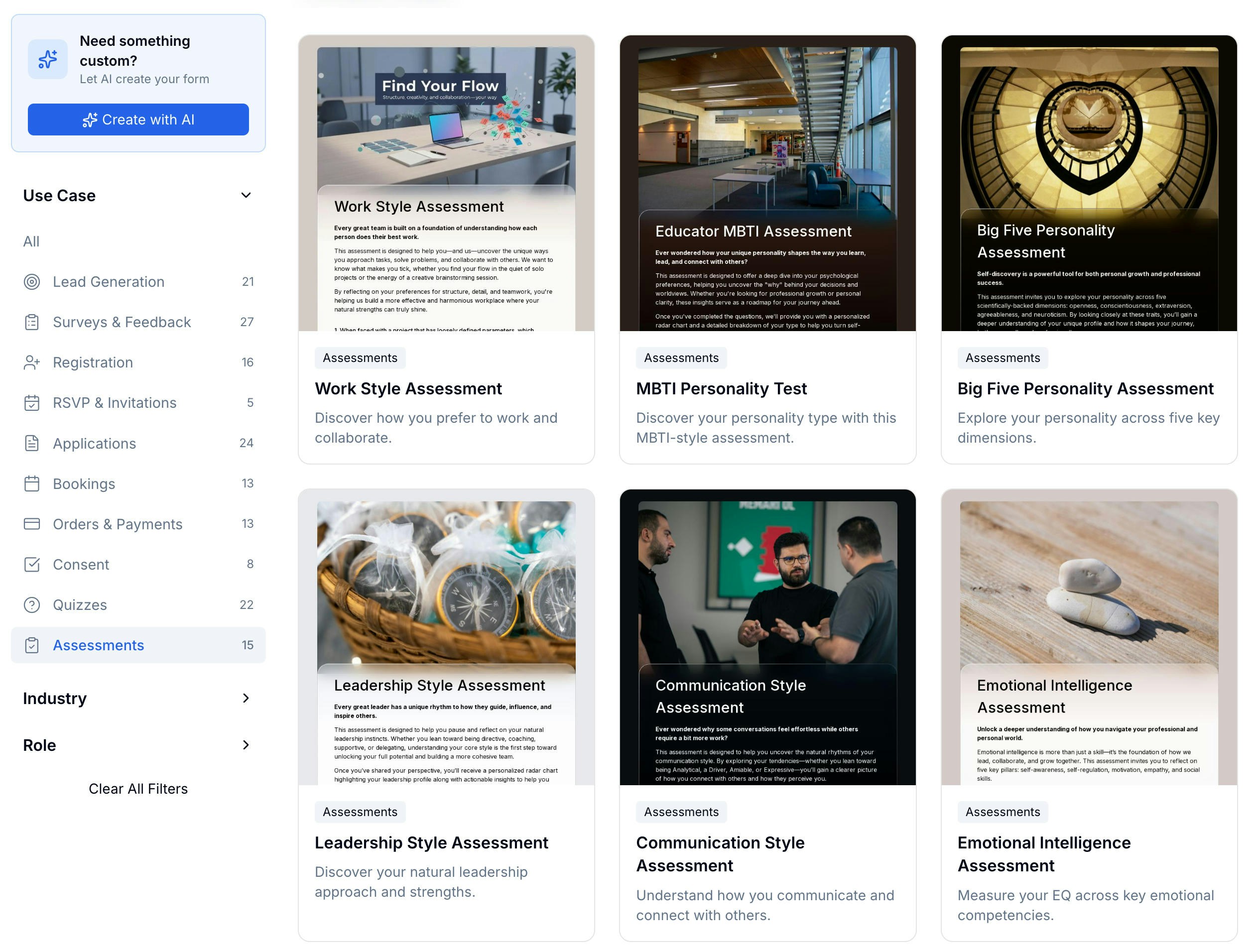 15+ templates — personality tests, soft skills, leadership, and more
## Setting Up Questions
The assessment editor shows your total question count and aggregate score at the top. The key difference from a quiz: **there are no correct answers**. Instead, each answer option carries its own point value, and the total score reflects the pattern of responses rather than accuracy.
15+ templates — personality tests, soft skills, leadership, and more
## Setting Up Questions
The assessment editor shows your total question count and aggregate score at the top. The key difference from a quiz: **there are no correct answers**. Instead, each answer option carries its own point value, and the total score reflects the pattern of responses rather than accuracy.
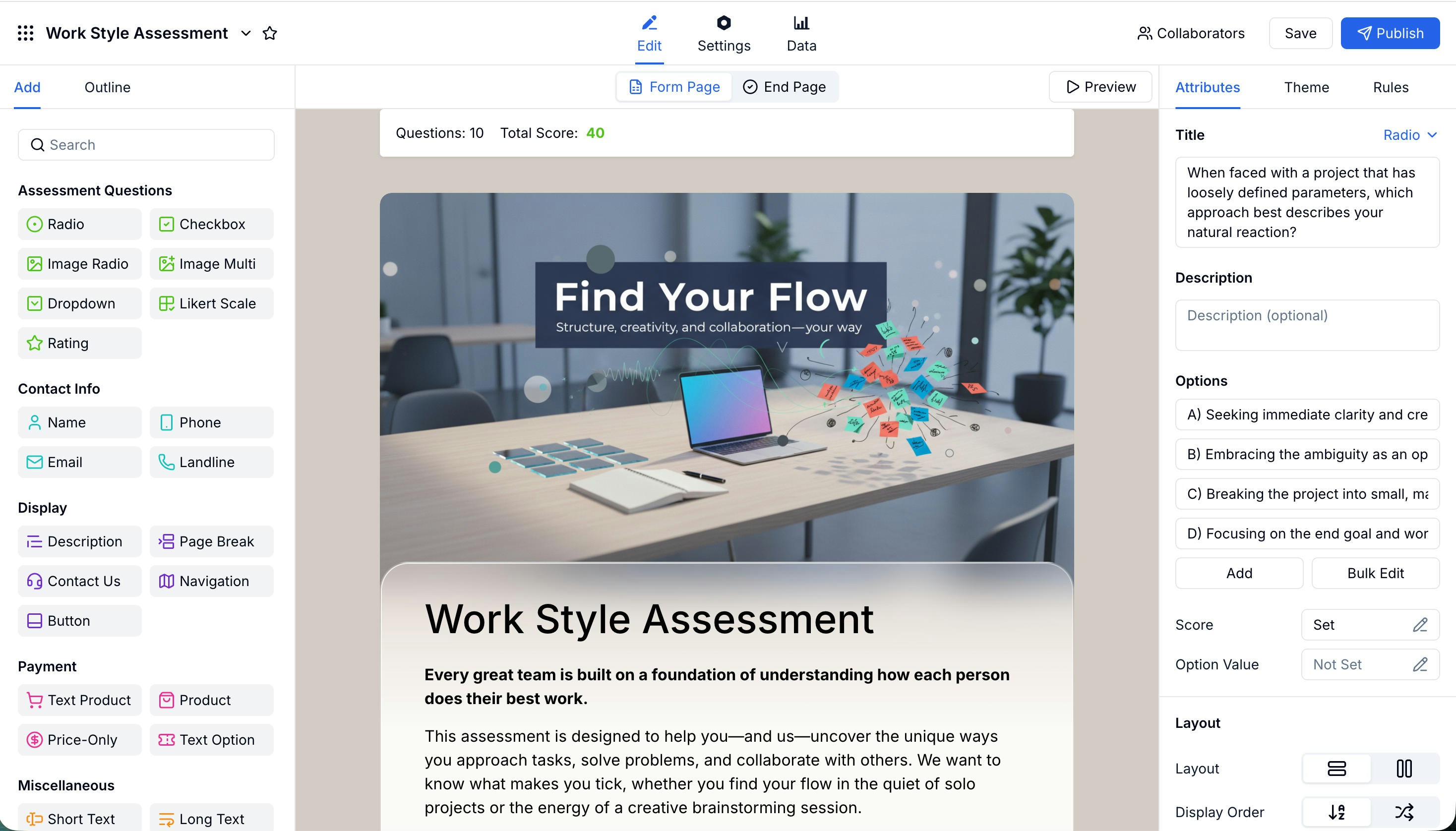 FormHug supports the following question types for assessments:
| Type | Best For |
| ----------------------------- | ----------------------------------------------------------- |
| **Radio** | Single-choice questions with weighted options |
| **Checkbox** | Multi-select questions where multiple traits can apply |
| **Image Radio / Image Multi** | Visual scenario-based questions |
| **Dropdown** | Long option lists in a compact format |
| **Likert Scale** | Agree-to-disagree scales for attitude and opinion questions |
| **Rating** | Numeric scale ratings (e.g. 1–5 or 1–10) |
### Assigning Scores to Options
Click **Score** in the right panel to assign a point value to each answer option individually. Each option can have a different value — for example, option A scores 1 point, B scores 2, C scores 3, D scores 4.
FormHug supports the following question types for assessments:
| Type | Best For |
| ----------------------------- | ----------------------------------------------------------- |
| **Radio** | Single-choice questions with weighted options |
| **Checkbox** | Multi-select questions where multiple traits can apply |
| **Image Radio / Image Multi** | Visual scenario-based questions |
| **Dropdown** | Long option lists in a compact format |
| **Likert Scale** | Agree-to-disagree scales for attitude and opinion questions |
| **Rating** | Numeric scale ratings (e.g. 1–5 or 1–10) |
### Assigning Scores to Options
Click **Score** in the right panel to assign a point value to each answer option individually. Each option can have a different value — for example, option A scores 1 point, B scores 2, C scores 3, D scores 4.
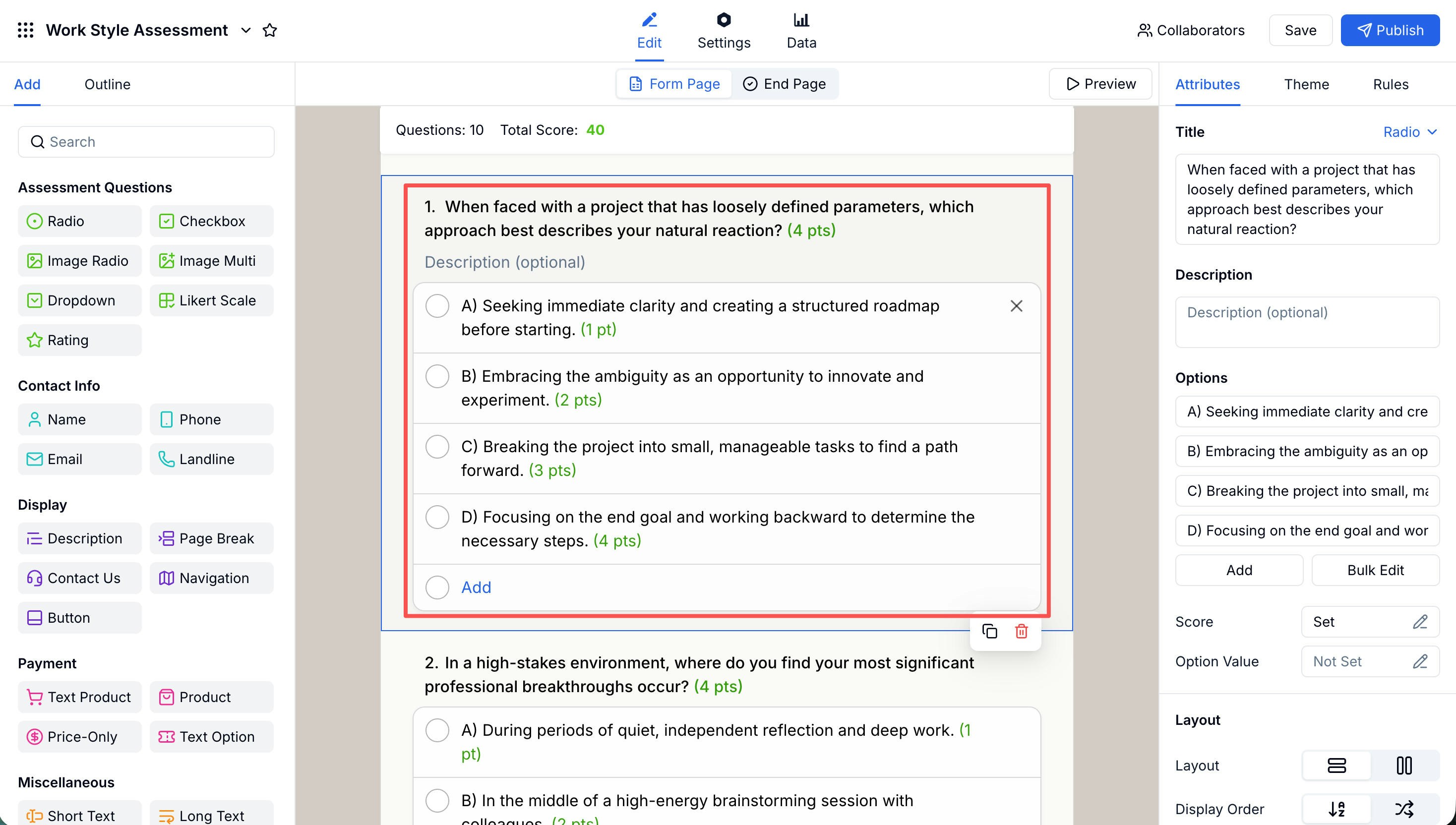 Design your scoring so that higher values consistently represent a stronger signal in the same direction — this makes dimension scores and the radar chart intuitive to read.
## Configuring the Radar Report
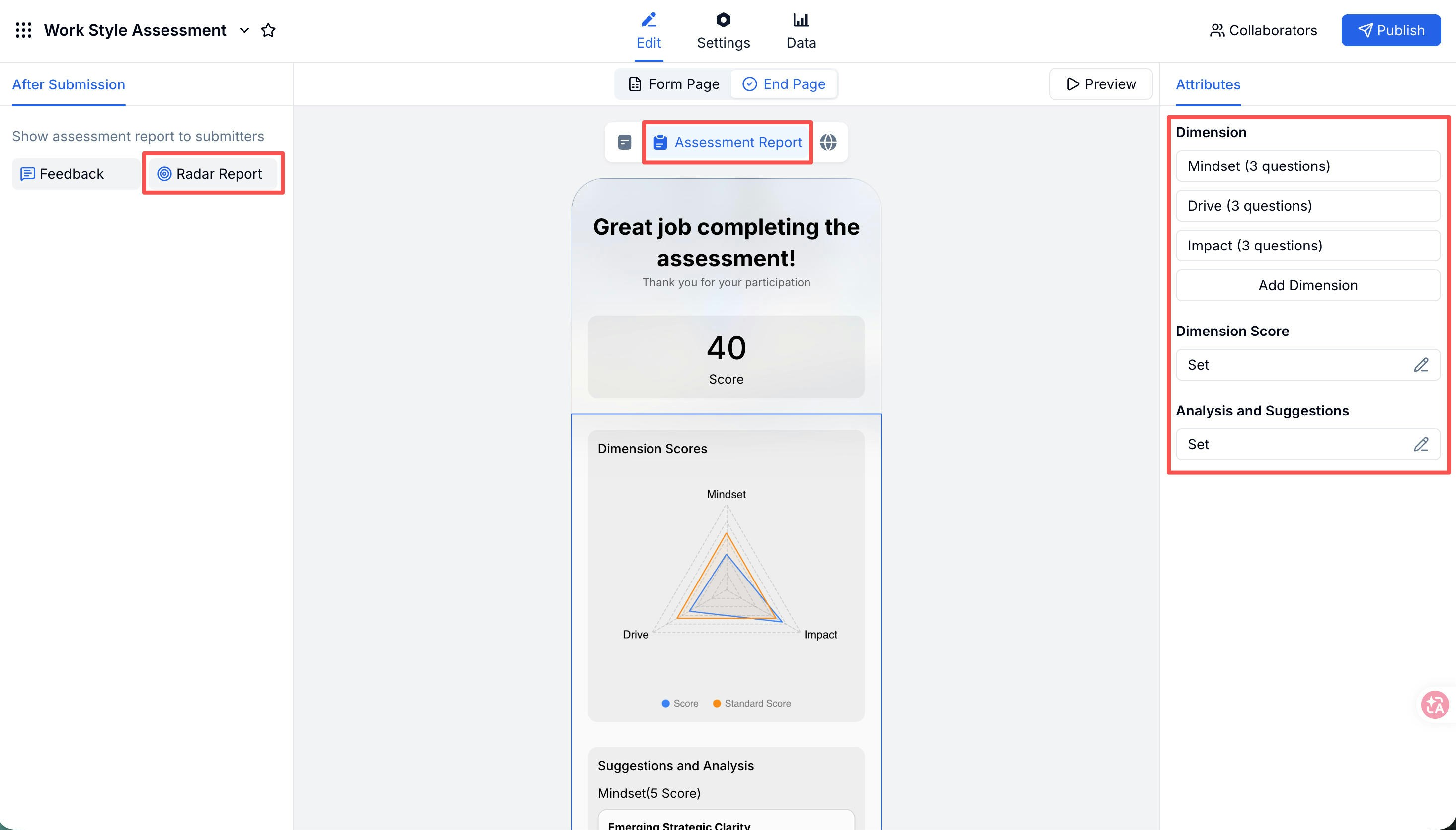
The **Assessment Report** is the heart of every assessment. It shows participants their overall score, a radar chart across all dimensions, and personalized analysis and suggestions for each dimension. You configure it from the End Page panel.
Design your scoring so that higher values consistently represent a stronger signal in the same direction — this makes dimension scores and the radar chart intuitive to read.
## Configuring the Radar Report
The **Assessment Report** is the heart of every assessment. It shows participants their overall score, a radar chart across all dimensions, and personalized analysis and suggestions for each dimension. You configure it from the End Page panel.
 ### Dimensions
A dimension is a named category that groups related questions together — for example, **Mindset**, **Drive**, and **Impact**. The radar chart draws one axis per dimension, so the shape of the chart reveals a participant's profile at a glance.
To set up a dimension, click **Add Dimension**, give it a name, then use **Bind Question** to assign the questions that belong to it.
### Dimensions
A dimension is a named category that groups related questions together — for example, **Mindset**, **Drive**, and **Impact**. The radar chart draws one axis per dimension, so the shape of the chart reveals a participant's profile at a glance.
To set up a dimension, click **Add Dimension**, give it a name, then use **Bind Question** to assign the questions that belong to it.
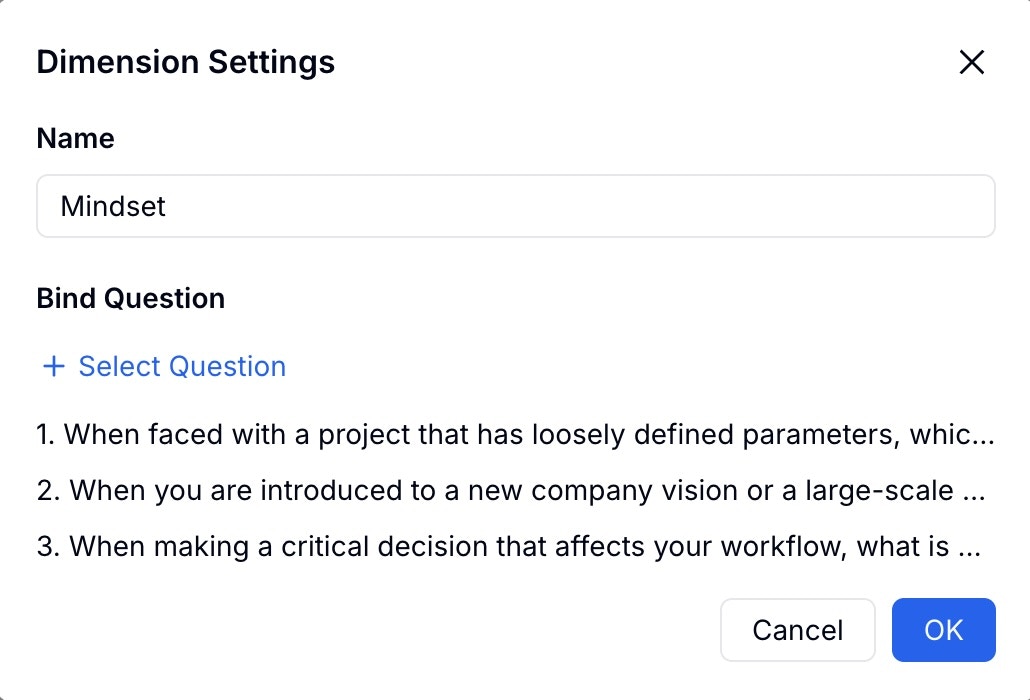 Each question can only belong to one dimension, and every question should be assigned to a dimension for the radar chart to be accurate.
### Dimension Score and Standard Score
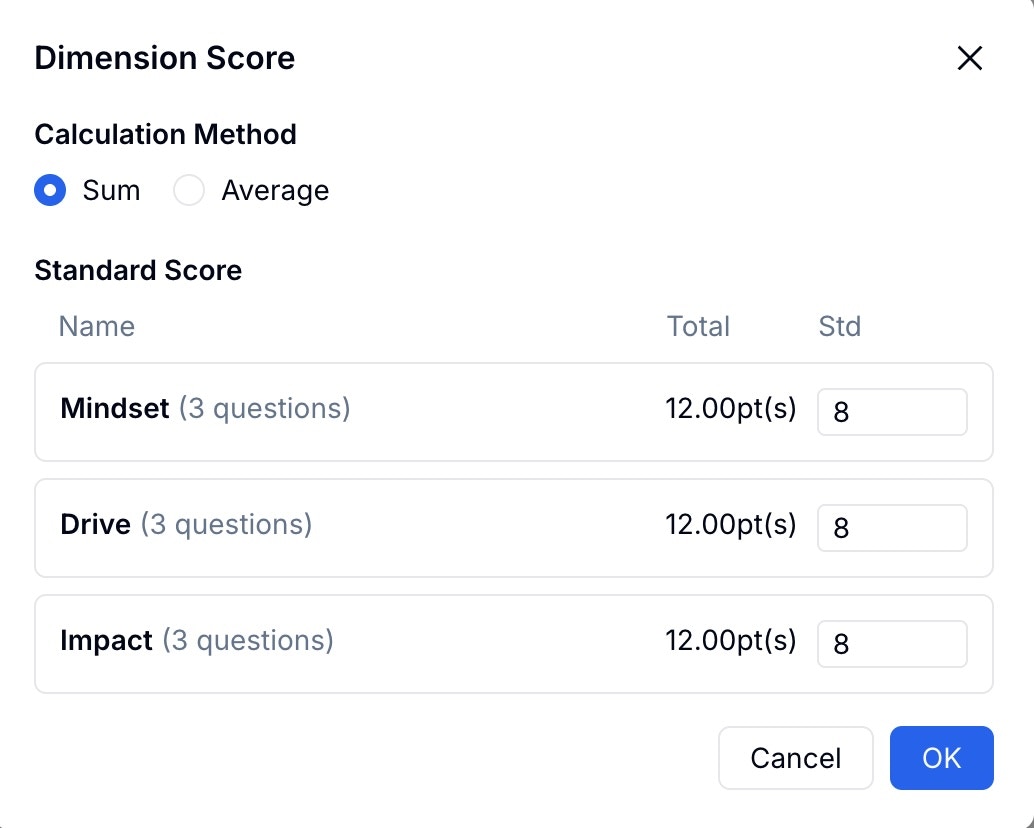
Click **Dimension Score** to configure two things for each dimension:
* **Calculation Method** — choose **Sum** (add up option scores) or **Average** (divide by question count)
* **Standard Score** — the baseline score that appears as a reference line on the radar chart
Each question can only belong to one dimension, and every question should be assigned to a dimension for the radar chart to be accurate.
### Dimension Score and Standard Score
Click **Dimension Score** to configure two things for each dimension:
* **Calculation Method** — choose **Sum** (add up option scores) or **Average** (divide by question count)
* **Standard Score** — the baseline score that appears as a reference line on the radar chart
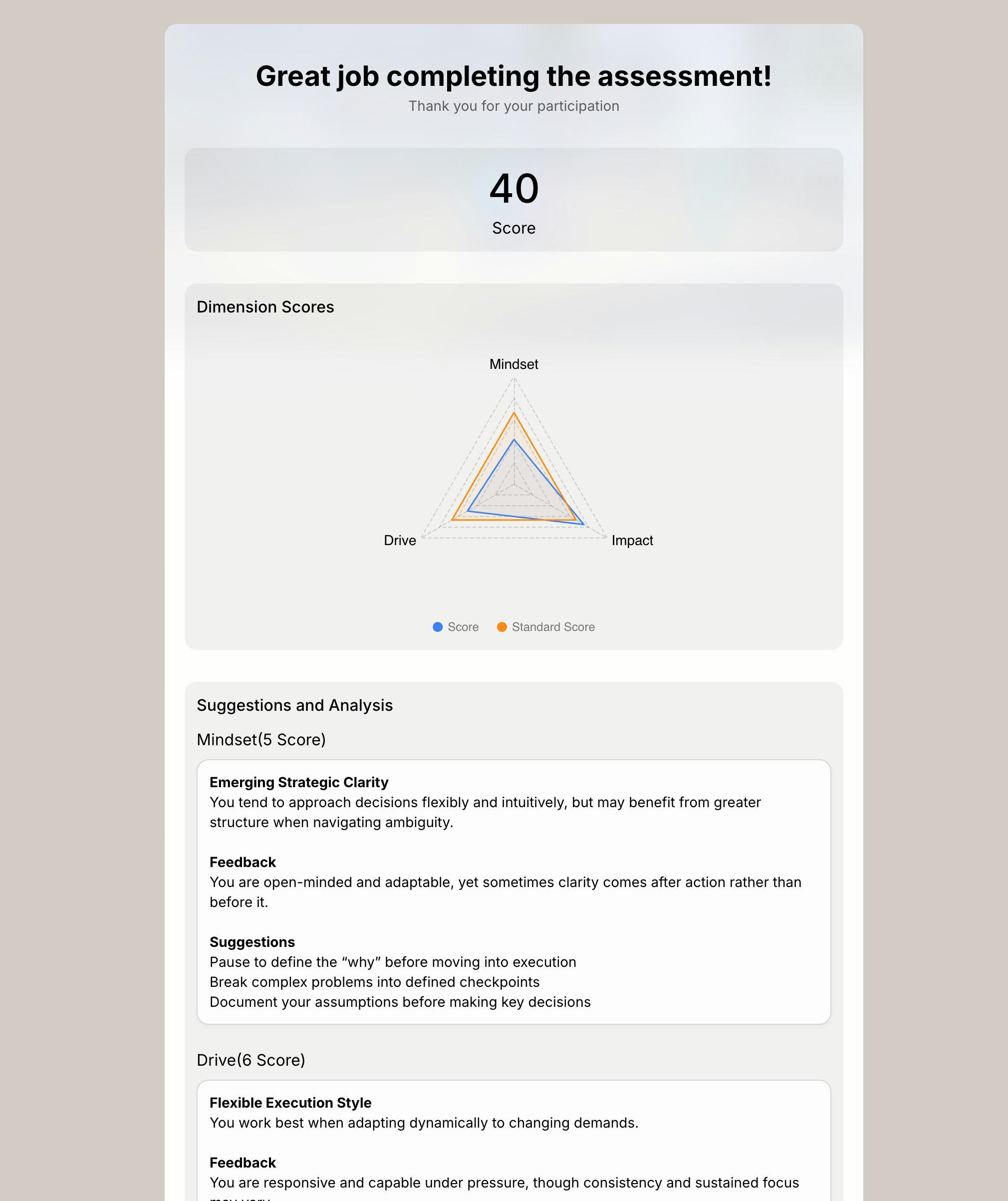
 The radar chart shows two lines: the participant's actual score (blue) and the standard score (orange). This lets participants instantly see where they're above or below the benchmark — without needing to interpret raw numbers.
### Analysis and Suggestions
Click **Analysis and Suggestions** to write personalized feedback for each dimension based on score ranges. Select a dimension on the left, then add one or more score ranges. For each range, write a title, feedback text, and concrete suggestions.
The radar chart shows two lines: the participant's actual score (blue) and the standard score (orange). This lets participants instantly see where they're above or below the benchmark — without needing to interpret raw numbers.
### Analysis and Suggestions
Click **Analysis and Suggestions** to write personalized feedback for each dimension based on score ranges. Select a dimension on the left, then add one or more score ranges. For each range, write a title, feedback text, and concrete suggestions.
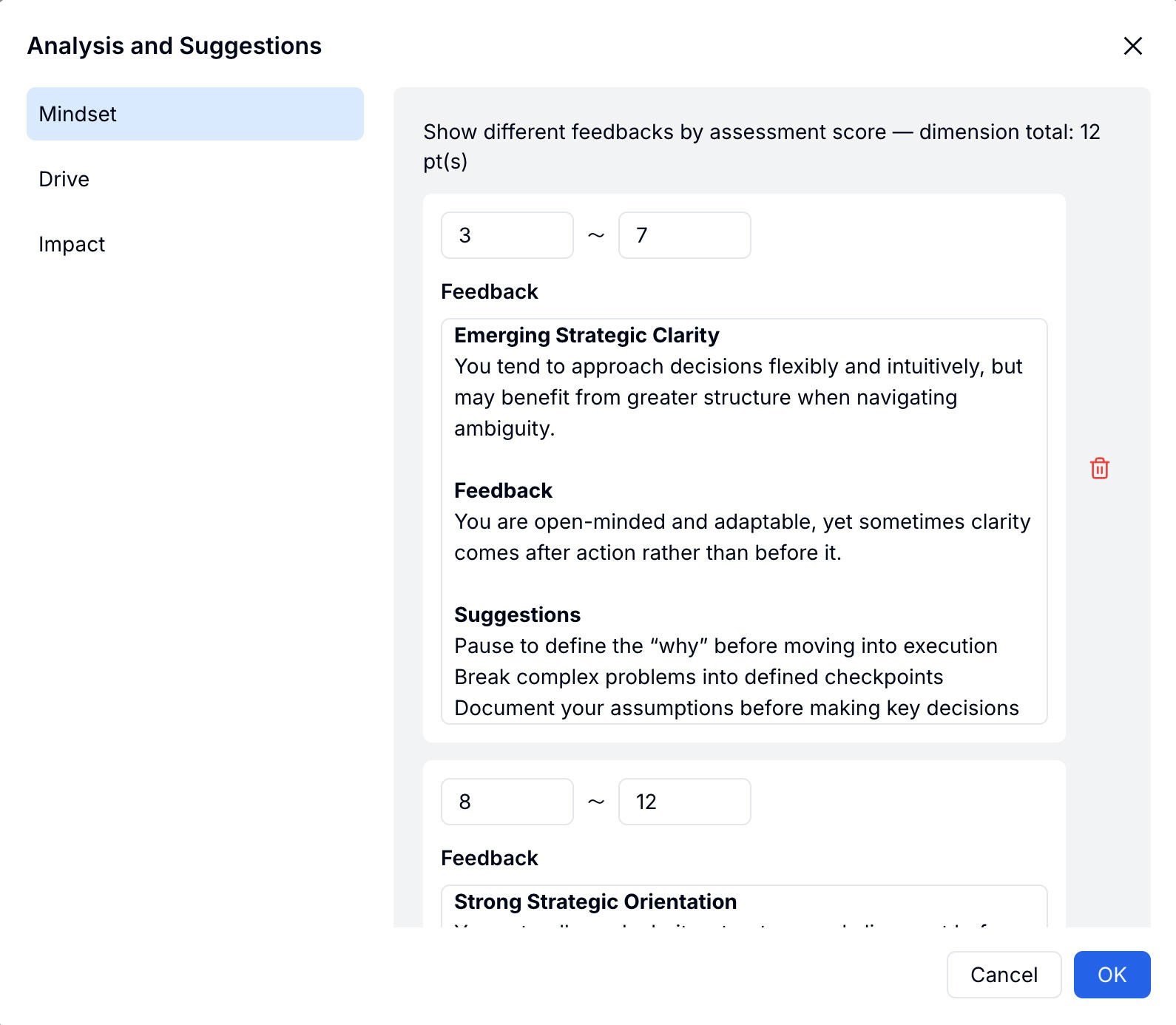 For example, a Mindset dimension scoring 3–7 might show "Emerging Strategic Clarity" with tailored suggestions, while scoring 8–12 shows "Strong Strategic Orientation" with different guidance.
### What Participants See
After submitting, participants land on a polished report page showing their overall score, the full radar chart with their score vs. the standard, and the analysis and suggestions for each dimension.
For example, a Mindset dimension scoring 3–7 might show "Emerging Strategic Clarity" with tailored suggestions, while scoring 8–12 shows "Strong Strategic Orientation" with different guidance.
### What Participants See
After submitting, participants land on a polished report page showing their overall score, the full radar chart with their score vs. the standard, and the analysis and suggestions for each dimension.
 ## Advanced Settings
Assessment supports the same advanced settings as Quiz — pre-quiz notice, time limit, random questions, and anti-cheating. Find them under **Settings → Quiz Settings**.
Pre-quiz notice, time limit, random questions, and anti-cheating options
## Related
Step-by-step: build and publish an assessment
Scored quizzes with correct answers — compare with Assessment
See the product page for AI-assisted assessment creation
Start from personality, leadership, and skills assessment templates
Build knowledge checks and feedback loops for employee learning
## Advanced Settings
Assessment supports the same advanced settings as Quiz — pre-quiz notice, time limit, random questions, and anti-cheating. Find them under **Settings → Quiz Settings**.
Pre-quiz notice, time limit, random questions, and anti-cheating options
## Related
Step-by-step: build and publish an assessment
Scored quizzes with correct answers — compare with Assessment
See the product page for AI-assisted assessment creation
Start from personality, leadership, and skills assessment templates
Build knowledge checks and feedback loops for employee learning