> ## Documentation Index
> Fetch the complete documentation index at: https://formhug.ai/docs/llms.txt
> Use this file to discover all available pages before exploring further.
# Quiz
> Build engaging trivia, MCQs, and interactive quizzes with automatic scoring, instant results, score-based feedback, and shareable certificates
**Quiz** turns any set of questions into an interactive, scored experience. Each question has a correct answer and point value — FormHug scores submissions automatically and shows every participant their results the moment they finish. Perfect for trivia, mini-tests, knowledge checks, MCQs, and any quiz where the fun is in finding out how you did.
 For a product-level overview, see the AI quiz maker. For a step-by-step article, read how to create an online quiz. If you're starting from source material rather than a prepared question list, Everything Can Be a Quiz explains the broader AI quiz workflow.
## What You Can Build with Quiz
| Scenario | Examples |
| ---------------------------- | ------------------------------------------------------------------------ |
| **Trivia & games** | Movie trivia, sports challenges, music knowledge, pop culture quizzes |
| **Brand & marketing** | Product knowledge quizzes, campaign engagement, giveaway contests |
| **Training & certification** | Onboarding tests, compliance checks, skill assessments with certificates |
| **Education** | Classroom mini-exams, homework checks, language practice tests |
| **Events & icebreakers** | Team games, conference warm-ups, live audience quizzes |
| **Lead generation** | Personality quizzes, "Which plan is right for you?" style interactions |
## Create a Quiz Your Way
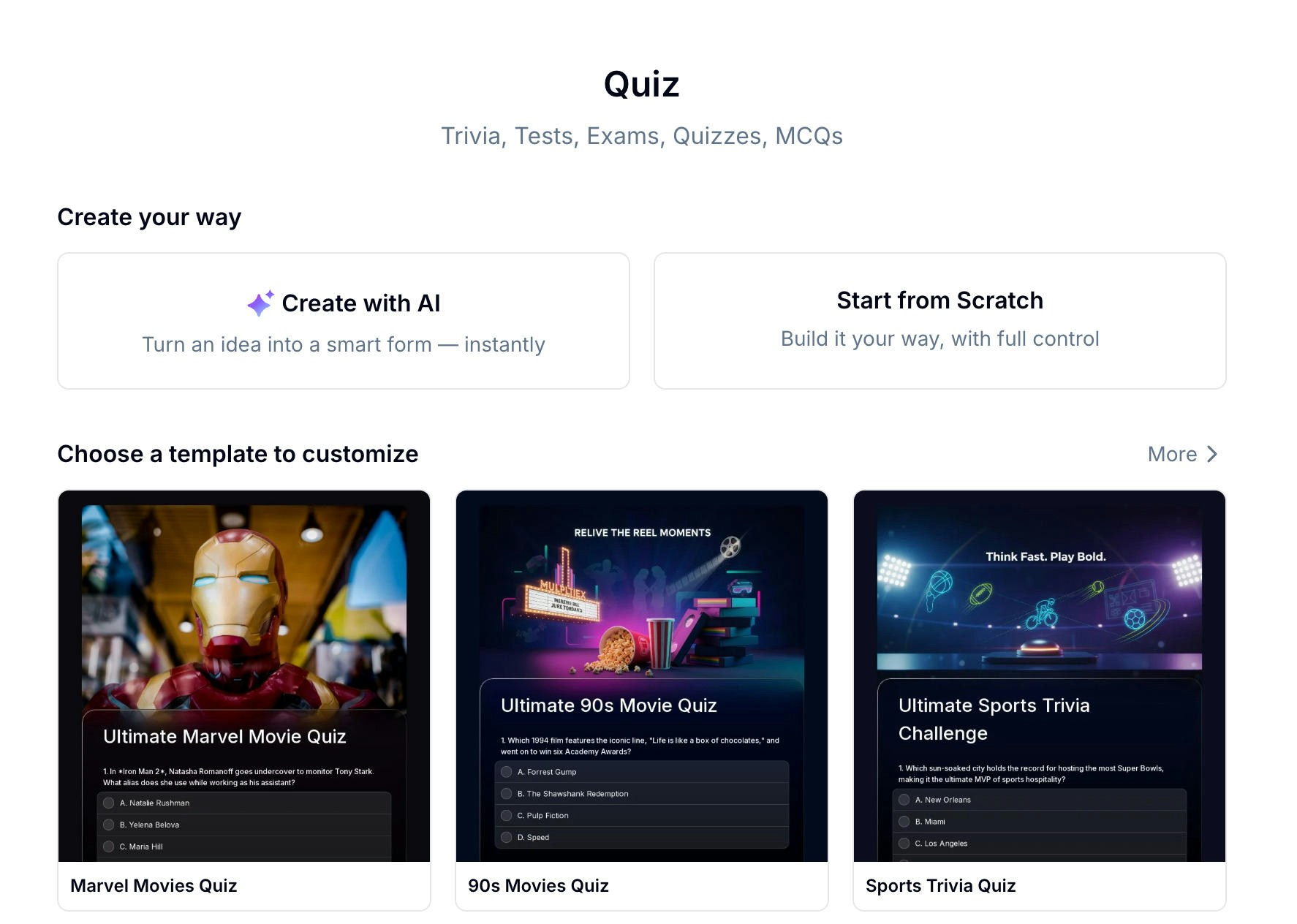
The fastest way to get started. Describe your quiz topic in one sentence, paste a link, or upload an existing question bank — Evan generates the questions, options, and scoring for you.
Pick from 22+ ready-made quiz templates. Open one, swap the questions, and publish. Great for trivia, general knowledge, and true/false formats.
Add questions one by one and configure every detail. Full control over layout, field types, scoring, and results.
Not sure where to start? Browse 22+ ready-made quiz templates and customize one in minutes.
For a product-level overview, see the AI quiz maker. For a step-by-step article, read how to create an online quiz. If you're starting from source material rather than a prepared question list, Everything Can Be a Quiz explains the broader AI quiz workflow.
## What You Can Build with Quiz
| Scenario | Examples |
| ---------------------------- | ------------------------------------------------------------------------ |
| **Trivia & games** | Movie trivia, sports challenges, music knowledge, pop culture quizzes |
| **Brand & marketing** | Product knowledge quizzes, campaign engagement, giveaway contests |
| **Training & certification** | Onboarding tests, compliance checks, skill assessments with certificates |
| **Education** | Classroom mini-exams, homework checks, language practice tests |
| **Events & icebreakers** | Team games, conference warm-ups, live audience quizzes |
| **Lead generation** | Personality quizzes, "Which plan is right for you?" style interactions |
## Create a Quiz Your Way
The fastest way to get started. Describe your quiz topic in one sentence, paste a link, or upload an existing question bank — Evan generates the questions, options, and scoring for you.
Pick from 22+ ready-made quiz templates. Open one, swap the questions, and publish. Great for trivia, general knowledge, and true/false formats.
Add questions one by one and configure every detail. Full control over layout, field types, scoring, and results.
Not sure where to start? Browse 22+ ready-made quiz templates and customize one in minutes.
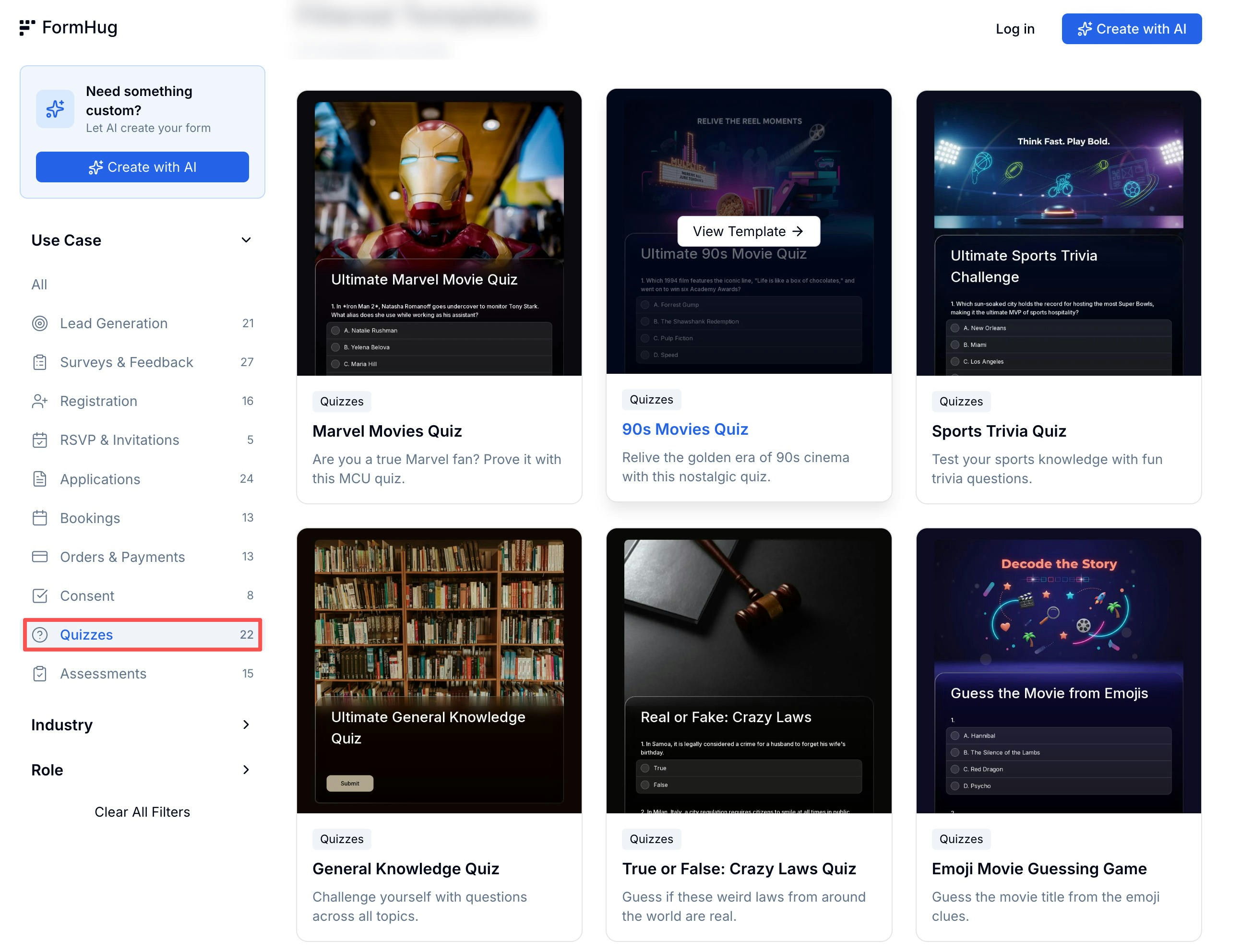 22+ quiz templates — trivia, MCQs, true/false, and more
Need raw question ideas first? Start with free quiz templates, true or false questions, or movie trivia questions.
## Try a Live Quiz
See how a finished quiz feels from the participant's side:
Test your MCU knowledge across 10 questions
How well do you know NBA history?
10 questions covering sports across the globe
## Setting Up Questions
The quiz editor shows your live question count and total score at the top so you always know where you stand.
22+ quiz templates — trivia, MCQs, true/false, and more
Need raw question ideas first? Start with free quiz templates, true or false questions, or movie trivia questions.
## Try a Live Quiz
See how a finished quiz feels from the participant's side:
Test your MCU knowledge across 10 questions
How well do you know NBA history?
10 questions covering sports across the globe
## Setting Up Questions
The quiz editor shows your live question count and total score at the top so you always know where you stand.
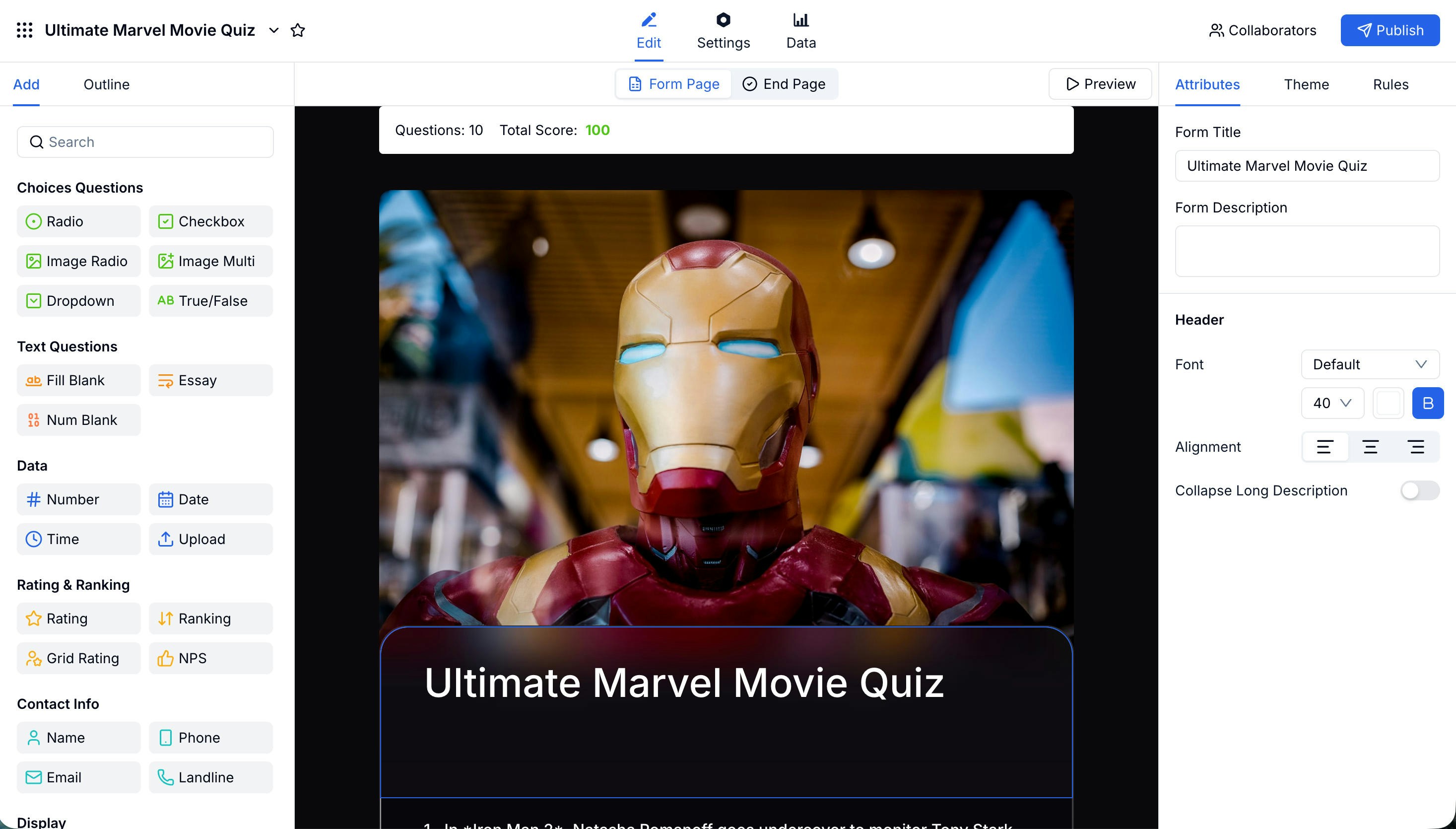 FormHug supports the following question types for scored questions:
| Type | Best For |
| ----------------------------- | ------------------------------------------- |
| **Radio** | Single-answer multiple choice (classic MCQ) |
| **Checkbox** | Multiple correct answers |
| **Image Radio / Image Multi** | Visual questions with image options |
| **True / False** | Quick binary questions |
| **Fill Blank / Num Blank** | Short text or numeric answers |
| **Essay** | Open-ended questions (manual grading) |
### Setting the Correct Answer and Score
For each question, click **Answer & Score** in the right panel to open the scoring dialog.
FormHug supports the following question types for scored questions:
| Type | Best For |
| ----------------------------- | ------------------------------------------- |
| **Radio** | Single-answer multiple choice (classic MCQ) |
| **Checkbox** | Multiple correct answers |
| **Image Radio / Image Multi** | Visual questions with image options |
| **True / False** | Quick binary questions |
| **Fill Blank / Num Blank** | Short text or numeric answers |
| **Essay** | Open-ended questions (manual grading) |
### Setting the Correct Answer and Score
For each question, click **Answer & Score** in the right panel to open the scoring dialog.
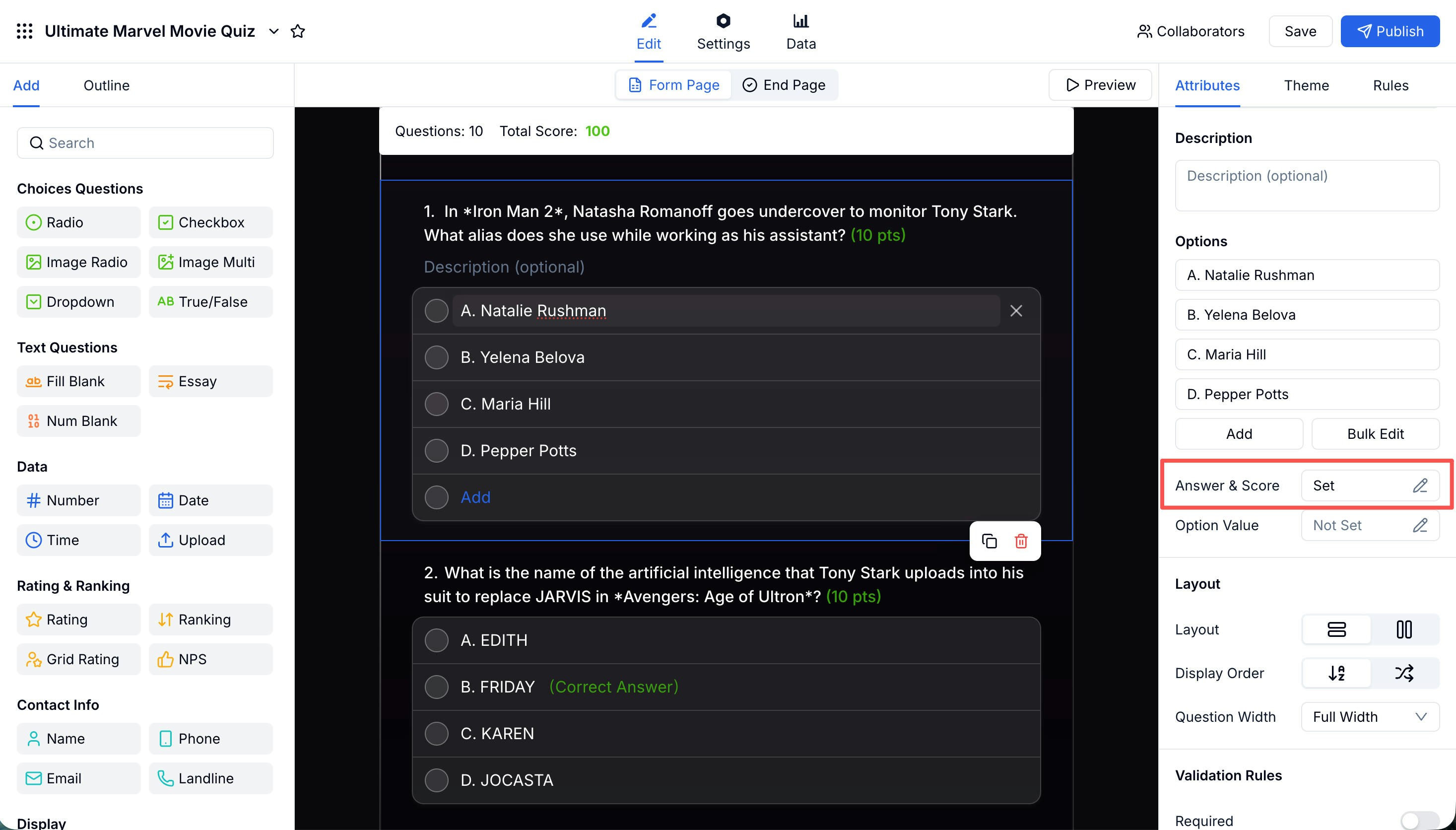 In the dialog you can:
* Mark the correct answer (or multiple correct answers for checkbox questions)
* Set the point value for the question
* Write an **Answer Explanation** that participants see after submitting
In the dialog you can:
* Mark the correct answer (or multiple correct answers for checkbox questions)
* Set the point value for the question
* Write an **Answer Explanation** that participants see after submitting
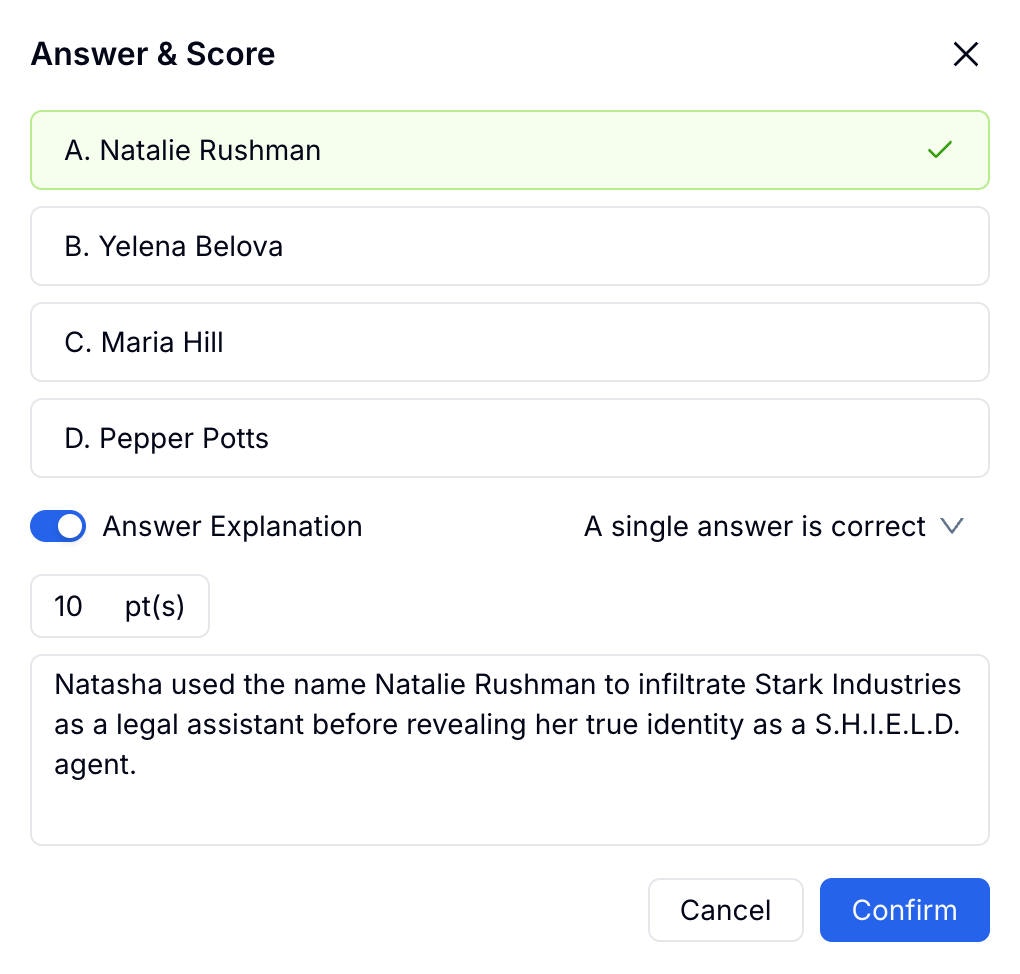 Add answer explanations to every question — they turn a simple score into a learning moment and make your quiz far more shareable.
## Configuring the Results Page
After participants submit, they land on the **Quiz Results** end page. You control exactly what they see there using four modules on the left panel.
Add answer explanations to every question — they turn a simple score into a learning moment and make your quiz far more shareable.
## Configuring the Results Page
After participants submit, they land on the **Quiz Results** end page. You control exactly what they see there using four modules on the left panel.
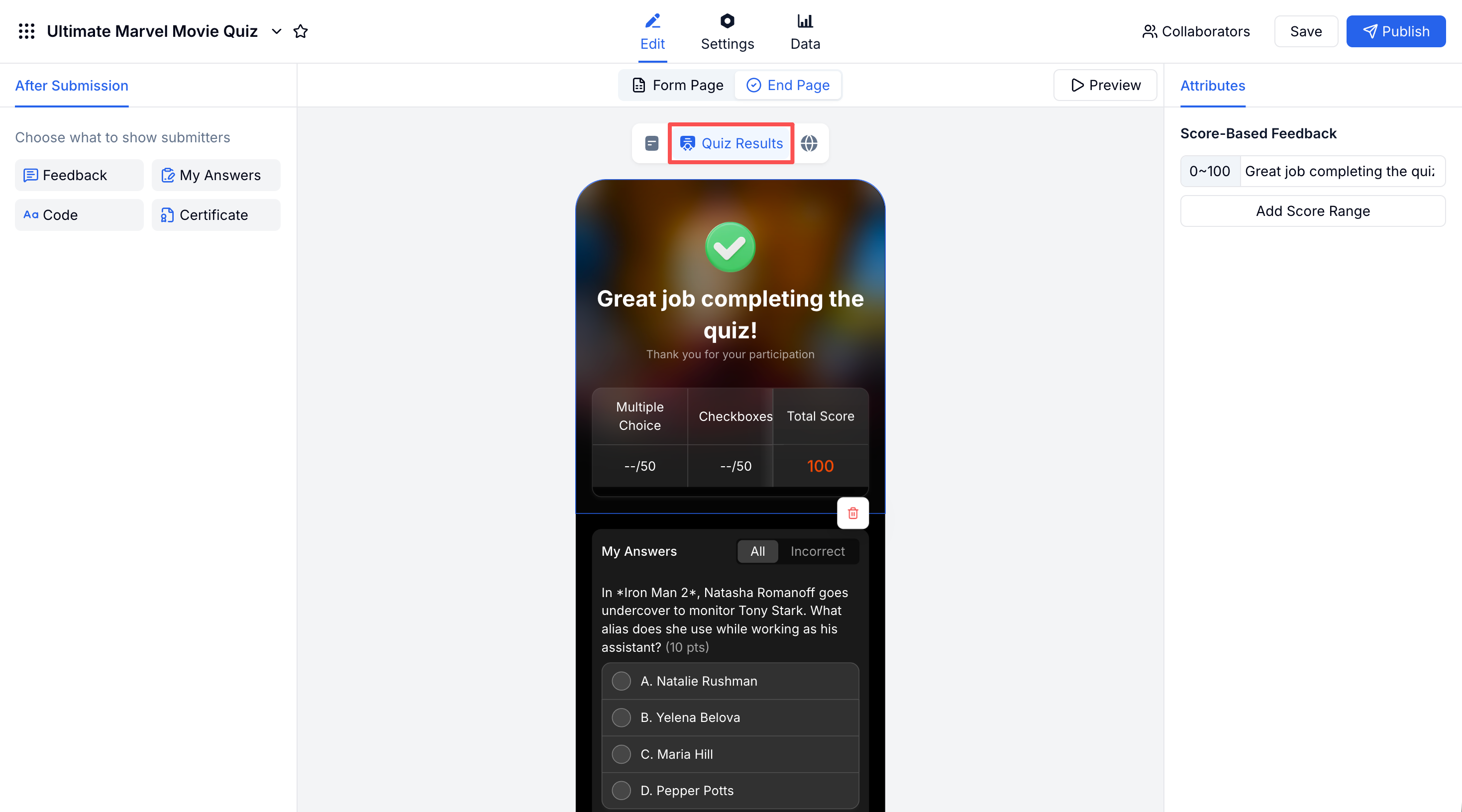 ### Score-Based Feedback
Set different messages for different score ranges. Add as many ranges as you need — for example, 0–60 gets an encouraging message, 61–100 gets a congratulations.
### Score-Based Feedback
Set different messages for different score ranges. Add as many ranges as you need — for example, 0–60 gets an encouraging message, 61–100 gets a congratulations.
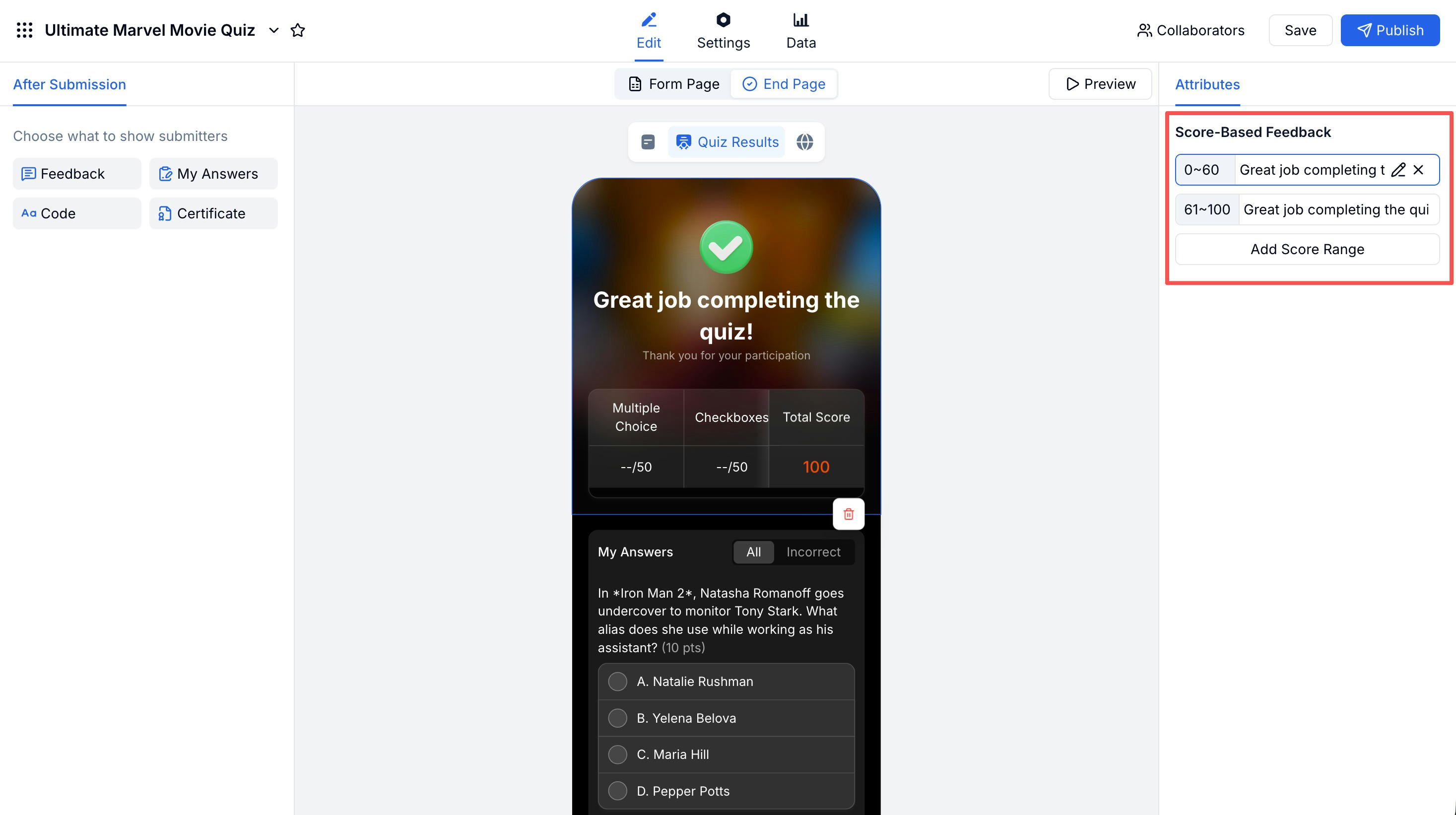 ### My Answers
Show participants a full review of their answers. With **Show Answers and Explanation** enabled, correct answers are highlighted in green, wrong answers in red, and the explanation you wrote appears below each incorrect response.
### My Answers
Show participants a full review of their answers. With **Show Answers and Explanation** enabled, correct answers are highlighted in green, wrong answers in red, and the explanation you wrote appears below each incorrect response.
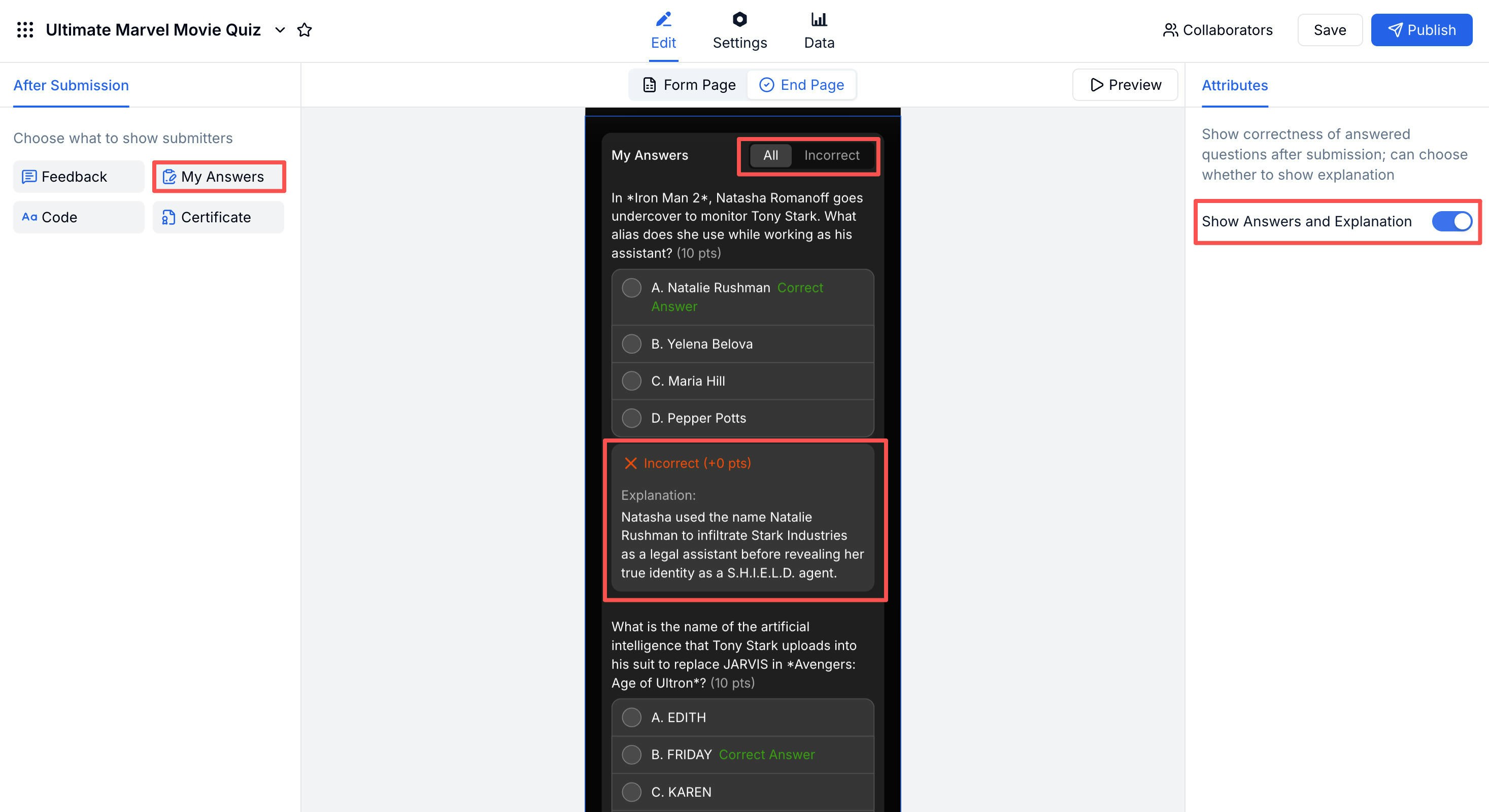 Participants can filter by **All** or **Incorrect only** to focus on what they got wrong.
### Certificate
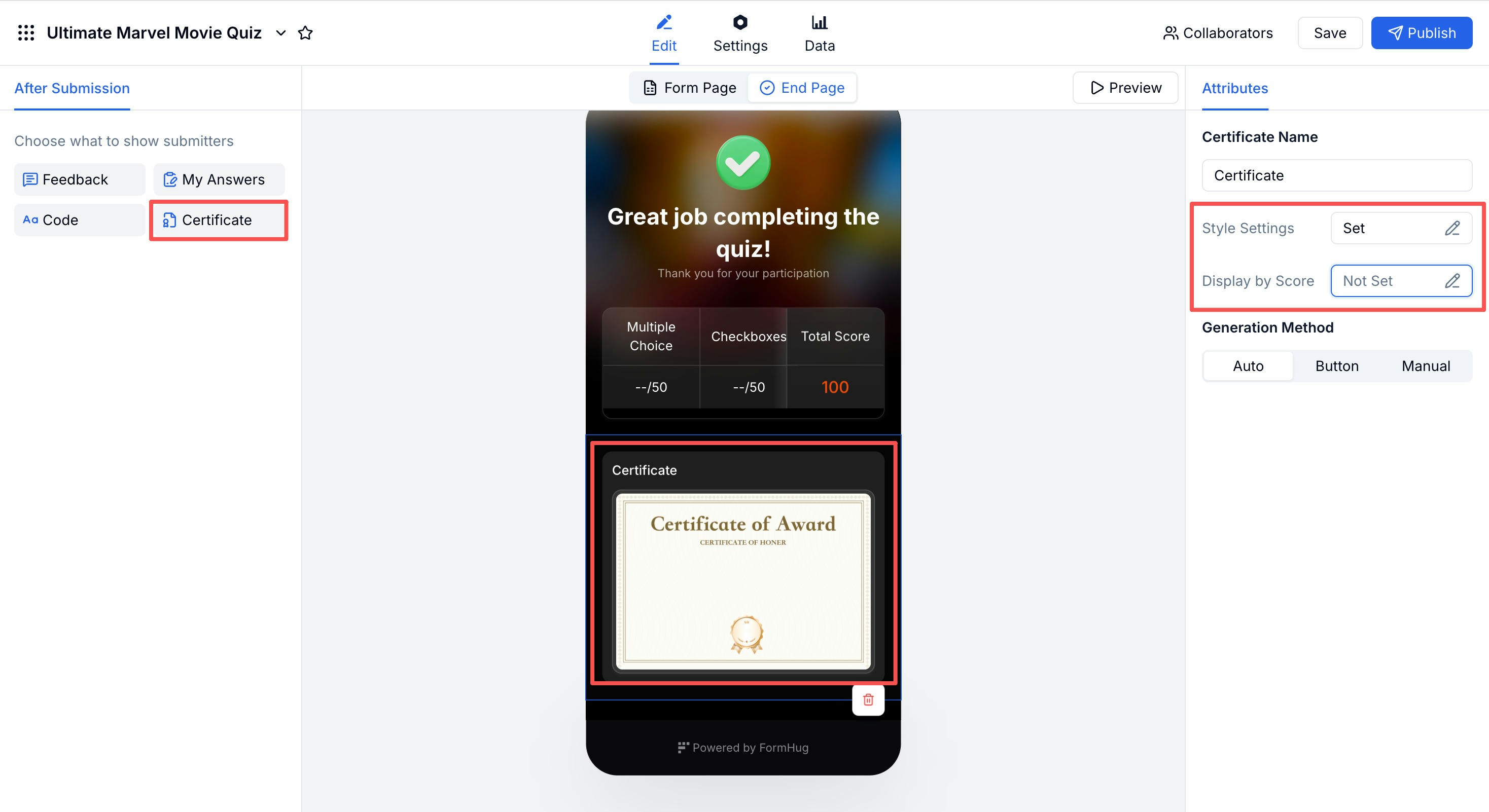
Award a downloadable certificate on the results page. You can set a **Display by Score** threshold so only participants who pass receive one, and choose the generation method: automatic, on-button-click, or manual.
Participants can filter by **All** or **Incorrect only** to focus on what they got wrong.
### Certificate
Award a downloadable certificate on the results page. You can set a **Display by Score** threshold so only participants who pass receive one, and choose the generation method: automatic, on-button-click, or manual.
 ### Code
Display a unique code on the results page — useful for redemption campaigns, discount codes, or event check-in vouchers tied to quiz completion.
## Advanced Settings
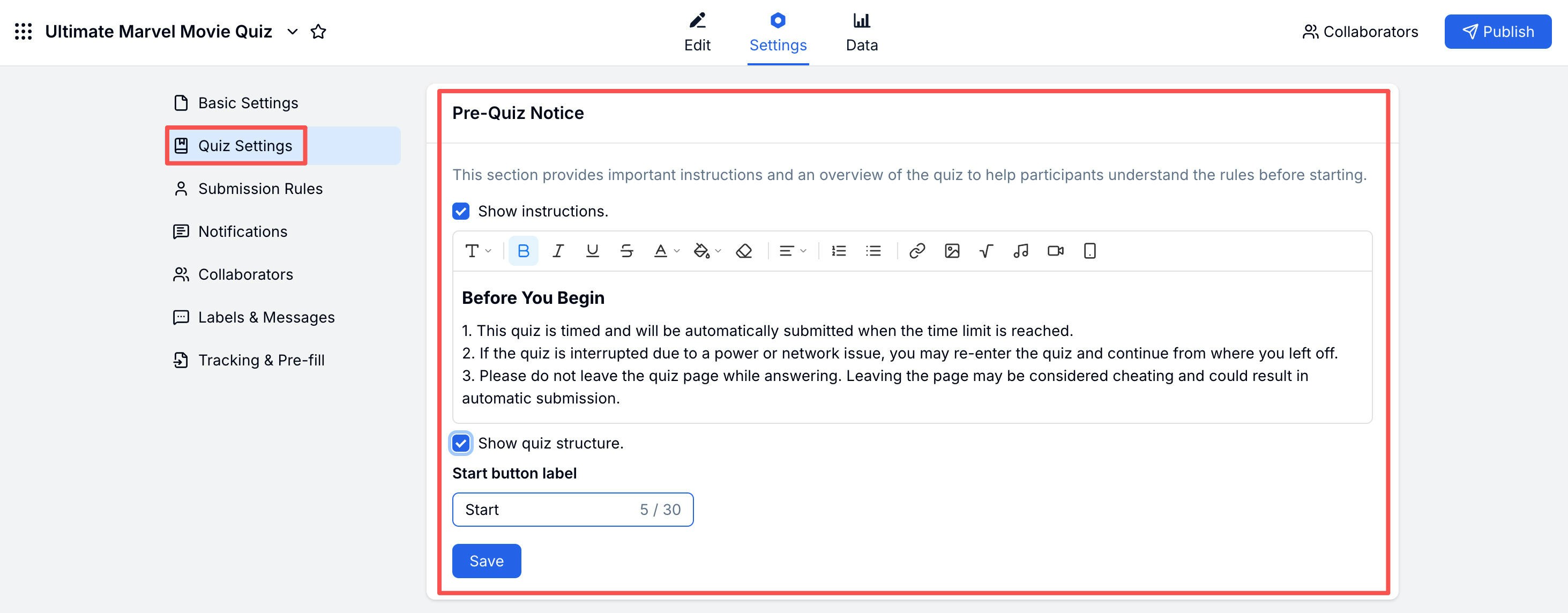
Find these under **Settings → Quiz Settings**.
### Code
Display a unique code on the results page — useful for redemption campaigns, discount codes, or event check-in vouchers tied to quiz completion.
## Advanced Settings
Find these under **Settings → Quiz Settings**.
 | Setting | What It Does |
| -------------------- | ------------------------------------------------------------------------------------------------ |
| **Pre-Quiz Notice** | Show instructions and quiz structure before participants start; customize the start button label |
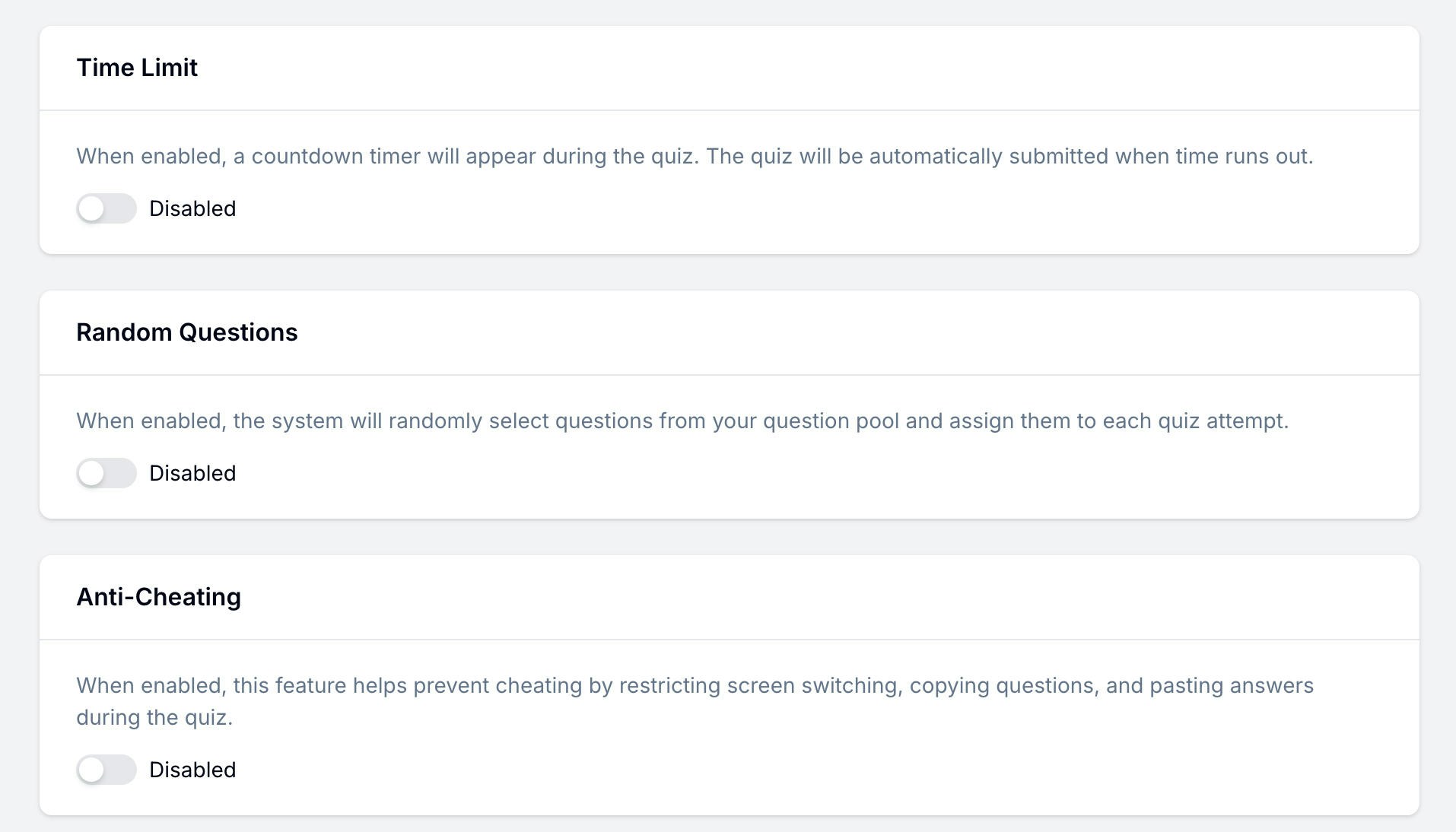
| **Time Limit** | Set a countdown timer; quiz auto-submits when time runs out |
| **Random Questions** | Randomly draw questions from your question pool for each attempt |
| **Anti-Cheating** | Restrict screen switching, copying questions, and pasting answers |
| Setting | What It Does |
| -------------------- | ------------------------------------------------------------------------------------------------ |
| **Pre-Quiz Notice** | Show instructions and quiz structure before participants start; customize the start button label |
| **Time Limit** | Set a countdown timer; quiz auto-submits when time runs out |
| **Random Questions** | Randomly draw questions from your question pool for each attempt |
| **Anti-Cheating** | Restrict screen switching, copying questions, and pasting answers |
 ## Related
Step-by-step: build and publish a quiz from scratch
Full reference for all Quiz Settings options
See the product page for AI quiz creation and publishing
Start from ready-made quiz and trivia templates
Browse quiz formats and question sets before building your own
Turn text, links, lessons, and ideas into quiz material with AI
## Related
Step-by-step: build and publish a quiz from scratch
Full reference for all Quiz Settings options
See the product page for AI quiz creation and publishing
Start from ready-made quiz and trivia templates
Browse quiz formats and question sets before building your own
Turn text, links, lessons, and ideas into quiz material with AI