Shared Folders: Bring Your Team Into the Whole Project

Build the form
Create the workflow with AI
Start from a prompt, a template, or a blank form and publish a polished FormHug workflow.
An event rarely runs on a single form.
There is a registration form for attendees, an application form for volunteers, a proposal form for speakers, and a feedback survey for when it is all over. Each form has a different job, but they all belong to the same event. And often, the same people need to work on them together.
Until now, sharing that work in FormHug meant sharing each form separately. You could organize everything into a folder, but bringing a teammate into the project still meant going through the forms one by one.
You can now share an entire folder in FormHug, giving your team a shared place for the forms that belong to the same event, project, or ongoing piece of work.
One Project, Several Forms
People usually think about their work in terms of outcomes: run the workshop, launch the program, organize the campaign, onboard the next group of customers.
Forms support different parts of that work.
For a workshop, you might collect registrations before the event, ask participants about their experience level, and send a feedback survey afterward. For a client project, you might use an initial inquiry form, a requirements questionnaire, and a review form at the end.
These are separate forms for good reasons. They reach different people, ask different questions, and come into use at different times. Combining them into one large form would make the experience worse.
But sharing them individually creates another kind of friction. Every time someone joins the work, you have to think through the set again: which forms belong to this project, and which ones have I already shared?
We built folder sharing to make that handoff simpler.
Share the Folder, Bring the Work Together
A folder already gives related forms a home. Sharing makes that home useful to a team.
Instead of treating every form as a separate invitation, you can share the folder that represents the work. The folder becomes a clear point of entry for the people collaborating with you.
That changes a small but recurring conversation.
“Let me share the registration form. You’ll also need the volunteer application. And there’s a separate feedback survey.”
Becomes:
“Here’s the folder for the event.”
The benefit is more than fewer sharing steps. It is a clearer connection between how you organize your forms and how your team understands the work. The collection has a purpose, a name, and a place people can return to.
How Folder Sharing Works
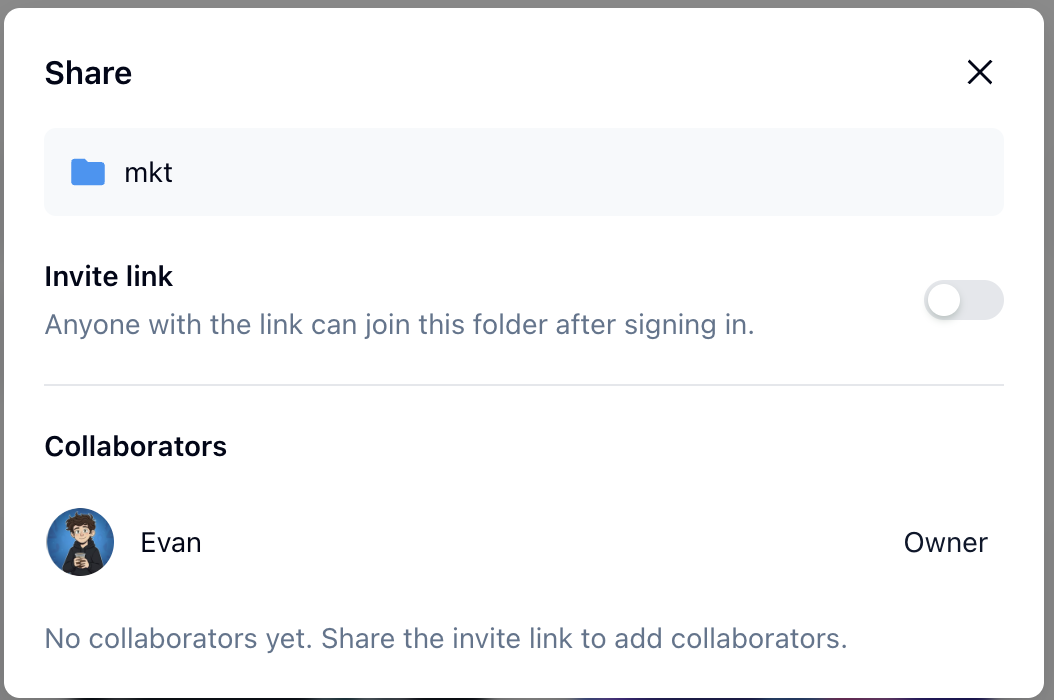
The folder’s Share dialog brings the invite link and collaborator list together. In this example, the invite link is still turned off and no collaborators have joined yet.
The workflow is straightforward:
- Group the relevant forms in a folder. Choose a collection that makes sense for the people working together, such as an event, a client project, or a program.
- Open the folder’s Share dialog and enable the invite link. Share that link with the people you want to bring into the folder.
- Your teammates sign in to join. Anyone with the invite link can join the folder after signing in. The Share dialog also shows the folder’s collaborators.
Choose the folder around the work you want to share. A folder called “Autumn Workshop” tells a teammate much more than a collection of unrelated forms gathered only for convenience.
Where It Helps
Event organizers can bring registration, volunteer applications, speaker proposals, and feedback into one shared folder. The team has a common place for the forms supporting the event, even though each form serves a different audience.
Project teams can group intake, requirements, requests, and review forms around a specific piece of work. Sharing the folder gives collaborators the project context alongside the individual forms.
Teams running recurring programs can organize the forms for a course, community initiative, or onboarding cycle together. The folder gives that round of work an understandable boundary.
These are examples of the same underlying need: several forms, one shared responsibility.
Built Around How Teams Work
Folders started as a way to organize forms. With sharing, they also become a way to organize collaboration.
We want the structure in FormHug to reflect the work people are actually doing. When several forms support the same goal, bringing someone into that work should feel like a single, understandable handoff.
If you already have a folder for an event or project, open its Share dialog and invite the people working on it with you.
Open FormHug and share the folder for your next piece of work.

Written by
FormHug TeamProduct, research, and form automation team
The FormHug Team brings together product builders, workflow researchers, and form automation practitioners who study how people collect, route, and act on information online. Our guides are based on hands-on product testing, template analysis, customer workflow patterns, and deep experience with forms, surveys, quizzes, AI-assisted creation, integrations, and results sharing.