How to Run a World Cup 2026 Office Pool (and Share the Standings Online)
Start collecting responses
Turn this into a shareable survey
Draft the questions, publish a clean link, and keep every response organized in FormHug.
Every office pool starts simple: one spreadsheet, one group chat, one person who promises to keep score. Then the World Cup begins, predictions arrive late, someone changes their champion pick, and the standings become a second job.
The 2026 World Cup makes that harder because the tournament is larger than before: 48 teams, 104 matches, and weeks of matches across North America. A casual office pool needs more structure, not more messages.
This guide shows how to run a World Cup 2026 office pool with a prediction form, clear rules, tiebreakers, and shared standings people can check online.
TL;DR - A World Cup office pool is a friendly workplace prediction game where employees submit picks, compare standings, and follow the tournament together.
- Use a form for entries - collect names, emails, departments, predictions, and tiebreakers in one place.
- Set rules before kickoff - deadline, scoring, allowed edits, and prize policy should be clear.
- Share standings online - a report link keeps people from asking for spreadsheet updates.
- Works for: HR events, remote teams, Slack communities, office lunches, employee engagement, and company watch parties.
- FormHug can collect office pool predictions and share a report link for group visibility.
Try the Live Office Pool Form
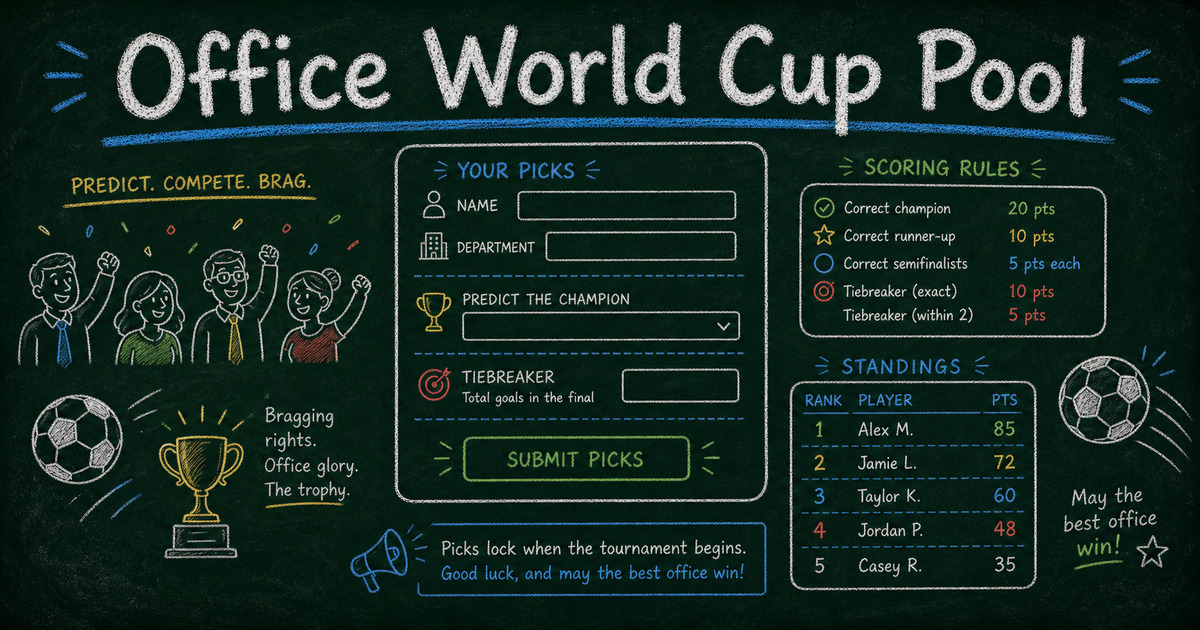
This example shows the respondent experience: people enter their name, team or department, champion pick, finalist predictions, golden boot guess, dark horse, and tiebreaker before the tournament starts.
Open the Office World Cup Pool form in a new tab ->
View the shared office pool report ->
For a lighter public version, use a World Cup fan survey. For a live workplace event, pair the pool with a watch party registration form. If you want a quick game before a match, add the World Cup trivia quiz.
What Is a World Cup Office Pool?
A World Cup office pool is a friendly workplace game where employees predict tournament outcomes and compare results. Unlike sports betting, the usual purpose is engagement: giving people a shared reason to follow matches, talk across teams, and enjoy a global event together.
Most office pools ask for:
- Employee name and work email
- Department or team
- Predicted champion
- Predicted finalists
- Golden boot or top scorer pick
- Dark horse pick
- Tiebreaker question
The safest version is low-stakes: bragging rights, a small trophy, team lunch, or internal recognition. If your company has policies about gambling, prizes, or contests, check those before adding money or external rewards.
The Office Pool Setup
Use the Entry -> Rules -> Standings framework.
| Layer | What it includes | Why it matters |
|---|---|---|
| Entry | Form with participant details and predictions | Keeps submissions clean and timestamped |
| Rules | Deadline, scoring, tiebreaker, prize policy | Prevents arguments later |
| Standings | Shared report or lookup page | Makes the pool visible without manual updates |
The form is the most important part because it creates a single source of truth. A group chat is good for excitement. It is bad for record keeping.
Live Office World Cup Pool Example
We built a FormHug example for an office World Cup pool:
Open the Office World Cup Pool form ->
It collects employee name, work email, department, champion prediction, finalists, golden boot pick, dark horse pick, and a tiebreaker.
You can also share the report:
View the shared office pool report ->
The report is useful because participants can see entries without asking the organizer to send another spreadsheet. For workflows where individuals need to look up their own private record, use Public Query. For a public group view, a shared report is usually simpler.
Rules for a Better World Cup Office Pool
Set a prediction deadline
Close entries before the opening match or before your chosen round begins. Put the deadline in the form description and announcement message.
For 2026, the two natural deadlines are June 11 (the opening match in Mexico City) and June 28 (the start of the Round of 32). The final is on July 19 at MetLife Stadium, so even a late-starting pool has weeks to run.
Decide whether edits are allowed
Most pools should lock predictions after the deadline. If edits are allowed, define the cutoff clearly.
Use a transparent scoring system
Keep scoring simple enough for everyone to understand:
| Prediction | Points |
|---|---|
| Champion correct | 10 |
| Runner-up correct | 6 |
| Correct finalist, wrong side | 4 |
| Golden boot correct | 5 |
| Dark horse reaches knockout stage | 3 |
| Exact final score | 5 |
| Closest tiebreaker | 2 |
You can adjust the numbers, but avoid overcomplicating the game. The goal is participation, not a math contest.
Add one tiebreaker
The best tiebreakers are numeric:
- Total goals in the final
- Minute of the first final goal
- Total yellow cards in the final
- Total goals by the champion across the tournament
One tiebreaker is enough. Multiple tiebreakers make the rules harder to explain.
How to Run a World Cup Office Pool
Step 1: Build the entry form
Create a form with participant details and predictions. Use required fields for the core picks so every entry is complete.
If your office uses departments or regions, include a department field. That lets you compare teams later: marketing vs sales, product vs support, or office vs remote.
Step 2: Publish the rules beside the form
Put the deadline, scoring rules, and prize policy in the form intro or announcement message. The rule text should be visible before people submit, not hidden in a follow-up email.
Step 3: Share the report link
After entries begin, share the report link in Slack, Teams, email, or the company intranet. Pin it where people already check updates.
For larger companies, consider posting weekly updates:
- Most popular champion pick
- Department with the most entries
- Biggest underdog pick
- Closest tiebreaker guesses
Step 4: Announce winners after the final
After the final, export or review submissions, apply your scoring rules, and announce the winner. If the standings are manual, say so up front. If you want participants to look up their own results later, pair the pool with a result-sharing workflow such as Public Query.
Started Late? Run a Knockout-Stage Pool
If the group stage is already underway, do not try to retrofit a pool around matches people have seen. Start fresh with a knockout pool before the Round of 32 begins on June 28.
A knockout pool is simpler and arguably more fun:
- Everyone picks the champion, both finalists, and one upset (a lower-ranked team that wins a knockout match).
- Keep one numeric tiebreaker, such as total goals in the final.
- Score it as 10 points for the champion, 4 per correct finalist, 5 for the upset, and the tiebreaker to settle draws.
Late joiners are on equal footing because no one has banked group-stage points, and the pool still runs for three weeks of single-elimination drama through the July 19 final.
Office Pool Announcement Template
Use this message as a starting point:
We’re running a friendly World Cup office pool. Submit your champion, finalists, golden boot pick, dark horse, and tiebreaker before kickoff. No sports expertise required. The prize is bragging rights and a team lunch. Submit your entry here: [link]
For remote teams, add:
We’ll share the standings report in Slack and post updates after each major round.
A spreadsheet can still be useful for final scoring. The form is better for entry collection because every participant submits the same fields in the same format before the deadline.
Frequently Asked Questions
How do you run a World Cup office pool?
Create a prediction form, set a deadline before kickoff, define the scoring rules, collect participant entries, share a standings report, and announce the winner after the final.
What questions should a World Cup office pool ask?
Ask for employee name, work email, department, champion prediction, finalists, golden boot pick, dark horse pick, and one numeric tiebreaker such as total goals in the final.
Can an office pool be run without gambling?
Yes. Many office pools are friendly engagement activities with no cash involved. Use bragging rights, a trophy, team lunch, or internal recognition instead of money if your workplace wants to avoid gambling concerns.
Can I start a World Cup office pool after the tournament has begun?
Yes. Start a knockout-stage pool before the Round of 32 begins on June 28. Ask for champion, finalists, one upset pick, and a tiebreaker. Everyone starts even, and the pool runs through the July 19 final.
How do I share World Cup office pool standings online?
Use a shared report link, lookup page, or published spreadsheet. With FormHug, you can collect entries through a form and share a report link so participants can see the prediction board.
What is a good tiebreaker for a World Cup office pool?
Use one numeric tiebreaker, such as total goals in the final or minute of the first final goal. Numeric tiebreakers are easier to compare than subjective answers.
Can I create a World Cup office pool with FormHug?
Yes. FormHug can collect office pool entries with a registration or survey-style form, then share a report link so participants can view the group’s predictions.
Related
- World Cup 2026 Fan Survey - collect prediction polls for broader fan communities and newsletters.
- World Cup 2026 Trivia Quiz - add a scored quiz to office lunches, watch parties, or Slack events.
- Watch Party Registration Form - collect RSVPs and guest details for matchday viewing events.
- Build a Lookup Page from Excel - learn how public lookup pages can share results without a portal.
An office pool gets messy when the organizer becomes the spreadsheet. Collect predictions in one FormHug form, share the standings link, and let the tournament do the rest. Create your World Cup office pool form ->

Written by
FormHug TeamProduct, research, and form automation team
The FormHug Team brings together product builders, workflow researchers, and form automation practitioners who study how people collect, route, and act on information online. Our guides are based on hands-on product testing, template analysis, customer workflow patterns, and deep experience with forms, surveys, quizzes, AI-assisted creation, integrations, and results sharing.