FormHug vs Fillout (2026): The Best Free Fillout Alternative
Compare your options
See how FormHug fits the workflow
Compare FormHug against other form builders when AI creation, quizzes, payments, templates, or agent workflows matter.
Fillout is a capable form builder that plays it safe. It landed somewhere between Tally’s free simplicity and Jotform’s enterprise complexity — solid, reliable, and slightly forgettable. It added AI generation in 2024 because the market demanded it, not because it’s built around AI.
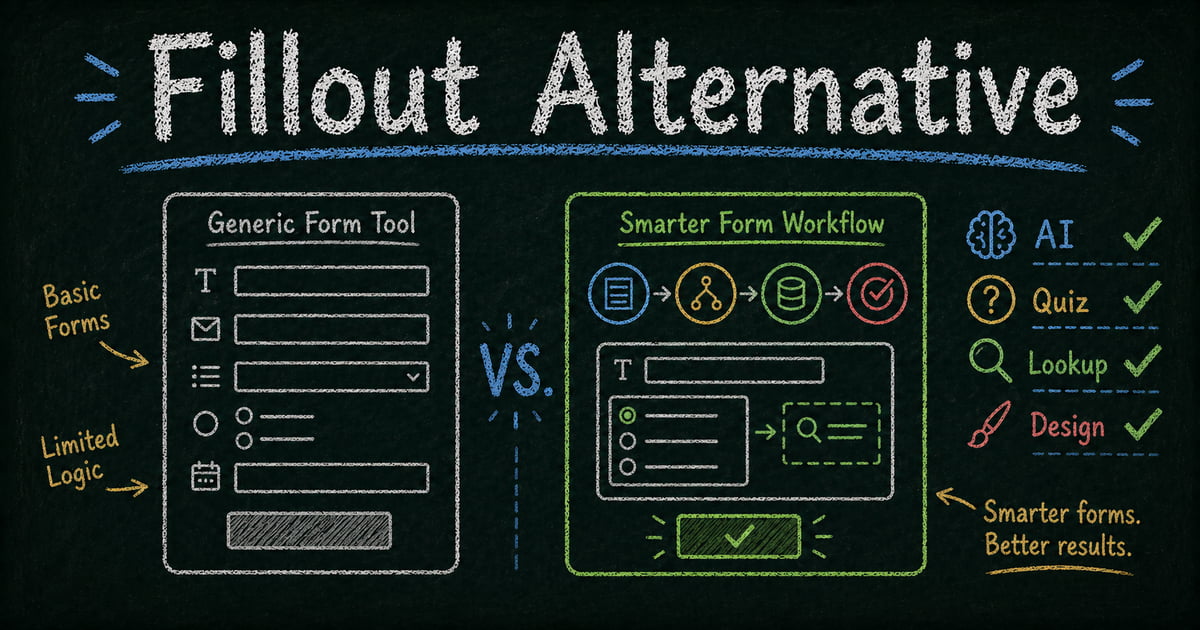
FormHug is built the other way around. AI isn’t a feature that was added to a form builder — it runs through form creation, form optimization, quiz generation, score-range messaging, and the MCP integration that lets you build and manage forms inside a Claude conversation. The forms look better, the free tier is more generous, and the philosophy is different: embrace where software is going, not where it’s been. For the shorter product-page version of this comparison, see FormHug’s Fillout alternative overview; for the broader product surface, start with FormHug’s AI form builder page.
Why People Look for a Fillout Alternative
Fillout’s pricing is where most users hit friction first. The free tier caps at 1,000 submissions per month. The Starter plan ($15/month) raises that to 2,000 — still low for anything with real traffic. Pro ($40/month) gets you 5,000. That’s a steep climb for users whose needs grow faster than their budget.
Beyond pricing, the product itself feels like a product designed not to upset anyone. The conditional logic is excellent. The Notion integration is genuine. But the design defaults are average, the layout is locked, the end page is a basic thank-you unless you upgrade, and the quiz and assessment features — while present — don’t have the depth or interactivity that makes them worth using for anything beyond a simple test.
If you are comparing Fillout alternatives because your form needs more free submissions, a better quiz result page, or an AI workflow that continues after the first draft, the decision is less about whether Fillout works. It does. The question is whether it gives enough room for the form to become a real workflow: collect responses, score or route them, show a useful end page, let respondents look up results, and keep costs predictable as submissions grow.
TL;DR: FormHug vs Fillout at a Glance
| Feature | FormHug | Fillout |
|---|---|---|
| Free submissions | ✅ 3,000/month | ⚠️ 1,000/month |
| Pro submissions | ✅ 30,000/month | ⚠️ 5,000/month |
| Custom end page (free tier) | ✅ Yes | ❌ Paid only |
| AI depth | ✅ AI-native — creation + optimization | ⚠️ Added feature, limited depth |
| Classic & card layout | ✅ One-click switch | ⚠️ Cumbersome to adjust |
| Public Query (respondent lookup) | ✅ Unique to FormHug | ❌ Does not exist |
| Quiz scoring & certificates | ✅ Full engine + radar charts | ⚠️ Basic support |
| Use inside Claude / Cursor (MCP) | ✅ | ❌ |
| Notion integration | ❌ | ✅ Native |
| Conditional logic | ✅ Advanced | ✅ Best-in-class |
What Is FormHug?
FormHug is an AI-native form builder covering registrations, surveys, quizzes, assessments, booking forms, and Public Query for respondent self-service. AI isn’t a bolt-on — it’s how forms are created, optimized, and extended. The design quality is high by default, and the free tier is one of the most generous in the market.
What Is Fillout?
Fillout launched in 2022 as a Typeform alternative and gained traction through its conditional logic engine and native Notion integration. It added AI generation in 2024 as a feature. Fillout is a reliable, well-rounded tool — but it’s positioned cautiously between simpler tools and enterprise platforms, without a clear point of view about where form builders are heading.
Feature-by-Feature Comparison
AI Depth
This is the most meaningful difference. FormHug is AI-native: you describe a form and it builds it, you ask to optimize a section and it rewrites it, you build a quiz and AI generates score-range feedback messages automatically. AI participates throughout the form creation and editing process, not just at the start.
Fillout added AI generation as a feature — type a prompt, get a draft. That’s where it ends. There’s no AI-assisted optimization, no AI-generated quiz feedback, no AI running through the workflow. For Fillout, AI is a lead generation claim. For FormHug, it’s how the product works.
Verdict: FormHug wins on AI depth. Fillout’s AI is functional but shallow.
Pricing and Free Tier Generosity
The numbers tell the story:
| Tier | FormHug | Fillout |
|---|---|---|
| Free | 3,000 submissions/month | 1,000 submissions/month |
| Entry paid | — | ~$15/mo (2,000 submissions) |
| Pro | 30,000 submissions/month | ~$40/mo (5,000 submissions) |
| Business | Unlimited | ~$80/mo |
FormHug’s free tier is three times more generous than Fillout’s. At the Pro level, FormHug gives 30,000 submissions per month — six times what Fillout Pro offers at a comparable price. For any form with meaningful traffic, this gap matters significantly.
Verdict: FormHug wins on pricing generosity at every tier.
End Page Customization
When a respondent submits a form, what do they see? In FormHug, the end page is fully configurable on the free tier: show a score, render a certificate, display which answers were correct, show a custom message based on the respondent’s score range, or present any content you choose. This matters for quizzes, assessments, registrations, and any form where the response itself is part of the experience.
In Fillout, customizing the end page requires a paid plan. On the free tier, you get a basic thank-you screen.
Verdict: FormHug — end page customization available on the free tier.
Design, Branding, and Layout
FormHug forms use a frosted glass design system with automatic theme adaptation — swap the header image and the form’s visual style adapts to match. Brand colors, logo, and custom domain are included. More distinctively, FormHug lets you switch between Classic layout (multiple questions on one page) and Card layout (one question at a time, full-screen) with a single click. Same form, different experience. Card layout drives higher completion rates on surveys and quizzes.
Fillout’s design is functional and customizable, but adjusting layout requires more manual effort — it’s not a one-click switch. The defaults are average rather than polished.
Verdict: FormHug for design quality and layout flexibility.
Quiz, Assessment, and Interactivity
FormHug’s quiz engine supports per-question scoring, answer explanations, certificates, multi-dimensional radar charts, and dynamic end pages with score-range feedback — built for forms that are meant to be shared, completed, and talked about. It’s a quiz as an experience, not just a data collection form with right answers marked.
Fillout supports quiz-style forms with basic scoring and result logic. The implementation works, but it’s ordinary — no radar charts, no certificates, no score-range messaging, no AI-generated feedback. It’s a checkbox feature, not a built-out product area.
Verdict: FormHug for any quiz or assessment built for engagement or certification.
Public Query — Respondent Self-Service
Public Query lets you publish a lookup page where respondents enter their own ID or email to retrieve their specific submission. Exam takers check their score. Event attendees confirm their registration. Competition participants look up their placement. Each respondent sees only their own data, and your team stops fielding “can I check my result?” requests.
This feature is unique to FormHug in the form builder space. Fillout has no equivalent.
Verdict: FormHug — this feature does not exist in Fillout.
Using FormHug Inside Claude (MCP)
FormHug connects to Claude, Cursor, and any MCP-compatible AI agent via its MCP server. Create a form, read submissions, and manage responses through a natural language conversation. For teams building AI workflows, forms become a programmable layer inside the agent.
Fillout has no MCP support.
Verdict: FormHug for any team building with AI agents.
Conditional Logic and Notion Integration
Fillout’s strongest cards. Its conditional logic engine is genuinely best-in-class — multi-branch flows, variable calculations, page routing. FormHug handles the conditional logic that most forms actually require, but Fillout’s implementation is more mature for deeply complex branching scenarios.
Fillout also has native Notion integration: forms write directly to Notion databases without Zapier. If your team’s source of truth lives in Notion, that’s a real workflow advantage.
Verdict: Fillout for complex conditional logic and Notion-centric teams.
Pricing Comparison
| Plan | FormHug | Fillout |
|---|---|---|
| Free | 3,000 submissions/month | 1,000 submissions/month |
| Starter / Entry | — | ~$15/mo (2,000 submissions) |
| Pro | 30,000 submissions/month | ~$40/mo (5,000 submissions) |
| Business | Unlimited | ~$80/mo |
The submission gap at the Pro level — 30,000 vs 5,000 — is the most significant pricing difference. For teams whose forms see real traffic, this is a 6x difference in effective capacity at comparable pricing.
Who Should Switch to FormHug?
- Teams whose free tier needs exceed 1,000 submissions/month — FormHug’s free tier is three times more generous
- Anyone building quizzes for engagement or certification — scoring, certificates, radar charts, score-range feedback, and a configurable end page are all included
- Professionals who want great design without manual effort — frosted glass aesthetic, auto-theming, classic/card layout switching
- Teams using AI throughout their workflow — FormHug’s AI extends into optimization and quiz configuration, not just initial generation
- Anyone who needs respondents to access their own results — Public Query is unique to FormHug
- Builders using Claude or Cursor — MCP integration makes FormHug part of your AI stack
Who Should Stay on Fillout?
- Teams deeply embedded in Notion — Fillout’s native Notion database integration is genuinely valuable if Notion is your source of truth
- Forms requiring complex conditional branching — Fillout’s logic engine is more mature for multi-variable, multi-branch flows
- Teams already on Fillout with existing Zapier workflows — migration friction may outweigh the benefits for established setups
Final Verdict
Fillout is a competent form builder that has found a stable position in the market by being good at most things without being exceptional at any of them. It’s well-built and reliable — but it’s also cautious, and caution has a cost when the form builder space is moving fast. For teams whose primary needs are Notion integration and complex conditional logic, it’s a reasonable choice.
FormHug is built for what comes next. More generous pricing at every tier, AI that runs through the product rather than sitting at the front door, quiz and assessment features designed for actual engagement, Public Query for respondent self-service, and MCP integration for AI-native workflows. The forms look better, cost less per submission, and do more after the respondent clicks submit.
For teams choosing a form builder in 2026, FormHug is the more forward-looking investment. Fillout is the safer, more conservative one. If your forms need to score a quiz, let respondents look up their own results, or run inside a Claude conversation, Fillout simply isn’t built for it — FormHug is.
Frequently Asked Questions
Is FormHug’s free tier really more generous than Fillout’s?
Yes. FormHug’s free tier includes 3,000 submissions per month. Fillout’s free tier caps at 1,000. At the Pro level, FormHug offers 30,000 submissions per month versus Fillout Pro’s 5,000 — a six-fold difference.
Does Fillout have real AI form generation?
Fillout added AI generation in 2024 — you describe a form and get a draft. FormHug also offers this, and goes further: AI is available throughout form editing and optimization, and for quizzes, AI automatically generates score-range feedback messages during the build process.
Which is better for quizzes — FormHug or Fillout?
FormHug. It supports per-question scoring, answer explanations, certificates of completion, multi-dimensional radar charts, and dynamic end pages with score-range feedback. Fillout supports basic quiz-style forms but lacks a dedicated quiz engine, certificates, or score-range messaging.
Can I customize the end page on FormHug’s free tier?
Yes. FormHug lets you configure the end page on the free tier — show a score, certificate, correct/incorrect answer breakdown, or custom messages by score range. Fillout requires a paid plan to customize the thank-you page.
What is Public Query and does Fillout have it?
Public Query is a FormHug feature that publishes a self-service lookup page where respondents enter their own ID or email to view their specific submission. It’s used for exam results, event confirmations, and competition placements. Fillout has no equivalent.
Related
- 7 Best AI Form Builders in 2026 (Tested & Ranked) — see how FormHug and Fillout rank across the full field
- FormHug vs Tally (2026) — how FormHug compares to the free-forever alternative
- FormHug vs Google Forms (2026) — how FormHug compares to the default free option

Written by
FormHug TeamProduct, research, and form automation team
The FormHug Team brings together product builders, workflow researchers, and form automation practitioners who study how people collect, route, and act on information online. Our guides are based on hands-on product testing, template analysis, customer workflow patterns, and deep experience with forms, surveys, quizzes, AI-assisted creation, integrations, and results sharing.