FormHug vs Tally (2026): The Best Free Tally Alternative
Compare your options
See how FormHug fits the workflow
Compare FormHug against other form builders when AI creation, quizzes, payments, templates, or agent workflows matter.
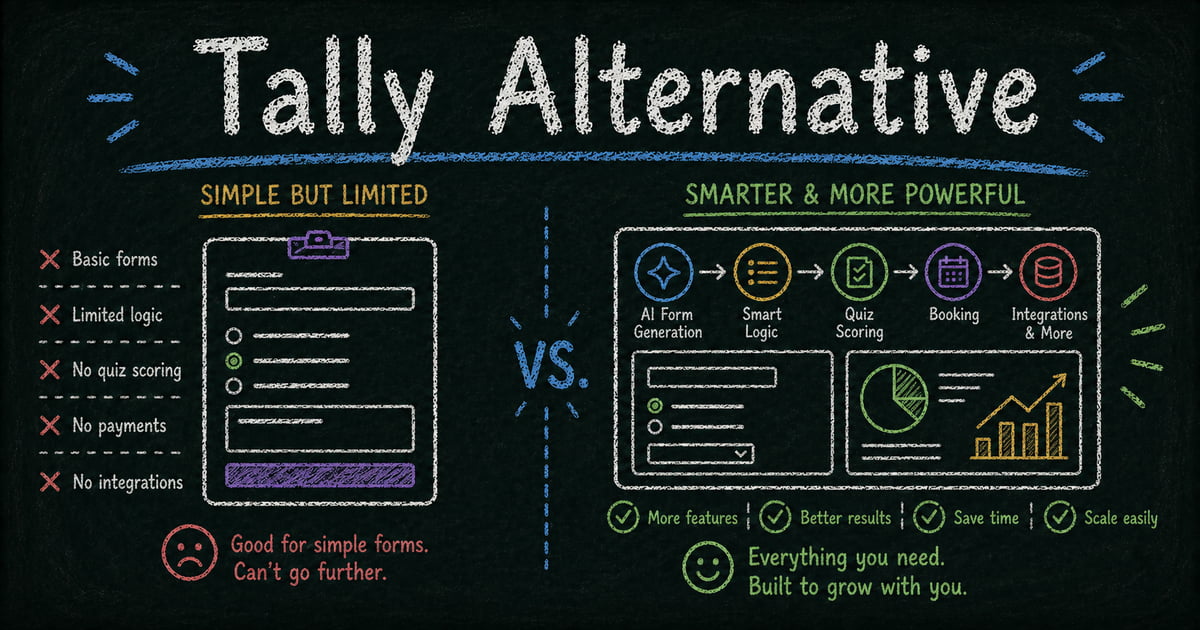
Tally built its reputation on one powerful promise: unlimited forms, unlimited responses, free forever. That’s a genuinely hard offer to compete with — and FormHug doesn’t try to beat it on price alone.
FormHug’s free tier covers unlimited forms and 3,000 submissions per month, which is enough for the vast majority of real-world use cases. The difference isn’t the free tier ceiling. It’s what the two tools can do: Tally is excellent at simple, clean data collection. FormHug is built for the full range — AI generation, professional design, quiz scoring with certificates, calendar booking, Public Query for respondent self-service, and direct integration with Claude and Cursor via MCP.
For the shorter product-page version of this comparison, see FormHug’s Tally alternative overview.
Why People Look for a Tally Alternative
Tally’s block editor — modeled on Notion’s interface — is elegant once you’re used to it. But Notion-style editing isn’t intuitive for everyone. Many users still expect to drag and drop fields, configure them in a panel, and preview in real time. That’s how most form builders work, and FormHug follows that pattern.
Beyond the interface, Tally’s limitations become apparent when you need more than basic collection: a quiz that scores answers and generates a certificate, a booking form with time slots, a form that lets respondents look up their own submission after the fact, or a form built inside a Claude conversation. These aren’t edge cases — they’re common needs that Tally simply doesn’t address.
TL;DR: FormHug vs Tally at a Glance
| Feature | FormHug | Tally |
|---|---|---|
| AI form creation | ✅ Natural language | ❌ Manual only |
| Free submissions | ✅ 3,000/month | ✅ Unlimited |
| Design quality | ✅ Frosted glass, auto-theming | Minimal / Notion-style |
| Classic & card layout | ✅ Switch with one click | ❌ Fixed layout |
| Public Query (respondent lookup) | ✅ Unique to FormHug | ❌ Does not exist |
| Quiz scoring & certificates | ✅ Full engine + radar charts | Limited |
| Booking forms | ✅ Calendar-based time slots | ❌ |
| End page content | ✅ Score, certificate, custom messages | Basic thank-you only |
| Use inside Claude / Cursor (MCP) | ✅ | ❌ |
| Conditional logic | ✅ Yes | Tally Pro only |
| White labeling | ✅ Yes | Tally Pro only |
What Is FormHug?
FormHug is an AI form builder built for the full range of form use cases — registrations, surveys, quizzes, bookings, assessments, and public result lookups. Describe what you need in plain language and FormHug builds the complete form, logic, and messaging. It’s designed for professionals who want forms that look good, do more, and connect to the tools they already use — including Claude and other AI agents via MCP.
What Is Tally?
Tally is a form builder that went viral for its free-forever model. It uses a Notion-style block editor — intuitive for anyone who lives in Notion, less so for users who prefer a traditional drag-and-drop interface. Tally’s free tier includes unlimited forms and unlimited responses with no watermark. Tally Pro (~$29/month) adds conditional logic, custom domains, and detailed analytics.
Feature-by-Feature Comparison
AI Form Creation
FormHug has native AI form generation. Describe your form in a sentence — audience, purpose, fields needed — and FormHug builds a complete, styled draft. Tally has no AI generation; every form is built manually using its block editor.
Verdict: FormHug wins clearly. AI generation removes most of the manual setup, especially for complex or multi-step forms.
Interface and Ease of Use
Tally’s block editor is genuinely easy to use for anyone familiar with Notion. Typing / inserts a new block — clean and keyboard-friendly. But it’s not how most people expect a form builder to work. FormHug uses a drag-and-drop interface with a field panel and live preview — the pattern that the majority of form builders follow, and the one most users arrive expecting.
Neither tool is hard to learn. The question is which workflow feels natural to you.
Verdict: Tally has the edge for Notion users. FormHug matches the expectation of most users coming from other form tools.
Design, Branding, and Layout
FormHug forms use a frosted glass aesthetic with automatic theme adaptation — swap the header image and the form’s color palette, typography, and visual tone adapt to match. Brand colors, logo, and custom domain support mean the form looks like yours.
Beyond styling, FormHug lets you choose between two layouts: Classic (multiple questions on a scrollable page) and Card (one question at a time, full-screen). Switch between them with one click — the content stays the same, the experience changes. Card layout drives higher completion rates on surveys and quizzes; Classic is better for longer, multi-section forms.
Tally’s aesthetic is intentionally minimal. The look is clean but generic, and there’s no layout mode choice — all forms use the same scrolling structure.
Verdict: FormHug for any form representing your brand or requiring a specific respondent experience.
Quiz, Assessment, and End Page
This is one of the widest gaps. FormHug’s quiz engine supports per-question scoring, correct answer explanations, multi-dimensional radar charts, certificates of completion, and a dynamic end page that shows the respondent their score, which answers they got right or wrong, and custom feedback messages by score range — all generated automatically by AI when you build the quiz.
The end page in FormHug isn’t just a “thank you” screen. It’s a configurable results display: show a score, render a certificate, reveal detailed feedback, or present a custom message depending on how the respondent performed.
Tally can build quiz-style forms but has no native scoring engine, no result display logic, and no certificate output.
If you’re building assessments, certification exams, or personality evaluations, FormHug handles the full use case. Tally doesn’t.
Verdict: FormHug by a wide margin for any quiz or assessment with real scoring or result display needs.
Booking Forms
FormHug supports calendar-based booking with configurable time slots per date. Respondents choose directly within the form — no external scheduling tool, no separate link.
Tally has no booking functionality of any kind.
Verdict: FormHug for any form that schedules time.
Public Query — Respondent Self-Service Lookup
Public Query is FormHug’s most distinctive feature and, as far as we know, unique in the form builder space. Once a form has responses, you can publish a self-service lookup page where respondents enter their own ID, email, or name to retrieve their specific submission — without seeing anyone else’s data, without contacting your team.
Exam takers check their score. Event registrants confirm their session. Competition participants look up their placement. The respondent gets their own data on demand, and you eliminate an entire category of support requests.
Tally has no equivalent. Responses are visible only to the form owner.
Verdict: FormHug — this feature does not exist in Tally.
Using FormHug Inside Claude (MCP Integration)
FormHug connects to Claude, Cursor, and any MCP-compatible AI agent via its MCP server; the MCP integration docs cover the connector setup. You can create a form, read submissions, and submit entries through a Claude conversation — without opening a browser or dashboard. For teams building AI workflows, this means forms become a programmable layer inside your agent, not a separate tool you switch to.
Tally has no MCP support or AI agent integration.
Verdict: FormHug for any team building with Claude or Cursor.
Pricing and Free Tier
Tally’s free plan is its headline advantage: unlimited forms, unlimited submissions, forever. FormHug’s free tier covers unlimited forms with 3,000 submissions per month — enough for most teams and use cases. At 3,000 submissions per month, you’re looking at 100 responses per day; very few forms outside high-traffic public campaigns hit that ceiling.
Where Tally charges for conditional logic and white labeling (Tally Pro, ~$29/month), FormHug’s paid plans include AI generation, the full quiz engine, Public Query, MCP integration, booking forms, and payment collection — a substantially broader feature set at a comparable price point.
Verdict: Tally wins on raw free tier volume. FormHug’s free tier is sufficient for most real-world use, and paid plans offer substantially more capability.
Pricing Comparison
| Plan | FormHug | Tally |
|---|---|---|
| Free | ✅ Unlimited forms, 3,000 submissions/month | ✅ Unlimited forms & responses |
| Pro | Paid (AI, quiz engine, Public Query, MCP) | ~$29/month (conditional logic, custom domain) |
Who Should Switch to FormHug?
- Teams building quizzes, assessments, or certifications — anyone who needs scoring, answer explanations, radar charts, score-range feedback, or certificates
- Users who prefer drag-and-drop — if Tally’s Notion-style block editor feels unfamiliar, FormHug’s interface matches the form builder pattern most users expect
- Professionals with brand standards — frosted glass design, auto-theming, classic/card layout choice, custom domain
- Anyone who needs respondents to access their own results — exam organizers, event managers, competition hosts, HR teams
- Service providers collecting payment or booking appointments — FormHug supports both natively; Tally supports neither
- AI builders using Claude or Cursor — MCP integration makes FormHug part of your AI workflow
Who Should Stay on Tally?
- Users who need truly unlimited free responses — if your form will receive thousands of submissions per month and budget is the constraint, Tally’s free tier is unmatched
- Notion power users — if you live in Notion and the block editor feels like home, Tally is the natural extension
- Simple data collection only — for basic surveys, contact forms, and signups with no design or feature requirements
Final Verdict
Tally’s free-forever model remains genuinely hard to beat for simple forms and budget-constrained teams. If you need unlimited responses at zero cost and your forms are straightforward, Tally does the job.
FormHug is the better choice when your forms need to do more: score a quiz, generate a certificate, let respondents look up their own results, accept a payment, book an appointment, or run inside a Claude conversation. The free tier — 3,000 submissions per month — covers the vast majority of real use cases, and the paid plans offer a depth of capability that Tally Pro doesn’t match.
The real question isn’t which tool is cheaper. It’s what your form needs to do after the respondent clicks submit.
Frequently Asked Questions
Does FormHug have a free plan like Tally?
Yes. FormHug’s free tier includes unlimited forms and 3,000 submissions per month — enough for most teams. Tally’s free tier is more generous on submission volume (unlimited), but FormHug’s free tier includes capabilities Tally reserves for its paid plan.
Does Tally have AI form creation?
No. As of 2026, Tally has no AI generation feature. All forms are built manually using its block editor. FormHug generates complete forms from a plain-language description.
Which is better for quizzes — FormHug or Tally?
FormHug. It supports per-question scoring, correct answer explanations, certificates, radar charts, and dynamic end pages with score-range feedback. Tally can build quiz-style forms but has no native scoring engine or result display.
What is Public Query and does Tally have it?
Public Query is a FormHug feature that lets you publish a self-service lookup page where respondents enter their own ID or email to view their specific submission. It’s used for exam results, event registration confirmations, competition placements, and similar scenarios. Tally has no equivalent feature.
Can I use FormHug inside Claude or Cursor?
Yes. FormHug has an MCP server that connects to Claude, Cursor, and any MCP-compatible AI agent. You can create forms, read submissions, and manage responses through a natural language conversation. Tally has no MCP support.
Related
- 7 Best AI Form Builders in 2026 (Tested & Ranked) — see how FormHug and Tally compare across the full field
- FormHug vs Google Forms (2026) — how FormHug compares to the default free option
- How to Create an Online Quiz — a step-by-step guide to the quiz features that set FormHug apart

Written by
FormHug TeamProduct, research, and form automation team
The FormHug Team brings together product builders, workflow researchers, and form automation practitioners who study how people collect, route, and act on information online. Our guides are based on hands-on product testing, template analysis, customer workflow patterns, and deep experience with forms, surveys, quizzes, AI-assisted creation, integrations, and results sharing.