AI Forms for Humans and Agents: Why the AI Era Needs Better Forms

Create with AI
Describe the workflow and get a form draft
Use FormHug to create forms from prompts, then share, automate, and reuse the structured responses.
Most AI form builders still tell the same story: describe a form, generate fields faster, publish the link. That is useful, but it misses the bigger shift.
The AI era does not make forms obsolete. It changes who can create forms, who can read forms, and how form data moves into the next action. A form is no longer only a page a person fills out. It can also be a structured interface an AI agent uses inside a workflow.
That is why the next generation of AI forms needs to serve two audiences at once: humans who need a trustworthy experience, and agents that need structured input they can act on.
The campaign idea is simple: AI forms for humans and agents. Beautiful for humans. Friendly for agents. Human-ready. Agent-native.
TL;DR — AI forms are becoming shared interfaces for human respondents and AI agents.
- Humans still need clarity — people complete forms when the experience feels polished, focused, and trustworthy.
- Agents need structure — AI workflows need fields, submissions, IDs, and actions, not just loose chat history.
- Chat and forms work together — chat is flexible for intent; forms are reliable for structured collection.
- Works for: lead capture, surveys, registrations, booking, quizzes, assessments, and public result lookup.
- An AI form builder should let humans create forms in the browser and let agents create, read, and manage forms through tools like MCP.
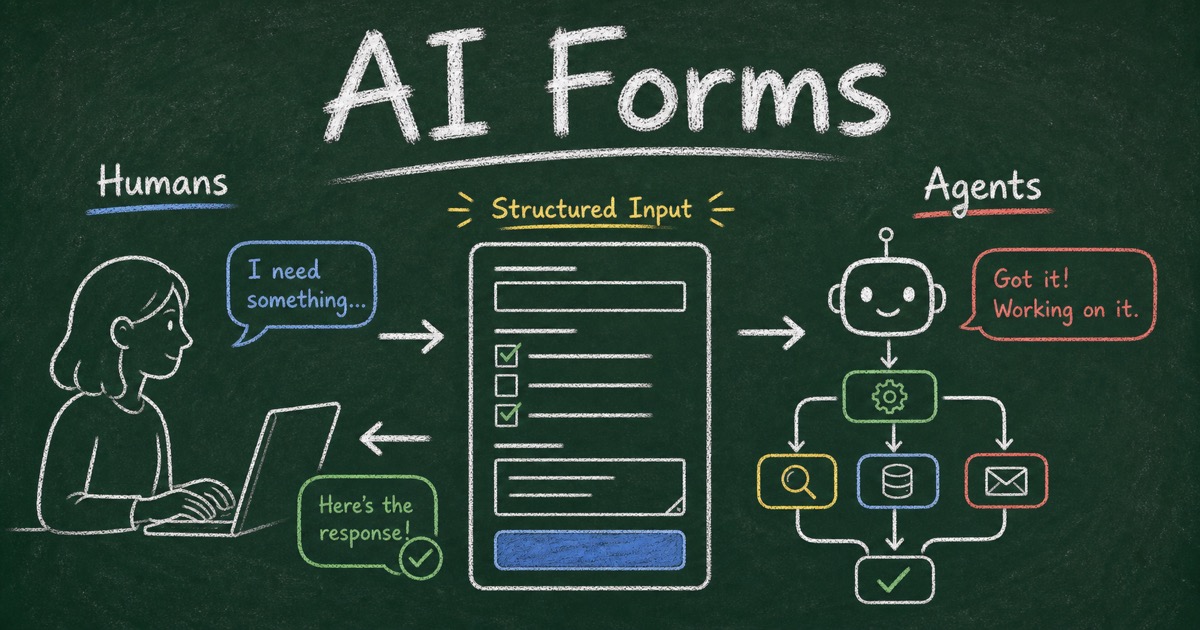
Forms Were Originally Human Interfaces
For most of the web’s history, forms had one simple job: ask a person for information in a predictable format.
That job still matters. A registration form needs names, emails, choices, and consent. A survey needs ratings and comments. A booking form needs dates. A quiz needs answers, scoring, and results.
Forms survived every wave of interface change because they create structure. They turn messy human intent into data a system can store, search, route, analyze, and act on.
AI does not remove that need. In many workflows, AI increases it.
When an agent helps plan an event, qualify a lead, summarize feedback, or collect employee preferences, it still needs clean input from real people. The difference is that the agent may now participate before and after the form: creating it, reading responses, summarizing patterns, and triggering the next step.
Why AI Agents Need Structured Human Input
AI agents can interpret requests, draft content, call tools, compare options, and reason across context. But workflows break down when input is scattered across chat messages, screenshots, forwarded emails, and half-filled spreadsheets.
Structured input gives agents a better working surface.
A form response has field names, answer types, and timestamps. It can be filtered, summarized, exported, or sent downstream. A form can ask every respondent the same important question in the same way.
This is what makes AI forms for agents different from ordinary AI-generated forms. The form is not only faster to create. It becomes part of the agent’s operating loop:
- A human describes the goal.
- An agent creates the form structure.
- People submit responses through a clear form experience.
- The agent reads the submissions and helps decide what happens next.
That loop is where forms become infrastructure for AI workflows.
Chat Is Flexible, but Forms Are Structured
It is tempting to say chat will replace forms. For some tasks, it will. If you need to brainstorm or ask follow-up questions, chat is the natural interface.
But chat is not always the best place to collect data.
If twenty people answer a feedback question in chat, the result is flexible but messy. If they answer a form with a rating field, category field, and optional comment, the result is ready for analysis. The schema is already there.
The practical future is chat plus forms.
Chat is where intent begins: “Create a feedback form for our beta launch.” A form is where structured input gets collected. The agent then returns to chat with the summary, the qualified leads, the follow-up list, or the next recommended action.
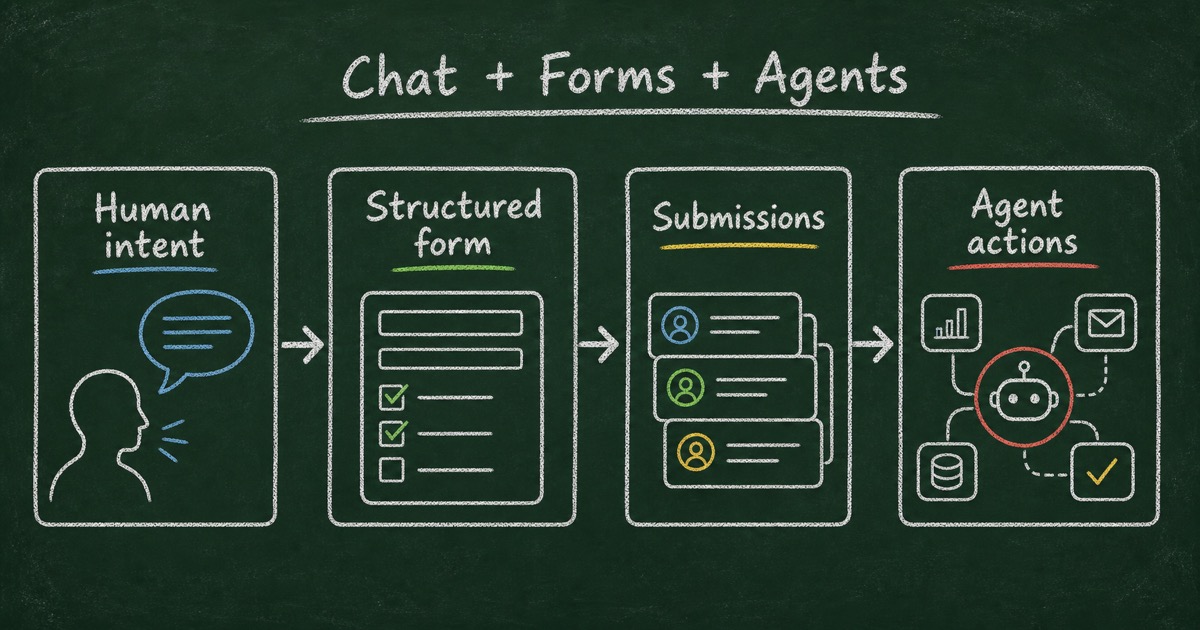
An AI-native form builder should support that entire movement, not just the first prompt.
Agent-Native Forms Must Serve Humans and Agents
The mistake in many automation products is treating the human experience as a detail after the workflow is technically connected.
That does not work for forms. Every form still has a person on the other side. A customer, applicant, attendee, student, respondent, or lead has to decide whether the form is worth completing. If the form feels untrustworthy, the workflow fails before the agent sees the data.
The best agent-native forms therefore have two jobs.
First, they must be beautiful for humans. The form should feel clear on mobile, easy to scan, and credible for the context.
Second, they must be friendly for agents. The form should be available through a tool interface, not trapped inside a dashboard. An agent should be able to create the form, retrieve submissions, and help with follow-up without forcing a human to copy data across tools.
That combination is the new standard: beautiful for humans, friendly for agents.
What Makes an AI Form Builder Agent-Native
An agent-native AI form builder is not just a form builder with an AI prompt box.
It needs a way for agents to interact with the form system as a tool. For FormHug, that layer is MCP for agents: a Model Context Protocol connection that lets Claude, Cursor, and other MCP-compatible agents create forms, read submissions, and manage workflows through natural language.
This changes the role of the form builder. Instead of being a separate destination you visit, it becomes a capability available inside the place where work is already happening.
For example, a Claude user can ask for a product feedback form, get a published link, collect responses, and then ask Claude to summarize what users want most.
The key is continuity. The workflow does not stop at “form created.” It continues through submission data and next actions.
Where FormHug Fits
FormHug is built around this humans-and-agents view of forms. Forms are the interface between humans and agents, and FormHug is the form layer for AI workflows.
For humans, FormHug creates polished forms for real-world scenes: registration, surveys, booking, quizzes, assessments, and Public Query workflows where respondents can look up their own results. The point is to publish forms people can trust and complete.
For agents, FormHug exposes form creation and submission access through MCP. The agent can create the structure, retrieve submissions, summarize answers, and help route follow-up work.
The free plan also makes experimentation practical: FormHug includes 3,000 submissions per month, so builders can test real AI form workflows without hitting a tiny response limit.
If you want the hands-on version, start with the FormHug MCP guide. If you work primarily inside Claude, see how to use FormHug as a Claude form builder. For the technical category, read the MCP form builder explainer; for practical scenarios, see AI agent workflows that need a form layer.
FAQ
What are agent-native forms?
Agent-native forms are forms designed so AI agents can create, read, and use them inside workflows, while human respondents still get a clear form experience.
How are AI forms different from Google Forms?
Google Forms is useful for simple manual collection. AI forms add natural-language creation, richer form scenes, and agent-facing workflows where tools like Claude can create forms and read submissions.
What is the best form builder for AI agents?
Look for an AI form builder with MCP support, submission access, and polished public forms. The agent should be able to create the form and read the data without manual copy-paste.
Will chat replace forms?
Chat will replace some informal collection tasks, but not every structured workflow. Forms are still better when you need consistent fields, comparable answers, consent, routing, scoring, or auditable submissions.
Why does design still matter if an agent creates the form?
Because real people still fill it out. A form that feels confusing or generic lowers trust and completion rates, even if the backend workflow is automated.
What is MCP in this context?
MCP, or Model Context Protocol, is a standard way for AI assistants to connect to external tools. With FormHug MCP, an agent can create forms, read submissions, and manage form workflows through a connected tool interface.
What makes FormHug an AI-native form builder?
FormHug supports natural-language form creation for humans, MCP access for agents, polished public form experiences, Public Query workflows, and form scenes including surveys, bookings, quizzes, and assessments.
Related
- MCP Form Builder — why agents need forms as tools
- Form Builder for Claude — how to build and manage forms inside Claude
- 5 AI Agent Workflows That Need a Form Layer — practical examples for events, waitlists, feedback, leads, and quizzes
- Forms Aren’t Dead. They Just Got an AI Brain. — a shorter opinion piece on the future of forms
Every workflow that depends on messy human input eventually needs structure. Give humans a form they trust, and give agents a form layer they can use. Explore MCP for agents → or build forms inside Claude →

Written by
FormHug TeamProduct, research, and form automation team
The FormHug Team brings together product builders, workflow researchers, and form automation practitioners who study how people collect, route, and act on information online. Our guides are based on hands-on product testing, template analysis, customer workflow patterns, and deep experience with forms, surveys, quizzes, AI-assisted creation, integrations, and results sharing.