Claude Form Builder: Create Forms Inside Claude

Create with AI
Describe the workflow and get a form draft
Use FormHug to create forms from prompts, then share, automate, and reuse the structured responses.
FormHug is a Claude form builder that connects to Claude via MCP — the standard way to add external tools to Claude. Describe any form in plain language, and Claude builds it with a shareable link. Ask Claude to add fields, change the form header, read submissions, or turn responses into a visual report — all in the chat. Combine it with Gmail, Notion, Slack, or any other Claude integration to turn form data into action. Free to start, no code required.
More people use Claude now than ever — not just developers, but teachers, coaches, small business owners, HR managers, and event organizers. They use it to plan, write, and think. But when they need to collect information from other people, there’s always a friction point: close Claude, open a form tool, build from scratch, come back. This guide shows how to build forms in Claude without that context switch.
FormHug closes that gap. It’s a Claude form builder — connect it once, and creating and managing forms becomes a native part of your Claude conversation.
This is the bigger shift behind AI-native forms: AI forms for humans and agents. Beautiful for humans. Friendly for agents. The form still needs to feel trustworthy for the person filling it out, but Claude can now create, update, inspect, and analyze the workflow around it.
July 24 update: FormHug is now listed in the Claude Connectors Directory with Interactive support. Read the product note, or install FormHug in Claude directly.
TL;DR — A Claude form builder lets you create, edit, inspect, and analyze forms from inside a Claude conversation instead of switching to a dashboard.
- Create forms in natural language — describe the fields and Claude builds the shareable form.
- Edit the workflow in chat — add follow-up questions, adjust the header image or theme, and keep refining the form.
- Read submissions in chat — ask Claude to summarize responses, find entries, extract follow-up lists, or generate a visual report.
- Works for: registrations, class signups, intake forms, feedback surveys, waitlists, research forms.
- FormHug connects through MCP, so form data can flow into Gmail, Notion, Slack, and other AI workflows.
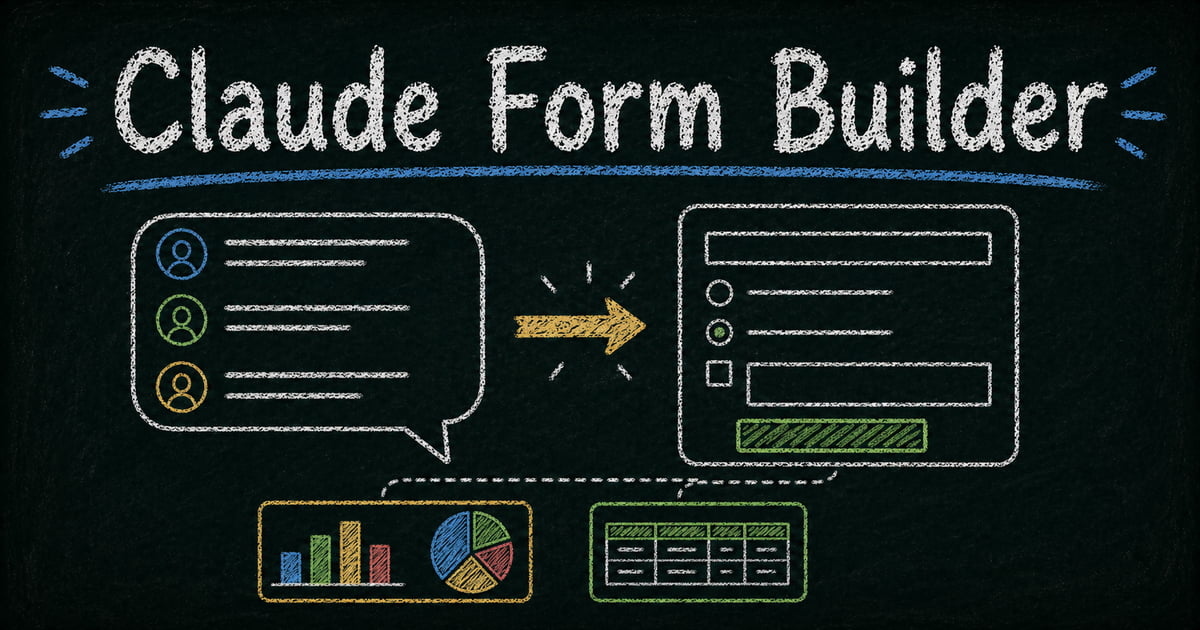
The original workflow board below captures the core pattern: describe the form in chat, publish it for people to complete, then bring the responses back into Claude for analysis.
Can Claude Create a Form?
Yes. Claude can create a form when it is connected to a form tool such as FormHug through MCP. You describe the fields, purpose, and follow-up workflow in plain language, and Claude uses the connected tool to build a real hosted form with a public link.
That distinction matters. Claude can always draft form questions in a chat response, but a Claude form builder creates the actual collection layer: fields, share link, submissions, and response data that Claude can read again later.
Watch Claude Build a Form with FormHug MCP
We recorded the workflow end to end. Watch the Claude + FormHug MCP demo on YouTube →
The demo shows Claude creating a product feedback form, adding a follow-up question, changing the form header image, working with sample submissions, and generating a visual report from the responses.
Build Any Form in Claude with Natural Language
The only interface is plain English. Describe what you need — Claude creates the form and gives you a shareable link.
An event organizer setting up workshop registration:
“Create a sign-up form for my Thursday morning Pilates class. I need their name, email, phone number, whether they’ve taken Pilates before, and their preferred class time — 7am or 9am.”
Claude builds the form. Paste the link into your Instagram bio, WhatsApp group, or email newsletter — done in under a minute.
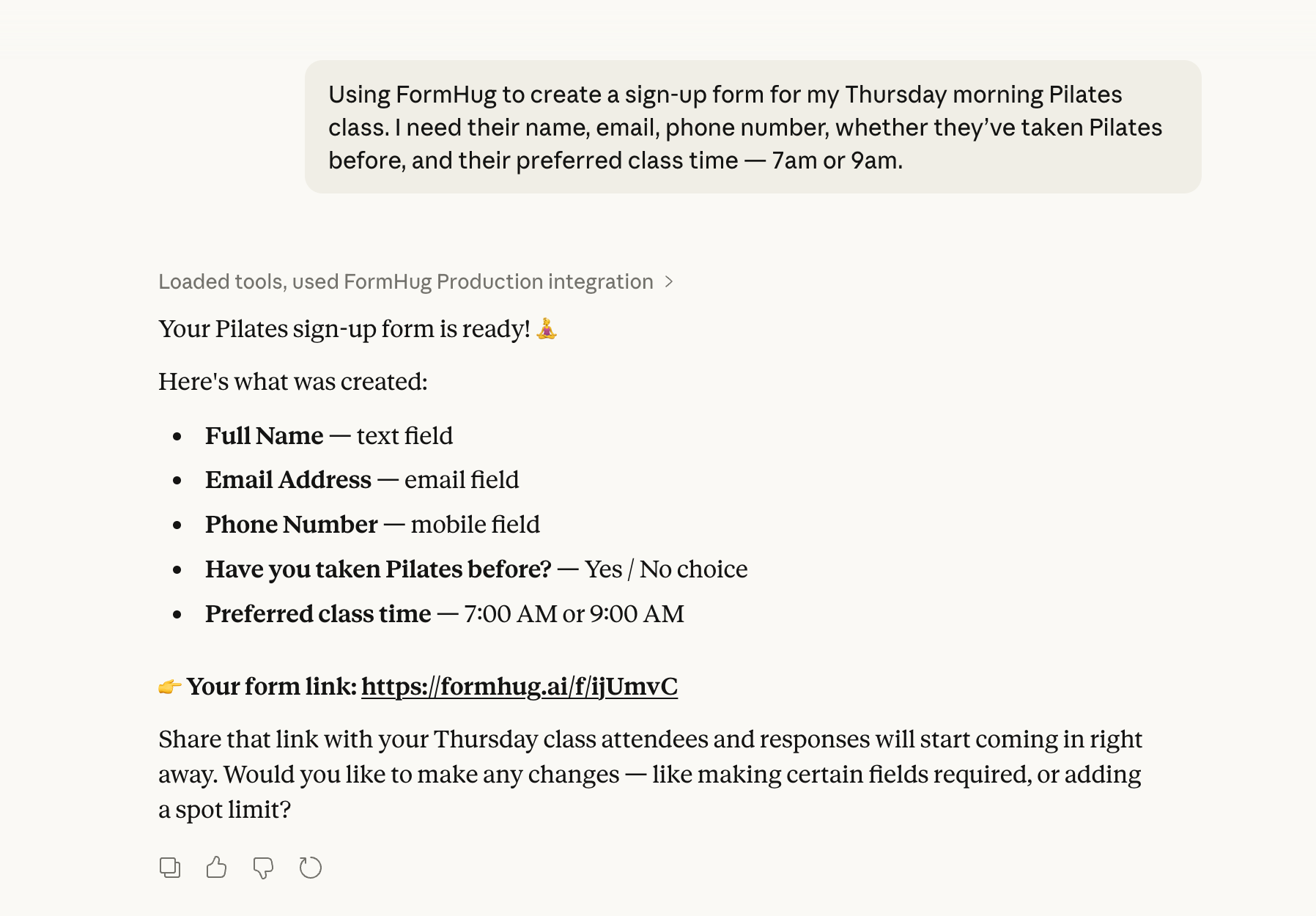
Need to tweak it? Just say so in the same conversation:
“Make the phone number optional.”
“Add a field for emergency contact name.”
Claude updates the form instantly. No settings page, no clicking through menus.
A product team collecting feedback:
The same pattern works for more polished public forms:
“Create a product feedback form for our AI writing tool. Ask for their email, what they used the product for, what felt confusing, and what they would improve. Add a follow-up question for users who rate the experience below 7 out of 10.”
Then refine the presentation:
“Change the header image to something more AI-themed and make the form feel more product-focused.”
Claude can update both the structure and the public-facing experience. The form is still built for real people to complete, but the workflow around it stays agent-friendly.
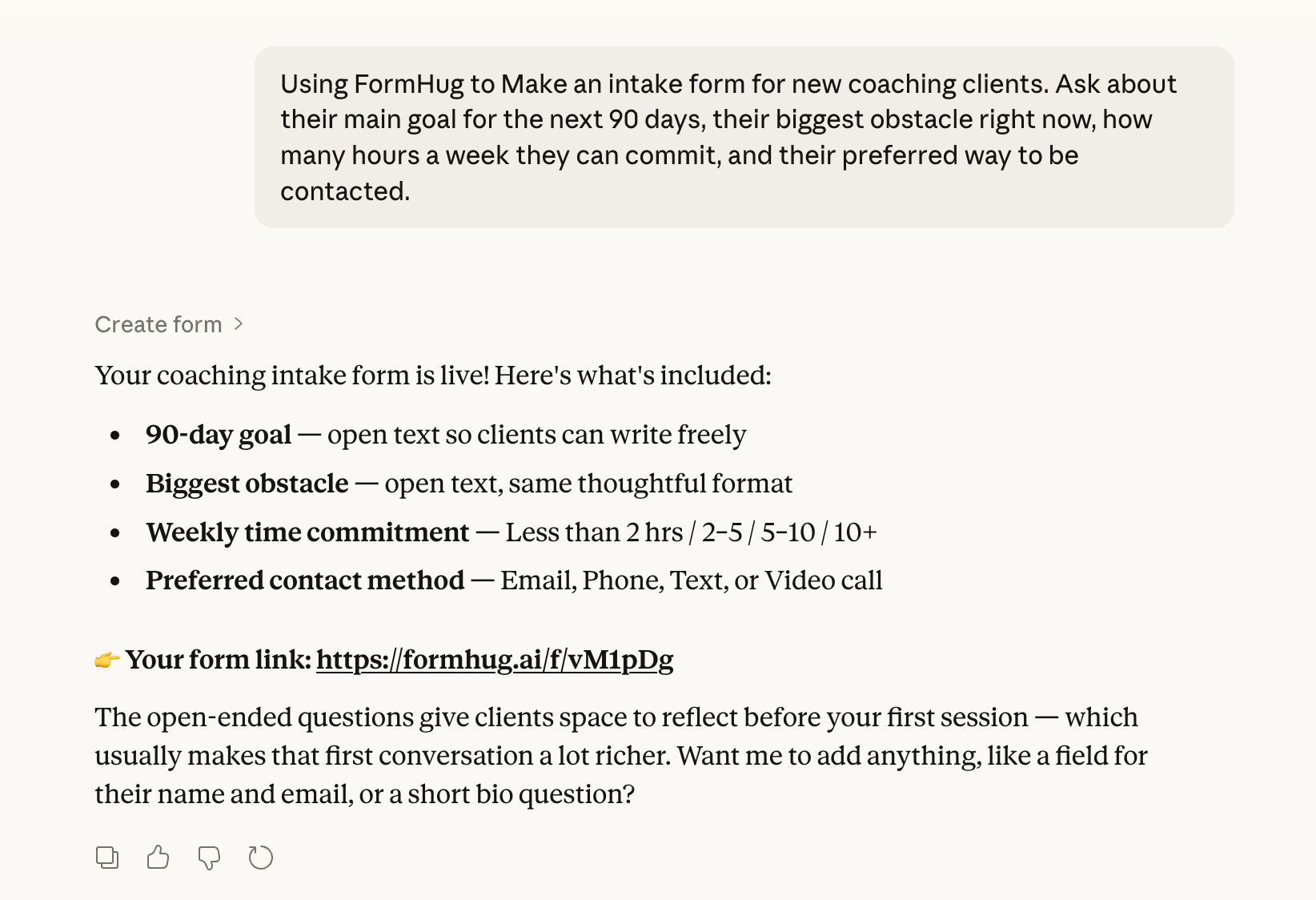
A consultant creating a client intake form:
“Make an intake form for new coaching clients. Ask about their main goal for the next 90 days, their biggest obstacle right now, how many hours a week they can commit, and their preferred way to be contacted.”
No field types to choose. No form builder to log into. You described what you needed — Claude handled the rest.
A developer prototyping a product with Claude:
You’re using Claude to build a landing page or MVP. At some point you need an early access sign-up. The typical move is to ask Claude to write a form in HTML — but that gives you UI with no backend. The data goes nowhere.
With FormHug connected, you ask instead:
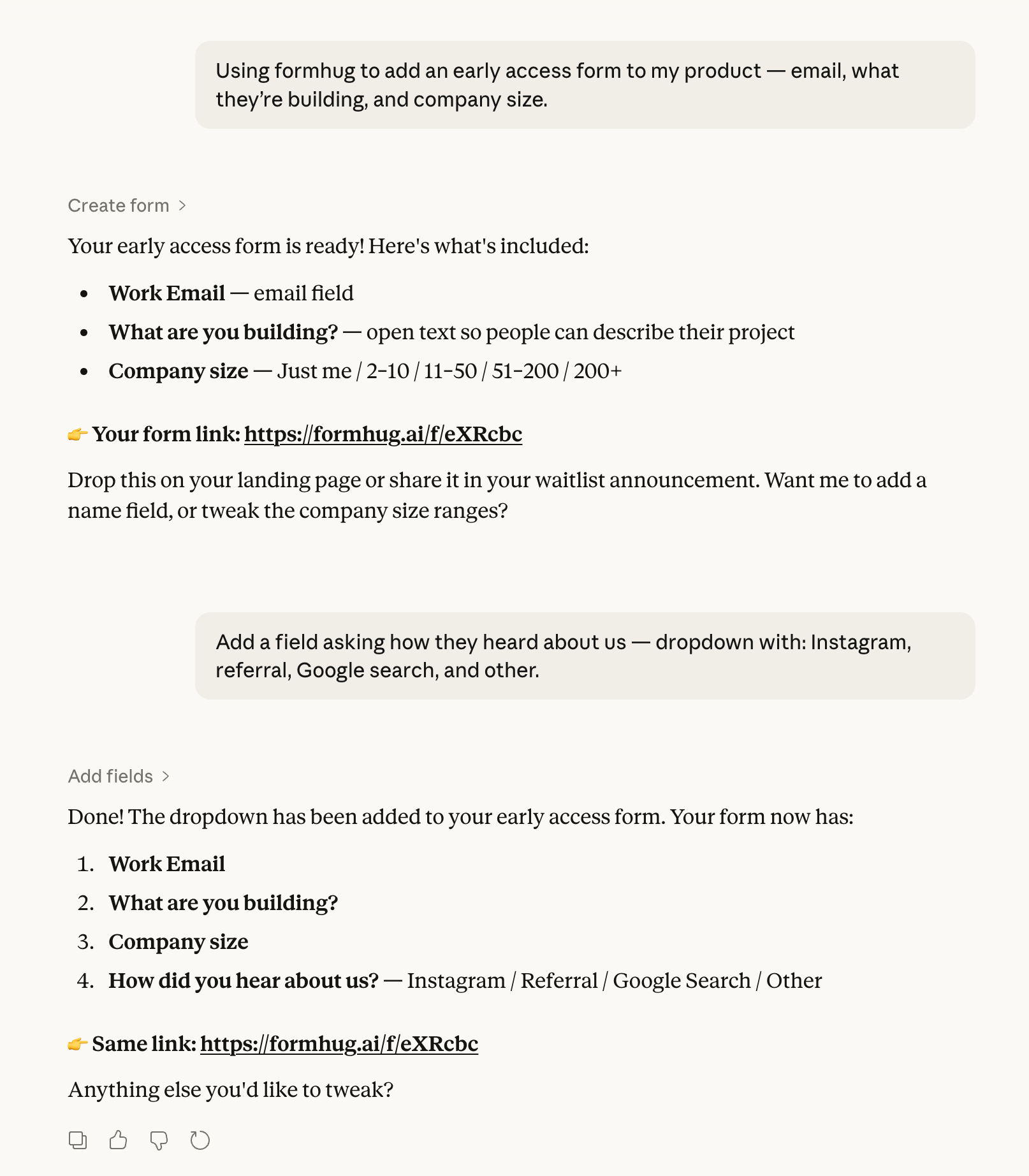
“Add an early access form to my product — email, what they’re building, and company size.”
Claude creates a real hosted form and returns a shareable link. Paste it as a button on your landing page. Responses flow into FormHug immediately — no backend to set up, no form handling code, no deployment. Your prototype ships with working early access infrastructure, not a placeholder.
View Form Responses Directly in Claude
Once submissions come in, you don’t need to open a dashboard.
“Show me the latest submission from my early access form.”
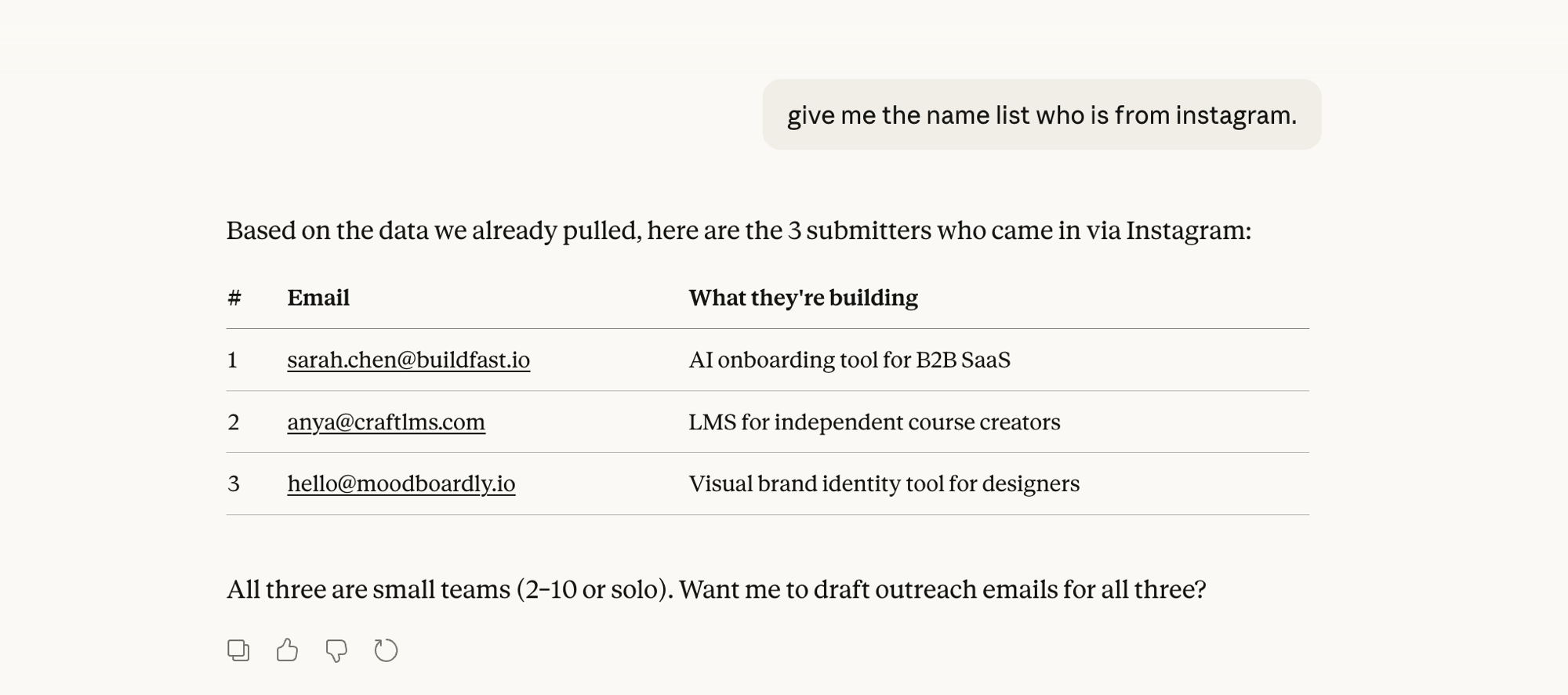
“Give me the list of everyone who came from Instagram.”
Claude retrieves the data and formats it clearly — names, emails, what they’re building — right in the chat. No tab switching, no dashboard login.
Let Claude Analyze and Visualize Your Form Data
This is where it becomes genuinely useful for anyone who collects data but doesn’t think of themselves as a “data person.”
Say your early access form has collected 50 sign-ups. You want to understand who’s signing up and where they’re coming from. Normally you’d export a spreadsheet, scroll through rows, and try to spot patterns.
In Claude, you ask:
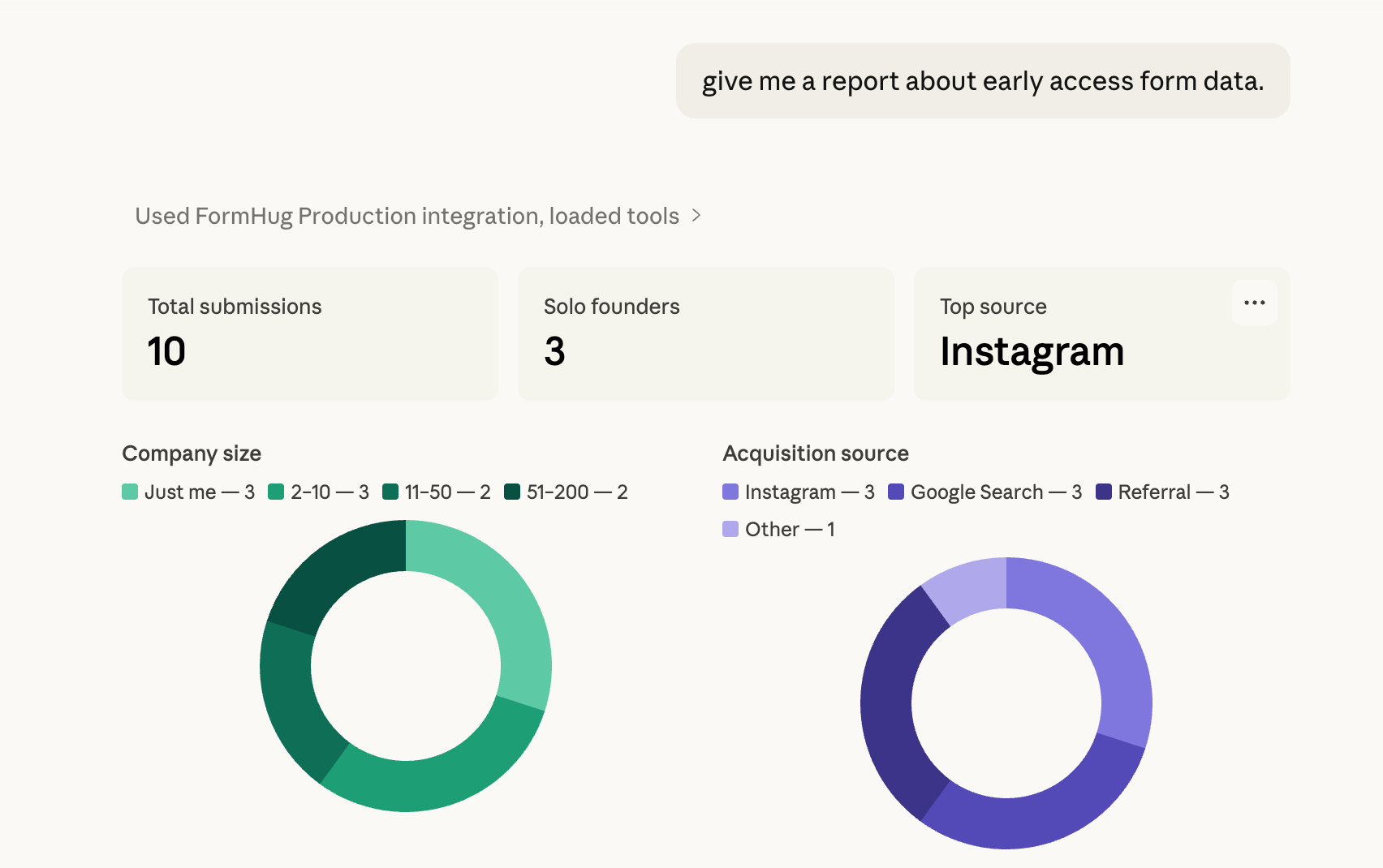
“Give me a report on my early access form data.”
Claude reads the submissions and gives you a full breakdown — total sign-ups, company size distribution, top acquisition sources — rendered as charts directly in the conversation.
For a product feedback form, that visual report can become the handoff between research and action:
“Create a visual report from these feedback submissions. Show the rating distribution, the most common complaints, the strongest feature requests, and three recommended next actions.”
Claude can turn submissions into charts, patterns, and next actions without making you export a CSV first. That matters because form data is rarely useful as raw rows. It becomes useful when you can ask better questions of it.
Or go deeper:
“What are the most common things people say they’re building? Any patterns?”
Claude synthesizes the open-text responses and surfaces themes you’d miss scanning a spreadsheet. No Excel pivot tables. No formula writing — just a conversation about your data.
Claude Form Builder + Other MCP Tools: Complete Workflows
FormHug handles data collection. Claude connects to dozens of other tools through MCP — email, calendar, project management, databases, messaging. When you combine them, you get complete workflows that never leave Claude.
FormHug + Gmail
A new early access sign-up comes in. Instead of manually reading the submission and drafting a welcome email:
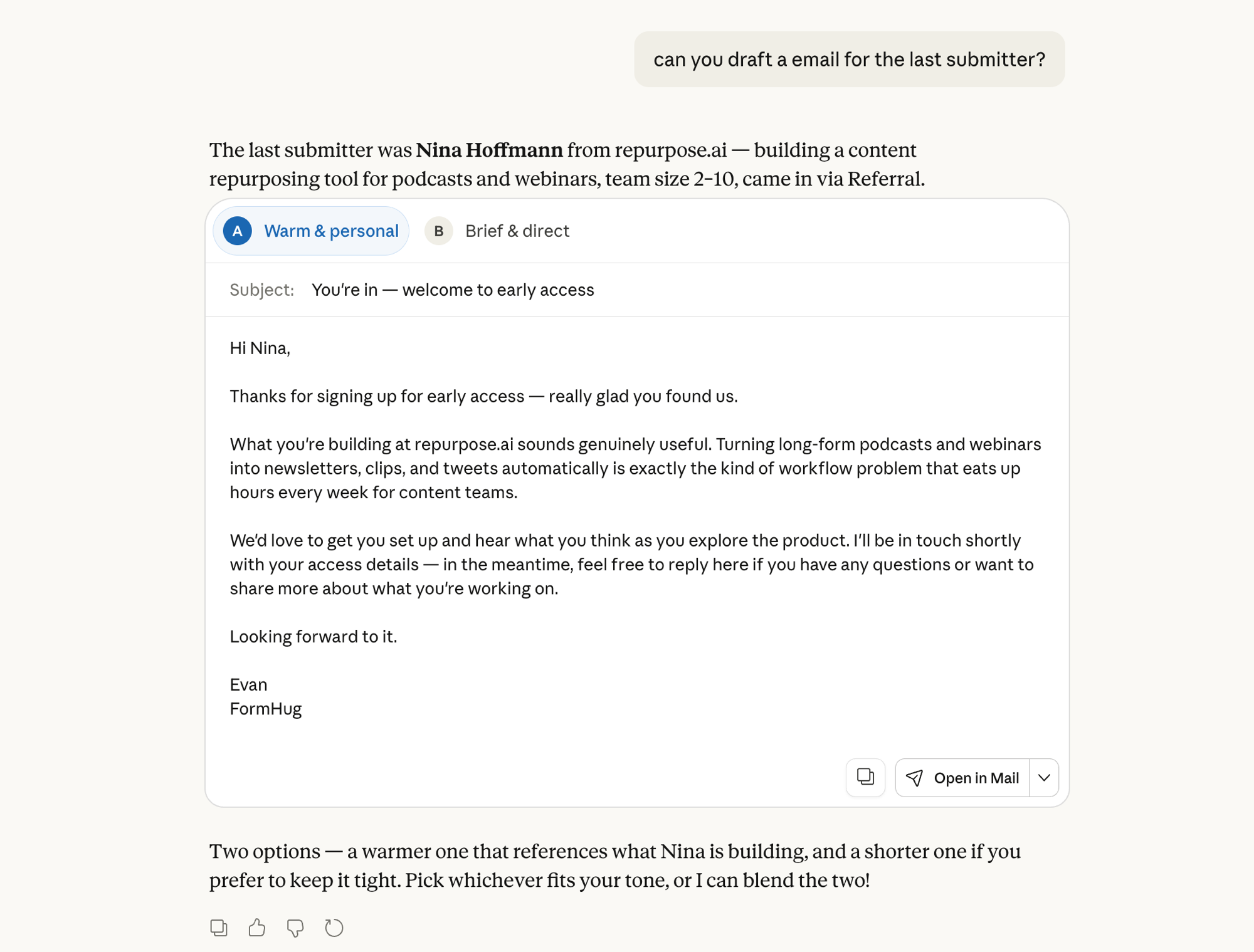
“Draft a personalized email for the last person who signed up. Reference what they’re building.”
Claude pulls the submission, reads their project description, and drafts a tailored email — ready to send via Gmail. One prompt, personalized outreach.
FormHug + Notion
Your intake form brings in a new client. You ask:
“Add this client to my Notion CRM. Create a new page with their goals, timeline, and contact info from the intake form.”
Claude logs the structured data directly into your Notion workspace — no copy-pasting, no tab switching.
FormHug + Slack
Your team needs to know when a new lead comes in. You ask:
“Check my lead form and post a summary of any new submissions to our #sales Slack channel.”
New leads surface to your team without anyone manually monitoring the form.
The pattern is always the same: FormHug collects the data. Claude + your other connected tools act on it. It’s the input layer that feeds everything else in your Claude workflow.
How to Connect FormHug to Claude
The simplest route is the public connector listing:
- Open FormHug in Claude Connectors
- Connect and authorize your FormHug account
- Enable FormHug for the conversation where you want to create or manage a form
FormHug is marked Interactive, so Claude can render supported FormHug interfaces directly in the conversation.
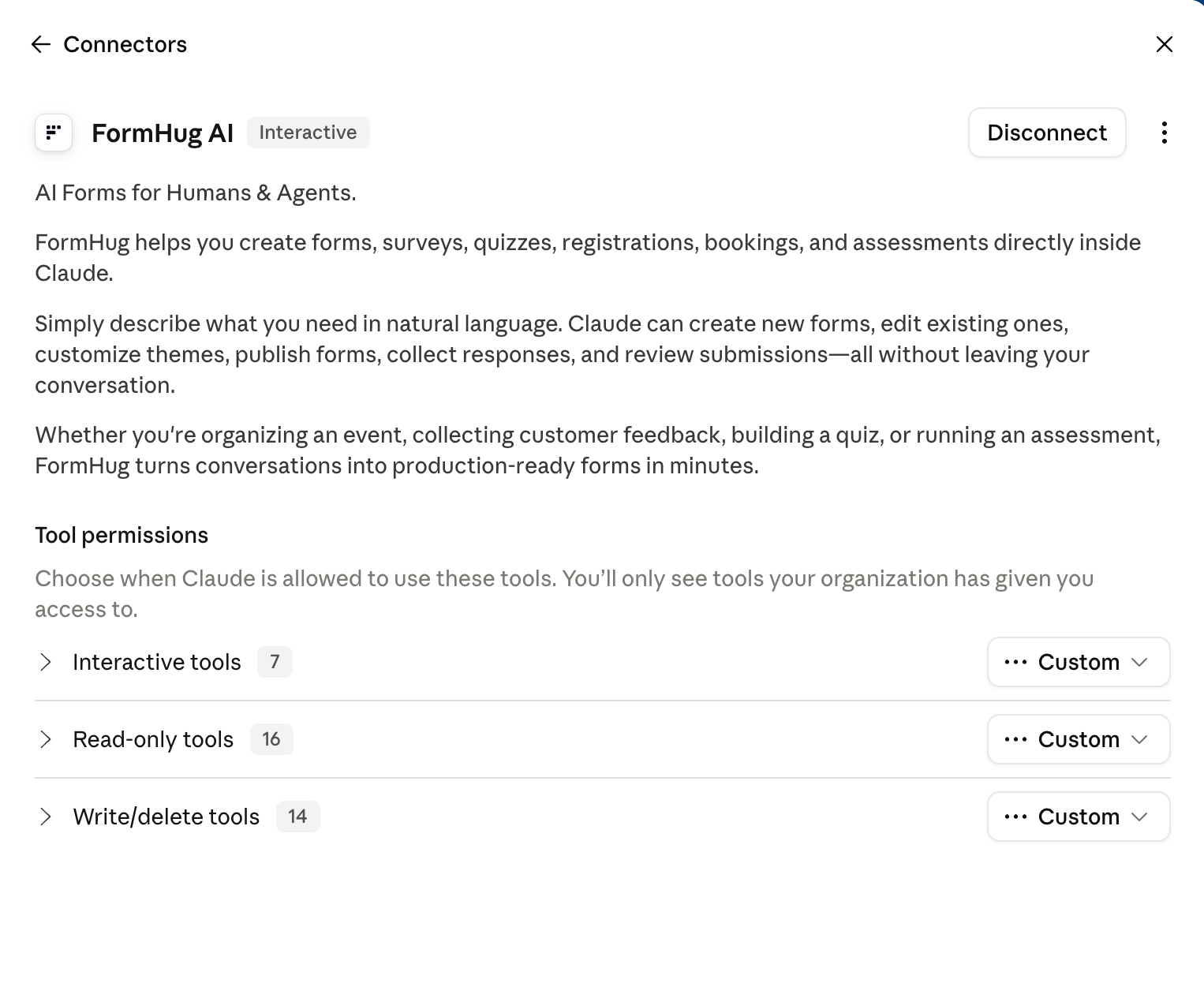
If you need the manual remote MCP route, Claude.ai and Claude Desktop also support a custom connector:
- Go to Customize → Connectors, click + then Add custom connector
- Paste the URL and click Add:
https://formhug.ai/mcp - Authorize — FormHug tools are now available in your chat
For the maintained setup reference, example prompts, and troubleshooting, use the FormHug + Claude guide alongside this walkthrough.
If you’re on a Team or Enterprise plan, ask your org Owner to add it via Organization settings → Connectors first, then connect from your own Connectors page.
FormHug is free to sign up. The MCP connection works on the free plan.
Frequently Asked Questions
Do I need to know how to code to use FormHug with Claude?
No. Everything happens in natural language — describe the form you need, ask to see responses, ask Claude to analyze your data. No technical knowledge required.
Can I use FormHug alongside other Claude MCP tools?
Yes — that’s where it gets powerful. FormHug handles data collection, and your other connected tools (Gmail, Notion, Slack) handle the follow-up. Claude orchestrates everything from a single conversation.
Where do my form responses go?
Responses are stored in your FormHug account. You can view them through Claude, log into the dashboard directly, or export them as a spreadsheet.
Is FormHug free to use with Claude?
Yes. FormHug has a free plan and the MCP connection works on all plans including free. Your plan’s submission limit applies to entries collected through your forms.
Can anyone fill out the form, even if they don’t use Claude?
Yes. Your form lives at a public URL. Anyone can open it in a browser — no Claude or FormHug account needed on their end.
What is a Claude MCP form builder?
A Claude MCP form builder is a form tool connected to Claude through the Model Context Protocol, so Claude can create forms, edit fields, read submissions, and summarize response data from chat.
How do I add FormHug to Claude?
Open the FormHug listing in Claude Connectors, connect it, and authorize your FormHug account. Claude can then create forms, render supported interactive interfaces, read authorized submissions, and analyze responses from the chat.
Related
- FormHug Is Now Available in Claude Connectors — see what changed with the directory listing and Interactive MCP Apps support
- AI Forms for Humans and Agents — the campaign essay on why forms are becoming the shared interface between people and AI agents
- MCP Form Builder — the technical explainer for why agents need forms as tools
- FormHug MCP for AI Agents — the full MCP guide covering Claude, Cursor, and other AI tools
The next time you need a form while working in Claude, the context switch is optional. FormHug is the form layer for humans and agents: beautiful for people to fill out, friendly for Claude to create, read, and analyze. Add FormHug to Claude →

Written by
FormHug TeamProduct, research, and form automation team
The FormHug Team brings together product builders, workflow researchers, and form automation practitioners who study how people collect, route, and act on information online. Our guides are based on hands-on product testing, template analysis, customer workflow patterns, and deep experience with forms, surveys, quizzes, AI-assisted creation, integrations, and results sharing.