AI Survey Maker: Create Better Surveys from a Prompt
Start collecting responses
Turn this into a shareable survey
Draft the questions, publish a clean link, and keep every response organized in FormHug.
An AI survey maker can create a usable first draft in seconds. The risk is that it can also create a confident-looking survey that asks too many questions, misses the decision you actually need to make, or collects answers you will never use.
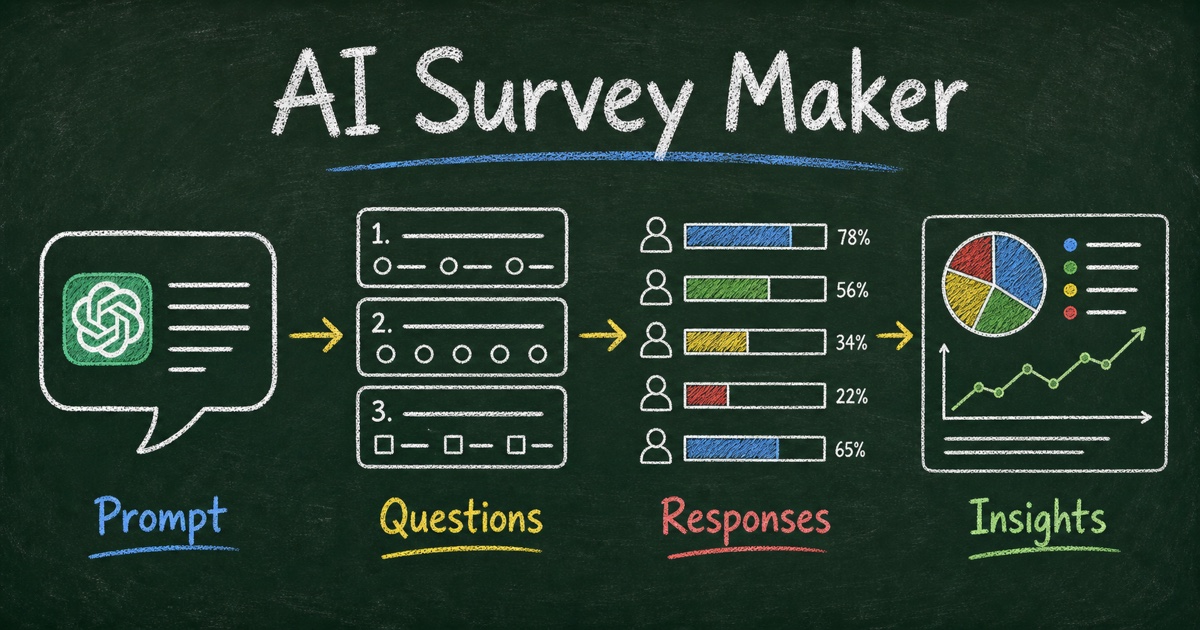
That is why the best AI survey workflow is not simply “ask AI for questions.” It starts with a decision, turns that decision into signals, converts the signals into questions, and then publishes the survey where real people can answer it.
FormHug is built for that full path: use AI to draft the survey, edit the structure, publish a shareable form, collect responses, and use the results to decide what happens next. This guide explains how to use an AI survey maker without turning your feedback request into a generic questionnaire.
TL;DR — FormHug is an AI survey maker that helps you turn a research goal into structured survey questions, publish the survey as a real form, and collect responses for analysis.
- Start with the decision — AI writes better survey questions when it knows what the answers will change.
- Review the question structure — keep the survey short, remove duplicate prompts, and separate ratings from explanations.
- Use templates when the goal is common — customer feedback, market research, event feedback, and product validation do not need to start from blank.
- Works for: product research, customer feedback, employee pulse checks, event feedback, education surveys, and creator audience research.
- A survey is not done when AI drafts questions; it is done when respondents can answer and the results can support a decision.
What Is an AI Survey Maker?
An AI survey maker is a tool that uses natural language to help create survey questions, field types, answer choices, and form structure. Instead of starting with a blank form, you describe the audience, goal, and decision, then the tool creates a draft survey you can edit and publish.
The useful part is not just speed. A good AI survey maker helps translate a vague research goal into a more consistent structure. For example, “find out whether customers like our new onboarding” can become a mix of rating scales, multiple-choice segmentation, and open-ended follow-up questions.
The important boundary is this: AI can draft the survey, but it cannot decide what your team will do with the answers. That decision still belongs to you. If the survey is not connected to a decision, even a polished AI-generated questionnaire becomes a pile of opinions.
For a broader tool-selection view, read the free survey maker guide. If you specifically want to create and publish the survey without leaving ChatGPT, use the ChatGPT Survey Maker workflow. If you are still learning the basics, start with how to create an online survey for free.
The Decision → Signal → Question Framework
Before you ask an AI survey maker to create anything, write one sentence:
After reading the responses, we will decide ___.
That blank is the difference between a survey that creates action and a survey that creates noise. Once the decision is clear, use the Decision → Signal → Question framework:
| Layer | What it means | Example |
|---|---|---|
| Decision | What you will choose, change, prioritize, or stop doing | Decide which onboarding step to improve first |
| Signal | The evidence that would change the decision | Confusion level, task completion, repeated comments |
| Question | The exact prompt that captures the signal | ”Which onboarding step felt most confusing?” |
This framework works because AI tends to overproduce questions when the prompt is vague. A decision gives it a boundary. A signal gives it a target. A question captures the signal without adding unnecessary friction.
In our testing, the strongest survey prompts did not begin with “make me a customer survey.” They included a decision and a constraint:
Create a 7-question customer onboarding survey that helps us decide which part of our first-run setup to improve first. Include one rating question, two multiple-choice questions, two open-ended follow-ups, one role/company-size question, and optional email for follow-up.
That prompt is still short, but it gives the AI survey maker enough shape to avoid a generic 15-question feedback form.
How to Create a Survey with AI
Step 1: Describe the decision, not just the topic
Start with the outcome you need. “Customer satisfaction survey” is a topic. “Find out why first-time users fail to complete onboarding” is a decision context.
A better prompt includes five parts:
- Audience — who will answer?
- Decision — what will the answers help you choose?
- Signals — what evidence matters?
- Question limit — how short should the survey be?
- Follow-up need — do you need contact permission, segmentation, or open text?
Try this structure:
Use FormHug to create a survey for [audience]. We need to decide [decision]. Capture [signals]. Keep it to [number] questions. Include [contact, segmentation, rating, or follow-up needs].
A clear prompt does not remove editing. It gives you a better first draft.
Step 2: Ask AI for structure before copy
Many weak AI surveys fail because they jump straight to polished wording. Structure matters more than phrasing. Before you approve the draft, check whether the survey contains the right mix of question types.
For most practical surveys, start with 5 to 8 questions:
- 1 segmentation question, such as role, customer type, or experience level
- 1 to 2 rating questions that quantify the signal
- 2 to 3 multiple-choice questions that make comparison easy
- 1 to 2 open-ended questions that explain the scores
- Optional email or consent only when follow-up is useful
This is not a universal law. It is a useful starting point because it keeps the survey short enough to finish while still giving you both numbers and reasons.
Step 3: Cut questions that do not support the decision
AI is good at producing plausible questions. That means your editing job is mostly subtraction.
Use the Draft → Cut → Test review:
- Draft — let AI create the first survey structure.
- Cut — remove every question that does not map to the decision.
- Test — read the survey as a respondent and ask whether each question feels necessary.
Watch for duplicate questions that ask the same thing in different words. Also watch for questions that would be interesting to know but would not change what you do next. Interesting-but-unused questions are the easiest way to make a survey feel longer than it is.
Step 4: Publish the survey as a real form
A survey draft inside a chat window is not yet a survey. It needs a public link, mobile-friendly fields, stored responses, and a way to review answers.
FormHug lets you turn the AI-generated structure into a hosted survey form. You can edit the title, description, fields, choices, required settings, and follow-up questions before sharing it. The survey can then be sent as a link, used as a QR-code destination, embedded where relevant, or shared with a specific audience.
For response analysis after launch, use the workflow in how to analyze survey results: separate scores from reasons, segment the answers, and convert the strongest patterns into actions.
Ready-Made AI Survey Templates
When the survey goal is common, start from a template instead of asking AI to invent the whole structure from scratch. Templates give you a proven baseline; AI helps adapt the questions to your audience and decision.
Useful starting points include:
- Product Idea Validation Survey — validate demand, audience, and willingness to use or pay before building.
- Customer Satisfaction Survey Template — measure satisfaction and collect reasons behind the score.
- Product Feedback Form Template — gather structured feedback after a feature, beta, or product update.
- Course Topic Validation Survey — test whether an audience actually wants a topic before you build a course, webinar, or workshop.
- AI Tools Usage Survey Template — understand how an audience uses AI tools, where they get value, and what blockers remain.
After choosing a template, ask AI to adapt it with a focused instruction:
Adapt this survey for early-stage SaaS founders deciding which onboarding problem to fix first. Keep the survey under 8 questions, preserve one rating question, and add one optional follow-up email field.
That combination is stronger than either blank-page AI generation or a static template alone.
What to Look for in an AI Survey Maker
Not every AI survey maker supports the full workflow from idea to responses. Some tools generate question text but still require manual copying into another product. Others create forms but do not help with templates, response access, or analysis.
Use this checklist when comparing options:
| Capability | Why it matters |
|---|---|
| Prompt-to-survey creation | Turns a rough goal into a structured first draft. |
| Editable fields and choices | Lets you cut, rename, reorder, and refine the survey before launch. |
| Multiple question types | Supports ratings, choices, open text, email, NPS, and segmentation. |
| Templates | Gives common survey use cases a stronger starting point than a blank prompt. |
| Shareable public link | Makes the survey usable outside your private AI conversation. |
| Response collection | Stores submissions so the survey becomes data, not just generated text. |
| Analysis workflow | Helps summarize, segment, and act on responses after collection. |
The key distinction is whether the tool only generates questions or creates a working survey workflow. A question generator can help you brainstorm. An AI survey maker should help you publish, collect, and learn.
Common AI Survey Mistakes to Avoid
Mistake 1: Asking for too many questions
AI will usually give you more questions than you need. A 14-question survey feels thorough to the creator and heavy to the respondent. If the audience is not highly motivated, start shorter.
A good rule for lightweight feedback is to ask: what is the fewest number of questions that would still let us make the decision? For many customer, event, or product surveys, that number is closer to 5 to 8 than 15 to 20.
Mistake 2: Mixing scores and explanations badly
A rating without a reason is hard to act on. An open-ended answer without a score is hard to compare. Pair them deliberately.
For example, ask:
- “How easy was it to complete onboarding?” using a 1 to 5 rating.
- “What was the main reason for your score?” as an open-ended follow-up.
This score-plus-reason pattern gives you both measurement and explanation. It also makes later analysis easier because you can compare low scores against repeated comment themes.
Mistake 3: Using AI wording without respondent context
AI-generated questions often sound neutral but generic. Before publishing, read the survey from the respondent’s point of view. Would they know what experience you mean? Would they understand how their answer will be used? Would they trust you with the information requested?
If a question asks for email, phone number, company name, or sensitive feedback, explain why. Trust is part of completion.
Mistake 4: Treating the survey as finished before analysis
A survey is not successful because it received responses. It is successful when the responses change a decision, message, product, event, class, or workflow.
Before launch, write the action rule:
If more than 30% of respondents choose [option] or mention [theme], we will [action].
The exact threshold depends on the audience size and context, but the discipline matters: decide how the result will be used before the answers arrive.
Frequently Asked Questions
What is the best AI survey maker for creating surveys from a prompt?
The best AI survey maker is the one that turns a prompt into a real survey workflow, not only a list of suggested questions. Look for AI drafting, editable fields, multiple question types, templates, a shareable public link, response collection, and a way to analyze results.
How do you create a survey with AI?
Start by describing the audience, decision, signals, and question limit. Then let AI draft the survey structure, remove questions that do not support the decision, refine the wording, publish the survey as a real form, and review the collected responses.
Can AI write good survey questions?
AI can write useful survey-question drafts when the prompt includes a clear decision and audience. It works best when you treat the output as a first draft, then edit for clarity, neutrality, length, and respondent trust.
How many questions should an AI-generated survey have?
For many lightweight surveys, 5 to 8 questions is enough to collect a useful mix of segmentation, ratings, multiple choice, and open-ended explanations. Longer surveys can work when the audience is motivated, but every extra question should support the decision.
Should I start from an AI prompt or a survey template?
Use a template when the survey goal is common, such as customer satisfaction, event feedback, product validation, or market research. Use an AI prompt to adapt the template to your audience, decision, language, and follow-up workflow.
Can FormHug create AI surveys for free?
FormHug lets you start creating surveys with AI, templates, shareable links, and response collection. You can begin with a free workflow, then upgrade when you need more capacity or advanced features for your team.
Related
- Free Survey Maker: Create an Online Survey People Actually Complete — learn what to look for before choosing a free survey tool.
- How to Create an Online Survey for Free That People Actually Complete — plan, write, publish, and share a clean survey without overbuilding it.
- How to Analyze Survey Results: Turn Responses Into Decisions — turn scores, comments, and segments into useful next actions.
A faster survey draft is only useful if it produces clearer decisions. Start with the decision, let AI create the structure, cut what does not belong, and publish the result where real respondents can answer. Create your survey →

Written by
FormHug TeamProduct, research, and form automation team
The FormHug Team brings together product builders, workflow researchers, and form automation practitioners who study how people collect, route, and act on information online. Our guides are based on hands-on product testing, template analysis, customer workflow patterns, and deep experience with forms, surveys, quizzes, AI-assisted creation, integrations, and results sharing.