Free Survey Maker: Create an Online Survey People Actually Complete
Start collecting responses
Turn this into a shareable survey
Draft the questions, publish a clean link, and keep every response organized in FormHug.
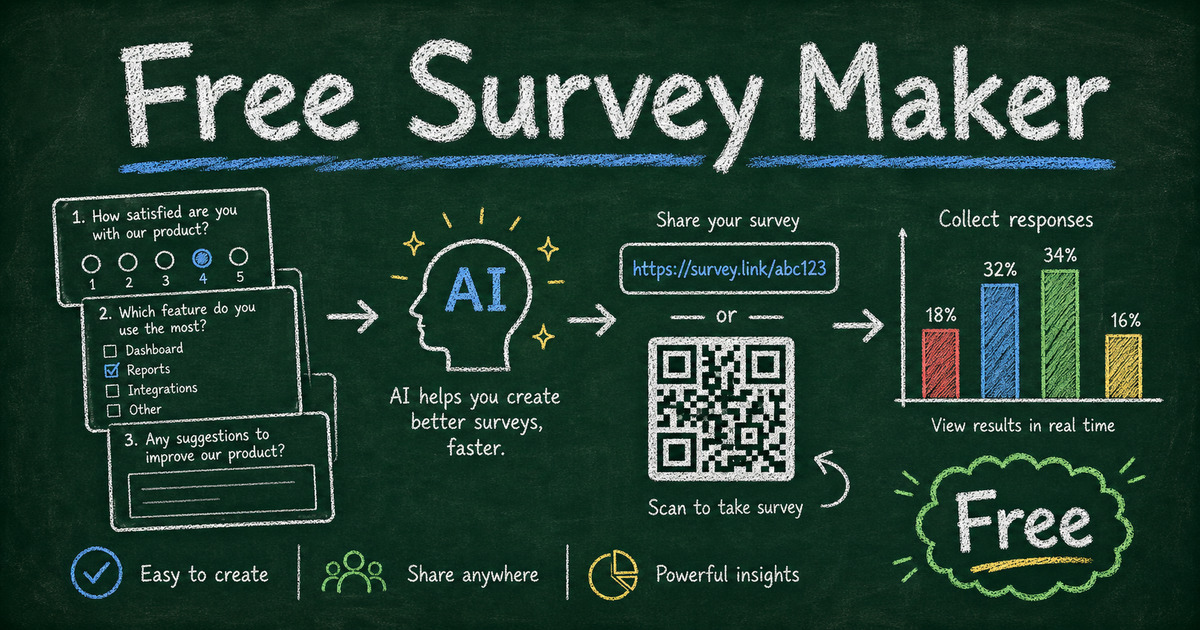
Most people do not need a research platform to launch their first survey. They need a free survey maker that lets them write clear questions, share the survey quickly, and read the answers without hitting a surprise limit after the first few responses.
The hard part is not finding a tool. It is choosing one that stays useful after the survey leaves the draft stage. A free plan that only lets you preview a form is not enough. A survey maker should help you create the survey, share it with real respondents, and understand what to do with the results.
This guide explains what to look for in a free survey maker, when to use a survey instead of a poll or form, and how to build a clean survey in FormHug without turning a simple feedback request into a long setup project.
TL;DR - FormHug is a free survey maker that helps you create online surveys with AI-generated drafts, templates, share links, QR-code-friendly URLs, conditional follow-ups, and response collection.
- Start with the decision - a useful survey begins with what the answers will help you choose, improve, or measure.
- Check the free-plan workflow - make sure you can create, publish, collect, and review responses before you need to pay.
- Use AI as a first draft, not the final survey - let the builder create structure, then cut questions that do not support the decision.
- Works for: customer feedback, employee pulse checks, student surveys, event feedback, product research, and creator audience surveys.
- No website or code is required; publish the survey as a shareable link, embedded form, or QR-code destination.
What Is a Free Survey Maker?
A free survey maker is an online tool that lets you create, publish, and collect responses from a survey without paying before the first real use. A good one supports common question types, mobile-friendly sharing, response viewing, and enough free capacity to run a real project.
That sounds simple, but “free” can mean very different things:
- Free to create a draft, but not collect enough responses.
- Free for simple forms, but not logic or exports.
- Free for internal use, but not polished enough for customers.
- Free for one survey, but hard to reuse for polls, quizzes, registration forms, or feedback workflows.
The best free survey maker is not just the tool with the longest feature list. It is the one that gets you from idea to answers with the least friction for both you and the respondent.
What to Look for in a Free Survey Maker
Searches like “free survey maker,” “create online survey free,” and “survey generator free” usually mean the same thing: someone wants to collect answers now, without discovering hidden limits later.
Use this checklist before you build:
| Free survey feature | Why it matters |
|---|---|
| AI survey draft | Turns a rough goal into a usable first structure faster than starting from blank. |
| Templates | Gives you a proven starting point for customer feedback, employee surveys, events, students, or market research. |
| Multiple question types | Covers ratings, multiple choice, yes/no, open text, contact fields, and segmentation. |
| Conditional logic | Shows relevant follow-ups and hides questions that do not apply. |
| Shareable link | Lets you send the survey by email, chat, social post, class page, or event follow-up. |
| QR-friendly URL | Useful for posters, classrooms, live events, retail counters, and workshops. |
| Embedding | Keeps respondents on the page where the survey is relevant. |
| Response access | You need to review answers, spot patterns, and export data when deeper analysis is needed. |
FormHug’s survey maker is built for this full path: create the survey with AI or a template, edit the questions, share the link, and collect responses in the same workflow.
Google Survey Maker vs Free Survey Maker
Searches like “Google survey maker,” “survey maker Google,” and “Google Forms survey maker” usually come from the same practical need: someone wants a familiar way to create a survey quickly. Google Forms is a reasonable starting point for simple internal surveys, classroom feedback, and forms that need to land in Google Sheets. For the full walkthrough, see how to make a survey with Google Forms.
The tradeoff is that Google Forms is still a general form tool. It can collect survey answers, and eligible users may see Gemini-assisted form creation or question suggestions, but its survey workflow is still less focused on polished respondent experience, reusable survey templates, conditional follow-ups, or turning a survey into a poll, quiz, registration form, or feedback workflow later.
Use Google Forms when the survey is simple, internal, and spreadsheet-first. Use a free survey maker like FormHug when you want to create a survey from a prompt, start from feedback templates, share a clean link or QR code, and keep the survey flexible enough to grow beyond one Google form.
Free Survey Maker vs Poll Maker vs Form Builder
The right tool depends on what kind of answer you need.
Use a survey maker when you need several answers that work together: ratings plus reasons, segments plus preferences, or feedback plus follow-up context.
Use a poll maker when one question is enough. A poll helps you choose a date, topic, feature, session, or winner. If your question can be answered in under 10 seconds, start with a free poll maker instead of a full survey.
Use a form builder when the main job is collecting structured information: registrations, applications, orders, bookings, intake details, or contact requests. FormHug covers all of these from the same AI form builder, so the survey can grow into a broader workflow when needed.
The practical test is simple: if you need to understand a topic, build a survey. If you need one vote, build a poll. If you need a submission that triggers a workflow, build a form.
Survey Types You Can Create for Free
Customer feedback survey
Use this after a purchase, onboarding step, support interaction, event, or service delivery. A strong first version has one rating question, one reason question, and one improvement question. For a deeper question bank, see customer satisfaction survey questions.
Employee pulse survey
Use this to check workload, morale, engagement, remote work preferences, training needs, or burnout risk. Keep sensitive questions anonymous and avoid demographic detail unless it is needed for action.
Student feedback survey
Use this for classroom climate, teaching clarity, workload, confidence, or course improvement. A short recurring survey is often more useful than one long end-of-term survey. The student perception survey guide gives a more education-specific structure.
Market research survey
Use this before investing in a product idea, campaign, pricing test, or audience segment. Ask screening questions first, then preference questions, then one open-ended question that captures the reason behind the choice. For starting points, browse the market research survey templates. If you are studying youth audiences, the Gen Z shopping habits survey template shows how to turn teen consumer behavior into a focused question set.
Event feedback survey
Use this within 24 to 48 hours after an event, class, workshop, or webinar. Ask what worked, what should change, and what topic would bring people back.
Anonymous survey
Use this when identity would reduce honesty: workplace culture, classroom belonging, sensitive feedback, leadership trust, or community moderation. The survey can still be structured and useful without asking for names or emails. For the dedicated workflow, see anonymous survey best practices.
How to Create a Free Survey in FormHug
Think of this as a launch workflow, not a click-by-click setup guide.
Step 1: Write the decision sentence
Before choosing a tool, finish this sentence:
“After reading the responses, we will decide ___.”
Examples:
- Which onboarding step to improve first.
- Which event topic to repeat.
- Whether customers prefer lower pricing, faster support, or more templates.
- Which employee training topic needs a follow-up session.
This prevents the survey from becoming a catch-all feedback request.
Step 2: Generate a focused first draft
Open FormHug and describe the survey in one practical prompt:
“Create a 7-question customer feedback survey that helps us decide which part of onboarding to improve first. Include one satisfaction rating, three multiple choice questions, one yes/no question, and two open-ended follow-ups.”
The AI draft gives you structure. Your job is to remove questions that do not support the decision.
Step 3: Add templates or logic only where they reduce effort
If you want a faster starting point, browse FormHug’s surveys and feedback templates. Templates are especially useful for NPS, customer feedback, event feedback, student feedback, and employee pulse checks.
Use conditional logic sparingly. Show a follow-up only when it makes the respondent path shorter or more relevant. If someone gives a low rating, ask what went wrong. If someone chooses a specific event session, ask about that session instead of the whole event.
Step 4: Publish, share, and review the first responses
Publish the survey as a link, QR-code destination, or embedded form. Read the first 20 responses before sending it to a larger audience.
If people skip one question, rewrite it. If everyone chooses “Other,” your answer choices are missing the real categories. If open-ended answers are vague, ask for a specific example instead of a general opinion.
How FormHug Compares for Free Surveys
| Need | FormHug | Basic free survey tools |
|---|---|---|
| AI survey creation | Built in through the AI builder | Often missing or limited |
| Templates | Survey, feedback, registration, quiz, and form templates | Usually survey-only or generic |
| Conditional follow-ups | Useful for shorter respondent paths | Often limited on free plans |
| Sharing | Link, embed-friendly forms, and QR-code-friendly URLs | Usually link sharing |
| Broader workflows | Surveys can grow into polls, quizzes, registrations, bookings, or payments | Often single-purpose |
| Free plan fit | Built to collect real responses before upgrade | Varies by response limits and exports |
Dedicated enterprise research platforms are still better for panel management, advanced statistical testing, and large research departments. But if you need a practical free survey maker for customer feedback, classrooms, events, employee check-ins, and early market research, FormHug keeps the workflow light.
Frequently Asked Questions
What is the best free survey maker?
The best free survey maker lets you create, publish, collect, and review real survey responses without forcing the project into a paid plan immediately. FormHug is a strong option when you want AI survey drafts, templates, conditional follow-ups, and shareable links in one place.
Can I create an online survey for free?
Yes. Choose one decision the survey will support, write 5 to 8 focused questions, create the survey in a free survey maker like FormHug, publish the link, and share it by email, chat, social post, QR code, or embed.
What is the difference between a survey maker and questionnaire maker?
A questionnaire maker helps you write the question set. A survey maker covers the broader workflow: question design, distribution, response collection, and result review. In everyday search, the terms often overlap. For a questionnaire-first workflow, see how to create an online questionnaire.
Is Google Forms a survey maker?
Yes. Google Forms can work as a basic survey maker when you need a simple free form, especially inside Google Workspace. Some eligible accounts also have Gemini-assisted form creation. If you want AI-generated survey drafts inside a survey-focused workflow, templates, conditional logic, QR-friendly sharing, and a more polished respondent experience, FormHug is a better fit.
How many questions should a free survey have?
Most free surveys should have 5 to 8 questions. That is enough for a segment question, a rating, two to four structured questions, and one open-ended follow-up. Longer surveys need a stronger reason to exist.
Can I make an anonymous survey for free?
Yes. Leave out name, email, phone, company, and other identifying fields. Explain that the survey is anonymous, and avoid demographic questions that could identify people indirectly.
Can I create a survey with a QR code?
Yes. Publish the survey as a shareable link, then turn that link into a QR code for events, classrooms, stores, product packaging, posters, or printed handouts.
What free survey templates should I start with?
Start with the template closest to your decision: customer feedback, NPS, event feedback, student feedback, employee pulse, or market research. Then rewrite the wording for your audience instead of accepting every default question.
Is FormHug free for surveys?
Yes. You can start creating surveys in FormHug for free, use AI to draft the survey, publish a shareable link, and collect responses. Paid plans are available when your workflow needs more scale or advanced features.
Related
- How to Create an Online Survey for Free - plan and launch a survey around one clear decision
- Google Survey Maker - use Google Forms for simple surveys and know when to switch
- How to Create an Online Questionnaire - write and publish a structured question set
- Free Poll Maker - use a one-question poll when a full survey is too much
A free survey maker only helps if people finish the survey and the answers change what you do next. Start with one decision, keep the question set lean, and make the first useful response easy to act on. Create your survey ->

Written by
FormHug TeamProduct, research, and form automation team
The FormHug Team brings together product builders, workflow researchers, and form automation practitioners who study how people collect, route, and act on information online. Our guides are based on hands-on product testing, template analysis, customer workflow patterns, and deep experience with forms, surveys, quizzes, AI-assisted creation, integrations, and results sharing.