Can ChatGPT Create a Real Online Form?
Create with AI
Describe the workflow and get a form draft
Use FormHug to create forms from prompts, then share, automate, and reuse the structured responses.
ChatGPT can write form questions in seconds. But a list of questions is not the same thing as a working online form.
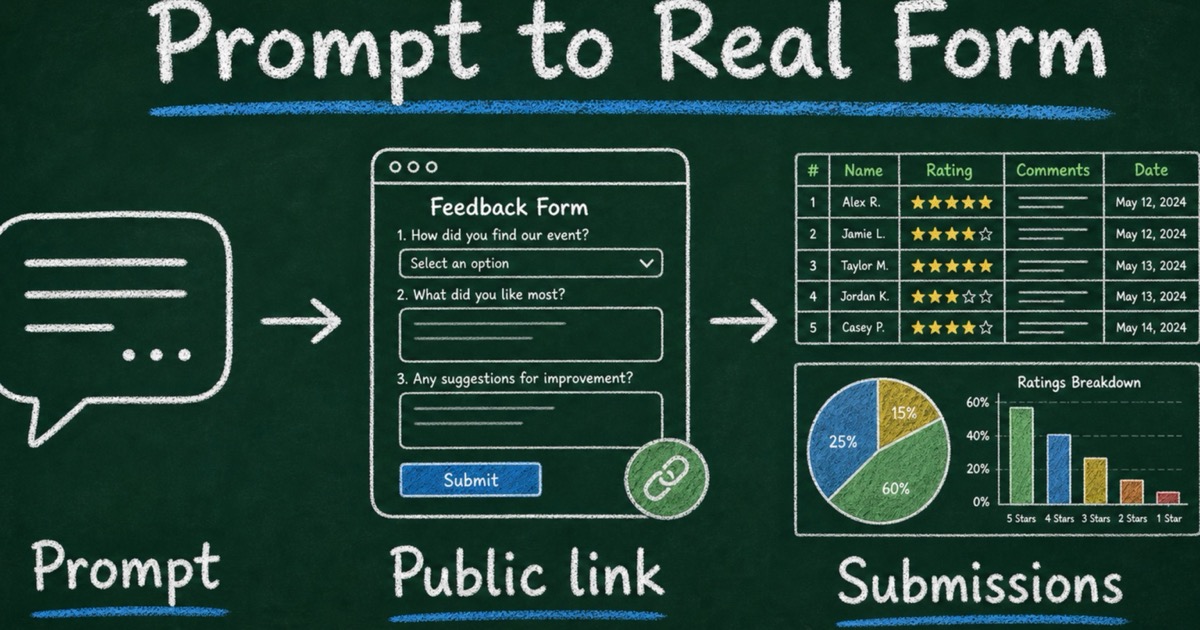
That difference matters when you need other people to respond. A real form needs a public link, structured fields, validation, stored submissions, and a way to review or analyze the answers later. Without those pieces, ChatGPT has created a draft you still need to copy into another tool.
So the practical answer is: yes, ChatGPT can create a real online form when it is connected to a form app like FormHug. Without that connection, it can draft the form. With FormHug, the conversation can continue into publishing, editing, response collection, and analysis. This article focuses on that boundary and how to verify that the result is a working form rather than generated copy.
TL;DR — ChatGPT can create a real online form when it uses FormHug as the form layer for publishing, fields, response collection, and analysis.
- ChatGPT alone drafts — it can suggest questions, answer choices, descriptions, and field types.
- A form app publishes — FormHug turns the draft into a hosted form with a public link and stored submissions.
- The workflow continues after sharing — you can refine the form and analyze responses in the same ChatGPT conversation.
- Works for: surveys, quizzes, registrations, customer intake, lead capture, applications, and feedback forms.
- The key distinction is simple: generated questions are content; a real form is a data-collection workflow.
What Counts as a Real Online Form?
A real online form is not just a questionnaire draft. It is a shareable web experience where respondents enter structured information and the owner can review the results later.
At minimum, a real form needs five things:
| Requirement | Why it matters |
|---|---|
| Hosted page | Respondents need a public URL they can open outside your chat. |
| Structured fields | Answers need types: text, email, choices, ratings, dates, uploads, or scores. |
| Validation | Required questions, email formats, and choice limits keep responses usable. |
| Stored submissions | Responses need to be saved somewhere you can revisit. |
| Review or analysis | The form should support decisions after answers arrive. |
This is why the phrase “ChatGPT form builder” can mean two very different things. One tool might only generate form copy. Another can turn the conversation into a hosted form workflow.
FormHug is built for the second meaning. ChatGPT helps understand what you want to collect; FormHug provides the form layer that turns the request into fields, a public link, submissions, and response analysis.
If you want the step-by-step product walkthrough, read how to create a form in ChatGPT with FormHug. For the launch overview, see FormHug is now available on ChatGPT Apps.
What ChatGPT Can Do Without a Form App
ChatGPT is useful before you ever publish a form. It can help you think through the audience, outcome, and wording.
For example, you can ask:
Create a customer feedback form for a beta product. Ask what users tried, where they got stuck, how valuable the product felt, and whether we may follow up.
ChatGPT can turn that into a clean question list. It can suggest field types, write friendly descriptions, make the wording more neutral, and shorten a long survey.
That draft work is valuable, but it stops at the edge of the conversation. Without a form app, ChatGPT cannot give respondents a normal web form to fill out. It cannot store submissions for your workspace. It cannot enforce form-specific validation. It cannot generate a real response table from people who never enter your chat.
Use ChatGPT alone when you need:
- a brainstorming partner for form questions;
- a first draft of a survey or quiz;
- cleaner wording for field labels;
- answer-choice ideas;
- a critique of an existing questionnaire.
Use FormHug with ChatGPT when you need the draft to become something people can actually complete.
What a Connected Form App Adds Inside ChatGPT
FormHug gives ChatGPT a way to create a working form instead of only describing one.
OpenAI groups third-party capabilities through plugins and their connected apps. OpenAI notes that availability can vary by plan, workspace policy, role, region, and supported surface, so the FormHug connection page is the best place to confirm access for your account. Once connected, the app gives ChatGPT approved tools for creating and working with forms.
The workflow is simple:
- You describe what you need in ChatGPT.
- ChatGPT uses FormHug to create the form structure.
- FormHug publishes the form and returns a shareable link.
- Respondents complete the form in a normal browser.
- You ask ChatGPT to help summarize or interpret the submissions.
That last step is where the workflow becomes different from a static form builder. You can keep using conversation for refinement: ask for a shorter form, request a new field, change choices, or review what people submitted.
In our testing, the strongest prompts name both the audience and the decision:
Use FormHug to create a 7-question onboarding survey for trial users. We need to decide which setup step to improve first. Include one role question, one 1–5 ease rating, two multiple-choice questions about where people got stuck, two open-ended follow-ups, and optional email for follow-up.
That request gives ChatGPT intent, and FormHug turns the intent into a real survey structure.
The Draft → Form → Response Loop
The best way to understand the difference is the Draft → Form → Response Loop.
| Stage | What happens | Tool role |
|---|---|---|
| Draft | Turn a goal into questions, choices, and instructions | ChatGPT |
| Form | Convert the draft into fields, requirements, and a public page | FormHug |
| Response | Collect submissions from real people | FormHug |
| Learning | Summarize, segment, and decide what to do next | ChatGPT + FormHug |
A question generator stops at the draft stage. A real ChatGPT form workflow continues into collection and learning.
This loop is useful for more than generic contact forms. It works for surveys designed with AI, surveys created inside ChatGPT, scored quizzes created inside ChatGPT, event registrations, training assessments, customer intake, lead qualification, and application forms.
The point is not that every form should be created by AI. The point is that many forms start as a messy human intention: “I need to know who is coming,” “I need to qualify this lead,” or “I need to understand why users are confused.” ChatGPT is good at understanding that intention. FormHug is the layer that makes the result usable outside the chat.
When ChatGPT Is the Right Starting Point
ChatGPT is most useful when the request begins as a messy description rather than a settled specification. Three situations fit especially well:
- You know the outcome but not the questions. Describe the decision the form should support and let the conversation shape the first field set.
- You need to adapt an existing workflow. Ask ChatGPT to shorten, localize, simplify, or repurpose a form for a different audience.
- You want to learn from submissions in the same conversation. After responses arrive, ask for themes, segments, follow-up questions, or a summary tied to the original goal.
If you already know every field and only need a standard form, a template may be faster than prompting from scratch. Try a Customer Satisfaction Survey, Event Registration Form, Lead Capture Form, or Client Intake Form, then ask ChatGPT to adapt it. For more prompt ideas, see 10 forms you can build inside ChatGPT.
How to Tell Whether ChatGPT Actually Created the Form
A simple test: can someone else open the form and submit a response without seeing your ChatGPT conversation?
If the answer is no, ChatGPT probably created a draft, not a real form.
Before you share the result, check for:
- a public form URL;
- field types that match the intended answers;
- required fields only where necessary;
- a clear introduction that explains why the form exists;
- a submissions view or response workflow;
- a plan for what you will do with the answers.
A working form should survive outside the prompt. Someone should be able to open it from email, Slack, a QR code, a website button, or a social post and complete it normally.
When You Should Not Use ChatGPT to Create the Form
ChatGPT is helpful, but not every form should be handed off without review.
Be especially careful with:
- employment assessments;
- school exams or graded tests;
- medical, legal, or financial intake;
- eligibility screening;
- sensitive personal data;
- research that requires consent language or institutional review.
In those cases, use ChatGPT for drafting and structure, but have a human expert review the final questions, scoring, disclosures, and data handling before publishing.
The same principle applies to ordinary business forms: AI can accelerate the first draft, but your team still owns the judgment. Remove fields you will not use. Explain why sensitive information is requested. Keep the respondent experience short and clear.
Frequently Asked Questions
Can ChatGPT create an online form by itself?
ChatGPT can draft the content of an online form by itself, including questions, choices, and descriptions. To create a real hosted form with a public link and stored submissions, it needs a connected form app such as FormHug.
How do I make a form in ChatGPT?
Connect FormHug in ChatGPT, start a chat, and describe the form you need. Include the audience, goal, required information, and what should happen after submission. ChatGPT can then use the connected app to create the form and return a public link.
What is the difference between a ChatGPT form draft and a real form?
A ChatGPT form draft is text inside a conversation. A real form has structured fields, validation, a hosted page, a shareable URL, saved submissions, and a way to review responses later.
Can ChatGPT make surveys and quizzes too?
Yes. With FormHug, ChatGPT can help create surveys, quizzes, registrations, applications, assessments, and feedback workflows. Surveys need response analysis; quizzes may also need correct answers, explanations, scoring, and result logic.
Do respondents need ChatGPT to fill out the form?
No. Respondents open the public FormHug link in a browser. They do not need access to your ChatGPT conversation, and they do not need to use ChatGPT to submit a response.
Is FormHug free to use with ChatGPT?
You can start creating forms with FormHug and ChatGPT, then upgrade when you need more capacity or advanced workflows. ChatGPT app and plugin availability can vary by plan, workspace, role, region, and surface. For the fastest path, connect FormHug in ChatGPT and try a simple form request.
Related
- How to Create a Form in ChatGPT with FormHug — follow the step-by-step workflow from prompt to public form link.
- FormHug Is Now Available on ChatGPT Apps — see what changed and how FormHug fits into ChatGPT Apps.
- 10 Forms You Can Build Inside ChatGPT with FormHug — copy practical prompts for registrations, surveys, quizzes, intake, and feedback.
- Agent-Ready Forms Are Not Just AI-Generated Forms — understand the product philosophy behind forms for AI workflows.
A form draft stuck inside chat still leaves you with copy-paste work, manual setup, and no response workflow. Use ChatGPT for the intent, use FormHug for the form layer, and give respondents a real link they can complete. Connect FormHug in ChatGPT →

Written by
FormHug TeamProduct, research, and form automation team
The FormHug Team brings together product builders, workflow researchers, and form automation practitioners who study how people collect, route, and act on information online. Our guides are based on hands-on product testing, template analysis, customer workflow patterns, and deep experience with forms, surveys, quizzes, AI-assisted creation, integrations, and results sharing.