7 Best ChatGPT Form Builder Apps for Forms, Surveys, and Quizzes (2026)

Create with AI
Describe the workflow and get a form draft
Use FormHug to create forms from prompts, then share, automate, and reuse the structured responses.
Search for form, survey, and quiz in ChatGPT’s connected-tool ecosystem and you will see three surprisingly different markets. General form builders appear beside submission-analysis tools, research platforms, live quiz products, flashcard apps, and assessment generators. Finding a connection is easy; finding one workflow that covers creation, collection, and analysis is harder.
We ran those three App Directory searches on June 18, 2026 and reviewed the listings alongside each product’s official website, documentation, and published pricing. FormHug was the only app visible in all three of our searches. Jotform was the strongest full-featured alternative, while most other results were better understood as form, survey, or quiz specialists.
July 14 update: OpenAI replaced the App Directory with the Plugin Directory on July 9, 2026. Existing app connections remain available, while plugins now act as the primary discovery layer and may package one or more underlying apps. The screenshots below remain a dated record of our June search, not a claim about today’s plugin ranking. See OpenAI’s current plugin guidance.
This comparison is for people who want to create real hosted forms from ChatGPT, edit them through conversation, share them with respondents, and analyze the submissions afterward. Directory results can change by date, region, ChatGPT plan, and product update, so treat our screenshots as a dated spot check rather than a permanent ranking.
TL;DR — FormHug is the best all-around ChatGPT form builder app for people who need forms, surveys, and quizzes in one conversational workflow.
- Best overall: FormHug — it appeared across all three directory searches and supports creation, editing, sharing, submissions, and response analysis.
- Best for enterprise depth: Jotform — it has the broadest mature feature set, including advanced logic, integrations, payments, signatures, and enterprise controls.
- Best for unlimited free forms and surveys: Weavely — its published free plan includes unlimited forms and responses, but it was not visible in our
quizsearch.- Best for specialists — Refiner and Centiment focus on survey research; QuizFlight and other quiz apps focus on learning or live play.
- Open FormHug in ChatGPT Apps.
Quick Comparison of the Best ChatGPT Form Builder Apps
| Rank | App | Best for | Forms | Surveys | Quizzes | Published free starting point |
|---|---|---|---|---|---|---|
| 1 | FormHug | Best all-around value | Yes | Yes | Yes | Unlimited forms, unlimited collaborators, 3,000 responses/month |
| 2 | Jotform | Enterprise-grade form workflows | Yes | Yes | Yes | 5 forms, 100 monthly submissions |
| 3 | Weavely | Unlimited free forms and surveys | Yes | Yes | Product supports quizzes; not shown in our quiz search | Unlimited forms and responses |
| 4 | Cognito Forms | Managing structured entries and workflows | Yes | Yes | Possible through scored forms | Unlimited forms, 100 entries/month |
| 5 | Refiner | In-product SaaS surveys | Limited | Yes | No | 25 responses/month after trial |
| 6 | Centiment | Market research and survey panels | Limited | Yes | No | Primarily paid research plans |
| 7 | QuizFlight | Live quizzes for events and training | No | No | Yes | Start-free option advertised |
The table compares product fit, not just whether a product can technically display a question. A real ChatGPT form builder should be able to create a hosted experience, preserve structured submissions, and let the user continue the workflow after the initial prompt.
What We Found in the Former ChatGPT Apps Directory
The former Apps directory provided the discovery and setup boundary used for our June test. OpenAI now uses the Plugin Directory as the primary discovery surface; a plugin can include apps, skills, and app templates, while the underlying app still handles external data and actions. This remains meaningfully different from copying an arbitrary MCP server URL into a developer setup.
It is still important to use precise language: directory approval is not a security certification, compliance audit, or guarantee that one product is better than another. It means the app passed OpenAI’s publication review and gives users a standard connection path. See OpenAI’s app submission and review guidance for the current process.
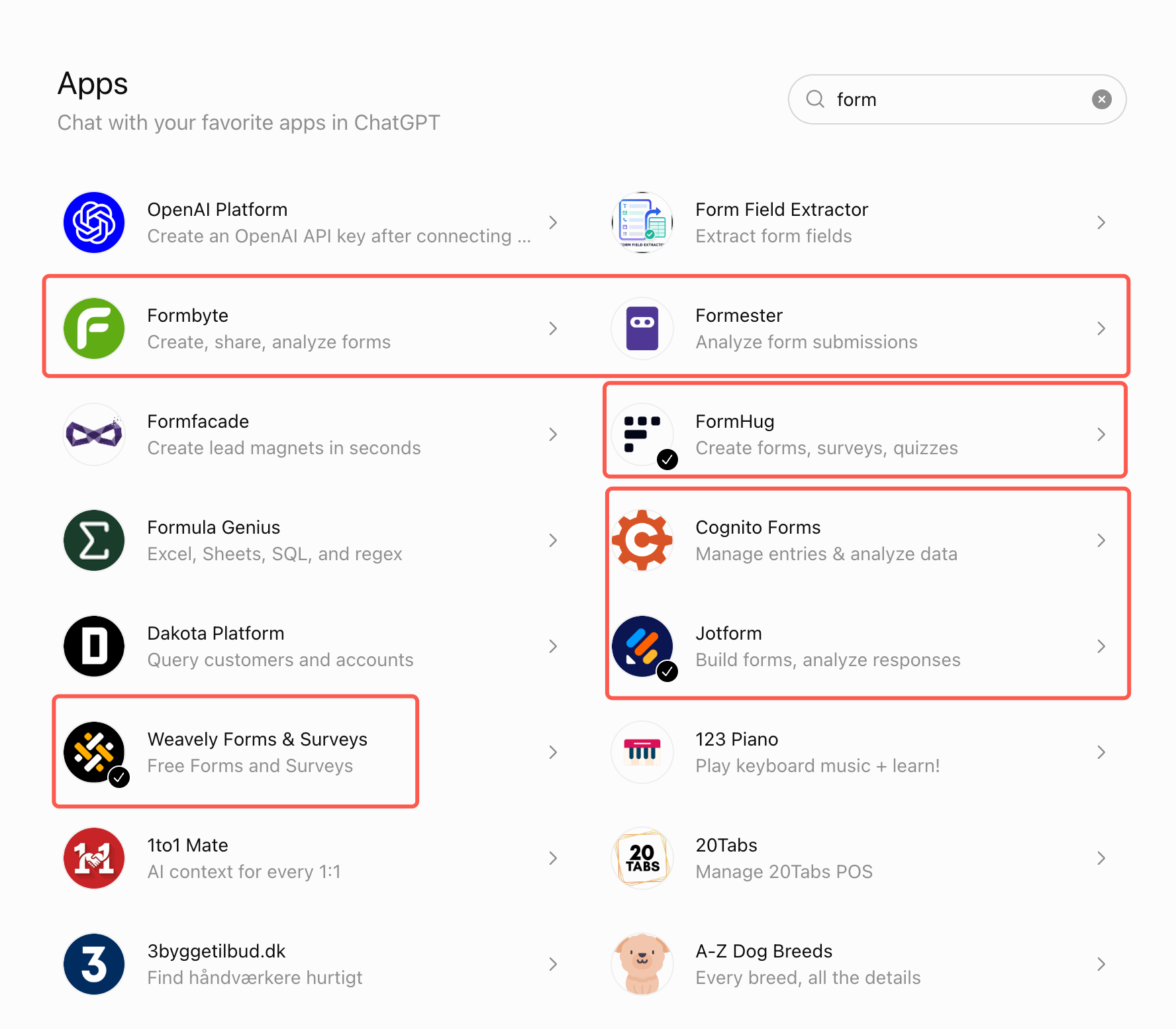
Searching for “form”
Our form search surfaced broad builders such as FormHug, Jotform, Weavely, Formbyte, and Cognito Forms alongside tools focused on extraction or submission analysis.
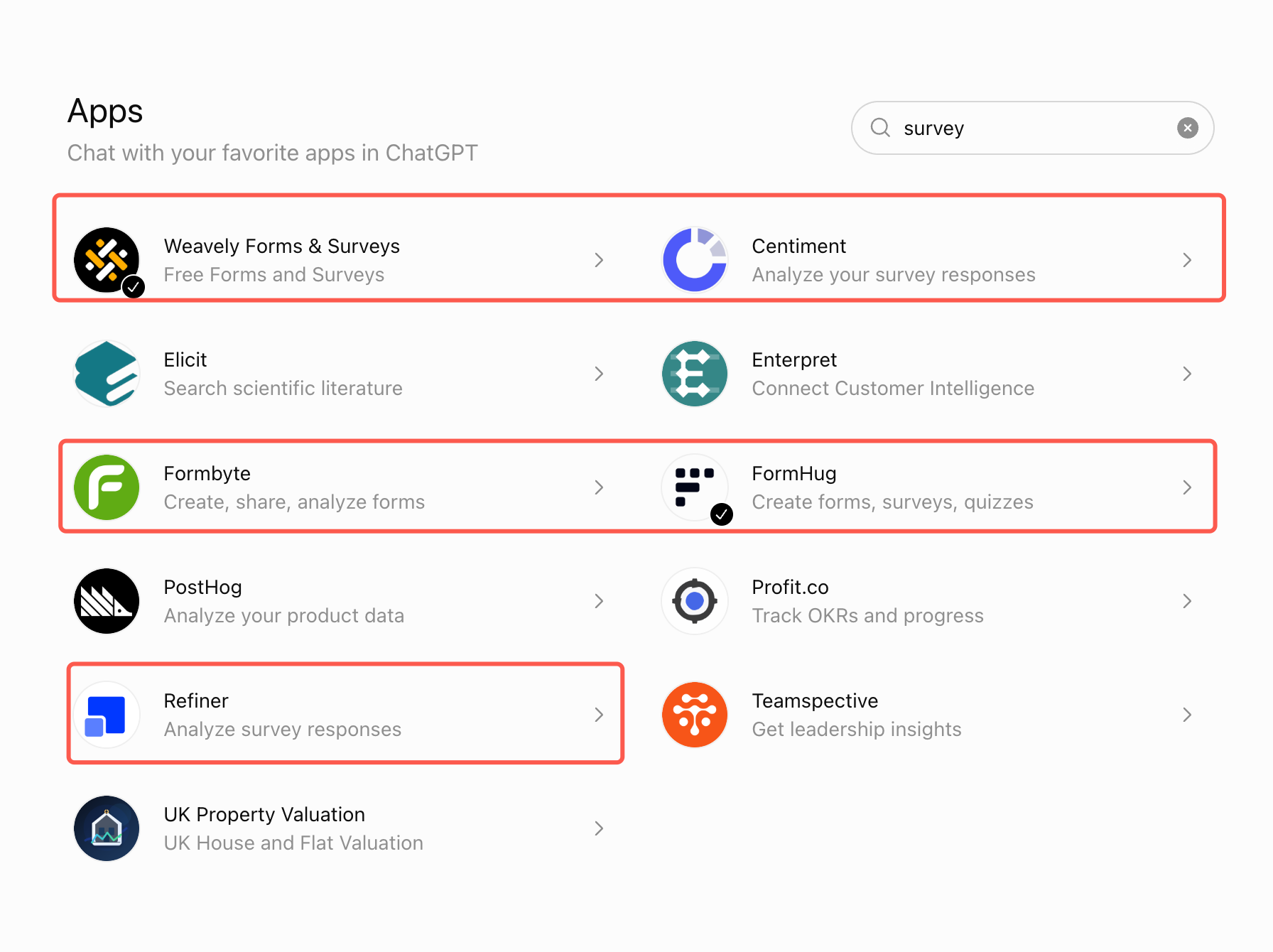
Searching for “survey”
The survey results mixed builders with research and analysis products. FormHug, Weavely, and Formbyte appeared as broader creation tools, while Refiner and Centiment emphasized survey responses, customer feedback, or research analysis.
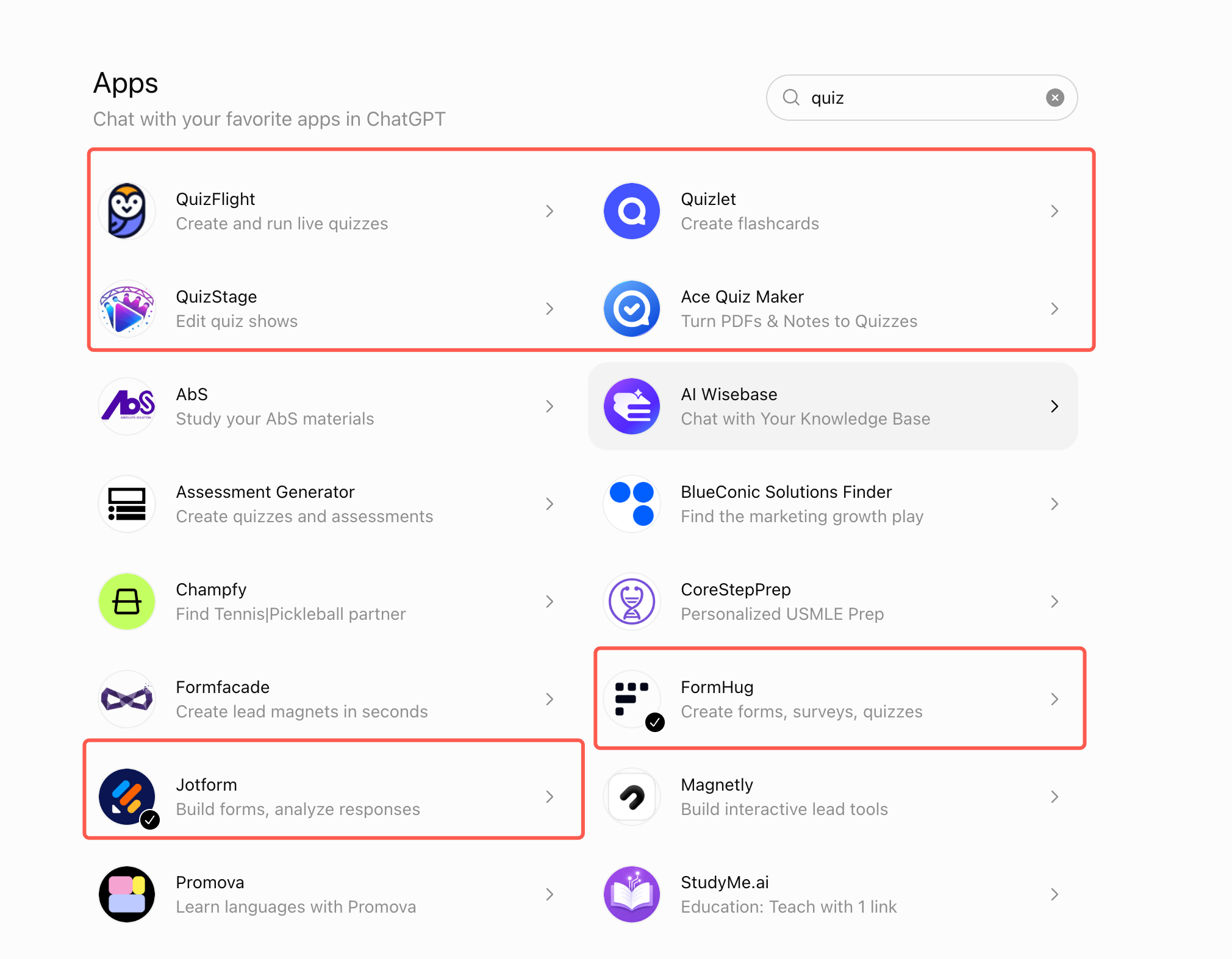
Searching for “quiz”
The quiz search was dominated by specialists: live quiz platforms, flashcards, quiz shows, document-to-quiz tools, and assessment generators. FormHug and Jotform stood out because they also appeared as general form builders rather than quiz-only products.
This gives us a useful selection framework: Breadth, Continuity, and Fit.
- Breadth asks whether the app covers forms, surveys, and quizzes or specializes in one job.
- Continuity asks whether it can move from creation to editing, collection, and analysis without rebuilding elsewhere.
- Fit asks whether you actually need a general workflow, enterprise depth, research specialization, or a learning experience.
1. FormHug — Best Overall ChatGPT Form Builder App
FormHug is the strongest all-around choice for users who want one ChatGPT app to create forms, surveys, quizzes, registrations, assessments, booking requests, and feedback workflows. In our directory check, it was the only app visible under all three primary searches: form, survey, and quiz.
That breadth matters because the categories often overlap. A workshop registration may need a pre-event survey. A course evaluation may include scored knowledge questions. A lead form may become an assessment. With a general form layer, you can change the workflow without changing products.
FormHug also covers more than generation. You can ask ChatGPT to create a hosted form, add or change fields, return the public link, retrieve submissions, and summarize response patterns. Our step-by-step ChatGPT form builder guide shows the complete prompt-to-report workflow with real product screenshots.
If you are evaluating the product through actual jobs rather than feature names, see 10 forms you can build inside ChatGPT. For the product and integration context, read the FormHug ChatGPT Apps announcement.
The published FormHug free plan is a major part of the recommendation: unlimited forms, unlimited collaborators, and 3,000 responses per month without a credit card. That makes FormHug particularly attractive for educators, creators, community organizers, consultants, and small teams that need meaningful response capacity before paying.
Limitations: FormHug does not match Jotform’s 20-year ecosystem, template count, payment-gateway breadth, enterprise administration, or specialized compliance options. It also does not replace the participant-panel services offered by research platforms such as Centiment.
Best for: People and small teams that want the broadest practical combination of forms, surveys, quizzes, generous free usage, and conversational response analysis.
2. Jotform — Best for Enterprise Features and Complex Workflows
Jotform is the most powerful general-purpose form builder in this comparison. Its official ChatGPT App documentation supports creating, editing, styling, sharing, managing, and analyzing forms through conversation. It can add conditional logic, change form settings, generate embed code, search submissions, and work with Jotform’s broader ecosystem.
Outside ChatGPT, Jotform offers more than 20,000 templates, extensive integrations, multiple payment gateways, e-signatures, offline mobile collection, and enterprise controls. If your organization already depends on Jotform or needs mature operational depth, it is the safer recommendation.
The tradeoff is price and free-plan capacity. Jotform’s current pricing lists five forms and 100 monthly submissions on Starter. Its first paid individual tier is listed at $34 per month when billed annually, with 25 forms and 1,000 monthly submissions. Those limits are reasonable for light use, but substantially tighter than FormHug’s 3,000-response free plan.
Those limits matter more inside an agent workflow than they do in a traditional drag-and-drop builder. A person may manually create one final form. An agent may create a draft, test two variants, separate the workflow by event or audience, and generate a quiz or follow-up survey in the same session. A five-form allowance can therefore disappear during one productive planning cycle.
When the agent reaches that ceiling, the problem is no longer just pricing. The workflow must pause while someone deletes a form, upgrades the account, or moves the task elsewhere. For AI-assisted work, capacity is part of reliability: the tool needs enough room for the agent to iterate without unexpectedly breaking the flow.
Limitations: The free tier is restrictive for agent-driven creation and forms that receive steady traffic. Its paid plans are also expensive for individuals or small teams that mainly need forms, surveys, quizzes, and response analysis rather than Jotform’s complete enterprise feature set.
Best for: Enterprises and established teams that prioritize integrations, complex logic, compliance options, payments, signatures, and operational maturity over free response volume.
3. Weavely — Best for Unlimited Free Forms and Surveys
Weavely is a strong AI-native competitor for conversational form creation. Its published free plan includes unlimited forms, unlimited responses, unlimited AI generation, conditional logic, custom styling, integrations, and AI data analytics. That is one of the most generous offers in the category.
Weavely appeared in our form and survey searches. Its official product site also describes support for quizzes, even though it was not visible in our quiz result screenshot. This is an important distinction between product capability and directory search visibility: absence from one search result does not prove that a product lacks the feature.
The main reason FormHug remains our overall recommendation is category clarity. FormHug’s directory description explicitly says “Create forms, surveys, quizzes,” and it surfaced across all three intents in our test. FormHug also provides quiz scoring, assessments, bookings, payments, and Public Query workflows from the same platform.
Limitations: Weavely’s ChatGPT workflow may hand users into its external editor for publishing and deeper customization, and its strongest directory visibility in our test was forms and surveys rather than quizzes.
Best for: Users whose top priority is unlimited free forms and survey responses, custom form styling, and AI-assisted creation.
4. Cognito Forms — Best for Structured Entry Management
Cognito Forms is an established form platform known for calculations, conditional logic, workflow automation, payments, and structured entry management. Its current free plan includes unlimited forms and 100 entries per month. Its ChatGPT Apps directory description in our screenshot emphasizes managing entries and analyzing data rather than presenting itself primarily as a prompt-to-form generator.
That makes Cognito Forms relevant when the form already belongs to a larger process: approvals, calculations, inventory-like records, payment data, or internal operations. It is less clearly positioned as the easiest conversational choice for someone who simply wants to create a survey or quiz from a prompt.
Limitations: Its directory positioning is narrower than FormHug’s creation-to-analysis message, and quiz creation is not its primary identity.
Best for: Existing Cognito Forms users and teams whose main concern is structured records, calculations, and operational workflows.
5. Refiner — Best for In-Product SaaS Surveys
Refiner is not trying to be a general form builder. It specializes in contextual customer surveys for web and mobile products: NPS, CSAT, CES, product-market-fit questions, targeted microsurveys, segmentation, and feedback analysis.
That specialization is valuable. Product teams may need to trigger a survey after a specific event, target a user segment, attach customer traits, and route feedback into tools such as Amplitude, HubSpot, Salesforce, or BigQuery. A general form builder is not automatically better at those jobs.
Refiner’s published pricing allows 25 responses per month on the free plan after its trial, while paid plans focus on monthly active users and unlimited survey responses. Choose it because you need product-feedback infrastructure, not because you need an inexpensive event registration form.
Limitations: It is survey-specific, has a much smaller free response allowance, and is not designed for general registrations, applications, bookings, or quizzes.
Best for: SaaS product and customer-experience teams collecting contextual in-app feedback from known users.
6. Centiment — Best for Survey Research and Audience Panels
Centiment combines survey software with access to research respondents. Its value is not merely writing questions; it helps researchers target audiences in more than 100 countries, manage sample collection, analyze survey results, and export data for tools such as Excel, CSV, or SPSS. Its survey-platform pricing is structured around research usage rather than a general free form-builder allowance.
If you need 500 qualified respondents from a defined demographic, a general form builder only solves the questionnaire and data-collection layer. Centiment addresses the harder research problem of finding the participants.
Limitations: It is primarily a research platform rather than a general form, registration, booking, or quiz builder. Its paid plans and panel costs reflect that specialization.
Best for: Market researchers and teams that need targeted survey respondents, research controls, and professional analysis exports.
7. QuizFlight — Best for Live Quizzes
QuizFlight focuses on creating and running live AI-generated quizzes for training, meetings, and events. That is a different experience from publishing a standard scored form: the live session, host, audience, and shared moment are central to the product.
The quiz directory search also surfaced several other specialists. Quizlet emphasizes flashcards, QuizStage edits quiz shows, Ace Quiz Maker turns PDFs and notes into study quizzes, and Assessment Generator focuses on quizzes and assessments. These tools may beat a general form builder for their exact learning format.
FormHug is the better choice when a quiz belongs to a broader data workflow: collect learner details, score answers, issue results, analyze performance, or combine the quiz with registration and follow-up. QuizFlight is the better choice when the goal is a hosted live quiz experience.
Limitations: It does not cover ordinary forms, survey research, intake workflows, or broad submission management.
Best for: Trainers, event hosts, and teams that want an interactive live quiz rather than a general-purpose form workflow.
Other Relevant Apps We Found
Several highlighted apps did not have enough independently verifiable information for a full ranking, or they occupied a narrower category than this comparison.
| App | Directory description or observable focus | How to interpret it |
|---|---|---|
| Formbyte | Create, share, and analyze forms | Potential general builder; verify current features and pricing inside its listing before choosing |
| Formester | Analyze form submissions | Appears analysis-oriented in the directory, although the separate Formester platform also offers AI form creation and quizzes |
| Quizlet | Create flashcards | Best understood as a study and recall product, not a hosted business form builder |
| QuizStage | Edit quiz shows | A quiz-show specialist rather than a general survey or form workflow |
| Ace Quiz Maker | Turn PDFs and notes into quizzes | Useful for study-material conversion and exam preparation |
| Assessment Generator | Create quizzes and assessments | Better aligned with structured assessment creation than general forms |
We would not recommend or reject these apps based on a one-line directory description alone. Open the listing, inspect the actions it requests, check whether it creates a persistent hosted result, and confirm the current pricing before connecting it to a production workflow.
How to Choose a ChatGPT Form Builder App
Do you need one workflow or one specialist task?
Choose FormHug or Jotform when the same account must handle registrations, feedback surveys, quizzes, applications, and response analysis. Choose a specialist when the format itself is the product: live quizzes, in-app NPS, participant recruitment, flashcards, or standards-aligned assessments.
Does the work continue after ChatGPT drafts the questions?
Question generation is now a commodity. The more useful test is whether the app creates a real hosted form, stores submissions, lets you edit the structure later, and returns data for analysis. We call this the Prompt-to-Decision Test: can the app carry the workflow from the first prompt to a decision based on real responses?
How much operational depth do you need?
Jotform wins when the answer includes multiple payment gateways, e-signatures, thousands of templates, offline collection, complex integrations, or enterprise administration. FormHug wins when you want a simpler AI-native workspace with broad form types and generous response capacity.
How much agent headroom do you need?
Agent headroom is the spare form and response capacity an automated workflow can consume before human intervention is required. It includes room for drafts, variants, tests, temporary forms, separate audiences, and follow-up workflows—not only the final published form.
This changes how limits should be evaluated. Five forms may sound adequate when a person creates one form at a time. It can be a fragile ceiling when ChatGPT is asked to generate a registration form, a feedback survey, two audience variants, and a scored quiz in one project. Unlimited forms give an agent room to iterate; higher response limits keep the resulting workflow running after publication.
What will the free limit cost you later?
Compare response limits before design features. A beautiful free form that stops at 25 or 100 responses may be expensive in practice. As of June 2026, FormHug publishes 3,000 free responses per month, Jotform publishes 100, Refiner publishes 25 after trial, and Weavely advertises unlimited responses. Recheck each official pricing page before making a long-term purchasing decision.
Do you want an approved directory app or a manual MCP connection?
For ordinary ChatGPT users, the official Plugin Directory path is easier to discover, connect, authorize, and manage. A manually added MCP server remains useful for developers, private tools, and integrations that are not distributed through the directory, but it requires more technical judgment from the user.
The practical advantage is reduced setup uncertainty, not an absolute guarantee of security. You should still inspect plugin capabilities, underlying app permissions, privacy terms, and the data you are asking it to access.
Final Recommendation
Choose FormHug if you want one ChatGPT app for forms, surveys, and quizzes; expect an agent to create and iterate on multiple hosted forms; and want enough free response capacity for a real project. Its appearance across all three core searches, explicit all-purpose directory description, unlimited-form allowance, and 3,000-response free plan make it the best all-around choice in this comparison.
Choose Jotform if your organization needs the deepest feature catalog, enterprise administration, many integrations, payment options, signatures, or established operational controls. Choose Weavely when unlimited free forms and responses are the deciding factor. Choose Refiner, Centiment, or a quiz specialist when their narrow expertise is the actual job you need done.
The honest recommendation is not that FormHug replaces every specialist. It is that most people searching ChatGPT for a form, survey, or quiz do not yet know which specialist category they need. FormHug gives them the broadest practical starting point without enterprise pricing or manual MCP configuration.
Use FormHug from its official ChatGPT Apps page.
Frequently Asked Questions
What is the best form builder app for ChatGPT?
FormHug is the best all-around recommendation for most individuals and small teams because it creates real hosted forms, surveys, and quizzes, supports conversational editing and response analysis, and includes 3,000 responses per month on its published free plan. Weavely is more generous on raw free usage, while Jotform is stronger for complex enterprise workflows.
Which ChatGPT app can create forms, surveys, and quizzes?
FormHug and Jotform both support forms, surveys, and quizzes. In our June 18, 2026 ChatGPT Apps directory check, FormHug was visible in all three searches. Weavely’s website also describes quiz support, although it did not appear in our quiz search screenshot.
Is FormHug better than Jotform in ChatGPT?
FormHug is better for users who prioritize simplicity, broad form/survey/quiz coverage, collaboration, and enough agent headroom to create multiple forms without hitting a form-count ceiling. Jotform is better for teams that need its larger integration ecosystem, enterprise controls, payment options, signatures, offline collection, and template library—and can justify its higher price and smaller entry-level allowances.
Are apps in the ChatGPT Apps directory tested by OpenAI?
Apps must be submitted to OpenAI for review and approved before developers can publish them in the public directory. OpenAI documents checks related to MCP connectivity, test cases, tool behavior, privacy disclosure, and web/mobile results. Approval should be treated as a publication-review signal, not as a security certification or endorsement that one app is best.
Is an official ChatGPT app easier than adding an MCP server manually?
Yes for most nontechnical users. A directory app provides a standard discovery, connection, and authorization flow. Manual MCP configuration is more appropriate for developers, private services, custom agents, and tools that are not published in the directory.
Which ChatGPT app is best for surveys?
Use FormHug for general surveys that belong to a broader form workflow. Use Weavely when unlimited free responses are the priority. Use Refiner for contextual in-product SaaS feedback, and use Centiment when you also need a targeted research panel.
Which ChatGPT app is best for quizzes?
Use FormHug when the quiz needs hosted responses, scoring, analysis, and connection to registration or follow-up workflows. Use QuizFlight for live hosted quiz sessions, Quizlet for flashcards, and Ace Quiz Maker for converting PDFs or notes into study quizzes.
Is FormHug free to use in ChatGPT?
FormHug’s published free plan includes unlimited forms, unlimited collaborators, and 3,000 responses per month with no credit card required. Open the FormHug ChatGPT App to connect it and check the current availability for your ChatGPT plan and region.

Written by
FormHug TeamProduct, research, and form automation team
The FormHug Team brings together product builders, workflow researchers, and form automation practitioners who study how people collect, route, and act on information online. Our guides are based on hands-on product testing, template analysis, customer workflow patterns, and deep experience with forms, surveys, quizzes, AI-assisted creation, integrations, and results sharing.