Google Forms Response Receipts for Creators: Copies, Edit Links, and Follow-Up
Create with AI
Describe the workflow and get a form draft
Use FormHug to create forms from prompts, then share, automate, and reuse the structured responses.
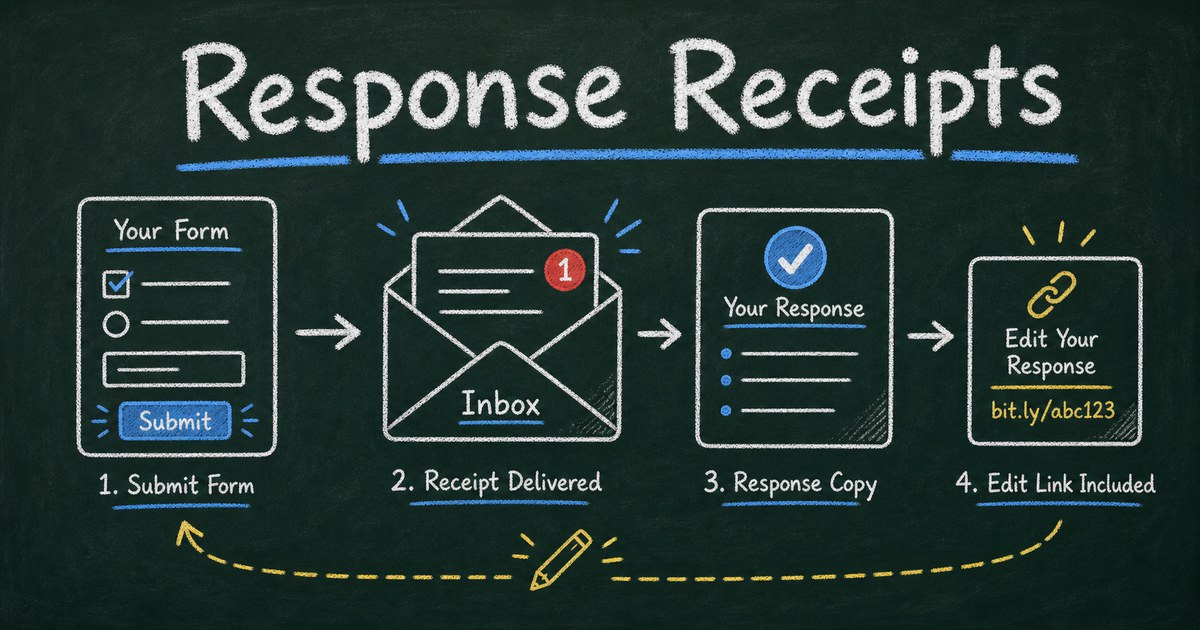
A Google Forms response receipt is a tiny creator setting until someone needs proof. Then it becomes the difference between confidence and a support message: “Did you get my registration?” “Can I change my answer?” “Where is my copy?”
Google Forms response receipts can send respondents a copy of their answers, but they depend on choices the form owner makes before sharing the form. They also create a privacy tradeoff: to email a receipt, the form needs an email address. That may be perfect for applications and registrations, but wrong for anonymous feedback.
This creator-focused guide explains how Google Forms response receipts work, when to use them, what can go wrong, and how to design a better follow-up flow with FormHug. If you already submitted a form and are trying to find your own answer, start with Can I See My Google Form Response? instead.
We treat receipts as a conversion and trust detail, not a minor setting. A form that collects 100 responses can still create 20 avoidable messages if respondents do not know whether they got a copy, whether they can edit, or when someone will reply. The receipt decision should be made before the form is shared, because the respondent experience is hard to repair after submissions have already started.
TL;DR - Google Forms response receipts send respondents a copy of their answers when the form is configured to collect or request email addresses.
- Receipts need email - a form cannot send a copy without some email collection path.
- Edit links are separate - a receipt may include an edit link only when editing after submit is enabled.
- Anonymous surveys need caution - receipts can weaken an anonymity promise if respondents do not understand the tradeoff.
- Works for: event registration, applications, order requests, client intake, school forms, and customer surveys.
- FormHug lets creators pair clear confirmation messages with respondent follow-up instead of leaving the post-submit experience vague.
What Are Google Forms Response Receipts?
Google Forms response receipts are email copies of submitted answers. A respondent submits a form, and Google sends a summary of the response to the email address associated with that submission.
The receipt is not the same as the creator’s response spreadsheet. It is a respondent-facing copy, useful when the person needs a record for registration, application, purchase request, school submission, or appointment details.
Think of response receipts as part of the Proof Layer of a form:
| Proof layer | What it answers | Example |
|---|---|---|
| Confirmation page | Did my response submit? | ”Your RSVP has been received.” |
| Email receipt | What did I submit? | Copy of answers in the respondent’s inbox |
| Edit link | Can I fix a mistake? | Link to revise a submitted response |
| Follow-up email | What happens next? | Reminder, payment note, appointment details |
When one layer is missing, respondents often ask the creator for help.
How to Send a Copy of Google Form Responses After Submit
For creators, the practical job is simple: decide whether each respondent should receive a copy after submit, then make the promise visible before they click the button.
Use this short checklist before publishing:
- Decide whether the form should collect or request email addresses.
- Turn on the response-copy setting only when a receipt fits the privacy promise.
- Enable edit-after-submit only if respondents should be able to change answers later.
- Submit a test response from a non-owner account.
- Check the inbox copy, edit link, spam folder, and confirmation wording.
The key phrase is after submit. A receipt cannot fix confusion if the form never collected an email address or if respondents expected anonymity. If the receipt is important, design it as part of the form experience, not as an afterthought.
When Should You Send a Response Receipt?
Use response receipts when the respondent has a practical reason to keep a copy.
Good use cases include:
- Event registrations with date, guest count, meal choice, or payment notes
- Job, school, grant, or volunteer applications
- Client intake forms where the respondent may need to review submitted details
- Order forms and purchase requests
- Appointment or booking forms
- Class registration and training enrollment
Skip or rethink receipts when the form is supposed to be anonymous. If you are collecting anonymous workplace feedback, student perception data, or sensitive reports, requiring an email receipt can contradict the trust promise. The anonymous survey guide explains how to protect that promise without making it vague.
Common Google Forms Receipt Problems
The respondent never received a copy
This usually happens because the form did not collect an email address, the respondent did not choose the copy option, or the email landed in spam or a secondary inbox tab.
For creators, the fix is not only technical. Write the expectation into the form: “You will receive a copy of your answers by email.” If that sentence is not true, do not write it.
The receipt does not include an edit link
Response receipts and edit links are related but separate. A respondent may receive a copy of answers without being allowed to change them. If edits are important, enable editing after submit and test the full path before sharing the form.
For more detail on the respondent side, see can I see my Google Form response?.
The form feels less anonymous
Email receipts require identity. Even if the creator does not plan to misuse the data, respondents may see the email requirement and assume their feedback is traceable.
Use direct wording:
“This form is not anonymous because we email you a copy of your responses.”
That is better than saying “anonymous” at the top and asking for an email at the bottom.
The receipt is not enough context
A copy of answers does not explain next steps. If someone registered for a class, ordered a product, or submitted an application, they may still need dates, deadlines, contact details, payment instructions, or a reminder.
That is where a dedicated confirmation email can be more useful than a raw response copy.
The Receipt Decision Matrix
Use this matrix before publishing a form:
| Form type | Send receipt? | Allow edits? | Privacy note |
|---|---|---|---|
| Event RSVP | Yes | Usually yes until deadline | Not anonymous |
| Client intake | Yes | Sometimes | Explain who reviews it |
| Anonymous employee survey | Usually no | No | Avoid email collection |
| School assignment upload | Yes | Depends on policy | Account may be required |
| Order request | Yes | Sometimes | Include payment/fulfillment timing |
| Customer feedback | Optional | Usually no | Use contact field only for follow-up |
We use this same decision pattern when drafting FormHug forms: first decide the trust promise, then decide whether the respondent needs a copy, then decide whether editing is allowed.
How FormHug Improves Creator Follow-Up
FormHug is useful when a simple receipt is not enough for the creator’s workflow. You can write a confirmation message that matches the form’s purpose, collect the email only when needed, and connect follow-up messages to the next step without pretending that a raw answer copy solves everything.
For example:
- A class registration form can confirm the seat and send reminder details later.
- A client intake form can tell the respondent when the team will reply.
- An anonymous survey can avoid email entirely and still show a clear thank-you message.
- An application form can explain whether edits are allowed and who to contact.
The email follow-up guide covers the broader automation workflow. This article stays focused on the creator decision: should the respondent get a copy, should they be able to edit, and what should they expect after submit?
Step-by-Step: Design a Better Receipt Flow
Step 1: Choose the form’s trust promise
Is the form anonymous, confidential, or identifiable? Decide this before asking for an email address. If the answer is anonymous, a receipt may not fit.
Step 2: Decide what the respondent needs after submit
A respondent may need proof, a copy, an edit path, a calendar reminder, payment details, or nothing beyond a confirmation message. Do not send an email just because the tool can.
Step 3: Write the exact post-submit expectation
Use one sentence near the submit button or confirmation page:
“After submitting, you will receive a copy by email and can edit your response until Friday.”
That sentence prevents confusion because it names the receipt and the edit rule.
Step 4: Test the inbox experience
Submit the form as a respondent. Check whether the email arrives, whether the answers are readable, whether the edit link works, and whether the wording still matches the form’s privacy promise.
Frequently Asked Questions
How do Google Forms response receipts work?
Google Forms response receipts send respondents an email copy of their submitted answers when the creator configures the form to collect or request email addresses. The receipt depends on form settings; it is not guaranteed for every form.
Why did I not get a copy of my Google Form response?
The form may not have collected your email, you may not have selected the copy option, the creator may not have enabled receipts, or the email may have gone to spam or another inbox tab.
Do response receipts make a Google Form not anonymous?
They can. If a form emails a response copy, it needs an email address. That means the response is connected to an identity unless the creator has a separate privacy-preserving workflow.
Does a Google Forms receipt include an edit link?
Only when the creator allows respondents to edit after submitting. A receipt can include a copy of answers without allowing changes.
Should every registration form send a receipt?
Usually yes. Registrations often include dates, guest counts, choices, or commitments that respondents need to verify later.
Should anonymous surveys send receipts?
Usually no. If anonymity is the main trust promise, collecting an email address for a receipt can make respondents less honest.
Can FormHug send better confirmation messages?
Yes. FormHug forms can use clear post-submit messaging and follow-up workflows so respondents know what happened, what they should save, and what comes next.
Related
- Can I See My Google Form Response? - help respondents find submitted answers, saved copies, and edit links.
- How to Send Confirmation and Reminder Emails After Form Submission - build useful post-submit email workflows.
- Anonymous Survey: How to Collect Honest Feedback Without Losing Trust - avoid weakening anonymity with unnecessary identity collection.
If a missing receipt creates support work, the form is pushing uncertainty downstream. Create a clearer follow-up flow ->

Written by
FormHug TeamProduct, research, and form automation team
The FormHug Team brings together product builders, workflow researchers, and form automation practitioners who study how people collect, route, and act on information online. Our guides are based on hands-on product testing, template analysis, customer workflow patterns, and deep experience with forms, surveys, quizzes, AI-assisted creation, integrations, and results sharing.