Quantitative Survey Question Types: Examples and When to Use Each
Start collecting responses
Turn this into a shareable survey
Draft the questions, publish a clean link, and keep every response organized in FormHug.
Quantitative survey question types turn opinions into numbers, but numbers are not automatically useful. A badly written 1-to-5 scale can be less trustworthy than one honest sentence in an open text box.
The value of quantitative research is comparability. You can count answers, compare segments, track changes over time, and make decisions from patterns instead of anecdotes. To get that value, the question type has to match the decision you are trying to make.
This guide explains the main types of quantitative survey questions, gives examples for each type, and shows how to combine them into a survey that produces measurable data without flattening the respondent’s real experience. It is a method hub, not a market research question bank.
TL;DR - Quantitative survey question types collect structured, countable answers that can be compared, averaged, ranked, or segmented.
- Use binary questions for eligibility - yes/no or true/false questions are best for screening and clear conditions.
- Use scales for intensity - Likert, rating, and numeric scales show how strongly someone feels.
- Use ranking for tradeoffs - ranking questions reveal priority when every option sounds important.
- Works for: customer satisfaction, employee surveys, product feedback, training evaluation, research questionnaires, and academic studies.
- FormHug can draft quantitative surveys with AI and combine closed-ended questions with optional open-ended follow-ups.
What Are Quantitative Survey Question Types?
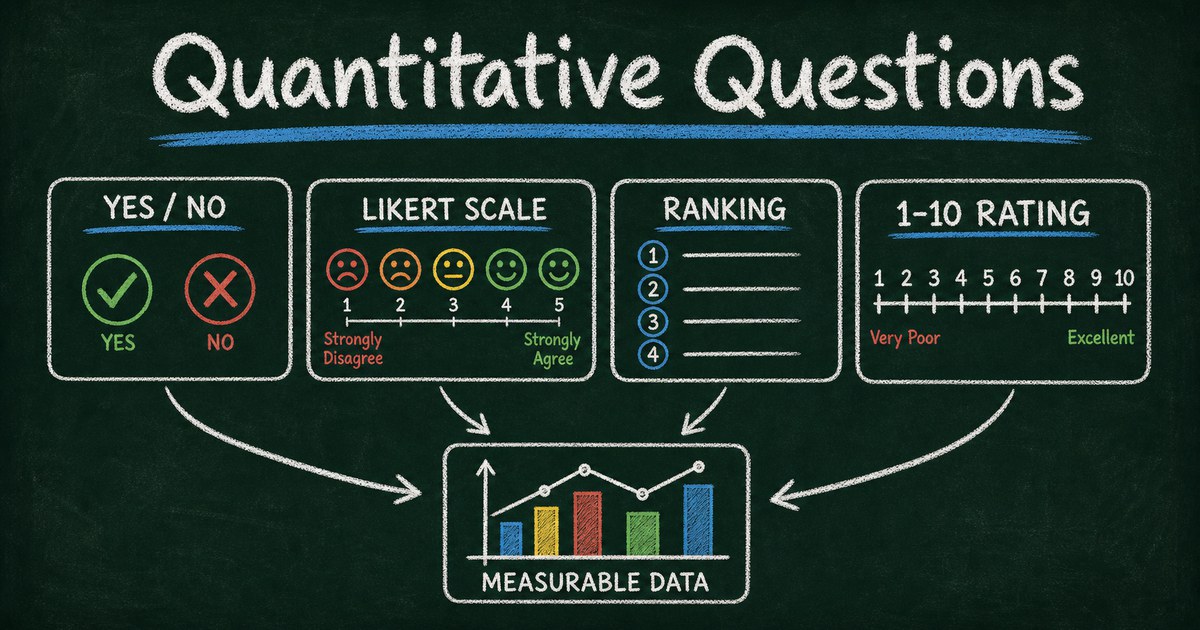
Quantitative survey question types are structured formats that produce measurable data. Instead of asking respondents to explain everything in their own words, you ask them to choose, rate, rank, count, or enter a number.
Common quantitative question types include:
- Yes/no questions
- Multiple choice questions
- Likert scale questions
- Rating scale questions
- Ranking questions
- Numeric input questions
- Matrix questions
The purpose is not to remove nuance. The purpose is to make the main answer comparable across respondents. If you also need the reason behind the number, add one open-ended follow-up.
The Measurement Match Framework
Use the Measurement Match Framework to choose the question type:
| What you need to measure | Best question type | Example |
|---|---|---|
| Eligibility or condition | Yes/no | ”Have you used this product in the past 30 days?” |
| Category or segment | Multiple choice | ”Which role best describes you?” |
| Agreement or attitude | Likert scale | ”I feel confident using this tool.” |
| Satisfaction or quality | Rating scale | ”How satisfied are you with support?” |
| Priority or preference | Ranking | ”Rank these features by importance.” |
| Quantity or frequency | Numeric input | ”How many hours did this take?” |
We use this framework when drafting FormHug surveys because it prevents the common mistake of using a 1-to-5 scale for everything. Different decisions need different measurements.
Yes/No and Dichotomous Questions
Binary questions are best when the answer has two clear states.
Examples:
- Have you used this product before?
- Did you attend the event live?
- Are you currently a paying customer?
- Did the training answer your main question?
- Would you like someone to follow up?
Use yes/no questions for screening, eligibility, consent, or clear factual states. Do not use them when the real answer has intensity. “Are you satisfied?” is weaker than a rating scale because it hides the difference between barely satisfied and highly satisfied.
For more examples, see dichotomous survey questions.
Multiple Choice Questions
Multiple choice questions capture categories, current behavior, segments, and reasons.
Examples:
- Which best describes your role?
- What is your main reason for choosing this product?
- Which tool do you currently use?
- Which channel brought you here?
- What stopped you from completing your purchase?
Use single-select when only one answer should be true. Use multi-select when several answers can be true. If answer options overlap, your data becomes hard to trust. The multiple choice survey questions guide goes deeper on answer option design.
Likert Scale Questions
Likert scale questions measure agreement, confidence, importance, frequency, or perceived quality using ordered answer choices.
Examples:
| Statement | Scale |
|---|---|
| ”The onboarding process was easy to understand.” | Strongly disagree -> Strongly agree |
| ”I feel confident using this feature.” | Strongly disagree -> Strongly agree |
| ”This topic is important to my work.” | Not important -> Extremely important |
| ”I receive useful feedback from my manager.” | Strongly disagree -> Strongly agree |
Use Likert scales when you want to compare attitudes across segments. Keep statements specific. “The product is good” is too broad; “The setup process was easy to complete” is measurable.
For more scale wording, see Likert scale survey questions.
Rating Scale Questions
Rating scales ask respondents to assign a score, often 1 to 5, 1 to 10, stars, smiley faces, or 0 to 10 for NPS.
Examples:
- How satisfied were you with the event?
- How would you rate the support experience?
- How useful was the training session?
- How likely are you to recommend us to a colleague?
- How easy was it to complete the form?
Use rating scales for satisfaction, quality, effort, likelihood, and experience evaluation. Choose the scale intentionally. A 5-point scale is easier for quick feedback; a 10-point scale gives more granularity but can create false precision if respondents do not distinguish between every number.
The survey rating scales guide compares 1-to-5, 1-to-10, stars, smiley faces, and NPS.
Ranking Questions
Ranking questions force tradeoffs. They are useful when respondents would otherwise mark every option as important.
Examples:
- Rank these product features from most to least important.
- Rank these pricing factors by influence on your decision.
- Rank these event topics in the order you want to attend them.
- Rank these workplace improvements by priority.
- Rank these purchase criteria: price, quality, speed, support, brand, privacy.
Use ranking sparingly. Ranking 4 or 5 items is manageable. Ranking 10 items creates fatigue and low-quality data.
For more examples, use ranking survey questions.
Numeric Questions
Numeric questions capture counts, amounts, durations, or frequencies.
Examples:
- How many people are on your team?
- How many hours per week do you spend on this task?
- How much do you currently pay per month?
- How many times did you use this feature last week?
- What budget range are you working with?
Use ranges when exact numbers are sensitive or hard to recall. “1-10 employees, 11-50 employees, 51-200 employees” often produces cleaner data than asking someone to type an exact company size.
How to Combine Quantitative and Qualitative Questions
The strongest surveys often use a quantitative question followed by one optional qualitative prompt.
Examples:
| Quantitative question | Follow-up |
|---|---|
| How satisfied were you with support? | What is the main reason for your score? |
| Which feature matters most? | Why did you choose that feature? |
| How likely are you to switch tools? | What would make switching easier? |
| Rank these topics by interest. | Is there a topic missing from this list? |
This pattern gives you both measurable data and the reasoning behind it. It is useful for customer satisfaction, employee feedback, product discovery, and research questionnaires. For a business-focused question bank, use market research survey questions.
Ready-Made Quantitative Survey Templates
If you want a faster starting point, these FormHug templates use structured question types that work well for quantitative research:
- 2026 Form Builder Usage Survey
- Customer Satisfaction Survey Template
- Employee Feedback Form
- 2026 SaaS Stack Survey
You can also start from the free survey maker guide if you are choosing a tool and workflow before writing questions.
Step-by-Step: Build a Quantitative Survey
Step 1: Define the metric
Decide what you want to measure: satisfaction, agreement, priority, usage, intent, eligibility, or price sensitivity.
Step 2: Match the question type
Use the Measurement Match Framework. Do not use a rating scale when you need a category, and do not use multiple choice when you need intensity.
Step 3: Add one reasoning prompt
For the most important metric, add an optional “Why?” or “What is the main reason?” question. This gives context without making the whole survey open-ended.
Step 4: Review the results by segment
Quantitative data becomes more useful when segmented. Compare answers by role, customer type, company size, location, or experience level instead of relying only on averages.
Frequently Asked Questions
What are quantitative survey question types?
Quantitative survey question types are structured formats that produce measurable answers, such as yes/no, multiple choice, Likert scale, rating scale, ranking, or numeric input.
What are examples of quantitative survey questions?
Examples include “How satisfied are you on a scale of 1 to 5?”, “Which feature do you use most?”, “Have you purchased this before?”, and “Rank these options by importance.”
Are Likert scale questions quantitative?
Yes. Likert scale questions produce ordered response data that can be counted, compared, and segmented. They are commonly used to measure agreement, confidence, importance, and frequency.
What is the difference between qualitative and quantitative survey questions?
Quantitative questions produce structured, countable answers. Qualitative questions produce open-ended text that explains reasoning, emotion, or context.
How many quantitative questions should a survey include?
For most feedback and research surveys, 8 to 12 total questions is enough. Use fewer for cold audiences and more only when respondents have a strong reason to complete the survey.
Can FormHug create quantitative survey questions?
Yes. You can describe the research goal in FormHug and ask AI to draft a survey using multiple choice, rating scales, Likert scales, ranking questions, and optional open-ended follow-ups.
Related
- Multiple Choice Survey Questions - write cleaner answer options for structured data.
- Likert Scale Survey Questions - measure agreement, frequency, confidence, and importance.
- Survey Rating Scales - choose between 1-to-5, 1-to-10, stars, smiley faces, and NPS.
- Market Research Survey Questions - choose business questions for product, pricing, competitor, and segment research.
If every answer is a number but no decision gets easier, the survey is measuring the wrong thing. Create your quantitative survey ->

Written by
FormHug TeamProduct, research, and form automation team
The FormHug Team brings together product builders, workflow researchers, and form automation practitioners who study how people collect, route, and act on information online. Our guides are based on hands-on product testing, template analysis, customer workflow patterns, and deep experience with forms, surveys, quizzes, AI-assisted creation, integrations, and results sharing.