Appointment Reminder Email Templates for Bookings, Classes, and Events
Create with AI
Describe the workflow and get a form draft
Use FormHug to create forms from prompts, then share, automate, and reuse the structured responses.
The most expensive appointment is the one someone meant to attend. They booked it, forgot the time, missed the prep note, or never saw the address. Then your team loses the slot and spends the next day trying to reschedule.
Appointment reminder emails are not marketing emails. They are operational messages tied to something the person already booked, registered for, or requested. A good reminder tells them when, where, what to bring, and what to do if they cannot make it.
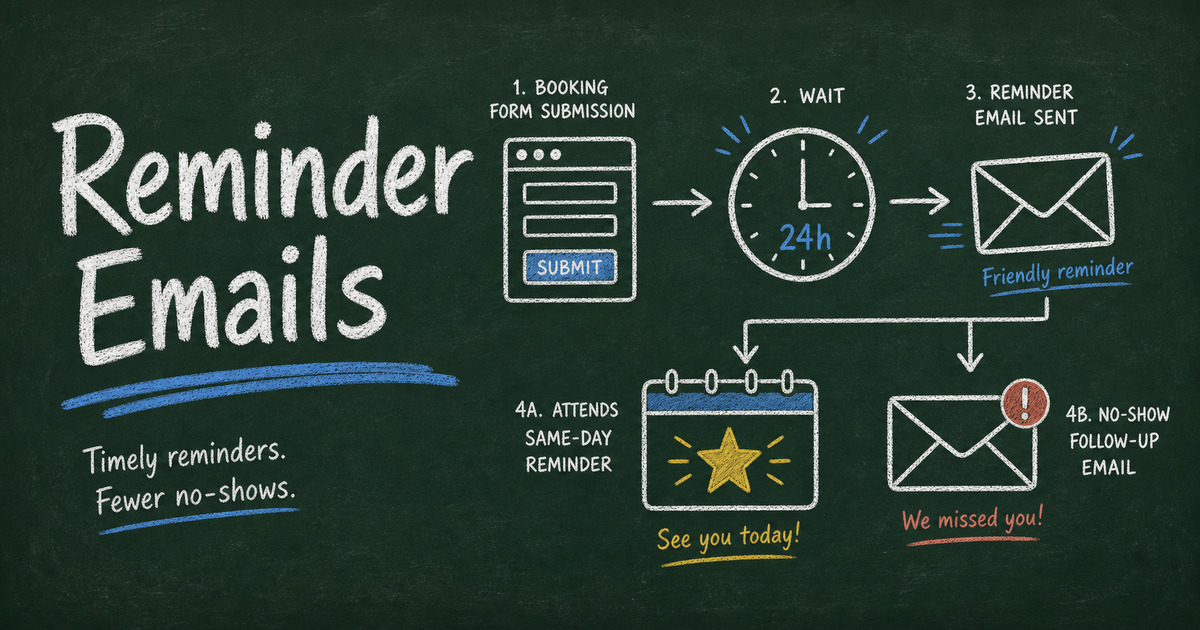
This guide gives copy-ready appointment reminder email templates for bookings, classes, consultations, events, and no-show follow-ups, plus a simple workflow for sending them from form submissions.
TL;DR — An appointment reminder email confirms the time, location, preparation steps, and rescheduling path before a booked appointment or event.
- Send at least one reminder — 24 hours before is the most useful default for appointments and classes.
- Include action details — date, time, location, what to bring, payment status, and cancellation instructions.
- Personalize from the submission — name, service, class, session, or booking date makes the reminder feel tied to the action.
- Works for: appointments, consultations, classes, workshops, RSVP events, interviews, and service bookings.
- FormHug can send confirmations automatically and reminder emails later from selected form submissions.
What Is an Appointment Reminder Email?
An appointment reminder email is a short message sent before a scheduled booking, class, consultation, interview, or event. Its job is to reduce missed appointments by repeating the essential details and giving the recipient a clear next step.
The best reminder emails answer five questions:
| Question | Example |
|---|---|
| What is this for? | ”Your pottery workshop is tomorrow” |
| When is it? | Date, time, and time zone if relevant |
| Where is it? | Address, room, Zoom link, or arrival instructions |
| What should I do before it? | Forms, payment, documents, preparation |
| What if I cannot attend? | Reschedule, cancel, reply, or contact link |
If the message does not answer those questions, people reply with avoidable questions or skip the appointment entirely.
When to Send Appointment Reminder Emails
Use a timing pattern based on the cost of a missed appointment.
| Timing | Best for | Message focus |
|---|---|---|
| Immediately after booking | Every workflow | Confirmation and record of booking |
| 48 hours before | Paid appointments, classes, travel-heavy events | Preparation and cancellation deadline |
| 24 hours before | Most appointments and workshops | Time, location, and what to bring |
| Same day | Interviews, consultations, service visits | Quick reminder and arrival instructions |
| After no-show | Missed appointments | Reschedule path and policy |
For most small teams, the essential setup is one automatic confirmation email and one reminder email before the appointment. That two-message pattern is covered in how to send confirmation and reminder emails after form submission.
Copy-Ready Appointment Reminder Email Templates
Use these templates as starting points. Replace bracketed fields with submitted data from your form.
24-hour appointment reminder
Subject: Reminder: Your appointment is tomorrow at [Time]
Hi [First Name],
This is a quick reminder that your [Appointment Type] is scheduled for [Date] at [Time].
Location: [Address or Meeting Link]
Please bring: [Documents, materials, or prep notes]
If you need to reschedule, please reply to this email or use this link: [Reschedule Link].
See you tomorrow,
[Team Name]
Same-day appointment reminder
Subject: Today: [Appointment Type] at [Time]
Hi [First Name],
Your [Appointment Type] is today at [Time].
Location: [Address or Meeting Link]
Arrival note: [Parking, check-in, Zoom waiting room, or access instructions]
If you are running late or cannot attend, please contact us at [Contact Method].
Thanks,
[Team Name]
Consultation reminder
Subject: Your consultation with [Business Name] is coming up
Hi [First Name],
We are looking forward to your consultation on [Date] at [Time].
To make the session useful, please have these ready:
- [Prep Item 1]
- [Prep Item 2]
- [Prep Item 3]
If anything has changed since you booked, reply with a quick note before the call.
Best,
[Consultant or Team Name]
Class or workshop reminder
Subject: Reminder: [Class Name] starts [Date]
Hi [First Name],
You are registered for [Class Name] on [Date] at [Time].
What to bring: [Materials or equipment]
Location: [Address or Link]
Session: [Selected Session]
If you can no longer attend, please let us know so we can release your spot to someone else.
See you soon,
[Team Name]
For a full signup workflow, pair this with a class registration form or an online booking form.
Event RSVP reminder
Subject: Reminder: [Event Name] is on [Date]
Hi [First Name],
Thanks for your RSVP. [Event Name] is coming up on [Date] at [Time].
Location: [Venue or Link]
Your RSVP: [Attendance Status]
Guest count: [Guest Count]
Meal choice: [Meal Choice]
If your plans have changed, please update us by [Deadline].
Thanks,
[Host Name]
If you are still collecting responses, use how to create an RSVP form to keep attendance, guest count, and meal choices in one place.
Interview reminder
Subject: Interview reminder: [Role] on [Date]
Hi [First Name],
This is a reminder for your interview for [Role] on [Date] at [Time].
Interview format: [Video, phone, or onsite]
Interviewers: [Names, if available]
Link or location: [Link or Address]
Please reply if you need to reschedule.
Best,
[Hiring Team]
No-show follow-up
Subject: We missed you today
Hi [First Name],
We missed you for your [Appointment Type] scheduled for [Date] at [Time].
If you would like to reschedule, please use this link: [Reschedule Link]. If you no longer need the appointment, no action is needed.
Thanks,
[Team Name]
Keep this message calm. The goal is to recover the booking or close the loop, not make the recipient defensive.
The Reminder Email Formula
Use the Context → Details → Action formula for every reminder.
Context tells the recipient why they are getting the email: “You booked a consultation” or “You are registered for the workshop.”
Details repeat the facts they need: date, time, location, selected session, preparation, and payment status.
Action explains what to do next: attend, bring something, complete a form, reschedule, cancel, or reply.
This formula keeps reminder emails short without making them vague. It also makes the message easier to personalize with fields from a registration or booking form.
How to Send Appointment Reminders From Form Submissions
Step 1: Collect the booking details cleanly
The reminder can only be as good as the form data. Use structured fields for appointment type, date, time, email, phone, and any selected service or class.
If the appointment starts from a form, use an online booking form. If it starts from a fixed event or class, use a registration form. If it needs a payment or deposit, add the payment field before the confirmation.
Step 2: Send the confirmation automatically
The confirmation email should go out immediately after submission. It gives the recipient a record and reduces “did my booking go through?” messages.
In FormHug, connect Gmail, create a notification rule, and map the recipient to the email field on the form. Use fields like name, service, date, and time inside the email. We tested this workflow with an AI workshop signup form; the notification setup took about two minutes once the form existed.
Step 3: Filter and send the reminder later
Before the appointment, open the form’s submissions, filter the people who should receive the reminder, select them, and send a bulk email from the Data tab.
This is useful when the reminder should only go to confirmed registrants, people in one session, or appointments happening on a specific date. It avoids the spreadsheet-export-paste-send loop.
Step 4: Reuse the same data after the appointment
After the appointment, the same submission record can power a follow-up survey, feedback form, or next-step email. For classes, you might send a student perception survey. For events, send a short feedback survey with a survey form. For consultations, send a next-step intake form.
Appointment Reminder Templates by Use Case
| Use case | Best subject line | Include |
|---|---|---|
| Medical or wellness appointment | ”Reminder: Your appointment is tomorrow” | Time, location, prep, arrival instructions |
| Consultation | ”Your consultation is coming up” | Agenda, documents, meeting link |
| Class or workshop | ”Reminder: [Class Name] starts tomorrow” | Materials, session, location, cancellation note |
| Interview | ”Interview reminder: [Role] on [Date]“ | Interviewers, format, link, reschedule path |
| Service visit | ”Reminder: [Service] appointment on [Date]“ | Address, arrival window, contact number |
| RSVP event | ”Reminder: [Event Name] is on [Date]“ | RSVP status, guest count, venue, update deadline |
The content changes, but the pattern stays the same. People need confidence that the booking exists and clarity about what they should do next.
Frequently Asked Questions
How do you write an appointment reminder email?
Write a short email that includes the appointment type, date, time, location or meeting link, preparation steps, and rescheduling instructions. Use the Context → Details → Action formula so the message is clear and easy to act on.
When should you send an appointment reminder email?
For most appointments, send one reminder 24 hours before. For paid appointments, classes, interviews, or travel-heavy events, send an additional reminder 48 hours before if people need time to prepare or cancel.
What should the subject line say?
Use a direct subject line such as “Reminder: Your appointment is tomorrow at 2 PM” or “Today: Consultation at 10 AM.” Include the date or time when possible.
Can reminder emails reduce no-shows?
Yes. Reminder emails reduce avoidable no-shows by repeating the time, location, and preparation steps before the appointment. They work best when paired with a clear reschedule or cancellation path.
Should I send appointment reminders by email or SMS?
Email is better when the reminder includes details, links, documents, or preparation notes. SMS is better for very short same-day prompts. Many teams use email for the full reminder and SMS for urgent same-day updates.
Can I personalize reminder emails from form data?
Yes. If the appointment came from a form submission, use fields such as first name, appointment type, date, time, session, or location inside the email body and subject line.
Can FormHug send appointment reminder emails?
Yes. FormHug can send automatic confirmation emails after submission and bulk reminder emails later to selected submitters through Gmail. You can start with a booking, registration, RSVP, or intake form and keep the follow-up tied to the submission data.
Related
- How to Send Confirmation and Reminder Emails After Form Submission — set up Gmail confirmations and selected reminder sends.
- How to Create an Online Booking Form — collect appointment details before sending reminders.
- How to Create an RSVP Form — collect event attendance and send reminder details from one workflow.
- Class Registration Software for Workshops and Courses — manage class signups before the reminder email.
Every missed appointment starts as a small communication gap: the time, the place, the prep, or the reschedule path was not clear enough. Close that gap before the slot arrives. Create your booking or registration form →

Written by
FormHug TeamProduct, research, and form automation team
The FormHug Team brings together product builders, workflow researchers, and form automation practitioners who study how people collect, route, and act on information online. Our guides are based on hands-on product testing, template analysis, customer workflow patterns, and deep experience with forms, surveys, quizzes, AI-assisted creation, integrations, and results sharing.