Dichotomous Survey Questions: 60 Examples and When to Use Them
Start collecting responses
Turn this into a shareable survey
Draft the questions, publish a clean link, and keep every response organized in FormHug.
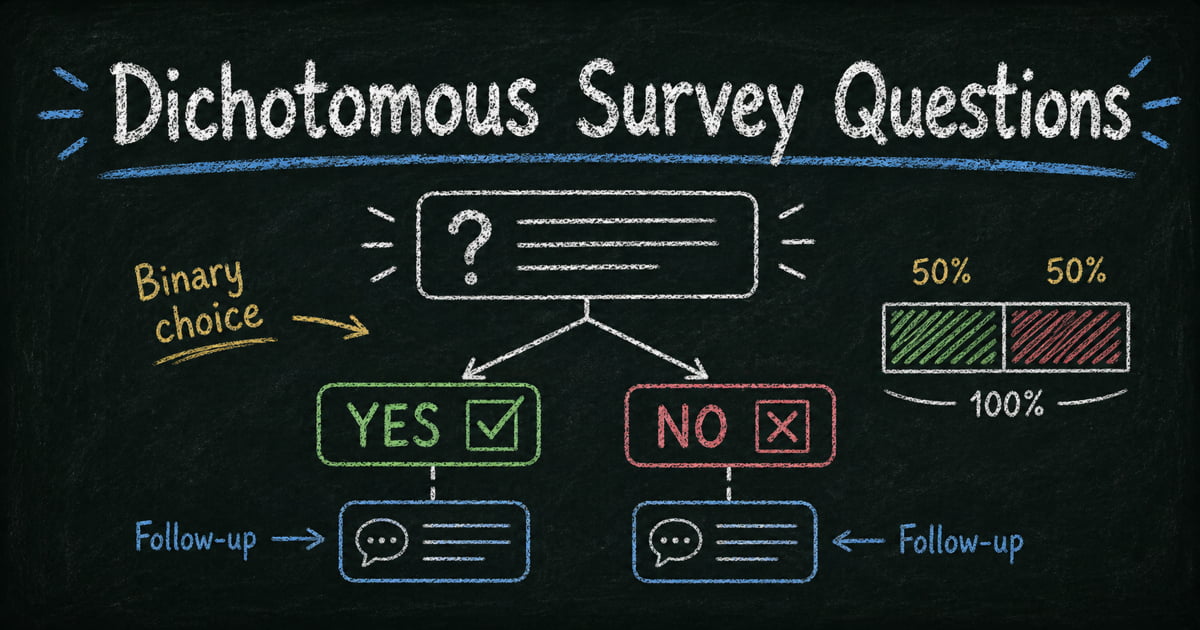
A dichotomous question gives respondents exactly two answer choices. That can be Yes or No, True or False, Agree or Disagree, Pass or Fail, Eligible or Not Eligible. The format is efficient, but it is also unforgiving: if the question is not genuinely binary, the data will look clean while quietly losing the truth.
Good dichotomous questions work best as gates. They identify which respondents qualify, which behavior happened, which follow-up should appear, or which group a response belongs to. They are less useful for measuring intensity, preference, or uncertainty.
This guide explains what dichotomous survey questions are, when to use them, when to avoid them, and 60 examples you can adapt for customer, employee, education, event, and market research surveys.
TL;DR - Dichotomous survey questions are two-choice questions used to capture clear binary answers or route respondents into the right follow-up path.
- Best for clean splits - use them for eligibility, behavior, consent, attendance, and yes/no qualification.
- Weak for nuance - avoid them when respondents need a scale, multiple answers, or “not applicable.”
- Follow-up matters - the binary answer sorts the response; the follow-up explains it.
- Works for: screening surveys, customer feedback, employee pulse checks, training evaluations, event RSVPs, and product research.
- FormHug can use dichotomous answers to show or hide the next question automatically.
What Are Dichotomous Survey Questions?
A dichotomous survey question is a closed-ended question with exactly two answer options. The most common format is Yes/No, but the category is broader.
Definition - A dichotomous survey question asks respondents to choose between two possible answers, such as Yes/No, True/False, Agree/Disagree, or Eligible/Not eligible. Use it when the answer is genuinely binary and should qualify, route, or segment respondents.
In plain terms, dichotomous questions are best when the answer should split respondents into two clear groups. They are not a good fit when someone might reasonably need “maybe,” “not sure,” “sometimes,” or more than one answer.
Common dichotomous answer pairs include:
| Answer pair | Best used for |
|---|---|
| Yes / No | Behavior, consent, eligibility, interest |
| True / False | Knowledge checks, quizzes, compliance training |
| Agree / Disagree | Simple opinion checks |
| Pass / Fail | Evaluation or assessment outcomes |
| Attended / Did not attend | Event and training records |
| Eligible / Not eligible | Screening and qualification |
The goal is not to reduce every topic to two choices. The goal is to identify moments where two choices are enough to support a decision.
Dichotomous Questionnaire Sample
A simple dichotomous questionnaire usually starts with a gate, asks a few binary behavior questions, then adds one follow-up where the answer needs context. Here is a short sample for a product research survey:
| Purpose | Dichotomous question | Answer options | Suggested follow-up |
|---|---|---|---|
| Eligibility | Are you currently using a tool for this workflow? | Yes / No | If Yes: Which tool do you use now? |
| Behavior | Have you used this type of product in the last 30 days? | Yes / No | If No: What stopped you from using one? |
| Buying intent | Would this feature save you time each week? | Yes / No | If Yes: What task would it replace? |
| Adoption blocker | Is price the main factor in your decision? | Yes / No | If Yes: What price range feels reasonable? |
| Research consent | Are you available for a follow-up interview? | Yes / No | If Yes: Ask for email or preferred contact method. |
This structure works because each binary question has a job. It qualifies, segments, or routes the respondent instead of asking a vague opinion and pretending the answer is complete.
Dichotomous vs Yes/No vs Multiple Choice vs Likert Questions
These question types overlap in everyday language, but they should not compete for the same job in a survey.
| Question type | Number of answer options | Best for | Example |
|---|---|---|---|
| Dichotomous question | 2 | Binary classification, screening, routing | ”Have you used this product before?” |
| Yes/no question | 2 | A common subtype of dichotomous question | ”Would you like a follow-up?” |
| Multiple choice question | 3+ | Categories, reasons, preferences, selectable lists | ”Which feature do you use most?” |
| Likert scale question | Usually 5 or 7 | Agreement, attitude, belief, or intensity | ”I found the setup easy.” |
Use yes or no survey questions when the answer labels are literally Yes and No. Use multiple choice survey questions when more than two answer options may be valid. Use Likert scale survey questions or survey rating scales when you need intensity instead of a clean split.
When Dichotomous Questions Work Best
Screening and eligibility
Dichotomous questions are excellent early in a form because they quickly decide whether the rest of the survey applies.
- Are you 18 years or older?
- Are you currently a customer?
- Do you live in the United States?
- Are you the primary decision-maker for this purchase?
- Have you used this product in the past 30 days?
- Are you available for a follow-up interview?
If the respondent does not qualify, you can end the survey politely or send them to a shorter path.
Behavior confirmation
Behavior is easier to measure with a binary question than attitude.
- Did you complete the onboarding task?
- Have you logged in this week?
- Did you attend the training session?
- Have you submitted an expense report before?
- Did you watch the product demo?
- Have you tried the new feature?
These questions create useful segments because they separate actual experience from general opinion.
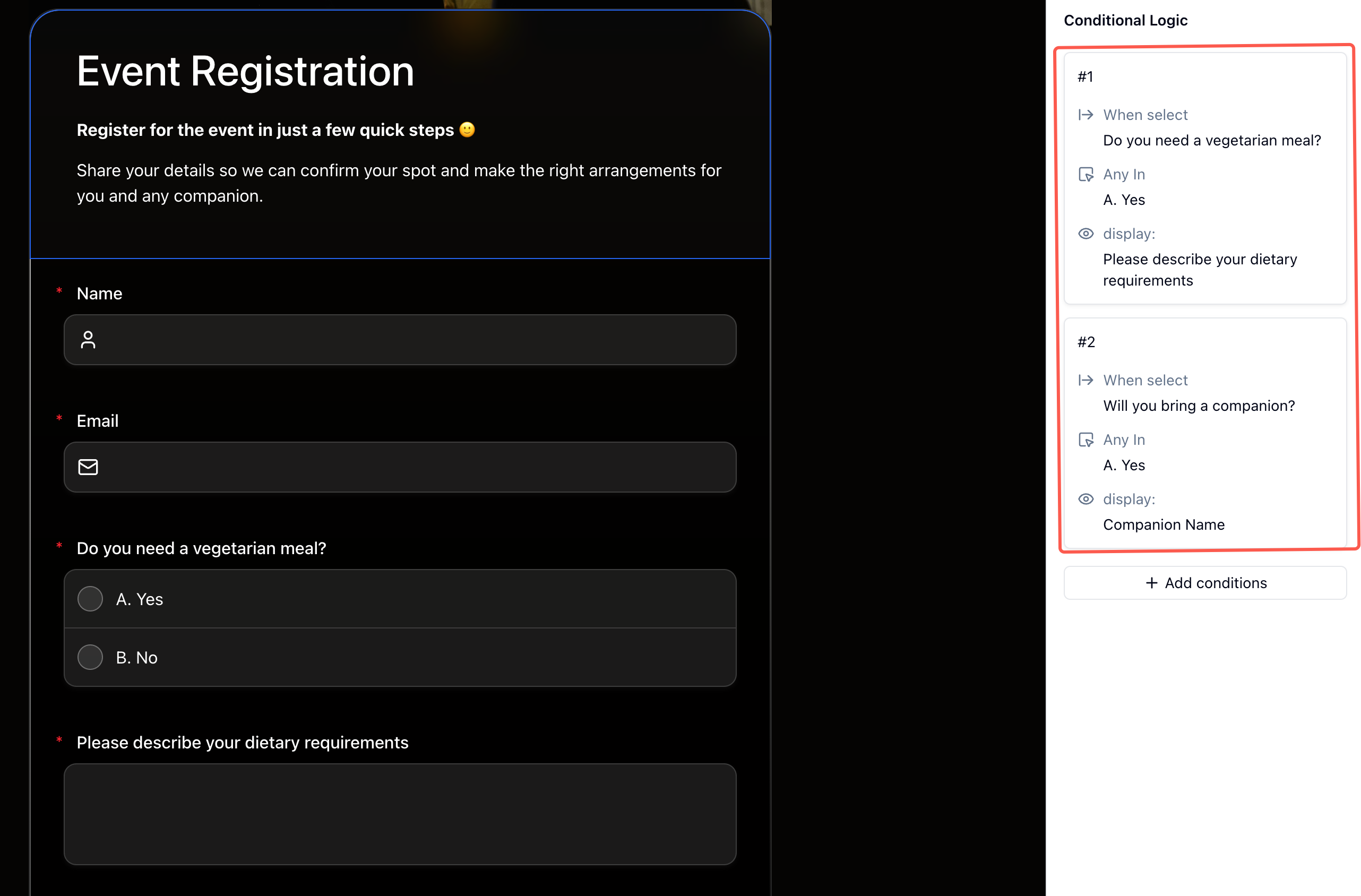
Routing and conditional logic
Dichotomous answers are natural triggers for conditional logic.
If the answer is Yes, show a question about experience. If the answer is No, show a question about barriers. That produces more relevant data and a shorter experience for each respondent.
60 Dichotomous Survey Question Examples
Customer feedback questions
- Did our product solve the problem you expected it to solve?
- Would you buy this product again?
- Did you find the setup process easy to complete?
- Have you contacted support in the last 30 days?
- Did support resolve your issue?
- Would you recommend this product to someone with a similar need?
- Did the pricing feel clear before purchase?
- Did the product description match what you received?
- Have you used this product more than once?
- Would you like a follow-up from our team?
Useful follow-ups:
- If Yes: “What made the experience work for you?”
- If No: “What stopped it from working?”
- If the answer may not apply: ask a qualifying question first, such as “Have you used the product?”
Product research questions
- Are you currently using a tool for this workflow?
- Have you paid for a similar tool before?
- Would this feature save you time?
- Would this feature replace something you already use?
- Did the prototype behave the way you expected?
- Would you use this feature without training?
- Is mobile access required for your use case?
- Do you need team collaboration before adopting this?
- Would you share this with a colleague?
- Is this problem urgent enough to solve this quarter?
Useful follow-ups:
- If Yes: “What would you expect this feature to replace?”
- If No: “What would make this worth considering?”
- If unsure: use “Not sure” instead of forcing a binary answer.
Employee survey questions
- Do you understand your priorities for this week?
- Do you have the resources you need to do your work?
- Have you received useful feedback recently?
- Do you feel comfortable raising concerns?
- Would you recommend this company as a good place to work?
- Have you had a one-on-one with your manager this month?
- Do you know how your work is evaluated?
- Is your workload sustainable right now?
- Have you used the employee benefits available to you?
- Do you feel recognized for good work?
Useful follow-ups:
- If Yes: “What helped most?”
- If No: “What is the main blocker?”
- For sentiment questions, consider a rating scale if intensity matters.
Event and training questions
- Did you attend the full session?
- Did the event start on time?
- Was the agenda clear before the event?
- Did the speaker answer your main question?
- Would you attend another event like this?
- Did the training improve your understanding of the topic?
- Did you receive the materials you needed?
- Was the session length appropriate?
- Did you participate in the exercises?
- Would you recommend this training to a teammate?
Useful follow-ups:
- If Yes: “Which part was most useful?”
- If No: “What would have made participation easier?”
- For event registration, binary answers can also route attendees to relevant event registration questions.
Education and assessment questions
- Did the lesson objective make sense?
- Did you complete the assigned reading?
- Did you feel prepared for the quiz?
- Was the feedback easy to understand?
- Did the assignment instructions include enough detail?
- Would more examples help you learn this topic?
- Did the practice questions match the exam format?
- Have you asked for help on this topic?
- Did you use the study guide?
- Would you take another course in this format?
Useful follow-ups:
- If Yes: “Which resource helped most?”
- If No: “What made the material harder to use?”
- For scored knowledge checks, see true or false quiz questions.
Market research questions
- Have you heard of this brand before today?
- Have you purchased from this category in the last year?
- Are you planning to purchase in the next 90 days?
- Would you consider switching providers?
- Is price the main factor in your decision?
- Do you currently have a subscription in this category?
- Have you canceled a similar subscription before?
- Would you participate in a paid interview?
- Do you use AI tools for this workflow?
- Is data privacy a major concern for this purchase?
Useful follow-ups:
- If Yes: “Which option, provider, or behavior matters most?”
- If No: “What would need to change?”
- If the question screens research participants, use the answer to route eligible respondents into the longer survey path.
Bad vs Better Dichotomous Questions
The easiest way to improve dichotomous questions is to make sure the answer can honestly be one of two choices. If the question measures degree, emotion, frequency, or mixed behavior, use another format.
| Weak dichotomous question | Better version | Why it is better |
|---|---|---|
| Are you satisfied? | Did the product solve the problem you bought it for? | Satisfaction is a range; problem resolution is closer to binary |
| Do you like our support? | Did support resolve your issue? | ”Like” is vague; resolution is observable |
| Is our pricing good? | Was the price clear before purchase? | Clarity is easier to answer than value judgment |
| Do you use email or Slack? | Which tools do you use? | Multiple answers can be true |
| Do you care about training? | Did you complete the training module? | Behavior is less loaded than attitude |
| Was the event perfect? | Did the event start on time? | ”Perfect” is emotional and unrealistic |
When a binary answer matters, write the question around an event, condition, or decision. When the reason matters, add an open-ended follow-up.
When Not to Use Dichotomous Questions
When intensity matters
“Are you satisfied?” is weaker than “How satisfied are you?” Satisfaction is usually a range, not a switch. Use rating scales, Likert scales, or NPS when you need intensity.
When multiple answers can be true
“Do you use email or Slack?” is not a good dichotomous question because many respondents use both. Use multiple choice or checkboxes instead.
When the respondent may not know
If “not sure” is a legitimate answer, include it. Forcing Yes or No creates false confidence. This matters in research, compliance, healthcare, education, and any survey where guessing can distort the result.
When the question is emotionally loaded
“Do you care about team success?” pressures respondents into Yes. A better version asks about behavior: “Did you help a teammate with a work problem this week?”
How to Build a Dichotomous Survey in FormHug
Step 1: Separate gates from measurement questions
Use dichotomous questions for gates: eligibility, attendance, prior usage, consent, or interest. Use scales for measurement: satisfaction, importance, confidence, frequency, or agreement strength.
Step 2: Use AI to draft the first version
Open the AI form builder and describe the survey: “Create a product research survey with dichotomous screening questions, follow-ups for users and non-users, and a final rating scale.” The AI builder creates an editable draft.
Step 3: Add follow-ups for both answer paths
For every important binary answer, ask one targeted follow-up. A Yes answer might ask what worked. A No answer might ask what blocked adoption.
Step 4: Review by segment
Analyze the results by answer group. Compare customers versus non-customers, attendees versus non-attendees, or users versus non-users. For broader survey workflows, start from FormHug’s survey maker or browse the surveys and feedback templates.
Frequently Asked Questions
What is a dichotomous survey question?
A dichotomous survey question is a question with exactly two answer options. Yes/No is the most common example, but True/False, Agree/Disagree, and Pass/Fail are also dichotomous formats.
What is an example of a dichotomous question?
“Have you purchased from us before?” is a dichotomous question because the respondent can answer only Yes or No. “True or false: The training is required” is another example.
Are dichotomous questions the same as yes or no questions?
Yes/no questions are a subtype of dichotomous questions. All yes/no questions are dichotomous, but not all dichotomous questions use Yes and No as the answer labels.
What is the difference between dichotomous and binary questions?
In survey writing, dichotomous and binary are often used the same way. Both describe questions with two possible answers. “Dichotomous” is the more formal research term.
Is multiple choice dichotomous?
Only if the multiple choice question has exactly two answer options. Most multiple choice questions have three or more options, so they are not dichotomous.
Is a Likert scale dichotomous?
No. A Likert scale usually has five or seven ordered options, such as Strongly disagree to Strongly agree. Use Likert scales when you need intensity or agreement, not a binary split.
Are dichotomous questions good for surveys?
They are good when the topic is truly binary and the answer changes what you ask next. They are not good for measuring intensity, frequency, or mixed opinions.
Should dichotomous questions include a neutral option?
If you add a neutral option, the question is no longer dichotomous. That is fine when uncertainty is important. Use “Not sure” or “Not applicable” when forcing a binary answer would create inaccurate data.
Can dichotomous questions be used in quizzes?
Yes. True/False quiz questions are dichotomous. They work well for quick knowledge checks, compliance training, and mini exams, but they can be too easy if every question is purely factual.
Can FormHug route respondents based on dichotomous answers?
Yes. FormHug supports conditional logic, so a dichotomous answer can show or hide follow-up fields automatically. That makes binary questions useful for screening and branching surveys.
Related
- Yes or No Survey Questions - examples and follow-up patterns for the most common dichotomous format
- Multiple Choice Survey Questions - use three or more answer options when a binary split is too narrow
- Likert Scale Survey Questions - measure agreement when Yes/No is too blunt
- How to Use Conditional Logic in Forms - route respondents based on binary answers
Binary questions are useful only when the split is real. Use them as clean gates, then let the follow-up do the deeper work. Create your survey ->

Written by
FormHug TeamProduct, research, and form automation team
The FormHug Team brings together product builders, workflow researchers, and form automation practitioners who study how people collect, route, and act on information online. Our guides are based on hands-on product testing, template analysis, customer workflow patterns, and deep experience with forms, surveys, quizzes, AI-assisted creation, integrations, and results sharing.