Yes or No Survey Questions: Examples, Best Practices, and Templates
Start collecting responses
Turn this into a shareable survey
Draft the questions, publish a clean link, and keep every response organized in FormHug.
A yes or no survey question looks simple because it gives respondents only two choices. That simplicity is exactly why it works, and exactly why it gets misused. A weak yes/no question forces a false choice. A strong one confirms a behavior, separates respondents into useful groups, or triggers the right follow-up.
The best yes or no survey questions do not try to explain the whole story in one answer. They create a clean decision point: did this happen, does this apply, are you interested, should we follow up? The insight usually comes from what you ask next.
This guide covers when to use yes or no survey questions, examples by use case, the mistakes that create bad data, and how to build a better binary survey with FormHug.
TL;DR - Yes or no survey questions are binary questions that work best when you need a clear behavior, eligibility, preference, or routing answer.
- Use them for decision points - confirm whether something happened, whether a respondent qualifies, or whether a follow-up is needed.
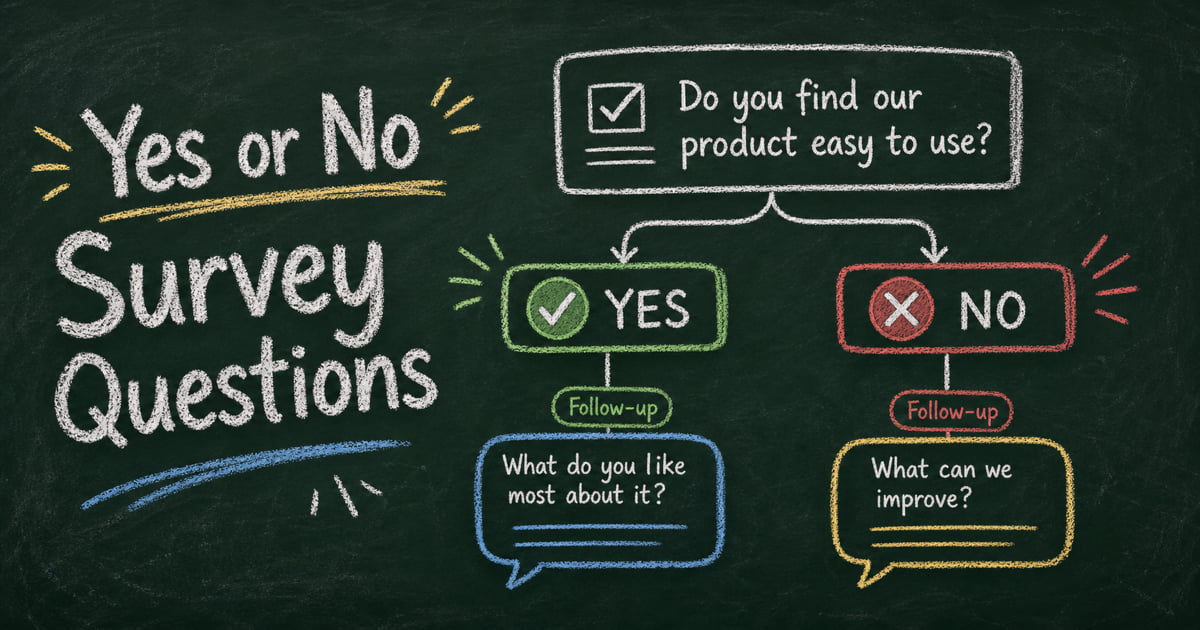
- Pair them with follow-ups - a yes/no answer tells you what happened; a targeted follow-up explains why.
- Avoid false choices - do not use yes/no questions when respondents may need “not sure,” “not applicable,” or multiple options.
- Works for: customer feedback, employee pulse surveys, event RSVPs, lead qualification, product research, and student surveys.
- FormHug can show different follow-up questions based on Yes or No answers with conditional logic.
What Are Yes or No Survey Questions?
Yes or no survey questions are closed-ended questions that ask respondents to choose between two answers: Yes or No. They are useful when the question is genuinely binary and the answer should drive a clear next step.
Yes/no questions are the most common type of dichotomous survey questions, a broader category that also includes True/False, Agree/Disagree, Pass/Fail, and other two-choice formats.
Examples:
- Did you attend the live session?
- Have you used this product in the last 30 days?
- Would you like someone from our team to follow up?
- Are you currently using a tool for this workflow?
The format is powerful because it reduces hesitation. Respondents do not need to rank, explain, or choose among overlapping options. They can answer quickly, which makes yes/no questions useful near the beginning of a survey, inside a qualification flow, or before a conditional follow-up.
Yes or No Survey Template
Use this template when you need a short binary survey that still produces usable context:
| Section | Question | Answer options | Follow-up |
|---|---|---|---|
| Qualification | Have you used this product, service, or event before? | Yes / No | If Yes: What did you use it for? |
| Outcome | Did it solve the main problem you expected it to solve? | Yes / No | If No: What problem remains? |
| Experience | Was the process easy to complete? | Yes / No | If No: Where did you get stuck? |
| Intent | Would you use it again? | Yes / No | If Yes: What would make you return? |
| Follow-up | Would you like someone to contact you? | Yes / No | If Yes: Ask for email or preferred contact method. |
This yes/no survey template keeps the form short while avoiding the biggest weakness of binary questions: missing the reason behind the answer. The follow-up question is what turns a quick Yes or No into feedback you can act on.
When to Use Yes or No Survey Questions
Use yes/no questions when the answer will change how you interpret the response or what you ask next.
Use them to confirm behavior
Behavior questions are stronger than opinion questions because the answer is grounded in something that happened.
- Have you purchased from us before?
- Did you complete the onboarding checklist?
- Have you recommended this product to a colleague?
- Did the training cover the topic you expected?
- Have you contacted support in the last 90 days?
These questions are especially useful in customer research because they help you segment responses. A first-time buyer and a repeat buyer should not always see the same follow-up question.
Use them to qualify respondents
Qualification questions keep surveys short by sending respondents down the right path.
- Are you responsible for purchasing software for your team?
- Do you manage at least one direct report?
- Are you currently enrolled in this course?
- Have you used the feature we are asking about?
- Are you located in the service area?
If someone answers No, you can skip questions that do not apply. That prevents the survey from feeling longer than it needs to be.
Use them to trigger follow-up questions
Yes/no questions are most useful when they unlock a more specific prompt.
| Yes/No question | If Yes, ask | If No, ask |
|---|---|---|
| Did the event meet your expectations? | What part worked best? | What was missing? |
| Would you buy this product again? | What would make you choose it again? | What would need to change? |
| Have you tried this feature? | What did you use it for? | What prevented you from trying it? |
| Did the course feel relevant? | Which topic was most useful? | Which topic felt least relevant? |
This pattern keeps the first question easy while still collecting context.
Yes or No Survey Question Examples
Use these examples as starting points. Replace generic words like “product,” “event,” or “course” with the specific thing your respondent experienced.
Customer feedback
- Did our product solve the problem you bought it for?
- Did you find what you were looking for today?
- Would you recommend our product to a colleague?
- Have you used our product more than once this week?
- Did anything about the checkout process feel confusing?
- Would you buy from us again?
- Did our support team resolve your issue?
- Do you want a follow-up from our team?
Product research
- Have you used a similar tool before?
- Are you currently paying for a tool in this category?
- Would this feature save you time?
- Would you use this feature at least once a week?
- Is this feature important enough to affect your buying decision?
- Did the prototype match what you expected?
- Would you share this tool with your team?
- Do you need an integration before you can adopt this?
Employee pulse surveys
- Do you understand what is expected of you this week?
- Do you have the tools you need to do your job well?
- Have you received useful feedback in the last month?
- Do you feel comfortable asking for help?
- Would you recommend this team as a good place to work?
- Have you had a meaningful one-on-one with your manager recently?
- Do you feel your workload is sustainable?
- Do you know how your work connects to company goals?
Event and training feedback
- Did the session start on time?
- Was the topic relevant to your work?
- Did the speaker explain the material clearly?
- Would you attend another session from this presenter?
- Did you have enough time for questions?
- Were the logistics clear before the event?
- Did the event meet the expectation set in the invitation?
- Would you like access to the recording or slides?
Student and education surveys
- Did the assignment instructions make sense?
- Did you feel prepared for the quiz?
- Did the lesson help you understand the topic better?
- Have you used the study materials provided?
- Would you like more practice questions?
- Did you receive feedback quickly enough?
- Are you comfortable asking questions in class?
- Did the course workload feel manageable?
Best Practices for Writing Yes or No Survey Questions
Ask one thing at a time
Avoid double-barreled questions such as “Was the event useful and well organized?” A respondent might think the event was useful but poorly organized. Split it into two questions:
- Was the event useful?
- Was the event well organized?
Each answer becomes easier to interpret.
Use neutral wording
Do not lead the respondent toward the answer you want.
Weak: “Did you enjoy our excellent new dashboard?”
Better: “Did the new dashboard help you find the information you needed?”
Neutral wording improves trust and gives you more usable feedback.
Add “Not applicable” when the question may not apply
Not every binary-looking question is actually binary. “Did support resolve your issue?” only applies to people who contacted support. If you send it to everyone, add “Not applicable” or use a qualifying question first.
Follow the answer with a reason
For important questions, always ask one follow-up. The yes/no answer tells you the direction. The follow-up tells you what to change.
- If Yes: “What made it work well?”
- If No: “What should we improve first?”
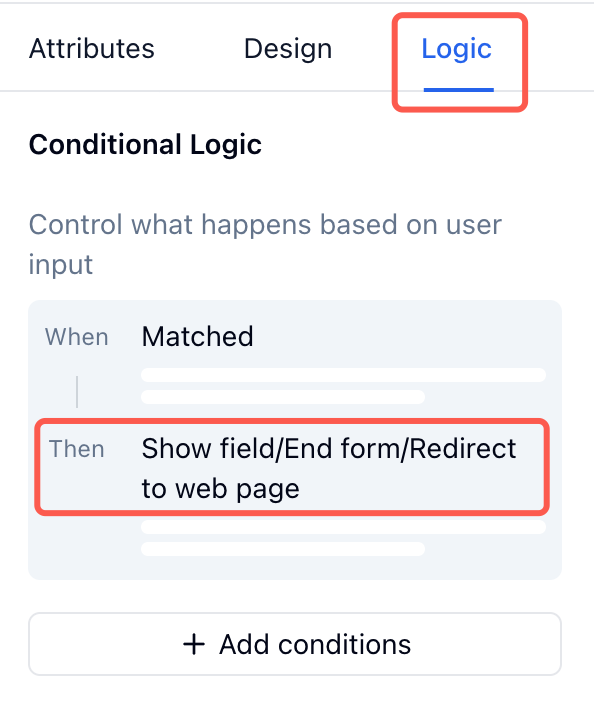
FormHug’s conditional logic lets you show only the relevant follow-up, so respondents do not see questions that do not match their answer.
How to Build a Yes or No Survey in FormHug
Step 1: Start with the decision you need to make
Write down what the survey should help you decide. For example: “Should we improve onboarding?” or “Which users are ready for a sales follow-up?” The decision tells you which yes/no questions matter.
Step 2: Create the first draft with AI
Open FormHug and describe the survey in plain language: “Create a customer feedback survey with yes/no questions and follow-up questions for negative answers.” The AI builder generates the fields, answer options, and initial structure.
Step 3: Add conditional follow-ups
For each important yes/no question, add one follow-up question for Yes and one for No. Keep the follow-up specific: “What was missing?” is better than “Why?”
Step 4: Publish and review answers by segment
Share the survey link, then review answers by Yes and No groups. For broader research workflows, the survey maker feature page explains FormHug’s question types, logic branching, and response analysis.
Frequently Asked Questions
Are yes or no survey questions reliable?
Yes, when the question is truly binary. They become unreliable when the respondent needs nuance, such as “sometimes,” “not sure,” or “not applicable.” Use yes/no questions for clear facts, behaviors, and routing decisions.
What is the difference between yes/no and dichotomous questions?
Yes/no questions are one type of dichotomous question. A dichotomous question gives respondents two answer choices, such as Yes/No, True/False, Agree/Disagree, or Pass/Fail.
Should I include Maybe as an option?
Only include Maybe when uncertainty is a meaningful answer. If the question is about a factual behavior, such as “Did you attend the webinar?”, Maybe usually creates noise. If the question is about intent, such as “Would you buy this?”, Maybe may be useful.
How many yes/no questions should a survey include?
Use as many as the decision requires, but avoid long strings of binary questions with no context. For most feedback surveys, 3 to 6 yes/no questions plus targeted follow-ups is more useful than 15 yes/no questions in a row.
Can yes/no questions work for customer satisfaction?
Yes, but they should not replace rating scales entirely. “Did we solve your issue?” is useful. For satisfaction level, a rating scale or NPS question usually captures more nuance.
Can FormHug show a different follow-up based on Yes or No?
Yes. FormHug supports conditional logic, so a Yes answer can show one follow-up and a No answer can show another. This keeps the survey shorter for each respondent while collecting better context.
Related
- How to Use Conditional Logic in Forms - show different follow-up questions based on yes/no answers
- Dichotomous Survey Questions - compare Yes/No with other two-choice survey formats
- How to Create an Evaluation Form - turn ratings and binary checks into actionable feedback
- NPS Survey Best Practices - pair score-based survey questions with better follow-ups
Every vague binary question costs you a chance to learn something useful. Turn each Yes or No into a clear next step, then collect the context behind it. Create your survey ->

Written by
FormHug TeamProduct, research, and form automation team
The FormHug Team brings together product builders, workflow researchers, and form automation practitioners who study how people collect, route, and act on information online. Our guides are based on hands-on product testing, template analysis, customer workflow patterns, and deep experience with forms, surveys, quizzes, AI-assisted creation, integrations, and results sharing.