From GPT Prompt to a Usable Online Form
Create with AI
Describe the workflow and get a form draft
Use FormHug to create forms from prompts, then share, automate, and reuse the structured responses.
It is easy to leave a chat with a convincing list of questions and still have no form to send. Someone must copy the draft into a builder, choose field types, configure the response experience, publish a link, and later find the submissions. The prompt solved the writing problem; the workflow still has a last mile.
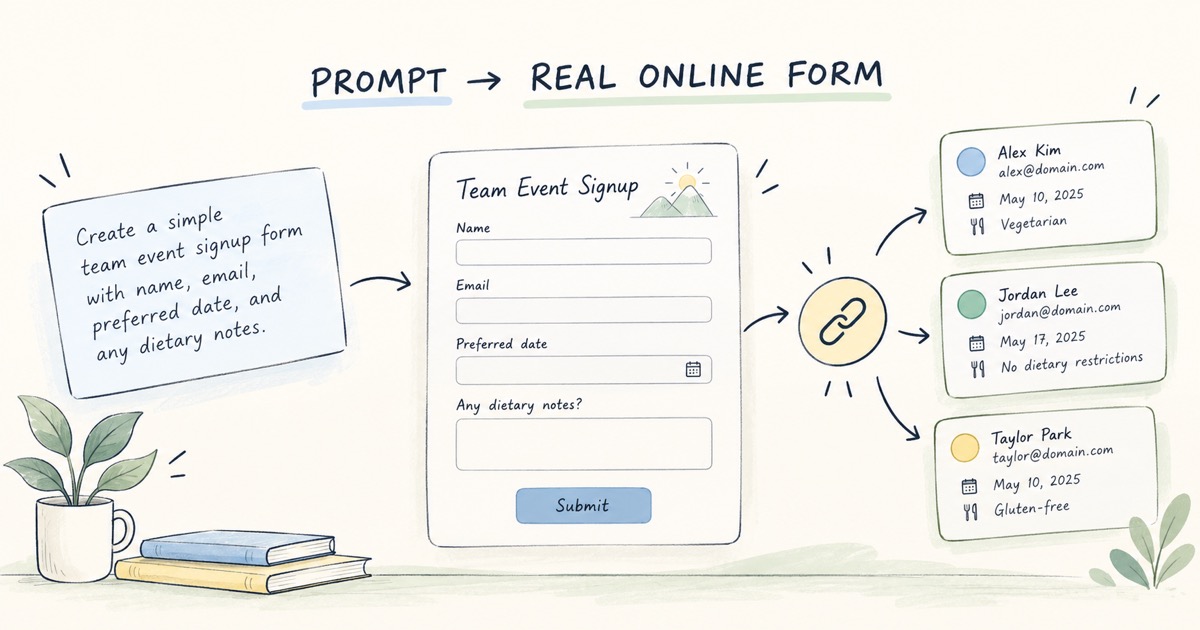
FormHug’s ChatGPT connection is designed to bridge that gap: describe the job in plain language, create a hosted form, refine its structure, and share it with people who are not in the original conversation. The important change is not that GPT can suggest questions. It is that a prompt can become a usable collection workflow with a response destination.
A Draft Is Not Yet an Online Form
A GPT response may contain good question wording, but a usable form also needs structure. Each question needs an appropriate input type; required fields should be limited to what the task needs; instructions should make sense to respondents; and the form must have a place to store submissions.
The difference is practical. A list of “name, email, preferred session” can be copied into a form builder, but it does not decide whether a session is a single choice, whether email is validated, what confirmation respondents see, or who can review the answers. Those choices determine whether the form works after the conversation ends.
What Changes When a Prompt Can Create a Real Form
With FormHug connected in ChatGPT, the conversation can move from describing the goal to creating a hosted form. You can ask for a registration, survey, quiz, feedback form, intake, or other structured workflow; then refine fields and wording conversationally. FormHug provides the public form experience and stores submitted responses for later review.
This is different from asking GPT to return HTML or a question outline. A code snippet needs to be deployed and connected to data storage. A hosted form already has a respondent-facing link and a managed submission workflow. The product boundary matters: the language model helps translate intent into a structure, while the form service operates that structure.
Describe the Outcome, Then Review the Structure
A prompt works best when it names the respondent, the moment, and the information needed. For example:
Create a registration form for a 90-minute product workshop. Collect each
participant’s name, work email, role, and one question they hope the session
will answer. Let them choose one of three session times. Keep the introduction
brief and show a confirmation after submission.
The first generated form is a draft, not an instruction to publish without review. Check whether each field is necessary, whether the choices are complete, and whether the form makes sense to someone who has not seen the chat. A prompt should describe the goal and constraints; the person organizing the workflow remains responsible for deciding what to collect.
A Prompt-to-Form Workflow in Four Moves
1. State the job and audience
Say what the form should help you do and who will fill it out. “Collect workshop registrations from external attendees” gives more context than “make a form.”
2. Describe the minimum useful information
List the details needed to run the workflow. Separate required information from optional context, and avoid collecting sensitive or identifying data without a clear purpose.
3. Refine the respondent experience
Review the field types, labels, answer choices, and confirmation. Ask for edits where a question is unclear or too demanding. If different people need different questions, explain the routing logic rather than assuming the AI knows it.
4. Share the link and work with responses
Preview the public form, test a normal submission, and share the link through the channel respondents use. Once responses arrive, review or summarize them in the context of the original goal.
This is the workflow we want to make feel continuous: plan in conversation, collect through a form people can complete, and return to structured responses when it is time to act. For examples of the kinds of work that fit this pattern, see forms you can build inside ChatGPT.
The Human Review Still Matters
Prompt-driven creation reduces setup friction; it does not decide what the organization should ask. Review the form for clarity, relevance, privacy, and operational ownership before sharing it. Ask whether every required field is truly needed, whether the respondent knows what happens next, and whether someone will monitor the submissions.
Do not treat a generated form as a policy review, consent notice, or security assessment. When the form collects health, financial, employment, or other sensitive information, use your organization’s approved language and processes. The tool can organize a workflow; it cannot authorize the data collection for you.
FormHug is available as an app in ChatGPT for creating, editing, publishing, and analyzing hosted forms. If you use a different agent environment, FormHug also provides an MCP path; choose the connection that fits the tool you already use. See how to create a form in ChatGPT for the user-facing walkthrough, or how FormHug works as a real online form for the distinction between a generated draft and a hosted form.
Who Benefits from Prompt-to-Form Creation?
This workflow is useful when planning and collection naturally happen together: a facilitator preparing registration, a product team shaping feedback questions, a teacher creating a knowledge check, or an operator collecting intake details. In each case, the value comes from reducing the handoff between an idea and a form respondents can actually use.
It is less useful when the task requires a complex custom application, a regulated workflow with unreviewed data rules, or a survey program whose sampling design needs specialist input. In those cases, use the prompt to draft the structure, then bring in the appropriate technical, legal, privacy, or research review before launch.
Continue from the Conversation
If your plan is already taking shape in ChatGPT, you do not need to stop at suggested questions. Describe the workflow, review the generated fields, and check the respondent-facing form before sharing it. FormHug turns that prompt into a hosted collection point; the next step is deciding how your team will use what comes back.
- How to Create a Form in ChatGPT — follow the practical setup and sharing workflow.
- Can ChatGPT Create a Real Online Form? — understand the difference between generated content and hosted collection.
- 10 Forms You Can Build Inside ChatGPT — explore prompts for surveys, registrations, quizzes, and intake.
A good prompt can start the form, but the work is not finished until respondents can submit it and someone can use the answers. Turn your next GPT prompt into a real workflow with FormHug in ChatGPT →

Written by
FormHug TeamProduct, research, and form automation team
The FormHug Team brings together product builders, workflow researchers, and form automation practitioners who study how people collect, route, and act on information online. Our guides are based on hands-on product testing, template analysis, customer workflow patterns, and deep experience with forms, surveys, quizzes, AI-assisted creation, integrations, and results sharing.