How to Build an Online Exam with Automatic Scoring
Create the assessment
Turn this into a scored assessment
Build an assessment with scoring, result pages, feedback, and records you can review later.
An online exam can return a score in seconds and still leave the instructor with more questions: Was the answer key correct? Does the pass mark reflect the material? Can a learner see what to review? Automatic scoring makes the calculation faster; it does not make those decisions for you.
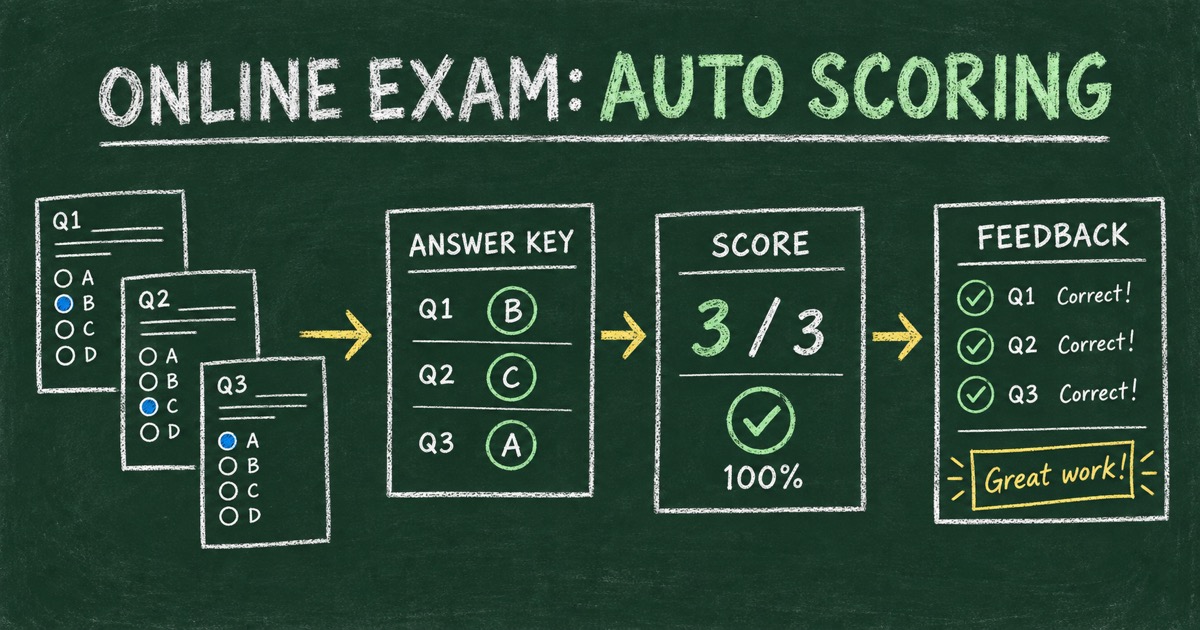
To build an online exam with automatic scoring, decide what each question measures, configure a verified key and point rule, choose how results should be interpreted, and test the full learner experience before sharing the link. This guide focuses on that scoring workflow—not on treating a quiz score as proof of identity or real-world competence.
TL;DR — Automatic scoring applies a configured answer key and point rule to responses, then returns a consistent result without manual calculation.
- Use auto-scoring for answers with a defensible key and a predictable scoring rule.
- Explain the pass threshold and how each question contributes to the result.
- Test correct, incorrect, and boundary cases before learners take the exam.
- Works for: knowledge checks, onboarding, course review, product training, and practice exams.
- Essays and consequential decisions may still require qualified human review.
What Is an Online Exam with Automatic Scoring?
An automatically scored online exam is a web-based assessment where a system compares submitted answers with configured answer rules, calculates points, and presents a result. It is most straightforward for objective questions with a clearly defined correct response, such as a single-answer multiple-choice item or a numeric answer with an accepted value.
The score is a calculation, not a judgment about every aspect of learning. A correct total depends on accurate questions, a valid answer key, sensible point values, and a result policy that matches the exam’s purpose. If any of those inputs are wrong, the software can reproduce the error consistently.
Decide Which Questions Can Be Auto-Scored
Before choosing a quiz tool, sort questions into two groups: those with a clear scoring rule and those that require interpretation. Multiple choice, true/false, and exact-answer questions are often suitable for automatic scoring when the accepted answer is unambiguous. An essay about a complex decision may need a rubric and human judgment even if an AI can suggest a score.
Ask of every item: “Could two qualified reviewers agree on the scoring rule before seeing a response?” If not, clarify the prompt, define accepted alternatives, or keep the item for manual review. Do not force an open-ended answer into an exact-match rule if equivalent wording should receive credit.
For the content layer, see how to turn an AI question bank into an online exam. It covers selecting and checking questions before they become a scored test.
Set Points and a Passing Rule Learners Can Understand
Write down how many points each question is worth and whether every item has equal weight. Equal points are transparent and often work for short knowledge checks. Weighted points can reflect importance or complexity, but the rationale should be tied to the learning objectives.
Then set the passing rule. A pass mark should reflect what a learner must demonstrate, not simply create a desired pass rate. If the exam includes sections, decide whether the total score is enough or whether a minimum score is required in a critical section. Tell learners the relevant rules before they begin.
Keep the result language aligned with the score. A learner who misses a threshold needs a next step—review a section, practice again, or speak with an instructor—not only a red “fail” label. A short quiz for formative practice may use encouraging feedback across all ranges rather than a strict pass/fail distinction.
Use Feedback to Make Scores Actionable
A total score answers “How many points did this response earn?” It does not explain why an answer was wrong or what to do next. Add per-question explanations when they support learning, and use score-based feedback only when each range corresponds to a real difference in performance or follow-up.
For example, a practice exam might direct a learner to review the topic behind missed questions. A required onboarding assessment might show whether the learner met the stated threshold and how to retake it. Avoid claims such as “certified” or “competent” unless the organization has a validated process that gives those words their meaning.
FormHug’s quiz maker supports scored quizzes, answer explanations, and result feedback. The question author still needs to verify keys, choose points, and decide what a score means for the course or program.
Configure and Test the Exam in Four Steps
Step 1: Define the learning outcome
List what the exam should measure and which questions provide evidence for each outcome. Remove duplicate items before you set scores.
Step 2: Configure the answer key
Mark the correct response for each objective question and document accepted alternatives where appropriate. Ask a subject-matter reviewer to check high-consequence content.
Step 3: Set points and result rules
Choose point values, the pass condition, feedback, and any retake instructions. Make the rules visible to learners before they answer.
Step 4: Preview representative outcomes
Submit known correct and incorrect patterns, including a response near the pass boundary. Confirm the total, status, explanation, and result page all match the rule you intended.
Automatic Scoring Has Limits
Automatic scoring reduces repetitive calculation and applies a configured rule consistently. It does not prevent someone from sharing answers, confirm who took the test, prove the questions cover the full curriculum, or guarantee that a pass score predicts workplace performance.
For a low-stakes practice quiz, immediate scoring may be all the workflow needs. For certification, employment, safety, or other consequential outcomes, add appropriate human review, identity and integrity controls, accessibility checks, and a documented appeal or retake path. The assessment owner should decide those safeguards before the exam is used.
Frequently Asked Questions
How do I create an online exam with automatic scoring?
Choose questions with clear scoring rules, verify the answer key, set point values and a stated pass condition, configure learner feedback, then test correct, incorrect, and boundary responses before sharing the exam.
What types of exam questions can be auto-scored?
Questions with a defined key—such as single-answer multiple choice, true/false, or exact numeric responses—are common candidates. Open responses may need human review when more than one wording or reasoning path can be correct.
How should I choose a passing score for an online exam?
Set the threshold based on the minimum knowledge or skill the exam is meant to verify. Check it against the question blueprint and explain it to learners; do not choose a cutoff only to produce a preferred pass rate.
Can an online exam show explanations after automatic grading?
Yes, if the quiz platform supports answer explanations and the exam owner chooses when to reveal them. Immediate explanations suit many practice checks; formal exams may need to delay feedback until the assessment window closes.
Does automatic scoring make an online exam secure?
No. Scoring calculates a result from submitted answers. Exam security, identity verification, question exposure, and evidence of independent work are separate concerns and need their own controls.
Can FormHug automatically score an online exam?
FormHug supports scored quizzes with answer keys, explanations, and result feedback. Review the current quiz settings and test the public respondent experience before using one for a formal program.
Related
- How to Create an Online Quiz — plan question types, explanations, settings, and the result page.
- How to Create a Quiz for Employee Training — use a scored check after a workplace learning session.
- How to Create a Mini Exam Online — build a short assessment for a focused topic.
A fast score is only useful when the key and pass rule are fair. Test the entire result path before inviting learners to take your next online exam with FormHug →

Written by
FormHug TeamProduct, research, and form automation team
The FormHug Team brings together product builders, workflow researchers, and form automation practitioners who study how people collect, route, and act on information online. Our guides are based on hands-on product testing, template analysis, customer workflow patterns, and deep experience with forms, surveys, quizzes, AI-assisted creation, integrations, and results sharing.