Restaurant Reservation Form: How to Take Bookings Without a Phone Call
Start from a template
Use a ready-made form structure
Pick a registration, booking, intake, application, or order template and customize it for your workflow.
Phone reservations work until they do not. Someone calls during service. A staff member writes the wrong time. A guest forgets the booking. A large party says “about ten people” and arrives with sixteen.
A restaurant reservation form template gives guests a simple way to request a table and gives your team the details needed to confirm, prepare, and avoid avoidable back-and-forth. It does not have to be a full reservation platform. For many small restaurants, pop-ups, private dining rooms, catering teams, and special events, a well-built form is enough.
This guide shows how to create a restaurant reservation form, what fields to include, when to take deposits, and how to use templates for dining bookings.
TL;DR - A restaurant reservation form should collect guest name, phone or email, party size, date, time, seating preference, dietary notes, occasion, and confirmation status.
- Collect the operational details - party size, time, allergies, high chairs, accessibility needs, and special occasions matter more than long comments.
- Use approval when capacity is tight - a request form can be safer than instant confirmation.
- Add deposits for high-risk bookings - large parties, tasting menus, holidays, and private rooms often need payment.
- Works for: restaurants, pop-ups, private dining, catering tastings, wine dinners, event spaces, and chef’s tables.
- FormHug can collect bookings, deposits, and guest notes in one form.
What Is a Restaurant Reservation Form?
A restaurant reservation form is an online form that lets guests request or book a table. It collects the details your team needs before confirming: who is coming, how many people, when they want to dine, and whether there are special needs.
It is different from a contact form because it is structured around availability and service logistics. It is different from a full reservation platform because you can keep the workflow simple: collect the request, review capacity, confirm by email or phone.
For broader booking patterns, see booking form templates and how to create an online booking form.
Free Restaurant Reservation Form Template
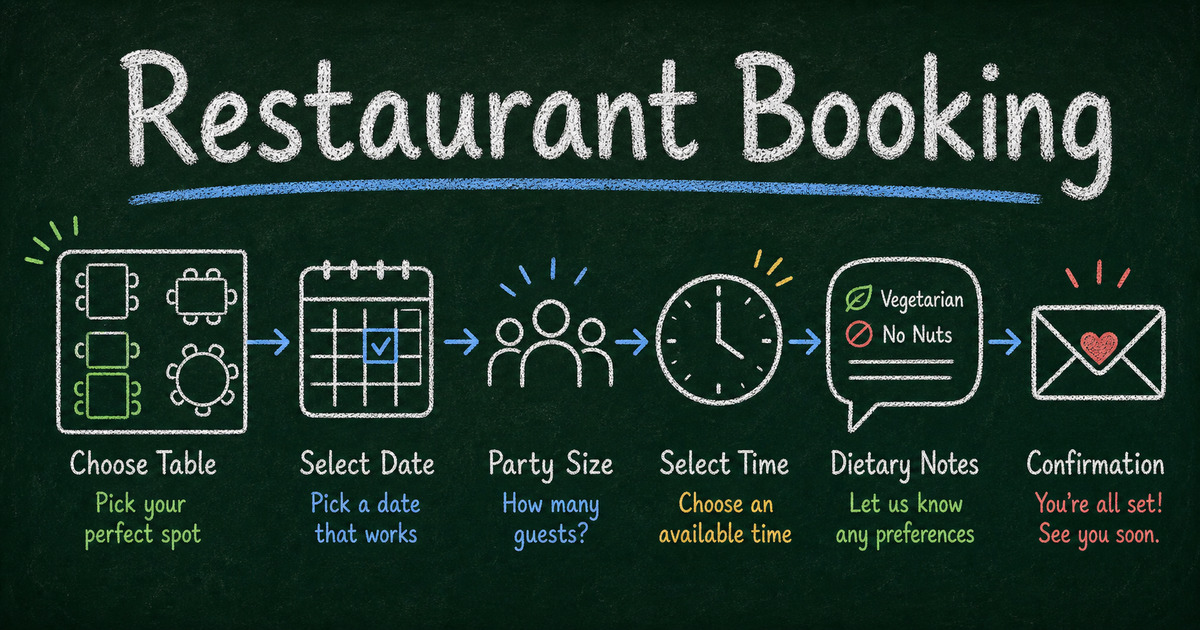
Use the Restaurant Booking Form as the starting point for table bookings. It covers the core details most restaurants need before confirming a reservation: guest contact, party size, preferred date and time, seating notes, dietary needs, and special requests.
Customize the template based on the booking model:
| Restaurant workflow | What to add |
|---|---|
| Standard table booking | Preferred time, party size, seating preference |
| Large party request | Deposit, cancellation policy, contact phone |
| Private dining inquiry | Budget, event type, room preference, menu notes |
| Tasting menu reservation | Dietary restrictions, prepaid deposit, arrival policy |
| Pop-up dinner | Ticket quantity, time slot, payment, confirmation email |
The important choice is whether the form creates a confirmed booking or a reservation request. If capacity changes quickly, collect the request first and confirm manually.
What to Include in a Restaurant Reservation Form
Use this baseline:
| Section | Fields |
|---|---|
| Guest details | name, phone, email |
| Reservation | date, time, party size |
| Seating | indoor, outdoor, bar, private room, accessibility |
| Dining context | occasion, tasting menu, kids, high chair |
| Dietary needs | allergies, restrictions, notes |
| Confirmation | request vs confirmed booking |
| Payment | deposit or cancellation fee if needed |
| Consent | cancellation policy acknowledgement |
Keep the form short. A guest should be able to request a table in under a minute unless the booking requires a deposit or special menu.
Reservation Request vs. Instant Booking
There are two common models:
| Model | Best for |
|---|---|
| Reservation request | small restaurants, limited seating, events, private rooms |
| Instant booking | fixed time slots, predictable capacity, automated confirmations |
If your team still checks a paper book or POS calendar, use a reservation request form. The guest submits preferences, and staff confirms availability. This avoids promising tables you do not have.
If you have reliable capacity rules and time slots, use instant booking. In FormHug’s booking form builder, you can create time-slot booking flows for appointment-style use cases.
How to Create a Restaurant Reservation Form
Step 1: Choose the booking model
Decide whether the form is:
- a request that staff approves;
- an instant booking for available slots;
- a private dining inquiry;
- a special event reservation;
- a catering tasting request.
The model determines whether you need payment, approval, or follow-up questions.
Step 2: Ask for party size before special requests
Party size changes everything: table layout, staff planning, prep, and whether a deposit is needed. Put it near the top.
Use a number field or dropdown instead of open text. “6” is easier to process than “maybe six or seven.”
Step 3: Add date and time choices
For simple request forms, ask for preferred date, preferred time, and optional backup time. For fixed capacity, use booking slots.
If you are not offering lunch on Mondays, do not let guests request Monday lunch. The less impossible input you accept, the less apologizing your staff has to do.
Step 4: Collect dietary and accessibility needs
Ask:
- Does anyone in your party have allergies?
- Any dietary restrictions?
- Do you need wheelchair-accessible seating?
- Do you need a high chair?
- Is this a special occasion?
Use conditional logic so “Yes” opens a details field.
Step 5: Add policy acknowledgement
For peak times, large parties, tasting menus, deposits, and holidays, include a short policy acknowledgement:
- cancellation window;
- late arrival policy;
- deposit or no-show terms;
- party-size change policy.
Keep it readable. Policy copy should prevent confusion, not bury the guest in legal text.
Restaurant Reservation Form Templates
Standard dining reservations
Use the Restaurant Booking Form for general dining reservations and table booking forms. It is the closest match for party size, time, contact details, and guest notes.
Private rooms and event spaces
Use the Room Booking Form for private rooms, event spaces, tasting rooms, or venue-style bookings.
Catering and food orders
Use the Food Order Form Template when the form is closer to pre-ordering food than booking a table.
General service appointments
Use the Service Booking Form when reservations are part of a broader service workflow, such as tastings, consultations, or event planning.
When to Take a Deposit
Deposits are useful when a no-show creates real cost:
- large parties;
- tasting menus;
- private rooms;
- holiday seatings;
- chef’s table experiences;
- catering tastings;
- prepaid events.
Use a payment form when the reservation must include money. FormHug can add Stripe payment fields to forms; the broader setup is covered in how to create a payment form. We tested deposit-style reservation forms and found the cleanest versions keep deposits and policies close together so guests understand the commitment before checkout.
Frequently Asked Questions
What should a restaurant reservation form include?
It should include guest name, phone or email, party size, date, time, seating preference, dietary notes, occasion, and any cancellation or deposit policy.
Should a reservation form confirm bookings automatically?
Only when capacity is reliable. If staff needs to check availability, make the form a reservation request and confirm manually.
Can I take deposits through a reservation form?
Yes. Add a payment field for deposits, prepaid menus, private rooms, or special events where no-shows are costly.
Should I ask for dietary restrictions on every reservation?
Yes, but keep it lightweight. A simple yes/no question with a conditional details field is enough for most dining reservations.
How long should a restaurant reservation form be?
Most dining reservation forms should take under one minute. Private dining and event inquiries can be longer because the request is more complex.
Can FormHug handle restaurant booking forms with payment?
Yes. FormHug can collect reservation details and Stripe payment in one form, which works well for deposits, tasting menus, private rooms, and prepaid dining events.
Related
- Booking Form Templates — browse booking patterns for restaurants, rooms, services, and consultations.
- How to Create an Online Booking Form — build booking forms around availability, capacity, and confirmation.
- How to Create a Payment Form with Stripe — add deposits or prepaid reservations to a form workflow.
- How Many Questions Should a Survey Have? — keep reservation forms short enough for guests to finish.
A good reservation form saves staff time without making the guest feel processed. Ask for the few details that make service smoother, then confirm clearly. Create your form →

Written by
FormHug TeamProduct, research, and form automation team
The FormHug Team brings together product builders, workflow researchers, and form automation practitioners who study how people collect, route, and act on information online. Our guides are based on hands-on product testing, template analysis, customer workflow patterns, and deep experience with forms, surveys, quizzes, AI-assisted creation, integrations, and results sharing.