How to Create a Waitlist Form for a Product, Course, or Event
Capture better leads
Build a form that qualifies the next step
Create a lead form or recommendation quiz that asks the right questions and routes every response.
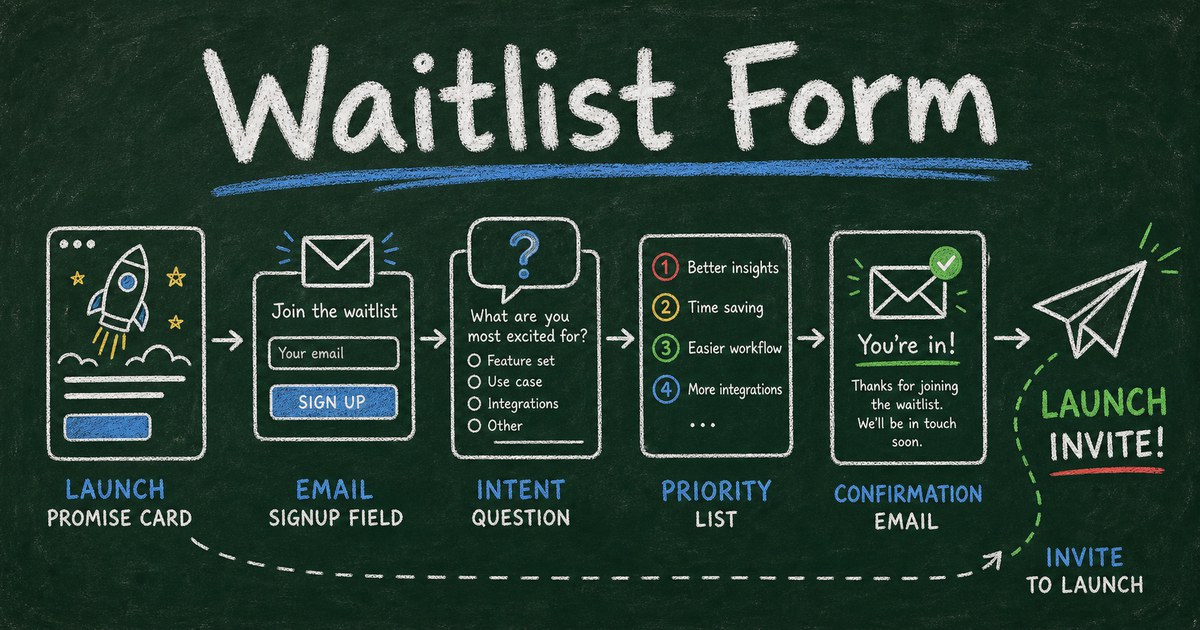
A waitlist is not proof that people will buy. It is proof that your promise was interesting enough for someone to leave a trace. The difference matters.
Too many waitlist forms collect only email addresses, celebrate a big number, and then disappoint at launch because the list says nothing about who signed up, why they care, or what they expected. A stronger waitlist form captures demand and context at the same time.
This guide shows how to create a waitlist form for a product, course, event, beta, community, or service launch without turning it into a long application.
TL;DR - A waitlist form collects contact details and demand signals from people who want early access to something not fully available yet.
- Ask for email plus intent - one qualifying question is often more useful than a large anonymous list.
- Segment by use case - product, course, and event waitlists need different follow-up messages.
- Confirm immediately - people should know they are on the list and what happens next.
- Works for: SaaS launches, online courses, limited events, communities, product drops, coaching programs.
- A waitlist validates interest, not retention; use it to learn who to invite first.
What Is a Waitlist Form?
A waitlist form is a short online form that lets people register interest before a product, course, event, service, or offer is fully available. It usually collects name, email, and one or two context fields that help you prioritize or personalize follow-up.
It is different from a newsletter signup. A newsletter says “send me updates.” A waitlist says “I want access when this opens.” That intent is stronger, but only if the form captures enough context to understand it.
It is also different from a full application form. A waitlist should be lightweight. If it takes five minutes to join, it is no longer a waitlist; it is an application.
The Signal, Segment, Sequence Framework
A useful waitlist has three jobs:
| Job | What it captures | Example |
|---|---|---|
| Signal | How strong is the interest? | ”How soon would you use this?” |
| Segment | Who is this person? | Product team, coach, student, event attendee |
| Sequence | What should happen next? | Confirmation, invite, beta cohort, launch email |
This framework keeps the form short while making the list useful.
If you only collect email, every lead looks the same. If you ask 15 questions, fewer people join. The middle path is one contact section, one intent question, one segment question, and one optional note.
What to Include in a Waitlist Form
Use these fields as a starting point:
| Field | Required? | Why it matters |
|---|---|---|
| Name | optional or required | Personalizes follow-up |
| required | Sends launch access | |
| Use case | required | Segments the list |
| Urgency | optional | Prioritizes early invites |
| Role or company | optional | Helps B2B qualification |
| Referral source | optional | Shows which channels work |
| Notes | optional | Captures unexpected demand |
For a product waitlist, ask what problem they want solved. For a course waitlist, ask their experience level or goal. For an event waitlist, ask preferred date, location, or ticket type.
If the form is also a lead magnet, keep the promise clear. “Join the waitlist” is weaker than “Get first access to the beta and the launch discount.”
Waitlist Form Templates and Starting Points
Templates help you avoid overbuilding the first version.
- Workshop Registration Form Template - useful when a waitlist will become a paid or limited-seat workshop.
- Course Registration Form Template - useful when the waitlist is for an online course or cohort launch.
- Event Registration Form Template - useful when the waitlist will become a confirmed event signup flow.
- Webinar Registration Form Template - useful when the waitlist is tied to a launch webinar or live session.
If you want a dedicated early-access form, start from the FormHug template center and search for “waitlist,” “lead capture,” or “registration.”
How to Create a Waitlist Form
Step 1: Write the promise
Before adding fields, write the line people are joining for:
- “Get early access to the beta.”
- “Join the first cohort when enrollment opens.”
- “Be notified when a seat becomes available.”
- “Get first access to the product drop.”
- “Join the waitlist for the next workshop date.”
The promise should answer: what will they get, when might they get it, and why should they join now?
Step 2: Build the short form
In FormHug, start with AI, a template, or a blank form.
Use a prompt like:
Create a waitlist form for a new online course. Collect name, email, experience level, main goal, preferred start month, and optional notes. Send a confirmation message after submission.
In our testing, the best waitlist drafts had 4 to 6 fields. More than that started to feel like an application.
Step 3: Add one prioritization question
One good prioritization question makes follow-up better:
| Waitlist type | Prioritization question |
|---|---|
| SaaS beta | What workflow would you use this for first? |
| Course | What goal are you trying to reach? |
| Event | Which date or city works best? |
| Product drop | Which item are you most interested in? |
| Community | What would make this worth joining? |
This question helps you invite the right people first instead of treating the list as a queue.
Step 4: Send confirmation and plan the next email
A waitlist form should trigger a confirmation immediately. Include:
- Confirmation that they are on the list
- What happens next
- Approximate timing, if known
- Any benefit for joining early
- A way to update their information if needed
If you want to automate richer follow-up, read how to send emails to form submitters.
Waitlist Forms by Use Case
Product waitlist
Collect role, company type, use case, urgency, and email. Do not ask for a full product requirements document. The goal is to identify who has the strongest pain now.
Course waitlist
Collect learning goal, experience level, preferred cohort timing, and email. This helps you segment beginner and advanced students before launch.
Event waitlist
Collect name, email, preferred date, ticket type, and party size. If seats open, you can invite the right person quickly. For confirmed events, use an RSVP form or registration form templates instead.
Service or coaching waitlist
Collect desired service, urgency, budget range if appropriate, and contact details. A waitlist can become a light qualification form without becoming a full intake. For deeper context, use how to create an intake form.
How FormHug Compares for Waitlist Forms
| Need | FormHug | Simple email form |
|---|---|---|
| AI form draft | Yes | Usually no |
| Conditional questions | Yes | Often limited |
| Confirmation emails | Yes | Varies |
| Templates | Lead, registration, product feedback, applications | Usually generic |
| Broader workflow | Can become registration, booking, payment, or survey | Usually signup-only |
A landing page tool can be enough for pure email capture. Use FormHug when the waitlist needs useful fields, confirmation, segmentation, and a path into later workflows.
Frequently Asked Questions
How do I set up a waitlist form?
Create a short form with email, one segment question, one intent or urgency question, and an optional note. Publish it as a shareable link or embed it on your launch page, then send a confirmation after submission.
What fields should a waitlist form include?
At minimum, collect email and one useful context field. For most waitlists, add name, use case, urgency, preferred timing, and optional notes. Keep the form to 4 to 6 fields unless it is an application.
Is a waitlist a good way to validate demand?
A waitlist validates interest in the promise, not proof of purchase or retention. It is useful when you collect enough context to learn who signed up and why. It is weak when it only collects emails.
Should a waitlist form ask for payment?
Usually no. If you need stronger commitment, consider a small deposit or paid reservation, but make the terms clear. For paid registrations or deposits, use a payment form workflow instead of a basic waitlist.
Can I use a waitlist for an event?
Yes. Use a waitlist when seats, dates, or tickets are not available yet. Once the event is open, switch to a registration or RSVP form so people can confirm attendance.
Is FormHug free for waitlist forms?
Yes. You can create a waitlist form with FormHug AI, publish it, and collect responses on the free plan.
Related
- How to Build a Lead Generation Form - qualify prospects without adding too much friction
- Best Registration Form Templates - turn a waitlist into confirmed signups
- How to Send Emails to Form Submitters - automate confirmation and launch follow-up
A waitlist should tell you more than “someone typed an email.” Capture the promise, the person, and the reason they care. Create your waitlist form →

Written by
FormHug TeamProduct, research, and form automation team
The FormHug Team brings together product builders, workflow researchers, and form automation practitioners who study how people collect, route, and act on information online. Our guides are based on hands-on product testing, template analysis, customer workflow patterns, and deep experience with forms, surveys, quizzes, AI-assisted creation, integrations, and results sharing.