Scholarship Application Form: Templates for Schools and Nonprofits
Start from a template
Use a ready-made form structure
Pick a registration, booking, intake, application, or order template and customize it for your workflow.
A scholarship application form has to do two jobs at once: feel approachable to students and produce review-ready information for the people awarding funds. If either side fails, the process gets messy fast.
Too little structure creates incomplete applications, missing documents, and hard-to-compare essays. Too much structure makes the scholarship feel intimidating, especially for first-generation students, community programs, small nonprofits, and local awards.
This guide explains what to include in a scholarship application form, how to structure eligibility and essay questions, and how to build a cleaner online scholarship workflow in FormHug.
TL;DR - A scholarship application form collects eligibility, applicant details, academic or community background, essay responses, supporting documents, and consent so reviewers can compare applicants fairly.
- Start with eligibility - do not make students complete a full application before learning whether they qualify.
- Separate facts from judgment - contact details, documents, essays, and reviewer notes need different fields.
- Keep essay prompts focused - one strong prompt beats four vague ones.
- Works for: school scholarships, nonprofit grants, community awards, training stipends, creator funds, and youth programs.
- FormHug can generate application drafts, collect uploads, and organize responses for review.
Start from the Scholarship Application Template
If you do not want to build the scholarship form from a blank page, start from the Scholarship Application Form Template. It gives you the basic structure first: applicant details, eligibility-style questions, long-text responses, uploads, and consent.
Open the Scholarship Application Form Template ->
You can also try the public form itself before editing the template:
Open the live scholarship application form ->
Use the template as the starting structure, then customize it around your eligibility rules, essay prompts, supporting documents, and reviewer criteria. The sections below explain what to keep, what to remove, and where a scholarship form needs more care than a generic application.
What Is a Scholarship Application Form?
A scholarship application form is an online application used to collect information from students or applicants seeking financial support. It usually includes eligibility questions, contact details, academic or program information, short essays, supporting documents, and consent.
The form is not only a data collection tool. It is part of the applicant experience. A confusing scholarship form can discourage qualified applicants, especially when the award is meant to widen access.
If your scholarship process is part of a larger application workflow, read how to create an online application form. The same principles apply: ask only what reviewers need, group questions clearly, and explain how the information will be used.
The Scholarship Review Stack
Use the Scholarship Review Stack to design the form around the review decision:
| Layer | Purpose | Example |
|---|---|---|
| Eligibility | decide whether the applicant qualifies | school, age, location, program |
| Identity | know who is applying | name, email, phone |
| Fit | understand connection to the award | goals, field, community |
| Evidence | support the application | transcript, portfolio, recommendation |
| Essay | evaluate motivation and context | short written response |
| Consent | confirm truth and permission | certification checkbox |
This stack keeps the form fair. Reviewers should not have to infer eligibility from an essay or search an upload for basic facts. Applicants should not have to write long answers before passing simple eligibility gates.
What to Include in a Scholarship Application Form
Eligibility questions
Ask eligibility early:
- Are you currently enrolled in the required school, program, or community?
- Do you meet the age, grade, location, or residency requirement?
- Are you applying for the correct award category?
- Have you received this scholarship before?
Use yes/no or multiple-choice questions here. If an applicant is not eligible, route them to a polite message instead of letting them finish a form they cannot win.
Applicant details
Collect the basics:
- Full name
- Email address
- Phone number
- Mailing address, if required
- School or organization
- Grade level, program, or field of study
Only ask for sensitive personal information when it is genuinely required for eligibility, compliance, or payment. If the form collects minors’ information, review your consent process carefully.
Academic, program, or community background
The right fields depend on the award:
- GPA or academic standing
- Major or intended field
- Volunteer experience
- Leadership roles
- Financial need category
- Project or program participation
Use structured fields before open text. Reviewers can compare “hours volunteered” more easily when it is a number or range than when it is buried in an essay.
Essay questions
Keep essay prompts specific:
- What goal would this scholarship help you pursue?
- Describe a challenge you have worked through and what you learned.
- How have you contributed to your school, workplace, family, or community?
- Why is this program or field important to you?
Limit most scholarship forms to 1 or 2 essay prompts. If you need more, state word limits clearly. A 250-word answer often produces better review data than an open-ended “tell us your story.”
Documents and references
Common uploads include:
- Transcript
- Resume
- Portfolio
- Recommendation letter
- Proof of enrollment
- Financial aid document
Do not ask for uploads “just in case.” Each upload increases applicant effort and reviewer burden.
Scholarship Application Template
Use this structure as a starting point:
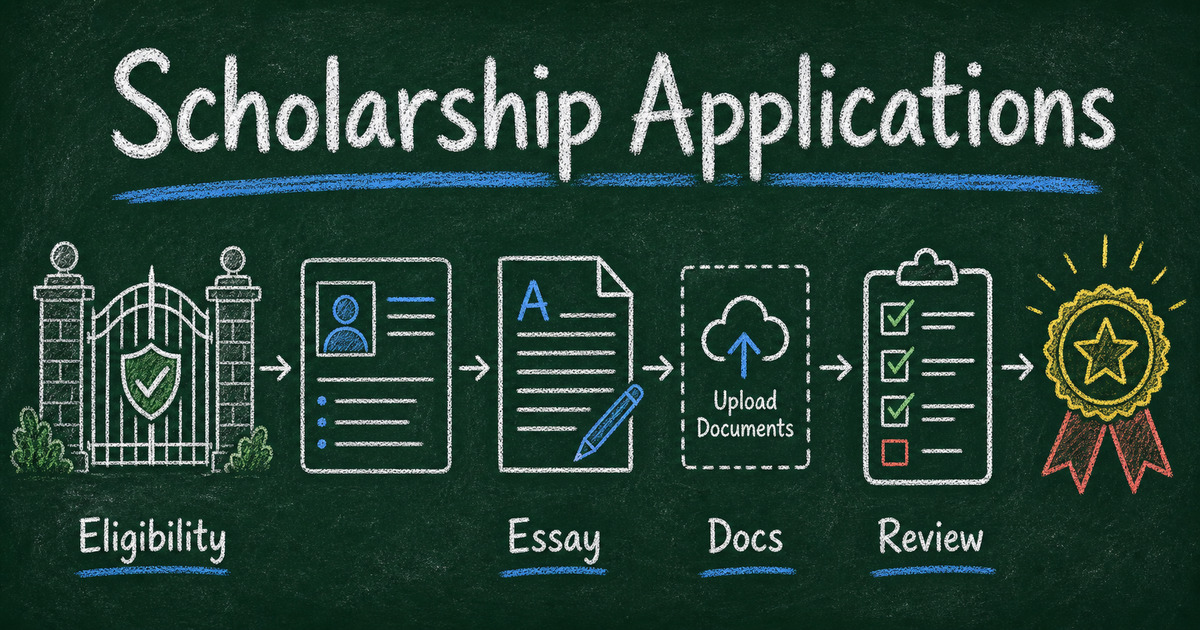
- Eligibility check
- Applicant contact details
- School or program information
- Award category
- Short background questions
- Essay prompt
- Supporting document upload
- Reference contact, if needed
- Consent and certification
- Confirmation message with next steps
For related applicant workflows, see volunteer application form and best form templates for businesses. The best scholarship forms borrow from both: they need human context and operational structure.
How to Build a Scholarship Application Form in FormHug
Step 1: Generate the first draft
Ask FormHug AI:
Create a scholarship application form for a local nonprofit. Include eligibility, applicant details, school information, one 250-word essay, document upload, reference contact, and consent.
Step 2: Add eligibility logic
If someone does not meet a requirement, show a short explanation and avoid collecting unnecessary information. This respects applicants’ time and keeps your response table cleaner.
Step 3: Separate applicant answers from reviewer notes
Applicant fields should be visible to the applicant. Reviewer notes, scores, and decisions should be handled separately in your review process. Do not mix internal judgment fields into the public application.
Step 4: Test the applicant experience
Submit a test application on mobile. In our testing, scholarship forms often fail on mobile because essay prompts, upload instructions, or long eligibility lists feel heavier than they look on desktop.
Frequently Asked Questions
How do I create a scholarship application form online?
Start with eligibility, then collect applicant details, school or program information, short essay responses, supporting documents, and consent. Use an online form builder so applicants can submit from any device.
What questions should be on a scholarship application form?
Ask about eligibility, contact details, school or program status, goals, community involvement, financial need if relevant, one or two essay prompts, supporting documents, and certification that the information is accurate.
How long should a scholarship application be?
Keep the core form as short as possible. Many scholarship applications can work with 10 to 15 fields plus one essay and one upload. Add more only when reviewers truly need the information.
Should a scholarship form ask for GPA?
Ask for GPA only if it is part of the eligibility or review criteria. If the scholarship is not academic-performance-based, GPA may add unnecessary friction or bias.
Can I collect recommendation letters through a form?
Yes, you can include an upload field or ask for a reference contact. For more formal processes, collect the recommender’s email and send a separate request.
Can FormHug create scholarship application forms?
Yes. FormHug AI can draft a scholarship application form, and you can edit fields, add uploads, include consent, and share the form with applicants by link or QR code.
Related
- How to Create an Online Application Form - design a complete applicant workflow
- Volunteer Application Form - collect values, availability, and fit for nonprofit programs
- Multi-Step Form - break longer applications into clearer stages
- Best Form Templates for Businesses - compare reusable form structures
Every unclear scholarship form quietly filters out someone who might have qualified. Start with eligibility, ask only what reviewers need, and make the path feel possible. Create your application form →

Written by
FormHug TeamProduct, research, and form automation team
The FormHug Team brings together product builders, workflow researchers, and form automation practitioners who study how people collect, route, and act on information online. Our guides are based on hands-on product testing, template analysis, customer workflow patterns, and deep experience with forms, surveys, quizzes, AI-assisted creation, integrations, and results sharing.