How to Create an Online Application Form for School, Jobs, Grants, and Volunteers
Start from a template
Use a ready-made form structure
Pick a registration, booking, intake, application, or order template and customize it for your workflow.
Application forms are where messy review processes begin. If the form asks the wrong questions, reviewers spend hours chasing missing details, comparing inconsistent answers, and making decisions from information that should have been collected upfront.
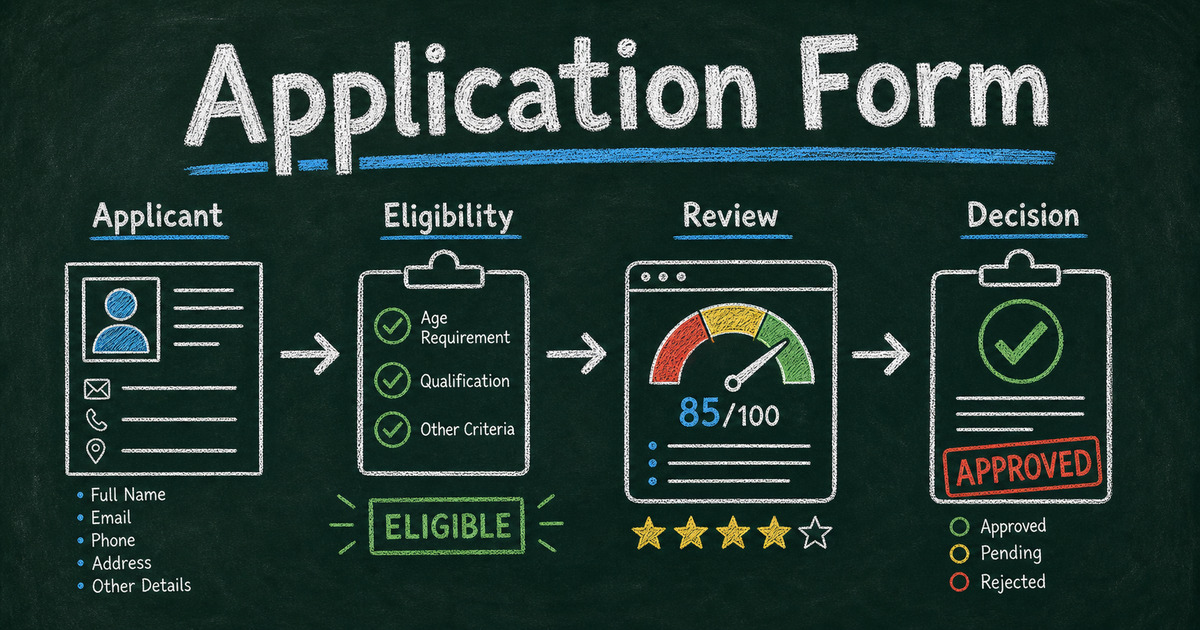
A good online application form is not just a digital version of a paper form. It is a review system in miniature: eligibility first, evidence second, logistics third, and follow-up permission at the end. That structure works for job applications, school programs, grants, vendors, volunteers, scholarships, and internal requests.
This guide explains how to create an online application form that collects review-ready information without overwhelming applicants.
TL;DR - FormHug helps you create online application forms with AI drafts, templates, structured questions, file-friendly workflows, and shareable links.
- Application means review - use an application form when a submission needs approval before the next step.
- Ask eligibility before evidence - disqualifying criteria should appear early so applicants do not waste time.
- Make answers comparable - reviewers need consistent fields, not 20 different essay formats.
- Works for: jobs, schools, grants, scholarships, vendors, volunteers, fellowships, and program admissions.
- Start with a template, then customize the scoring and review fields around your decision.
What Is an Online Application Form?
An online application form is a digital form used to collect information from people who want to be considered for a job, program, grant, school, vendor list, volunteer role, scholarship, or opportunity. Unlike registration forms, application forms do not automatically confirm participation. They feed a review or approval process.
The core question is: Can we make a fair decision from the information submitted?
If the answer is no, the form needs better structure. That does not always mean more questions. It often means clearer categories, better answer options, and fewer vague open-text prompts.
For simple signups, use a registration form template. For service onboarding, see how to create an intake form. For candidate or student evaluation after submission, pair the form with an evaluation form.
The Eligibility -> Evidence -> Logistics Framework
Use the Eligibility -> Evidence -> Logistics framework for application forms.
Eligibility answers whether the applicant is allowed or appropriate for the opportunity. Examples: age range, location, availability, experience level, required documents, organization type, budget, or program fit.
Evidence helps reviewers compare applicants. Examples: work samples, short answers, experience, goals, references, portfolio links, project descriptions, or financial need statements.
Logistics helps you follow up. Examples: contact details, scheduling availability, communication preference, consent, and next-step acknowledgement.
This order matters. If an applicant is not eligible, do not make them complete 15 essay fields before they find out. If they are eligible, collect evidence in a consistent format so reviewers are not comparing one applicant’s paragraph against another applicant’s checklist.
Application Form Questions by Use Case
Job application form questions
- Which role are you applying for?
- What is your relevant work experience?
- Which skill best matches this role?
- What is your earliest start date?
- Are you authorized to work in the required location?
- Share a portfolio, resume, or work sample link.
- Why are you interested in this role?
Use the Job Application Form Template when you need a structured hiring intake before interviews.
School or program application questions
- Which program are you applying to?
- What is your current education level?
- What experience or prerequisite knowledge do you have?
- What goal do you want to achieve through the program?
- Which schedule option works best?
- Do you need financial aid or accommodations?
- What should reviewers know before making a decision?
For student-focused workflows, the Student Registration Form Template can work when participation is open. Use an application form when the program has limited seats or review criteria.
Grant application form questions
- What project or organization is requesting funding?
- How much funding are you requesting?
- What problem does the project address?
- Who will benefit?
- What timeline will the project follow?
- How will you measure success?
- What budget categories will the funds cover?
Start with the Grant Application Form Template when you need structured project proposals and comparable budget details.
Volunteer application questions
- Which volunteer role interests you?
- What availability do you have?
- What relevant experience do you bring?
- Are there tasks you cannot perform?
- Do you need training before starting?
- Can we contact you for scheduling updates?
- Why do you want to volunteer with this program?
Volunteer forms should be respectful of time. If the role does not require review, use a registration form instead of an application form.
Vendor or partner application questions
- What product or service do you provide?
- Where do you operate?
- What insurance, license, or certification do you hold?
- What references or examples can you share?
- Which dates, markets, or categories are you applying for?
- What makes your offering a good fit?
- Who should we contact for follow-up?
Use the Vendor Application Form Template when submissions need review before approval.
Make Application Answers Easy to Review
The applicant experience matters, but the reviewer experience matters too. A beautiful application form still fails if every answer is hard to compare.
Use structured fields for anything reviewers will compare:
| Review need | Better field type |
|---|---|
| Eligibility | Yes/no, dropdown, multiple choice |
| Experience level | Multiple choice or rating |
| Availability | Checkbox list or date field |
| Budget range | Dropdown or number |
| Motivation | Short paragraph |
| Work sample | URL or file-friendly field |
| Consent | Checkbox |
Use open-ended questions carefully. A 250-word answer can be useful for motivation, fit, or project description. It is a poor format for availability, eligibility, or budget.
In our testing, the best application drafts use 2-4 open-ended questions and keep the rest structured. That gives reviewers enough context without turning every application into an essay packet.
How to Create an Online Application Form in FormHug
Step 1: Define the review decision
Write the decision in one sentence: “We will use this application to decide whether…” Then list the 3-5 criteria reviewers will actually use. Those criteria become your form sections.
Step 2: Generate a first draft
Open FormHug and describe the application in plain language:
“Create a 12-question volunteer application form for a community tutoring program. Include eligibility, availability, relevant experience, preferred age group, motivation, consent, and contact details.”
The AI draft gives you structure. Your job is to remove questions that do not affect review.
Step 3: Put eligibility first
Move disqualifying questions near the beginning. If location, age, availability, license, document, or experience level is required, ask before longer evidence questions.
Step 4: Publish, test, and review the first 5 submissions
Before sharing widely, submit a test application and ask one reviewer to score it. Then review the first 5 real submissions for missing information. If reviewers still need to email every applicant for clarification, the form needs another pass.
How FormHug Compares for Application Forms
| Need | FormHug | Basic form tools |
|---|---|---|
| AI application draft | Built in | Often manual |
| Templates | Job, grant, vendor, registration, intake, and feedback forms | Varies by tool |
| Review-ready structure | Easy to combine structured fields with short answers | Often starts as a blank form |
| Sharing | Public link and embed-friendly workflows | Usually link sharing |
| Broader workflow | Can connect applications to surveys, evaluations, payments, and follow-up forms | Often single-purpose |
If the form is only a contact request, a basic form tool is fine. If the submission affects review, eligibility, or approval, FormHug gives you a faster path from rough criteria to a structured application.
Frequently Asked Questions
How do I create an online application form?
Define the review decision, list the eligibility criteria, write structured questions for comparable answers, add evidence fields, collect contact details, test the form, and publish it as a shareable link or embedded form.
What should an application form include?
An application form should include applicant identity, contact information, eligibility questions, evidence or experience questions, logistics, consent, and follow-up permission. The exact fields depend on what reviewers need to decide.
What is the difference between an application form and a registration form?
An application form requires review before approval. A registration form confirms participation after submission. If every person who submits can join, use registration. If someone must evaluate the submission, use an application form.
How many questions should an application form have?
Short application forms often have 8-12 questions. More complex grant, vendor, job, or school applications may need 15-25 questions, but only if each field supports eligibility, evidence, logistics, or consent.
Should application forms use open-ended questions?
Yes, but sparingly. Use open-ended questions for motivation, project descriptions, goals, and context. Use structured fields for eligibility, availability, budget, role, experience level, and anything reviewers need to compare quickly.
Can I create a free online application form with FormHug?
Yes. FormHug lets you start building application forms for free, use AI to draft the structure, customize templates, publish a link, and collect responses.
Related
- How to Create an Intake Form - collect structured information before a service or consultation
- How to Create an Evaluation Form - review submissions, people, programs, or outcomes consistently
- Best Registration Form Templates - choose a signup template when review is not required
- Best Form Templates for Businesses - browse broader template categories for teams and businesses
Application forms should make review easier, not simply move paperwork online. Put eligibility first, make evidence comparable, and give reviewers the information they need without forcing applicants through unnecessary fields. Create your application form ->

Written by
FormHug TeamProduct, research, and form automation team
The FormHug Team brings together product builders, workflow researchers, and form automation practitioners who study how people collect, route, and act on information online. Our guides are based on hands-on product testing, template analysis, customer workflow patterns, and deep experience with forms, surveys, quizzes, AI-assisted creation, integrations, and results sharing.