Volunteer Application Form: Templates and Questions That Work
Start from a template
Use a ready-made form structure
Pick a registration, booking, intake, application, or order template and customize it for your workflow.
A volunteer application form should not feel like a job application with the salary removed.
Volunteers are giving time, energy, and trust. The form should make it easy for them to say when they can help, what they are comfortable doing, and what your organization needs to know before placing them in a role. It should also help your team sort applicants without turning every signup into a manual email thread.
This guide shows how to create a volunteer application form, which questions to ask, when to use an application instead of a simple signup form, and which templates make the process faster.
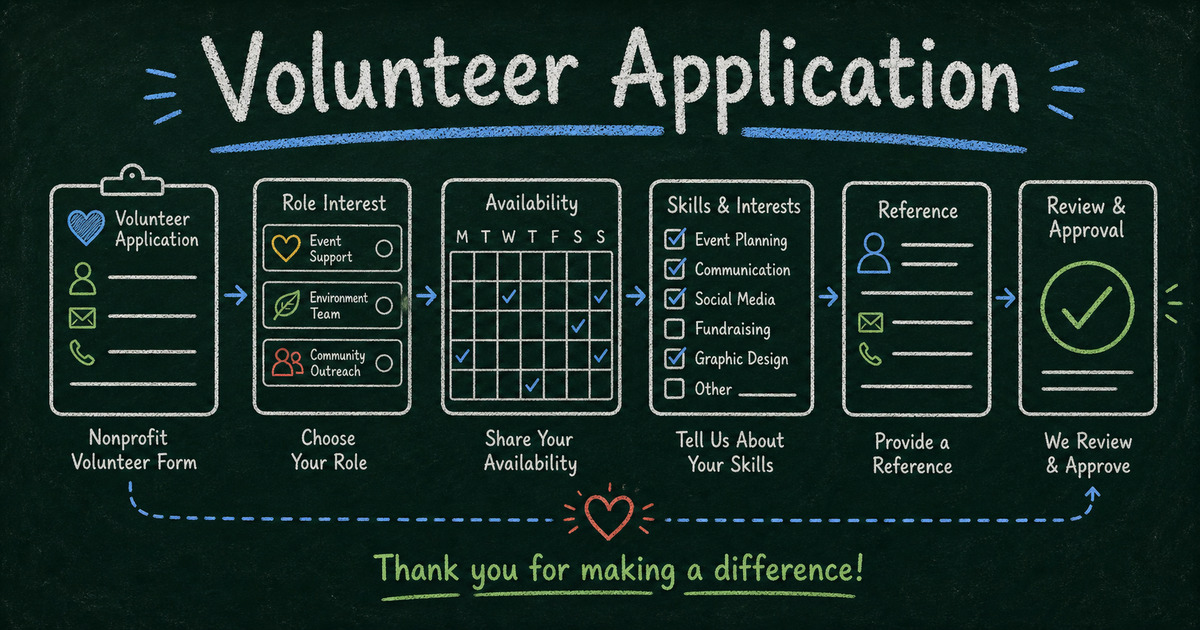
TL;DR - A volunteer application form should collect contact details, availability, interests, skills, experience, role preferences, references when needed, consent, and onboarding notes.
- Use applications for screening - use simple signup forms only when anyone can join immediately.
- Ask for availability early - role fit does not matter if the schedule does not work.
- Separate enthusiasm from eligibility - motivation is useful, but background checks, age requirements, training, and consent may matter more.
- Works for: nonprofits, schools, churches, community events, animal shelters, youth programs, and fundraisers.
- FormHug can turn volunteer applications into sortable submissions instead of scattered emails.
What Is a Volunteer Application Form?
A volunteer application form is an online form used to collect information from people who want to volunteer. It helps the organization understand who they are, when they are available, what roles fit them, and whether any screening or onboarding steps are required.
It is different from a volunteer signup form. A signup form is for low-risk, open roles where people can choose a shift and show up. An application form is for roles that require review, placement, training, references, or consent.
If your process is closer to event attendance than screening, start from registration form templates. If you need review and selection, follow the online application form model.
Volunteer Application Form Questions
Use this structure:
| Section | Questions |
|---|---|
| Contact | name, email, phone, city |
| Availability | days, times, start date, frequency |
| Interests | preferred roles, causes, locations |
| Skills | languages, certifications, tools, experience |
| Experience | past volunteering, work with similar groups |
| Eligibility | age, transportation, background check consent |
| References | name, relationship, contact details if needed |
| Consent | code of conduct, privacy notice, media consent |
| Onboarding | training needs, accessibility needs, notes |
The best forms make role matching easy. A volunteer coordinator should be able to scan a submission and know what to do next.
When to Use an Application vs. a Signup Form
Use a simple signup form when:
- the role is open to anyone;
- the risk is low;
- there is no screening;
- the main constraint is shift capacity.
Use a volunteer application form when:
- volunteers work with children, patients, vulnerable populations, animals, money, or private data;
- the organization needs to match skills to roles;
- training is required;
- background checks or references may be needed;
- availability determines placement.
For event-based roles, the Event Registration Form Template can work as a lightweight signup. For ongoing programs, use an application-style form and add approval steps.
How to Create a Volunteer Application Form
Step 1: Define the volunteer roles
List the actual roles before writing questions. For example:
- event setup;
- check-in desk;
- food service;
- tutoring;
- transport;
- social media;
- fundraising calls;
- animal care;
- administrative support.
Role options should match how your team assigns work. Avoid vague choices like “help wherever needed” unless you also ask for skills and limitations. We usually recommend building volunteer forms backward from the coordinator’s review view: if a field will not help place the volunteer, it probably should not be required.
Step 2: Ask availability before motivation
Many volunteer forms ask “Why do you want to help?” before asking when the person is available. Reverse that.
Availability is the first matching constraint. Ask:
- Which days are you usually available?
- What times work best?
- How often can you volunteer?
- When can you start?
- Are there dates you cannot attend?
Then ask motivation and experience.
Step 3: Use checkboxes for skills and preferences
Checkboxes are easier to scan than long paragraphs. Use them for:
- preferred roles;
- languages spoken;
- certifications;
- transportation access;
- physical activity comfort;
- software or admin skills.
Keep one optional long-text field for anything the applicant wants to explain.
Step 4: Add screening fields only when justified
Do not ask for sensitive information just because another nonprofit does. Add background-check consent, references, age eligibility, or ID-related fields only when the role requires them.
If minors can volunteer, add parent or guardian contact and consent.
Step 5: Create an internal review view
After submissions come in, your team needs a way to sort by role, availability, location, and status. A good volunteer form is not only about the applicant experience; it is also a volunteer-management tool.
Volunteer Form Templates to Start From
Event volunteering
Use the Event Registration Form Template for one-time events where volunteers choose a shift or indicate interest.
Training-based volunteering
Use the Training Registration Form Template when volunteers must complete orientation before placement.
Membership-based volunteering
Use the Membership Registration Form Template when volunteers also become members of the organization.
Workshop or community program volunteering
Use the Workshop Registration Form Template for structured programs where attendance and role participation are both important.
Common Mistakes
Asking for a life story
Motivation matters, but a volunteer form is not an essay contest. One short motivation question is enough for most roles.
Forgetting constraints
The useful details are often practical: availability, transportation, physical limitations, preferred location, training status, and background-check eligibility.
Making every field required
Required fields should be necessary for review. If a question is nice to know, keep it optional.
Frequently Asked Questions
What should a volunteer application form include?
It should include contact information, availability, role interests, relevant skills, experience, eligibility questions, references if needed, consent, and onboarding notes.
Do volunteers need to provide references?
Only when the role justifies it. References are common for roles involving children, vulnerable populations, money, transportation, or high trust.
How is a volunteer application different from a signup form?
A signup form lets someone join a shift or event. An application form supports review, screening, role matching, and onboarding.
How many questions should a volunteer application form have?
Most volunteer applications should stay around 8 to 12 questions before optional details. Add more only when the role requires screening, references, or training.
Should I ask for background-check consent?
Only when required by your organization, role, or local rules. If you ask, explain why and what happens next.
Can FormHug help sort volunteer applications after submission?
Yes. FormHug stores each application as a structured submission, so you can review people by role interest, availability, skills, and approval status instead of sorting through email replies.
Related
- How to Create an Online Application Form — structure application flows for review, screening, and selection.
- Best Registration Form Templates — compare signup templates for events, memberships, courses, and workshops.
- How to Create a Waitlist Form — useful when volunteer interest is higher than available roles.
- How to Get More Survey Responses — apply response-rate principles to volunteer outreach.
A strong volunteer application form respects the applicant’s time and gives your team enough structure to place people well. That is what turns goodwill into real capacity. Create your form →

Written by
FormHug TeamProduct, research, and form automation team
The FormHug Team brings together product builders, workflow researchers, and form automation practitioners who study how people collect, route, and act on information online. Our guides are based on hands-on product testing, template analysis, customer workflow patterns, and deep experience with forms, surveys, quizzes, AI-assisted creation, integrations, and results sharing.