Skills Assessment Template: How to Evaluate Team Competencies Online
Create the assessment
Turn this into a scored assessment
Build an assessment with scoring, result pages, feedback, and records you can review later.
Most teams do not have a skills problem. They have a visibility problem. Managers know who seems confident, who speaks up in meetings, and who gets asked for help, but they often cannot see the actual competency map across the team.
A skills assessment template turns that vague picture into structured evidence. It asks the same questions of every employee, scores the same dimensions, and returns a profile that can guide coaching, training, staffing, and development conversations.
This guide shows how to use a skills assessment template to evaluate team competencies online without turning the process into a spreadsheet exercise or a high-stakes exam.
TL;DR - A skills assessment template helps teams measure competencies across consistent dimensions and turn the result into development actions.
- Start with competencies - define the skills before writing questions.
- Use levels, not labels - measure beginner, developing, proficient, and advanced behavior.
- Return useful feedback - the result should guide learning, not simply rank people.
- Works for: employee development, training needs analysis, team planning, onboarding, coaching, and internal mobility.
- FormHug can build skills assessments with scoring, dimensions, radar charts, and personalized feedback.
What Is a Skills Assessment Template?
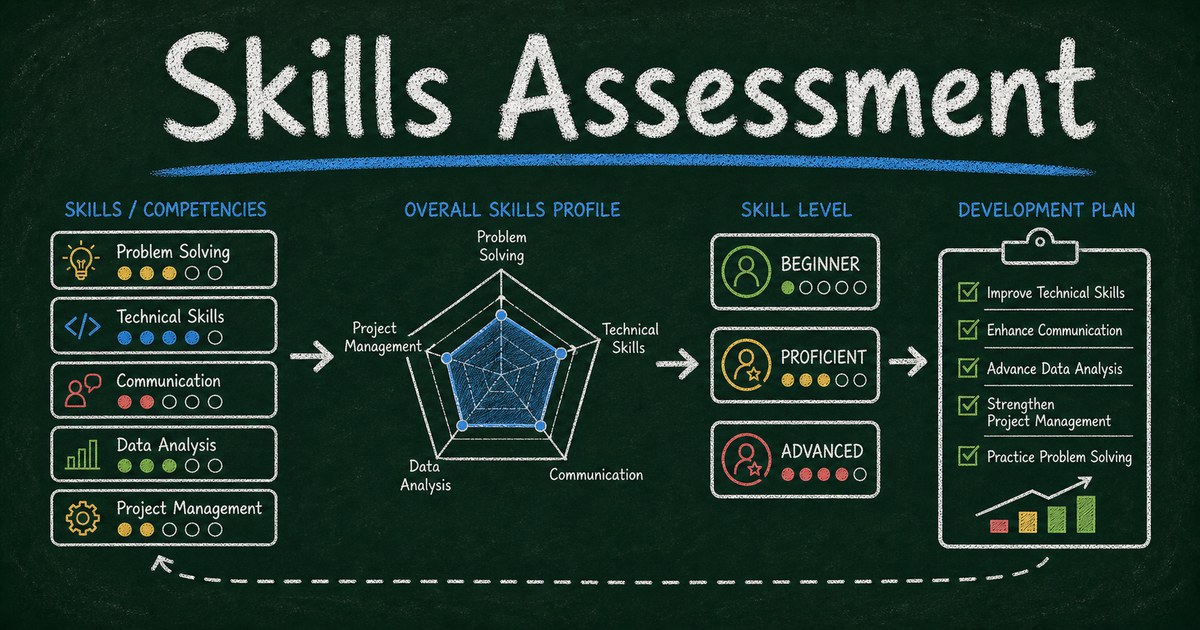
A skills assessment template is a reusable form for evaluating someone’s ability across a set of competencies. It usually includes skill dimensions, rating questions, scenario questions, scoring rules, and a result report.
Unlike a quiz, a skills assessment does not always have right answers. Some skills are measured through self-rating or manager rating. Others are measured through scenario questions, examples, or evidence.
The best template returns a profile: where someone is strong, where they are developing, and what to do next. In FormHug’s assessment maker, that profile can include dimensions, score ranges, radar charts, and written feedback.
The Competency Map Framework
Start with the Competency Map Framework:
| Layer | What to define | Example |
|---|---|---|
| Role | Who is being assessed? | Customer support specialist |
| Competencies | What skills matter? | Communication, troubleshooting, product knowledge |
| Behaviors | What does skill look like? | Explains steps clearly, isolates root cause |
| Levels | How mature is the skill? | Beginner, developing, proficient, advanced |
| Actions | What happens after scoring? | Training, coaching, stretch work |
The framework keeps the assessment practical. A vague skill like “communication” becomes measurable only when you define the behavior: “Can explain a technical issue in customer-friendly language.”
We use this structure when drafting assessment forms because it prevents the common mistake of asking broad self-esteem questions instead of observable competency questions.
What to Include in a Skills Assessment Template
Use these sections:
| Section | Purpose |
|---|---|
| Employee context | role, team, tenure, optional manager |
| Competency ratings | consistent scale across skill areas |
| Scenario questions | application in realistic situations |
| Evidence prompts | examples of recent work or decisions |
| Development goals | what the employee wants to improve |
| Result report | scores, radar chart, and next steps |
For most team assessments, use 4 to 6 competency dimensions. More than six makes the report harder to interpret. Fewer than three often feels too thin.
Ready-Made Assessment Templates
Start from a template when you need structure quickly:
- Work Style Assessment - useful for team collaboration, preferences, and working patterns.
- Communication Style Assessment - useful for coaching, team workshops, and manager development.
- Leadership Style Assessment - useful for managers and emerging leaders.
- Customer Service Skills Assessment - useful for support teams and customer-facing roles.
- AI Literacy Assessment - useful for teams adopting AI tools and agent workflows.
You can also browse the assessment template category for more starting points.
How to Build a Skills Assessment Online
Step 1: Choose the competency dimensions
Pick the dimensions that matter for the role or team. A customer support assessment might use:
- Product knowledge
- Troubleshooting
- Communication
- Ownership
- Escalation judgment
A manager assessment might use:
- Decision making
- Coaching
- Prioritization
- Communication
- Accountability
Keep the labels short because they will appear in the final report.
Step 2: Write behavior-based questions
Use a rating scale tied to behavior:
“I can diagnose a customer issue by separating symptoms, likely causes, and next steps.”
This is better than:
“I am good at troubleshooting.”
Behavior-based wording makes the score easier to discuss. It also reduces the chance that confident people overrate themselves and quieter people underrate themselves.
Step 3: Configure scoring and radar chart feedback
Map each question to a competency dimension. Use average scoring when dimensions have different question counts; use sum scoring when every dimension has the same number of questions.
Radar charts work well for skills assessments because the shape is more useful than a single score. A person might be strong in product knowledge and communication, but developing in escalation judgment. That pattern gives a manager a real coaching path.
For the broader assessment setup, see how to create an online personality test or skills assessment.
Step 4: Turn results into a development plan
Do not stop at the score. Add feedback for each range:
| Score range | Feedback role |
|---|---|
| Emerging | Name the next foundational skill |
| Developing | Suggest practice and support |
| Proficient | Reinforce reliable behavior |
| Advanced | Suggest mentorship or stretch work |
If the assessment produces no next step, it becomes a label. If it produces one development action per dimension, it becomes useful.
Frequently Asked Questions
How do you assess employee skills online?
Define the competencies for a role, write behavior-based questions for each competency, score answers by dimension, and return a report that shows strengths, gaps, and recommended next steps.
What should a skills assessment template include?
It should include employee context, competency dimensions, behavior-based rating questions, scenario questions, scoring rules, result feedback, and a development planning section.
How many competencies should a skills assessment measure?
Most skills assessments should measure 4 to 6 competencies. That is enough to show a meaningful profile without overwhelming the participant or the manager.
Should skills assessments be self-assessments or manager assessments?
Both can work. Self-assessments reveal confidence and perception. Manager assessments add external judgment. For important development decisions, compare both instead of relying on one perspective.
Can a skills assessment be used for hiring?
Use caution. Custom skills assessments are useful for development, training, and coaching. For high-stakes hiring decisions, use validated methods, clear criteria, and appropriate review.
Is FormHug free for skills assessments?
Yes. You can create skills assessments with FormHug, add dimensions and scoring, publish the form, and collect responses on the free plan.
Related
- How to Create an Online Personality Test or Skills Assessment - build dimensions, scoring, radar charts, and feedback
- How to Create an Evaluation Form - collect structured ratings for people, programs, or services
- Employee Training Quiz - use scored checks when skills depend on training content
Every unclear competency becomes a vague development conversation later. Use a skills assessment template to make the next coaching step visible. Create your assessment →

Written by
FormHug TeamProduct, research, and form automation team
The FormHug Team brings together product builders, workflow researchers, and form automation practitioners who study how people collect, route, and act on information online. Our guides are based on hands-on product testing, template analysis, customer workflow patterns, and deep experience with forms, surveys, quizzes, AI-assisted creation, integrations, and results sharing.