Real Estate Lead Capture Form: Questions That Qualify Buyers and Sellers
Capture better leads
Build a form that qualifies the next step
Create a lead form or recommendation quiz that asks the right questions and routes every response.
A real estate lead form should do more than collect a name, email, and “message.”
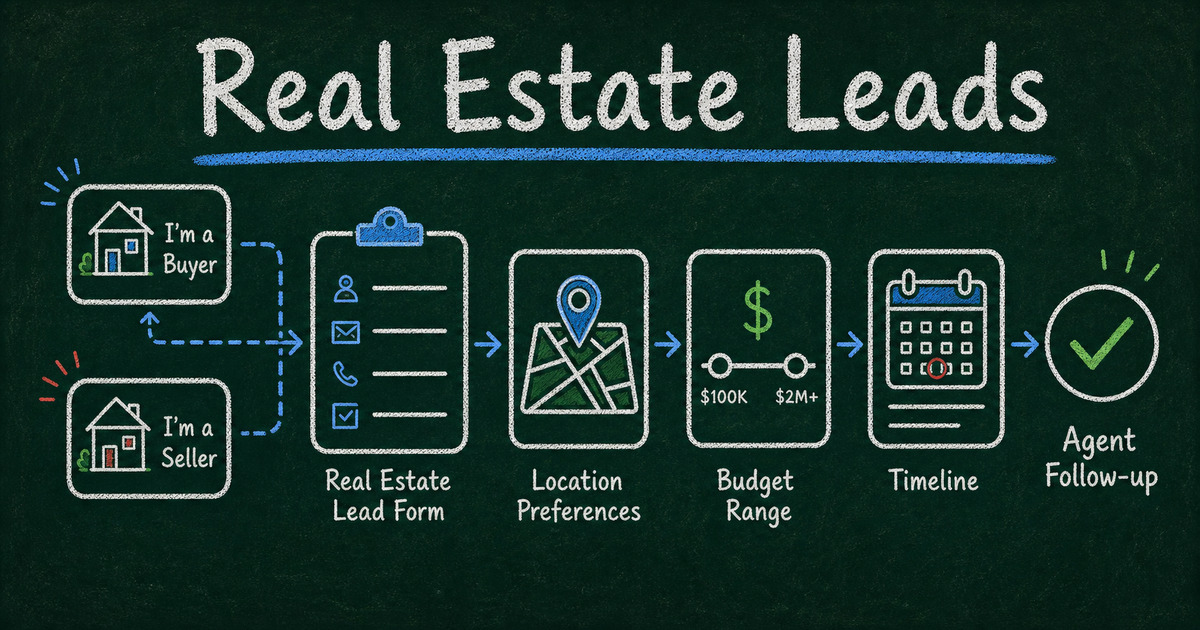
Buyers, sellers, renters, investors, and homeowners all arrive with different intent. If your form treats them the same, your follow-up has to do all the qualification later. A better real estate lead capture form asks a few targeted questions that reveal timeline, readiness, budget, location, and next step.
This guide covers the best real estate lead form questions, how to split buyer and seller paths, and which templates help agents and teams capture qualified leads without making the form feel like a mortgage application.
TL;DR - A real estate lead capture form should ask whether the person is buying, selling, renting, or investing, then collect timeline, location, budget or property value, financing status, contact details, and preferred follow-up.
- Start with intent - buyer and seller leads need different questions.
- Qualify without friction - ask enough to route the lead, not enough to exhaust them.
- Use timeline and financing as fit signals - urgency and readiness usually matter more than a long message field.
- Works for: real estate agents, brokerages, property managers, investors, relocation teams, and new development sales.
- FormHug templates can capture property inquiries and route high-intent leads faster.
What Is a Real Estate Lead Capture Form?
A real estate lead capture form is an online form that collects contact details and qualifying information from people interested in buying, selling, renting, investing, or asking about a property.
It is different from a general contact form because it helps you decide what kind of follow-up is needed:
- buyer consultation;
- seller valuation;
- rental showing;
- property inquiry;
- investor call;
- relocation support.
For the broader conversion framework, read how to build a lead generation form. If you want an interactive qualification path, see how to build a lead gen quiz.
The First Question: Buyer, Seller, Renter, or Investor?
Start with one routing question:
What can we help you with?
Options:
- buying a home;
- selling a home;
- renting;
- investing;
- property management;
- asking about a specific listing;
- not sure yet.
This single question determines the rest of the form. Use conditional logic so buyers see buyer questions and sellers see seller questions.
Real Estate Lead Form Questions
Buyer lead questions
Ask:
| Question | Why it matters |
|---|---|
| What areas are you considering? | location fit |
| What property type are you looking for? | search criteria |
| What is your budget range? | qualification |
| Have you been pre-approved? | readiness |
| When do you want to buy? | urgency |
| Are you currently working with an agent? | conflict and follow-up |
| What matters most in the home? | personalization |
Keep budget as a range, not an exact number. It feels less invasive and is easier to answer.
Seller lead questions
Ask:
| Question | Why it matters |
|---|---|
| What is the property address or area? | valuation context |
| What type of property is it? | comps and prep |
| When are you hoping to sell? | urgency |
| Have you already bought another home? | motivation |
| What is your estimated value? | expectations |
| What condition is the property in? | pricing and prep |
| Would you like a valuation or listing consultation? | next step |
Do not ask sellers for every property detail upfront. The form should get them to the conversation.
Renter and property inquiry questions
Ask:
- Which listing are you interested in?
- Desired move-in date?
- Number of bedrooms?
- Budget range?
- Number of occupants?
- Pets?
- Preferred showing time?
For rental and listing interest, start with the Property Inquiry Form.
How to Create a Real Estate Lead Capture Form
Step 1: Choose the conversion goal
The form should have one main goal:
- book a buyer consultation;
- request a home valuation;
- schedule a showing;
- capture listing interest;
- qualify investor leads;
- route property management inquiries.
A vague form produces vague leads.
Step 2: Add one routing question
Use a single-select field for buyer, seller, renter, investor, or other. This gives you cleaner data than asking people to explain their situation in an open comment.
Step 3: Ask 4 to 6 qualifying questions
Most real estate lead forms should stay short. Ask only what changes the follow-up:
- location;
- timeline;
- budget or expected property value;
- financing or readiness;
- preferred contact method;
- best time to reach them.
Step 4: Make contact fields frictionless
Ask for name, email, and phone. If phone is required for your process, explain why: “So we can confirm showing availability quickly.”
Step 5: Confirm the next step
The confirmation message should set expectations:
Thanks. We received your request and will follow up within one business day with availability or next steps.
Avoid vague “we will be in touch” copy when people are trying to schedule a showing or valuation.
Real Estate Lead Form Templates
Property inquiries
Use the Property Inquiry Form for listing-specific interest, buyer questions, rental inquiries, and showing requests.
General lead capture
Use the Lead Capture Form when the form sits on a landing page, homepage, or agent bio page.
Consultation requests
Use the Consultation Request Form for buyer consultations, seller strategy calls, investor discussions, or relocation planning.
Buyer and seller intake
Use the Real Estate Buyer & Seller Intake Form when you need a deeper intake form before a serious consultation.
Common Mistakes
Asking only for “message”
Open text is hard to sort. Use structured questions for intent, timeline, budget, and location, then keep one optional message field.
Treating sellers like buyers
Sellers care about valuation, timing, prep, and market confidence. Buyers care about fit, budget, financing, and availability. Split the paths.
Asking for too much financial detail
You need readiness signals, not a full financial profile. Pre-approval status and budget range are usually enough for first contact. We recommend designing real estate lead forms around the first useful follow-up, not around every fact an agent might eventually want.
Frequently Asked Questions
What questions should be on a real estate lead form?
Ask intent, location, timeline, budget or property value, financing or readiness, contact details, and preferred follow-up method.
Should buyer and seller leads use the same form?
They can start in the same form, but use conditional logic to show different follow-up questions after the person selects buyer or seller.
How many questions should a real estate lead form have?
Most lead capture forms should have 5 to 8 questions. Use longer intake forms only after someone has agreed to a consultation.
Should I ask if the lead already has an agent?
Yes, if your market or brokerage process requires it. Keep the question neutral and explain that it helps you route the inquiry correctly.
What is the best CTA for a real estate lead form?
Use a CTA tied to the outcome: “Request a Showing,” “Get a Home Valuation,” “Book a Buyer Call,” or “Ask About This Property.”
Can FormHug handle buyer and seller paths in one real estate form?
Yes. Use a routing question such as “buying, selling, renting, or investing,” then show different follow-up questions based on the answer.
Related
- How to Build a Lead Generation Form — the broader framework for capturing and qualifying website leads.
- How to Build a Lead Gen Quiz That Qualifies Prospects Automatically — turn real estate qualification into an interactive quiz-style funnel.
- How to Create an Intake Form — use intake structure once a lead is ready for a serious consultation.
- How to Get More Survey Responses — improve completion rates when you ask visitors for structured answers.
A real estate lead form should help both sides move faster. The lead gets a clear next step. The agent gets enough context to respond like a professional instead of starting from zero. Create your form →

Written by
FormHug TeamProduct, research, and form automation team
The FormHug Team brings together product builders, workflow researchers, and form automation practitioners who study how people collect, route, and act on information online. Our guides are based on hands-on product testing, template analysis, customer workflow patterns, and deep experience with forms, surveys, quizzes, AI-assisted creation, integrations, and results sharing.