5 AI Agent Workflows That Need a Form Layer

Create with AI
Describe the workflow and get a form draft
Use FormHug to create forms from prompts, then share, automate, and reuse the structured responses.
AI agents are good at planning the next step. They are less useful when the workflow depends on input from people and that input has nowhere structured to go.
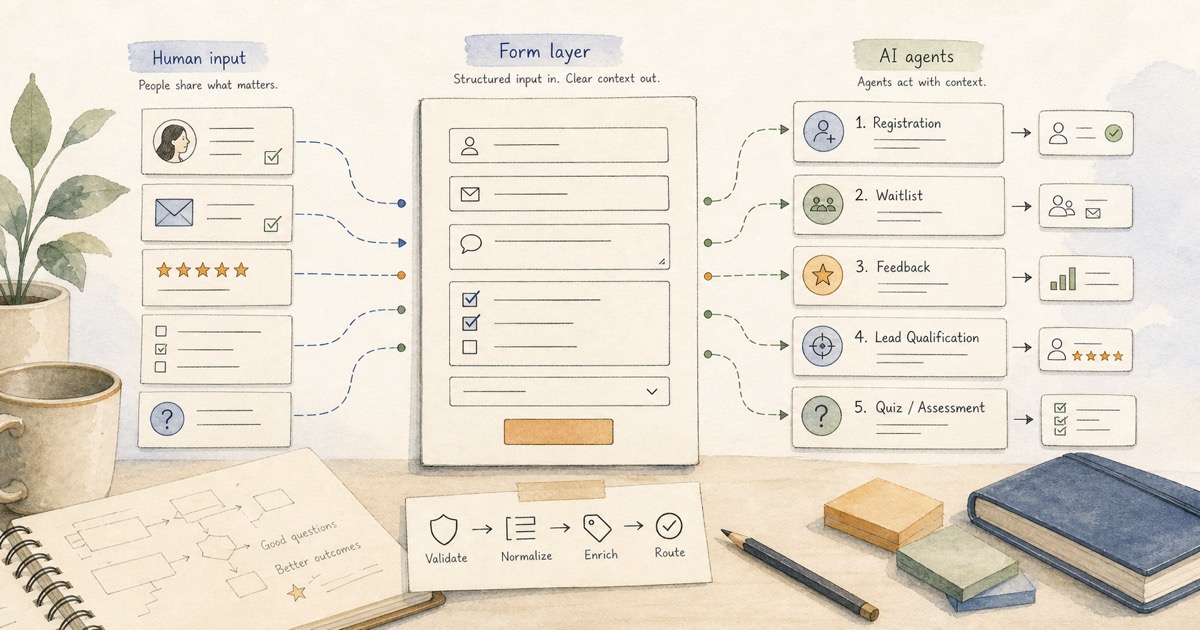
A form layer gives agents a clean way to collect human input: public links for respondents, structured fields for data quality, and submissions the agent can read later. Without that layer, many AI agent workflows fall back to messy chat, manual spreadsheets, or “go build a form and come back.”
The best agent workflows do not avoid forms. They use forms as the bridge between human responses and machine action.
TL;DR - AI agent workflows need a form layer when the agent has to collect structured input from people outside the chat.
- Forms collect clean input - fields, choices, and required answers make responses easier for agents to process.
- Agents can continue after submission - summarize responses, qualify leads, route approvals, or prepare follow-up.
- Public forms reach real people - respondents do not need to use the same AI tool as the agent.
- Works for: event registration, waitlists, customer feedback, lead qualification, quizzes, and assessments.
- FormHug combines polished public forms with MCP access for agent workflows.
What Is a Form Layer for AI Agents?
A form layer is the part of an AI workflow that collects structured information from humans and makes that data available to the agent.
It is not just a form page. It is the shared surface between people and agents:
- People get a clear public form they can complete on any device.
- The agent gets structured submissions it can read, summarize, and use.
- The workflow gets cleaner data than chat replies, DMs, or ad hoc spreadsheets.
With FormHug MCP, an MCP-compatible agent can create forms, read submissions, and help move response data into the next step. If you want the technical explanation, start with MCP Form Builder. This article focuses on the workflows where that form layer matters most.
1. Seminar and Event Registration
Events are full of structured questions: name, email, organization, role, session preference, dietary restrictions, attendance mode, consent, and follow-up permission.
An agent can help plan the event, draft the announcement, and create the registration form. Once people register, the same workflow can summarize attendee counts, prepare reminder lists, and flag special requirements.
This is where a registration form becomes more than a signup page. It becomes the input layer for event operations.
Example agent workflow:
- Create a registration form for a workshop.
- Share the public link in email, Slack, or social posts.
- Read submissions before the event.
- Prepare attendee lists, reminders, and follow-up segments.
Without a form layer, the agent can write the event copy but cannot reliably collect the registrations.
2. Product Waitlist Collection
Waitlists look simple, but useful waitlist data is rarely just an email address.
A product team may want to know who is signing up, what they are trying to solve, company size, role, budget, timeline, or which feature they care about most. That information helps the agent segment demand instead of counting raw emails.
An AI form builder can help create the waitlist quickly. A survey maker style form can collect richer context when the team needs research signal, not just signups.
Example agent workflow:
- Create a waitlist form for a new product.
- Ask for email, role, use case, and urgency.
- Collect responses from a landing page or launch post.
- Ask the agent to group users by segment and recommend launch messaging.
The agent does not just help build the waitlist. It helps understand who is waiting.
3. Customer Feedback Research
Customer feedback is one of the strongest uses for a form layer because agents need consistent data before they can find useful patterns.
Free-form chat feedback can be useful for interviews, but it is hard to compare across many respondents. A structured survey form can combine ratings, multiple-choice questions, and open text so an agent has both quantitative and qualitative material to work with.
Example agent workflow:
- Create a feedback form for a product feature.
- Ask for rating, use case, friction point, and suggested improvement.
- Collect responses from customers.
- Have the agent summarize themes, group complaints, and suggest next actions.
This is where AI form automation becomes practical. The agent helps with the full loop: question design, collection, synthesis, and follow-up.
4. Lead Qualification
Lead qualification breaks when the data arrives in unstructured places: random contact messages, chat transcripts, forwarded emails, and notes from calls.
A form layer gives the agent a consistent intake point. The form can ask about company size, budget, timeline, problem, role, and urgency. The agent can then rank leads, extract follow-up lists, and draft personalized outreach.
For teams experimenting with agent-assisted sales, an AI form builder is especially useful because the agent can create or refine the qualification form as the campaign changes.
Example agent workflow:
- Create a lead qualification form for a campaign.
- Collect structured answers from prospects.
- Score or group leads by fit.
- Draft follow-up notes for high-priority contacts.
The form layer keeps the agent from guessing. It gives the agent the fields it needs to make a better recommendation.
5. Quiz or Assessment Collection
Quizzes and assessments are another natural fit because the agent needs answer data before it can help with scoring, grouping, or review.
A quiz maker can collect answers for lightweight knowledge checks, product recommendation quizzes, or training reviews. An assessment maker can support more formal evaluations where scores, criteria, and result interpretation matter.
Example agent workflow:
- Create a quiz or assessment form.
- Collect answers from students, applicants, trainees, or users.
- Read submissions and summarize performance.
- Identify common misses or recommend next learning steps.
The agent can help explain the results, but the form layer provides the clean answer set.
Why These Workflows Need a Form Layer
The pattern across all five workflows is the same:
| Workflow | Human input needed | Agent action after submission |
|---|---|---|
| Event registration | attendee details and preferences | reminders, attendee lists, segments |
| Waitlist | contact info and demand signal | user grouping and launch messaging |
| Feedback | ratings and comments | themes, complaints, next actions |
| Lead qualification | fit, timeline, budget, problem | scoring and personalized follow-up |
| Quiz or assessment | answers and scores | summaries and learning recommendations |
In each case, chat is useful at the edges. The agent can help draft, summarize, and decide. But the workflow still needs a structured middle where people submit information consistently.
That middle is the form layer.
Where FormHug Fits
FormHug is built for this humans-and-agents loop.
For respondents, FormHug creates polished public forms for registrations, surveys, quizzes, assessments, bookings, payments, and more. For agents, FormHug MCP makes form creation and submission access available through MCP-compatible tools like Claude and Cursor.
If you want the campaign-level argument, read AI Forms for Humans and Agents. If you want a hands-on Claude workflow, read Claude Form Builder. If you want the category explanation, read MCP Form Builder.
The point is not that every workflow needs a giant form. The point is that every agent workflow that depends on human input needs a reliable way to collect it.
FAQ
What is a form layer for AI agents?
A form layer is the structured input surface an AI agent uses to collect information from people. It includes public forms for respondents and submission data the agent can read later.
Why not collect everything in chat?
Chat is flexible but inconsistent. Forms are better when the workflow needs required fields, comparable answers, timestamps, scoring, routing, or many respondents.
What AI agent workflows need forms?
Common examples include event registration, product waitlists, customer feedback, lead qualification, internal approvals, quizzes, assessments, and research surveys.
Can agents create forms themselves?
Yes, when the form builder supports an agent-facing tool interface such as MCP. FormHug MCP lets compatible agents create forms and read submissions from the workflow.
Do respondents need to use AI?
No. Respondents complete a normal public form. The AI agent works on the creation, analysis, and follow-up side of the workflow.
Related
- MCP Form Builder - why agents need forms as tools
- AI Forms for Humans and Agents - the main campaign essay
- Forms Aren’t Dead. They Just Got an AI Brain. - the short opinion piece behind the campaign idea
- Claude Form Builder - build and analyze forms inside Claude
Every AI agent workflow that depends on people eventually needs structured input. Give the agent a form layer, and the workflow can keep moving after the first prompt. Explore MCP for agents →

Written by
FormHug TeamProduct, research, and form automation team
The FormHug Team brings together product builders, workflow researchers, and form automation practitioners who study how people collect, route, and act on information online. Our guides are based on hands-on product testing, template analysis, customer workflow patterns, and deep experience with forms, surveys, quizzes, AI-assisted creation, integrations, and results sharing.