MCP Form Builder: Give AI Agents a Way to Create and Read Forms

Create with AI
Describe the workflow and get a form draft
Use FormHug to create forms from prompts, then share, automate, and reuse the structured responses.
AI agents can plan campaigns, write code, search files, draft messages, and call tools. But many workflows still break at the same old point: the moment the agent needs structured information from real people.
If an agent needs customer feedback, event registrations, lead details, internal approvals, quiz answers, or research responses, chat alone is not enough. Someone still has to create the form, publish it, collect submissions, and move the data back into the workflow.
That is where an MCP form builder changes the loop. Instead of treating forms as separate websites humans visit manually, MCP makes forms available to agents as tools they can create, read, and act on.
TL;DR — An MCP form builder lets AI agents create forms, read submissions, and use structured human input inside workflows.
- MCP connects agents to tools — instead of only suggesting actions, agents can call external systems.
- Forms structure human input — fields, choices, timestamps, and submissions are easier for agents to process than loose chat.
- Agents can manage the loop — create the form, collect responses, summarize patterns, and prepare follow-up.
- Works for: feedback, registrations, lead qualification, approvals, quizzes, and research workflows.
- FormHug MCP turns forms into an agent-accessible workflow layer.
What Is an MCP Form Builder?
An MCP form builder is a form system that AI agents can use through the Model Context Protocol. You can think of it as Model Context Protocol forms: normal public forms for people, plus an agent-facing tool interface for creation and data access.
MCP is a standard way for AI assistants to connect to external tools. Instead of every AI app needing a custom integration for every product, a service exposes an MCP server. An MCP-compatible agent can connect to that server and use the tools it provides. That is why MCP for AI agents matters: it turns external products into callable capabilities.
For a form builder, that means the agent can do more than talk about forms. It can create a form, edit fields, inspect the form structure, read submissions, and use response data in the next step of a workflow.
The simple version:
- Chat is where the human describes the goal.
- MCP is how the agent reaches the tool.
- The form builder is where structured input gets collected.
- Submissions become data the agent can summarize, route, or act on.
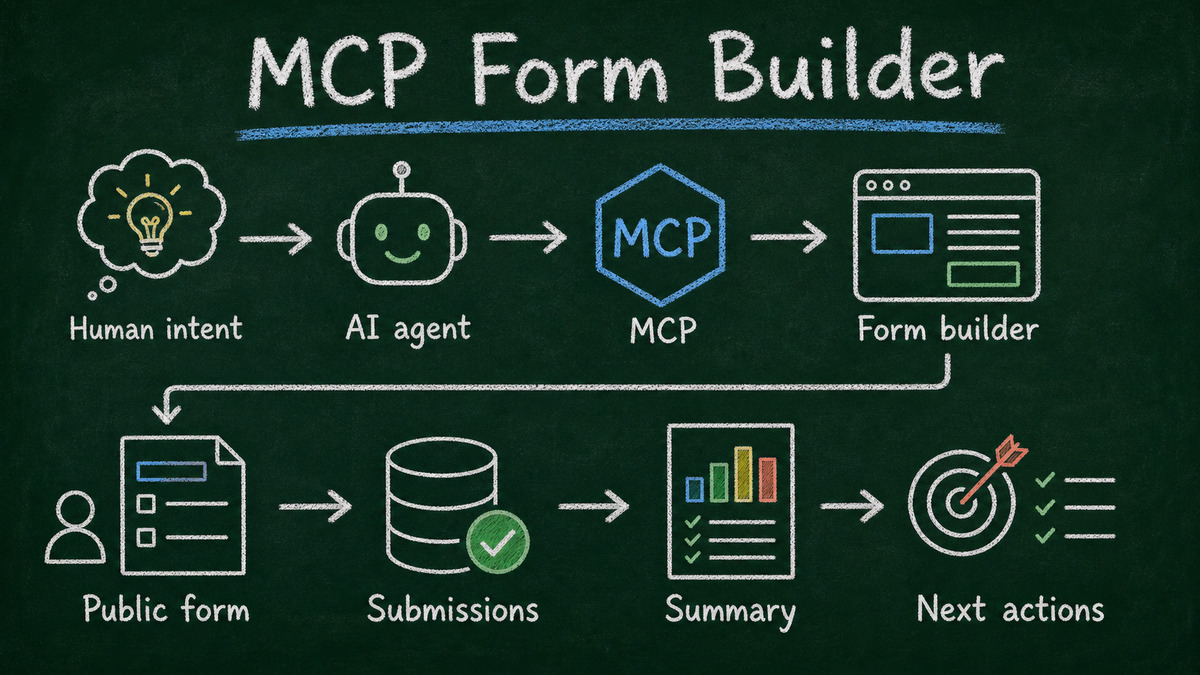
That makes an MCP form builder different from an ordinary AI form generator. The value is not only “generate fields faster.” The value is that the form system becomes part of the agent’s working environment.
For a direct category comparison, see AI Form Generator vs AI Form Builder. The short version is that generation produces the draft; a builder plus MCP keeps creation, submissions, and follow-up available to the agent.
Why AI Agents Need Tools, Not Just Chat
Chat is good at intent. A person can say, “I need feedback from beta users,” and the agent understands the goal. The problem is execution.
Without tools, the agent can only suggest a form structure, write copy for questions, or tell the human what to do next. The human still has to open a form builder, recreate the structure, publish the link, wait for responses, export the data, and paste it back into the conversation.
That is not an agent workflow. It is a chat-assisted manual workflow.
Tools change the agent’s role from advisor to operator. When an agent has access to a calendar, it can schedule. When it has access to email, it can draft or send. When it has access to a form builder, it can collect structured input from people.
For builders, this matters because the best AI workflows are not just conversations. They are loops:
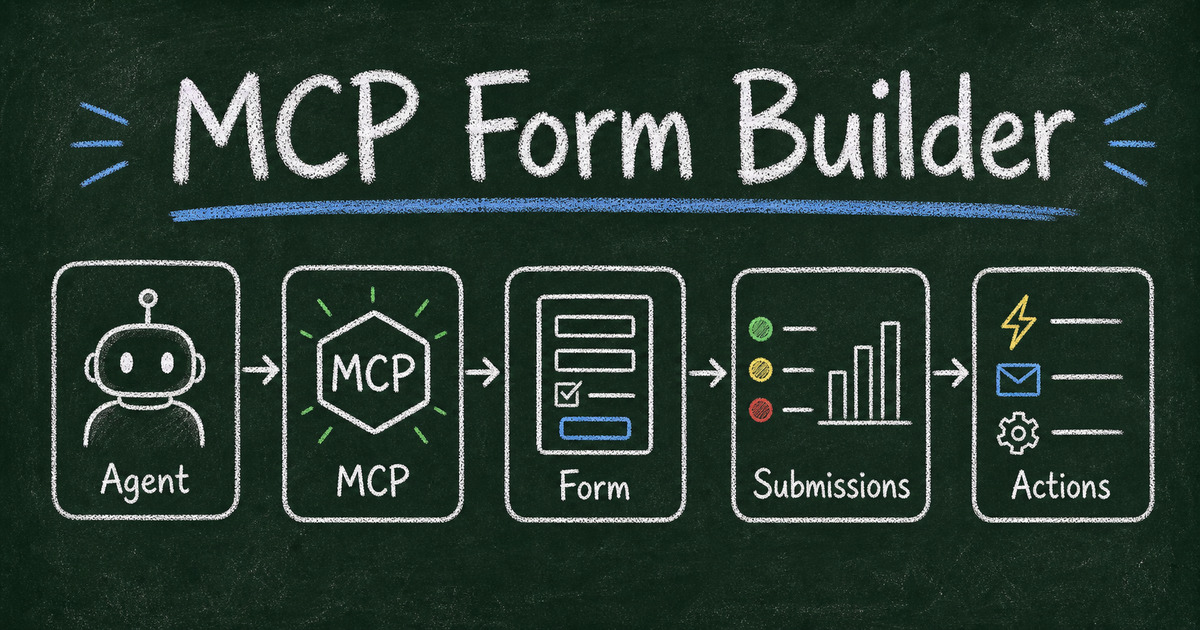
- A human describes an outcome.
- The agent chooses or creates the right tool surface.
- People provide structured input.
- The agent reads the data and prepares the next action.
An MCP form builder gives agents one of the missing tool surfaces in that loop.
The original concept board below shows the same loop as a compact sequence: agent, MCP connection, form, submissions, and actions.
Why Forms Are a Natural Tool Boundary for Agents
Forms are not exciting because they are old. They are useful because they create boundaries.
A form says: these are the questions, these are the answer types, this is what counts as a complete submission, and this is where the data goes. That structure is exactly what agents need when a workflow depends on input from people outside the chat.
Loose chat responses are flexible, but they are hard to compare. Email replies are familiar, but they are scattered. Spreadsheets are powerful, but they often become cleanup work. Forms give the agent a cleaner surface:
- Field names make the meaning explicit.
- Required fields prevent missing data.
- Choice fields make answers comparable.
- Timestamps and entry IDs make submissions traceable.
- Public links let anyone respond without using the agent.
This is why forms are a natural human-input boundary for AI agents. The agent does not need every respondent inside the same chat. It needs a reliable way to ask the right questions, collect answers, and return to the workflow with structured data.
What an MCP Form Builder Lets Agents Do
An MCP form builder should support the full form loop, not just the first draft.
Create forms from intent
A user can describe the goal in plain language: “Create a customer feedback form for our beta launch.” The agent turns that intent into fields, labels, choices, and a public form.
Refine the form as the workflow changes
Real workflows change. A team may need one more follow-up question, a different rating field, or a clearer description. With MCP, the agent can update the form instead of sending the user back to a dashboard.
Read submissions when responses arrive
Creation is only half the job. The more valuable step is reading the data after people respond. An agent can list submissions, retrieve entries, summarize patterns, or extract a follow-up list.
Turn responses into next actions
Form data becomes more useful when it moves. An agent can prepare a visual report, identify qualified leads, draft reminder emails, route approvals, or create a task list based on submissions.
The important part is continuity. The workflow does not stop at “here is a form link.” It continues through collection, analysis, and follow-up.
Five MCP Form Builder Workflows
Customer feedback
A product team asks an agent to create a feedback form for a new feature. The agent builds a form with rating, use case, pain point, and open comment fields. After responses come in, the agent summarizes the top complaints, groups feature requests, and recommends three follow-up actions.
This is stronger than asking users to reply in chat because every response has the same structure.
Event registration
An operations manager needs a registration form for a workshop. The agent creates the form, collects names, emails, company names, dietary restrictions, and session preferences. Later, the agent reads submissions and prepares attendee lists or reminder emails.
The form stays human-friendly, while the registration data stays agent-readable.
Lead qualification
A sales team asks an agent to create a lead capture form with company size, budget range, timeline, and main problem. After submissions arrive, the agent ranks leads by fit, extracts high-priority contacts, and drafts personalized follow-up notes.
The form becomes the structured intake layer for the sales workflow.
Internal approval
A team needs approval requests for budget, procurement, or content review. The agent creates a form with requester, amount, reason, due date, and approver notes. When entries arrive, the agent can summarize pending requests and route the next action.
This works because approvals need consistent fields, not a messy chain of chat messages.
Quiz or assessment collection
An educator, trainer, or team lead needs a lightweight quiz. The agent creates the quiz form, collects answers, and later reads submissions to summarize scores, identify common misses, or prepare a review plan.
For assessment workflows, structured collection matters more than clever generation. The agent needs clean answer data before it can help.
How FormHug MCP Fits This Pattern
FormHug MCP gives agents a form layer they can use through MCP. Claude, Cursor, and other MCP-compatible tools can connect to FormHug and work with forms from inside the agent environment. For teams comparing broader AI creation tools, FormHug also fits the AI form builder category, but the MCP layer is what makes forms available inside agent workflows.
With FormHug MCP, an agent can create forms, edit fields, read submissions, and help move response data into the next step of a workflow. The public form remains a clear experience for human respondents, while the backend remains accessible to the agent.
That is the campaign idea in practical terms: AI forms for humans and agents. Beautiful for humans. Friendly for agents.
If you want setup details, use the FormHug MCP guide. FormHug is also available in the public Claude Connectors Directory with Interactive MCP Apps support; the Claude Connectors product note explains what changed. If you work mostly in Claude, the Claude form builder walkthrough shows the same idea in a hands-on workflow.
Why This Is Bigger Than AI-Generated Forms
Many form builders can talk about AI as a faster way to generate fields. That is useful, but narrow. The bigger argument is that forms are not dead; they are becoming agent-native.
An MCP form builder is about a different question: can the form builder become a tool inside an agent workflow?
The difference looks like this:
| Old AI form builder story | MCP form builder story |
|---|---|
| AI helps a human draft a form faster | An agent can create and manage forms as a tool |
| The workflow still returns to a dashboard | The workflow can continue inside the agent environment |
| The form is mostly a web page | The form is also a structured input layer |
| Data often gets exported manually | Submissions can be read and summarized by the agent |
This is why MCP matters for forms. The form is no longer only something a person builds before the real workflow begins. It becomes the point where human input enters the agent loop.
FAQ
What is an MCP form builder?
An MCP form builder is a form builder exposed through the Model Context Protocol, so AI agents can create forms, edit fields, read submissions, and use form data inside workflows.
Why do AI agents need forms?
AI agents need structured human input for tasks like feedback, registration, qualification, approval, surveys, and assessments. Forms provide consistent fields and submissions that agents can process more reliably than loose chat.
Is an MCP form builder the same as an AI form generator?
No. An AI form generator usually helps create a form from a prompt. An MCP form builder gives an agent ongoing tool access, so it can create the form, read submissions, and help with follow-up actions.
Is it called an MCP form builder or a form builder MCP?
The clearer category term is MCP form builder: a form builder exposed to agents through the Model Context Protocol. Some people may say “form builder MCP” when they mean a specific MCP server for forms, but MCP form builder better describes the broader tool category.
What can an agent do with form submissions?
Depending on the connected tools, an agent can summarize responses, identify patterns, extract contact lists, rank leads, prepare reports, draft follow-up messages, or route tasks to other systems.
Does everyone who fills out the form need to use an AI agent?
No. Respondents fill out a normal public form in a browser. MCP is for the agent side of the workflow: creation, management, submission access, and follow-up.
Where does FormHug fit?
FormHug provides an MCP server for form workflows, so agents can create forms and read submissions while human respondents still get polished public forms.
Related
- FormHug Is Now Available in Claude Connectors - the directory launch and Interactive MCP Apps overview
- 5 AI Agent Workflows That Need a Form Layer - practical examples for events, waitlists, feedback, leads, and quizzes
- Claude Form Builder: Collect and Analyze Data in Chat - a practical walkthrough for building forms directly inside Claude
- FormHug MCP for AI Agents - the hands-on guide to connecting FormHug MCP with Claude, Cursor, and other agents
Every time an agent has to hand form creation or response analysis back to a human, the workflow slows down. Give the agent a form layer it can use directly. Explore MCP for agents →

Written by
FormHug TeamProduct, research, and form automation team
The FormHug Team brings together product builders, workflow researchers, and form automation practitioners who study how people collect, route, and act on information online. Our guides are based on hands-on product testing, template analysis, customer workflow patterns, and deep experience with forms, surveys, quizzes, AI-assisted creation, integrations, and results sharing.