AI Form Builder: How to Create Real Forms From a Prompt
Create with AI
Describe the workflow and get a form draft
Use FormHug to create forms from prompts, then share, automate, and reuse the structured responses.
An AI form builder should do more than write questions. If the output is only a neat list of fields inside a chat window, you still have the same work left: copy the questions, choose field types, publish the page, collect submissions, and analyze what came back.
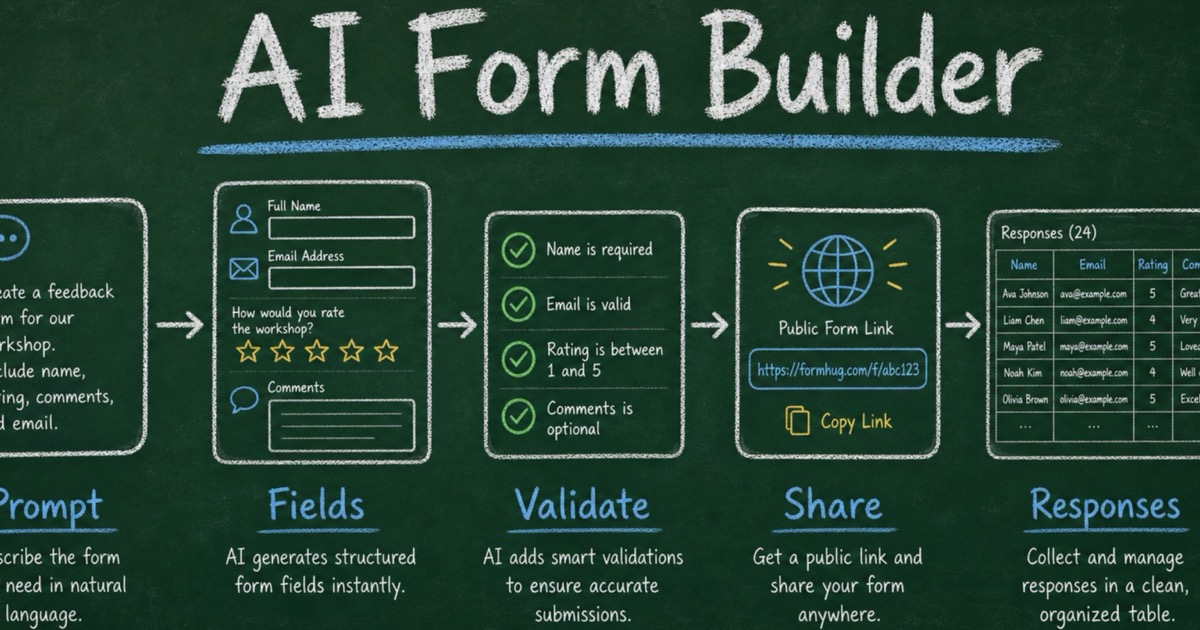
The useful shift is prompt-to-workflow. You describe the form you need in plain language, then the tool creates a real online form with structured fields, a public link, saved responses, and a way to keep improving the workflow.
FormHug is built around that distinction. AI helps you move from rough intent to form structure; FormHug turns that structure into a hosted form people can complete. This article explains how to evaluate that full workflow, write a stronger prompt, and turn the first draft into useful response data.
TL;DR — FormHug is an AI form builder that turns a natural-language prompt into a real online form with fields, publishing, submissions, and response workflows.
- Start with the job — tell AI what the form should accomplish, not only which fields you want.
- Review the structure — check field types, required settings, respondent friction, and trust language before sharing.
- Publish the workflow — a real AI form builder returns a public link and stores submissions, not just generated form copy.
- Works for: surveys, quizzes, registrations, intake forms, lead capture, applications, booking requests, and feedback forms.
- The best AI form builder is not a question generator; it is a bridge from prompt to data collection.
What Is an AI Form Builder?
An AI form builder is software that uses natural language to help create forms, surveys, quizzes, applications, registrations, and other structured data-collection workflows. Instead of building from a blank canvas, you describe the audience, goal, and information you need, then the tool creates a form draft you can edit and publish.
The phrase can be misleading because many AI tools stop at question generation. They can suggest fields such as name, email, role, and feedback, but they do not create a hosted form or collect submissions.
A real AI form builder should handle the full path:
| Layer | What it should do |
|---|---|
| Prompt | Understand the audience, goal, and desired outcome. |
| Structure | Create fields, choices, descriptions, and required settings. |
| Publishing | Produce a public form link people can open. |
| Responses | Store submissions in a form workspace. |
| Follow-up | Support review, analysis, automation, or export. |
That is the standard to use when comparing AI form tools. If the tool only writes question text, it is an AI form generator. If it creates a usable data-collection workflow, it is an AI form builder.
For a deeper category distinction, read AI Form Generator vs AI Form Builder. If you specifically want to create from ChatGPT, start with how to create a form in ChatGPT with FormHug, or review where ChatGPT stops and a real form backend begins.
The Prompt → Fields → Responses Framework
A good AI form workflow follows the Prompt → Fields → Responses framework.
Prompt: describe the job
Start with the work the form needs to do. Weak prompts list fields. Strong prompts explain the decision or workflow.
Weak prompt:
Make a contact form.
Stronger prompt:
Create a lead qualification form for a B2B consulting offer. We need to understand company size, current challenge, urgency, budget range, timeline, and preferred contact method. Keep it short enough to complete in under three minutes.
The stronger prompt gives AI a reason to include or remove fields. It also helps the form feel like a workflow rather than a generic questionnaire.
Fields: turn intent into structure
The AI should turn the prompt into field types that match respondent behavior:
- short text for names, titles, or company names;
- email fields for follow-up;
- single choice for mutually exclusive options;
- checkboxes when multiple answers are valid;
- ratings when you need comparable scores;
- long text when you need reasons, context, or stories;
- dates, times, payments, or uploads when the workflow requires them.
This is where an AI form builder is stronger than a plain prompt. It should not only write the label “What is your budget?” It should know whether that budget should be a dropdown, number field, radio choice, or optional long answer.
Responses: design for what happens next
A form is successful when the responses support a next step. Before publishing, decide how the answers will be used.
For example:
- If someone selects “urgent,” route them to faster follow-up.
- If a survey score is low, ask for the reason.
- If a quiz answer is wrong, show an explanation.
- If a booking request includes a preferred date, review availability.
- If a lead form asks for budget, use it to prioritize outreach.
In our testing, AI-generated forms improved most when the prompt included the next action. “Collect feedback” is vague. “Collect feedback so we can decide which onboarding step to fix first” produces a sharper form.
How to Create a Form with AI
Step 1: Write the outcome before the field list
Use this one-sentence setup:
This form should help us ___.
Then expand it into a prompt with five parts:
- Audience — who will fill it out?
- Outcome — what decision, process, or follow-up should the form support?
- Essential fields — what information is required?
- Constraints — how short, formal, private, scored, or mobile-friendly should it be?
- After submission — what should happen when responses arrive?
Copy this template:
Use FormHug to create a [type of form] for [audience]. The form should help us [outcome]. Collect [essential information]. Keep it [constraint]. After submission, we need to [follow-up or analysis].
This gives the AI enough context to build a structure instead of guessing from a generic title.
Step 2: Generate the draft, then fix the structure
AI often creates more fields than you need. That is useful for brainstorming, but risky for completion.
Review the first draft with the Purpose, Friction, Trust check:
- Purpose — does this field support the outcome?
- Friction — will this question slow down respondents unnecessarily?
- Trust — have we explained why personal or sensitive information is requested?
Cut anything that is interesting but not actionable. A shorter form with five useful fields beats a polished 14-field form that nobody finishes. Then check the field type: question wording is only half the form, and the input control determines how easy the answer will be to compare or act on.
Use this quick mapping:
| Need | Better field type |
|---|---|
| One option | Radio or dropdown |
| Several valid options | Checkbox |
| Comparable sentiment | Rating or NPS |
| Reason behind a score | Long text follow-up |
| Follow-up contact | Email field |
| Scheduling intent | Date or time field |
| Proof or documents | Attachment field |
| Ranked preferences | Ranking field |
A common AI mistake is turning everything into open-ended text. That makes the form easy to draft but hard to analyze. Use open text when you need explanation; use choices or ratings when you need comparison.
Step 3: Publish the form and test the link
A draft is not done until the public link works.
Before sharing widely, submit one test response yourself. Check that:
- required fields behave correctly;
- choice labels are clear;
- the intro explains what the form is for;
- the confirmation message makes sense;
- submissions appear where you expect;
- the response data is useful enough for the next action.
If you created the form inside ChatGPT with FormHug, ask for the public link and a short summary of what the form is designed to collect.
Step 4: Analyze responses against the original outcome
After submissions arrive, return to the sentence you wrote at the start:
This form should help us ___.
Then analyze the responses against that outcome. For surveys, look for score distributions and repeated comments. For lead forms, group responses by urgency, budget, and fit. For quizzes, review wrong answers and explanation quality. For registrations, summarize counts, preferences, and special requests.
For survey-specific workflows, see AI Survey Maker: Create Better Surveys from a Prompt and How to Analyze Survey Results.
AI Form Builder Use Cases
Customer feedback
Prompt:
Create a customer feedback form for people who tried our new feature. Ask what they tried, how easy it was, what confused them, what value they got, and whether we may contact them.
Best fields: role or customer type, rating, multiple choice for issue category, long-text reason, optional email.
Event registration
Prompt:
Create a registration form for a 90-minute workshop. Collect name, email, role, attendance mode, experience level, learning goals, dietary restrictions, and consent for updates.
Best fields: name, email, single-choice attendance mode, dropdown experience level, long-text learning goals, optional dietary field.
Lead capture
Prompt:
Create a short lead capture form for a consulting offer. Qualify company size, current challenge, urgency, budget range, timeline, and preferred contact method.
Best fields: company size dropdown, challenge choices, urgency radio, budget range radio, timeline dropdown, email.
Quiz or assessment
Prompt:
Create a 10-question onboarding quiz about AI safety basics. Use four multiple-choice answers per question, mark the correct answer, and include a short explanation.
Best fields: quiz questions with choices, correct answers, explanations, score display, optional respondent email when follow-up is needed.
Application or intake
Prompt:
Create a volunteer application form for a weekend community program. Ask for contact details, availability, relevant experience, preferred role, emergency contact, and agreement to follow event guidelines.
Best fields: contact fields, checkboxes for availability, long-answer experience, role preference, required agreement.
For more examples, read 10 forms you can build inside ChatGPT with FormHug.
Start Faster with a Form Template
A prompt is most useful when the workflow is unusual or still taking shape. For a familiar job, start from a proven structure and ask AI to adapt it to your audience, tone, required fields, and follow-up process.
- Lead Capture Form — qualify interest, urgency, and contact details without starting from a blank page.
- Client Intake Form — collect the background and constraints needed before a project or consultation.
- Product Feedback Form — combine ratings with focused follow-up questions.
- Consultation Booking Form — gather scheduling preferences and useful context before a call.
Treat the template as a baseline, not a finished form. The same Purpose, Friction, Trust check still applies after AI customizes it.
What to Look for in an AI Form Builder
When comparing tools, do not only ask whether they can generate fields. Ask whether they support the whole workflow.
| Capability | Why it matters |
|---|---|
| Prompt-to-form creation | Turns a rough goal into a structured first draft. |
| Editable fields | Lets you refine labels, choices, required settings, and order. |
| Multiple field types | Supports real data collection beyond open text. |
| Public link | Makes the form usable outside the AI conversation. |
| Submissions | Stores responses for review, analysis, or export. |
| Templates | Gives common workflows a stronger starting point. |
| Automation | Connects responses to notifications, reports, or follow-up work. |
| Agent-ready access | Lets AI tools create, read, or act on form data with permission. |
The strongest AI form builders combine generation with workflow. They do not stop when the draft looks good; they help you collect usable responses.
For a broader market view, see 7 Best AI Form Builders in 2026. For agent workflows, read FormHug MCP Server: Create and Manage Forms with Claude, Cursor, or Any AI Agent.
Common AI Form Builder Mistakes
Mistake 1: Starting with a form title only
“Create a customer survey” is too vague. Add the audience, decision, and constraints. AI performs better when it knows why the form exists.
Mistake 2: Accepting every generated field
AI often produces safe, generic fields. Delete fields you will not use. Every unnecessary question increases friction.
Mistake 3: Using open-ended questions for everything
Open-ended answers are useful for reasons and nuance. They are weak for segmentation, routing, and comparison. Use choices, ratings, and structured fields when you need patterns.
Mistake 4: Forgetting respondent trust
If you ask for email, phone, budget, company, health details, or sensitive feedback, explain why. Trust affects completion and answer quality.
Mistake 5: Treating publishing as the finish line
Publishing is the midpoint. The real value appears when responses help you decide, route, summarize, follow up, or improve something.
Frequently Asked Questions
What is the best AI form builder?
The best AI form builder is one that turns a prompt into a real form workflow: structured fields, editable settings, a public link, stored submissions, and response review. A tool that only generates question text is useful for brainstorming, but it is not enough for live data collection.
How do I create a form with AI?
Start by describing the audience, outcome, essential fields, constraints, and after-submission workflow. Use FormHug to turn that prompt into a structured form, review the fields, publish the public link, submit a test response, and analyze submissions against the original goal.
Can AI build surveys and quizzes too?
Yes. AI can help build surveys, quizzes, registrations, assessments, intake forms, applications, and feedback workflows. Surveys need a clear research decision; quizzes need answer choices, scoring, and explanations.
What is the difference between an AI form generator and an AI form builder?
An AI form generator creates form copy or suggested questions. An AI form builder creates a usable form workflow with fields, publishing, response collection, and analysis. The difference is whether respondents can actually submit answers through a hosted form.
Should I use a template or start from a prompt?
Use a template when the workflow is common, such as customer feedback, event registration, application intake, or product validation. Use a prompt to adapt the template to your audience, wording, length, and follow-up needs.
Can FormHug create AI forms for free?
FormHug lets you start creating forms with AI, templates, shareable links, and response collection. You can begin with a simple workflow, then upgrade when you need more capacity, automation, or team features.
Related
- Can ChatGPT Create a Real Online Form? — understand where ChatGPT stops and what a form app adds.
- AI Survey Maker: Create Better Surveys from a Prompt — learn how to turn research goals into survey questions and response analysis.
- How to Create a Form in ChatGPT with FormHug — create a real form directly from a ChatGPT conversation.
- 7 Best AI Form Builders in 2026 — compare AI form tools for different workflows.
A prompt can create a draft, but your business needs the next step: a public form, structured responses, and a workflow after submission. Start with the outcome, let AI build the structure, and publish a form people can actually complete. Create with the AI form builder →

Written by
FormHug TeamProduct, research, and form automation team
The FormHug Team brings together product builders, workflow researchers, and form automation practitioners who study how people collect, route, and act on information online. Our guides are based on hands-on product testing, template analysis, customer workflow patterns, and deep experience with forms, surveys, quizzes, AI-assisted creation, integrations, and results sharing.