AI Form Generator vs AI Form Builder: What's the Difference?
Create with AI
Describe the workflow and get a form draft
Use FormHug to create forms from prompts, then share, automate, and reuse the structured responses.
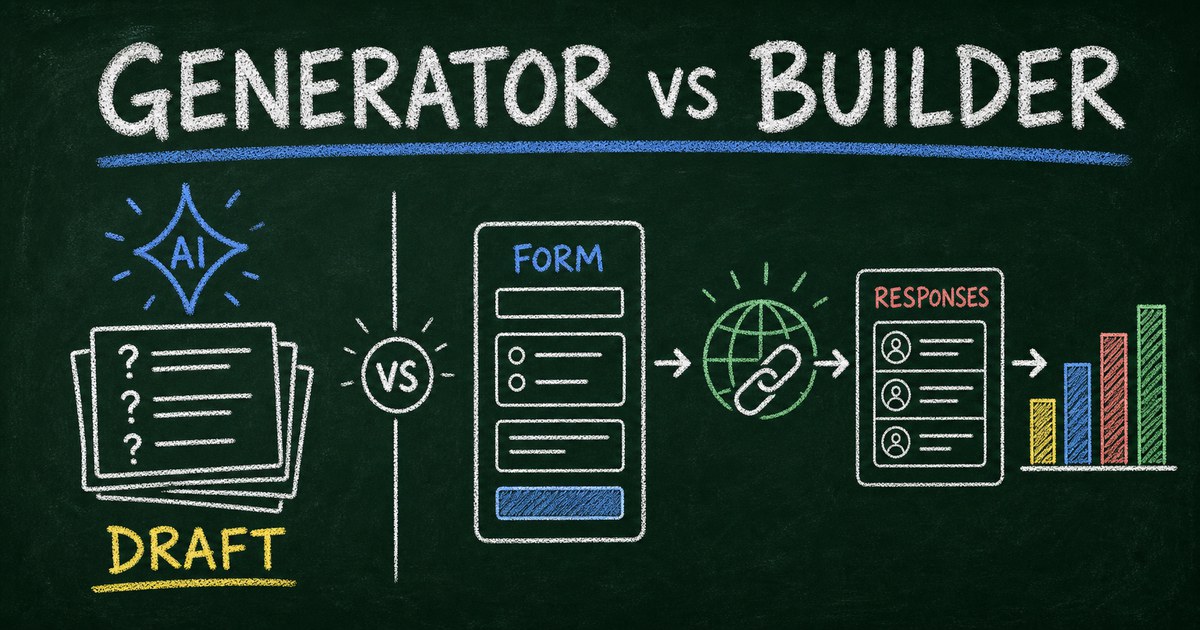
The difference between an AI form generator and an AI form builder appears after the first prompt. Both can produce questions in seconds. Only one is expected to carry those questions into a hosted form, collect structured responses, and keep the workflow usable after people submit.
That boundary matters when the form is tied to an event, research project, sales process, course, or customer workflow. A polished list of fields can still leave you rebuilding everything in another tool. A complete builder should reduce both drafting work and operational work.
We use a simple test when evaluating these tools: does the output stop at content, or does it become a working response system? This article explains the distinction, the features to check, and how to choose the right workflow.
TL;DR — An AI form generator drafts questions or fields; an AI form builder turns intent into a hosted, editable form that can collect and manage responses.
- Generator output — usually copy, questions, or a temporary preview.
- Builder output — a persistent form with field types, validation, sharing, submissions, and editing.
- The decisive test — ask what happens after someone submits.
- Works for: surveys, registrations, quizzes, applications, intake, and lead qualification.
- A tool can offer both capabilities, but the words are not interchangeable.
What Is an AI Form Generator?
An AI form generator converts a natural-language request into proposed form content. You might ask for a customer survey, workshop registration, or onboarding questionnaire and receive a title, introduction, questions, answer choices, and suggested required fields.
That output is useful. Starting from a structured draft is faster than starting from a blank page, and AI can surface missing questions such as dietary restrictions, consent, timelines, or follow-up details. But generation alone does not guarantee that the result is a usable online form.
Some generators return text to copy. Others show a preview but require another editor before publishing. A few produce code that still needs hosting and a backend. The common feature is that their main job is creating the initial content.
What Is an AI Form Builder?
An AI form builder is an online form system that uses AI to create the form and then supports the rest of the workflow: editing fields, applying validation, publishing a link, storing submissions, and reviewing or exporting responses.
The important word is builder, not AI. A builder owns the operational surface. It must know that an email question needs email validation, a quiz choice may need scoring, a date needs a date picker, and a conditional follow-up should only appear for relevant respondents.
In our own testing, the clearest distinction was persistence. A generated question list disappeared when the chat ended; a form created with FormHug remained available to edit, share, and analyze. The AI form builder workflow shows how a prompt becomes a real form rather than a disposable draft.
AI Form Generator vs AI Form Builder at a Glance
| Capability | AI form generator | AI form builder |
|---|---|---|
| Draft questions and answer choices | Yes | Yes |
| Map questions to real field types | Sometimes | Expected |
| Create a persistent hosted form | Sometimes | Expected |
| Validate emails, numbers, dates, and required fields | Rarely | Expected |
| Add logic, scoring, or outcome rules | Limited | Often supported |
| Store structured submissions | Usually no | Yes |
| Edit the form after publishing | Usually no | Yes |
| Analyze or export responses | Usually no | Yes |
The table is a category definition, not a guarantee about every product. Some tools market themselves as generators while providing a full backend; others use “builder” even though the AI only drafts fields. Evaluate the output and workflow, not the label.
The Prompt-to-Response Test
The Prompt-to-Response Test is a four-part way to tell whether a tool is a generator or a complete builder.
1. Does the prompt create structure, not only prose?
A working form needs typed fields. “Email address” should become an email field, not generic text. A rating should have a defined scale. Multiple-choice options should be stored as choices rather than pasted into a paragraph.
2. Can you revise the result without rebuilding it?
The first draft is rarely final. A real builder lets you add a question, change a field type, reorder sections, adjust requirements, or refine the wording while preserving the form and its link.
3. Can another person submit without entering your AI chat?
Forms are interfaces for respondents. A builder should produce a public link, embedded experience, or other stable delivery surface. If every participant needs access to the original chat, it is not a practical form workflow.
4. Does the response return as structured data?
This is the strongest boundary. A builder stores each answer against a known field and makes submissions available for review, export, analysis, or automation. That is what turns generated questions into an operational system.
The same boundary explains why ChatGPT needs a connected form app to create a real online form. Chat is excellent for intent and iteration; the form platform supplies persistence, public delivery, and structured data.
When an AI Form Generator Is Enough
A generator is enough when the deliverable is the question set itself. Common examples include brainstorming interview questions, drafting a one-time worksheet, preparing questions for an existing corporate form system, or generating HTML for a developer-managed application.
It can also be the right choice when your organization has already standardized on another platform. In that case, use AI to improve wording and coverage, then rebuild the approved questions inside the required system.
Choose a generator when:
- You only need a question draft.
- Someone else owns publishing and response storage.
- You must use an existing internal platform.
- You want code and already have hosting, authentication, and a database.
When You Need an AI Form Builder
A builder is the better fit when the form must survive beyond the drafting session. Registrations need attendee records. Surveys need comparable responses. Quizzes need answer keys and scores. Applications need files, contact details, and a reviewable submission history.
Choose a builder when:
- You need a shareable form link now.
- Nontechnical teammates must be able to edit the form later.
- Responses need to be stored, filtered, exported, or analyzed.
- The workflow uses validation, conditional logic, scoring, payments, or automation.
- An AI agent may need to create the form or read submissions through MCP.
For survey-specific decisions, see AI Survey Maker: Create Better Surveys from a Prompt. For agent workflows, an MCP form builder adds a tool interface so an agent can continue working after creation.
How to Build a Complete AI-Generated Form
Step 1: Describe the outcome and audience
Start with what the response will help you decide. “Create a feedback survey” is workable; “Create a six-question post-event survey for workshop attendees so we can improve content and logistics” produces a more focused structure.
Step 2: Review the data model
Check field types, required questions, answer choices, and any sensitive information. Remove questions that do not support the stated decision. For quizzes, verify every answer key; for surveys, avoid leading or double-barreled questions.
Step 3: Test the respondent experience
Submit one response on desktop and one on mobile. Confirm validation, conditional paths, completion messaging, and the time it takes. A form is not complete because it looks correct in an editor.
Step 4: Confirm the response workflow
Open the stored submission, check exports or analytics, and decide who handles follow-up. If an agent will process responses, confirm the permissions and tools it can use before collecting real data.
Frequently Asked Questions
What is the difference between an AI form generator and an AI form builder?
An AI form generator primarily drafts questions, fields, or code. An AI form builder creates and hosts an editable form, validates inputs, stores structured submissions, and supports the workflow after publication.
Can ChatGPT generate an online form?
ChatGPT can generate form questions, HTML, or a specification by itself. To create a persistent hosted form with stored responses, it needs a connected form app or another deployment backend.
Is an AI form builder the same as a no-code form builder?
Not exactly. A no-code builder lets people assemble forms without programming. An AI form builder adds natural-language generation and may also help with wording, logic, analysis, or automation.
Can an AI form generator collect responses?
Some products described as generators also include hosting and response storage. Check the actual workflow: a tool that publishes, stores, and manages submissions is functioning as a builder even if its marketing uses “generator.”
Should I use AI-generated questions without reviewing them?
No. Review wording, field types, privacy implications, answer choices, and factual answer keys. AI can accelerate drafting, but the form owner remains responsible for what is asked and how the data is used.
Do AI form builders support quizzes and surveys?
Many do, but depth varies. Survey workflows need good question types and analysis; quizzes need answer keys, scoring, feedback, and result controls. Confirm those capabilities rather than assuming every form builder supports them.
Can AI agents create and read forms?
Yes, when the form platform exposes an agent-accessible integration such as MCP. FormHug MCP can create and edit forms and retrieve structured submissions inside compatible agent workflows.
Is FormHug free to try?
Yes. FormHug’s free plan includes AI form generation, unlimited forms and collaborators, and up to 3,000 submissions per month without a credit card.
Related
- AI Form Builder: How to Create Real Forms From a Prompt — follow the complete prompt-to-published-form workflow.
- Can ChatGPT Create a Real Online Form? — understand where chat generation stops and a form backend begins.
- AI Survey Maker: Create Better Surveys From a Prompt — apply AI generation to research questions and survey decisions.
- MCP Form Builder for AI Agents — connect structured human input to agent workflows.
A question draft saves minutes; a complete response workflow saves the rebuilding, cleanup, and handoffs that follow. Create a real AI-generated form →

Written by
FormHug TeamProduct, research, and form automation team
The FormHug Team brings together product builders, workflow researchers, and form automation practitioners who study how people collect, route, and act on information online. Our guides are based on hands-on product testing, template analysis, customer workflow patterns, and deep experience with forms, surveys, quizzes, AI-assisted creation, integrations, and results sharing.