What Does RSVP Mean? Etiquette, Examples, and Digital RSVP Tips
Create with AI
Describe the workflow and get a form draft
Use FormHug to create forms from prompts, then share, automate, and reuse the structured responses.
An RSVP looks like a small line on an invitation, but it controls the entire event plan. A host cannot finalize catering, seating, guest lists, supplies, or reminders until people answer. One missing RSVP can mean an empty chair. Twenty missing RSVPs can mean the budget, room layout, and food order are all guesses.
The confusion is understandable. Some invitations say “RSVP by Friday.” Some say “please respond.” Some ask for a text, email, card, QR code, or form. The word sounds formal, but the job is simple: tell the host whether you are coming.
This guide explains what RSVP means, how guests should respond, what hosts should include, and how to turn scattered replies into a digital RSVP workflow that is easier to track.
TL;DR - RSVP means “please respond.” It asks invitees to confirm whether they will attend so the host can plan accurately.
- Respond either way - an RSVP request needs a yes or no, not silence.
- Use the requested channel - if the host gives a form, link, email, or card, answer there.
- Include planning details - guest count, meal choice, and dietary needs matter when the invitation asks for them.
- Works for: weddings, parties, corporate events, workshops, classes, community events, and conferences.
- Hosts should use one RSVP collection method so replies do not scatter across text, email, and spreadsheets.
What Does RSVP Mean?
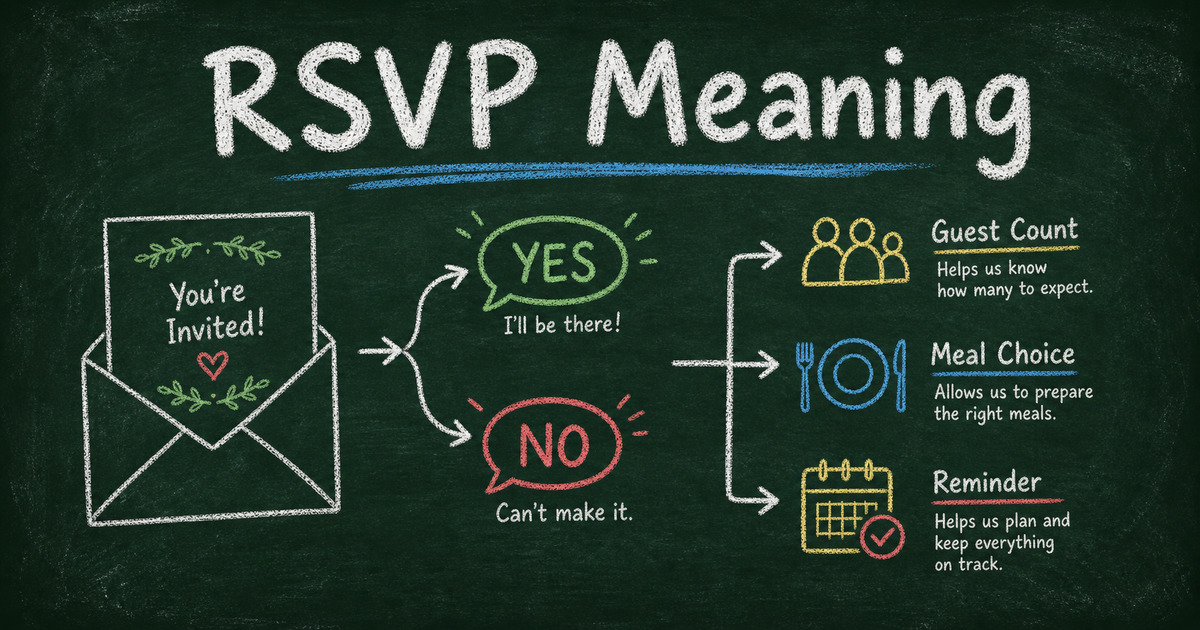
RSVP stands for the French phrase “repondez s’il vous plait,” which means “please respond.” On an invitation, it means the host wants you to confirm whether you will attend.
An RSVP is not only a courtesy. It is planning data. The host uses the answer to decide:
- How many seats to prepare
- How much food or drink to order
- Whether to reserve space for a plus-one
- Which meals or dietary accommodations are needed
- Whether to send reminders before the event
- When to close the guest list
That is why “I’ll let you know later” is not really an RSVP unless the host asked for tentative responses. A useful RSVP gives the host a clear answer by the deadline.
RSVP Etiquette for Guests
Good RSVP etiquette is mostly about clarity. The host should not have to interpret your answer, chase missing details, or match your text message to a guest list.
Respond by the deadline
If the invitation gives a date, answer before that date. For weddings, catered events, conferences, and workshops, the deadline may be tied to a venue or supplier cutoff.
If you are unsure, say that directly and ask when the host needs the final answer. Do not disappear until the day before the event.
Answer yes or no
An RSVP request expects a response even if you cannot attend. Declining is better than silence because the host can release a seat, adjust food, or invite someone else.
Simple decline:
Thank you for inviting me. I am sorry I cannot attend, but I hope the event goes beautifully.
Simple acceptance:
Thank you for the invitation. I will attend and look forward to seeing you there.
Include everyone covered by the invitation
If the invitation includes a guest, child, team member, or plus-one, say who is attending. If the invitation does not mention a plus-one, do not assume one is included. Ask politely if needed.
For digital RSVP forms, answer the guest-count question exactly. If your plans change, update the host quickly instead of arriving with a different number.
Use the channel the host requested
If the host sends an RSVP form, use the form. If they ask for an email, reply by email. If there is a printed card, return the card.
Using the requested method helps the host keep replies in one place. A casual text may feel easier for you, but it can create extra work if the host is tracking everything in a spreadsheet or event system.
RSVP Examples You Can Copy
What does RSVP mean on an invitation?
On an invitation, RSVP means the host wants a clear attendance answer by the deadline. It usually does not mean “reply only if you are coming.” Unless the invitation says “regrets only,” send a response whether the answer is yes or no.
If the invitation includes a link, QR code, email address, phone number, or paper card, use that method. The host likely chose it because they are using the replies to manage guest count, catering, seating, reminders, or check-in.
How to RSVP by text
Text works well for casual parties, small dinners, and informal gatherings. Keep it clear and include your name if the host may not recognize the number.
Text acceptance:
Hi [Host Name], this is [Your Name]. Thanks for inviting me. I will be there on [Date].
Text decline:
Hi [Host Name], thank you for the invite. I am sorry I cannot make it, but I hope you have a wonderful event.
Text with details:
Hi [Host Name], I will attend with [Guest Name]. We do not have any dietary restrictions. Looking forward to it.
How to RSVP by email
Email is better for formal events, professional gatherings, and situations where you need to include details. Use a short subject line so the host can search and organize replies later.
Email subject ideas:
- RSVP for [Event Name]
- [Your Name] - RSVP
- RSVP confirmation for [Date]
Email body:
Dear [Host Name],
Thank you for inviting me to [Event Name]. I am happy to confirm that I will attend on [Date]. Please let me know if you need anything else before the event.
Best, [Your Name]
RSVP wording examples for hosts
If you are hosting, write the RSVP request so guests know exactly what to do:
- Please RSVP by [Date] using the form below.
- Kindly respond by [Date] so we can finalize the guest count.
- Please confirm whether you will attend and include any dietary restrictions.
- RSVP here: [Link]
- Regrets only by [Date]: [Email or phone number]
For events with guest count, meals, sessions, or reminders, a digital form is usually cleaner than asking people to reply in free text. Start from FormHug’s RSVP and invitation templates if you want the answer, guest details, and follow-up fields in one place.
Formal event acceptance
Subject: RSVP for [Event Name]
Dear [Host Name],
Thank you for the invitation. I am pleased to confirm that I will attend [Event Name] on [Date].
Kind regards,
[Your Name]
Formal event decline
Subject: RSVP for [Event Name]
Dear [Host Name],
Thank you for inviting me to [Event Name]. Unfortunately, I will not be able to attend. I appreciate the invitation and hope the event goes very well.
Kind regards,
[Your Name]
Casual party acceptance
Thanks for the invite. I will be there on [Date]. Looking forward to it!
Casual decline
Thanks so much for inviting me. I cannot make it this time, but I hope you have a great celebration.
RSVP with a plus-one
Thank you for the invitation. I will attend with [Guest Name]. Please let me know if you need anything else from us before the event.
RSVP with dietary restrictions
Thank you for the invitation. I will attend. I wanted to note that I am vegetarian and allergic to [Allergy], if meal planning is still open.
Asking to change an RSVP
I am sorry for the change, but I need to update my RSVP for [Event Name]. I can no longer attend. Thank you for understanding, and I apologize for any inconvenience.
What Hosts Should Include in an RSVP Request
The best RSVP request removes ambiguity. Guests should know exactly how to respond, what information to include, and when the answer is due.
Include:
- Event name
- Date and time
- Location or virtual link
- RSVP deadline
- Response method
- Whether plus-ones are allowed
- Meal or dietary questions, if relevant
- Contact person for changes
For a small dinner, a text reply may be enough. For a wedding, workshop, conference, class, fundraiser, or company event, use a structured RSVP form. The moment you need guest count, meal choice, session selection, or reminders, a form is cleaner than freeform replies.
If you are building one from scratch, use how to create an RSVP form. If the event includes time slots or limited capacity, compare it with an online booking form instead.
Digital RSVP vs Text, Email, and Paper Cards
Each RSVP method works best for a different event size.
| RSVP method | Best for | Weak spot |
|---|---|---|
| Text message | Small casual events | Replies get buried and hard to export |
| Formal but low-volume events | Details arrive in different formats | |
| Paper card | Traditional weddings and formal invitations | Slow, manual, and easy to misread |
| Online RSVP form | Events with guest details, meals, reminders, or exports | Requires sending a link or QR code |
Online RSVP forms are strongest when the host needs structured answers. A form can require the attendance answer, show meal choices only to people attending, collect dietary restrictions, and send confirmation emails automatically.
FormHug works well here because the RSVP can live beside the rest of the event workflow: registration, payment, booking, survey, and post-event feedback. If you also want to send automatic guest confirmations, pair the RSVP form with the notification pattern in confirmation and reminder emails after form submission.
How to Create a Digital RSVP Workflow
Step 1: Pick one reply destination
Choose one place where official RSVPs should land: an RSVP form, event registration form, email address, or card. If you accept every channel equally, you will end up reconciling duplicates.
For most hosts, a form is the easiest default because it keeps names, email addresses, attendance, guest count, and meal choices in one table.
Step 2: Ask attendance first
Start with: “Will you attend?” Then use conditional logic so guests who answer “No” skip meal, plus-one, and session questions.
This keeps the form polite. Someone declining should not have to answer planning questions for an event they will not attend.
Step 3: Collect only planning details
Ask for details you will actually use:
- Name
- Attendance answer
- Guest count
- Meal choice
- Dietary restrictions
- Accessibility needs
- Optional note to the host
Skip anything that does not change the plan. Short RSVP forms get more complete answers.
Step 4: Send a confirmation
After submission, send an automatic confirmation with the event name, date, location, and the respondent’s choices. This prevents “did my RSVP go through?” messages.
For templates, start with FormHug’s RSVP and invitation templates. For broader event signups, use registration form templates.
Frequently Asked Questions
What does RSVP stand for?
RSVP stands for “repondez s’il vous plait,” a French phrase meaning “please respond.” On an invitation, it asks guests to confirm whether they will attend.
Do I need to RSVP if I am not going?
Yes. If the invitation asks for an RSVP, respond even when the answer is no. A decline helps the host update the guest count and planning details.
Is RSVP only for weddings?
No. RSVP requests are common for weddings, parties, dinners, corporate events, workshops, classes, conferences, fundraisers, and community gatherings.
What should an RSVP include?
At minimum, include your name and whether you will attend. If the host asks, also include guest count, meal choice, dietary restrictions, session selection, or accessibility needs.
Can I change my RSVP after responding?
Yes, but tell the host as soon as possible. Last-minute changes can affect seating, food, check-in, or capacity planning.
Is a digital RSVP acceptable for formal events?
Yes. Digital RSVPs are common for formal and informal events, especially when the host needs accurate guest data, meal choices, reminders, and exports.
What is the difference between RSVP and registration?
An RSVP confirms attendance for invited guests. Registration usually collects a broader signup for an event, class, conference, workshop, or ticketed activity. Some events need both.
Related
- How to Create an RSVP Form - build a structured RSVP form with attendance, meals, and guest details
- How to Send Confirmation and Reminder Emails After Form Submission - send automatic guest confirmations and event reminders
- How to Create an Online Booking Form - use booking when people need to choose a time, class, service, or slot
- How to Use Conditional Logic in Forms - show RSVP follow-up questions only when they apply
An unanswered RSVP is not a tiny etiquette problem; it is a planning gap. Give guests one clear place to answer, collect the details you need, and let the form handle the follow-up. Create your RSVP form ->

Written by
FormHug TeamProduct, research, and form automation team
The FormHug Team brings together product builders, workflow researchers, and form automation practitioners who study how people collect, route, and act on information online. Our guides are based on hands-on product testing, template analysis, customer workflow patterns, and deep experience with forms, surveys, quizzes, AI-assisted creation, integrations, and results sharing.