ChatGPT Survey Maker: Create and Publish a Real Survey
Start collecting responses
Turn this into a shareable survey
Draft the questions, publish a clean link, and keep every response organized in FormHug.
A survey can be drafted in one ChatGPT conversation and still take another hour to publish. The delay appears when you have to copy every question into a separate builder, recreate answer choices, choose field types, test the form, and later bring the responses back for analysis.
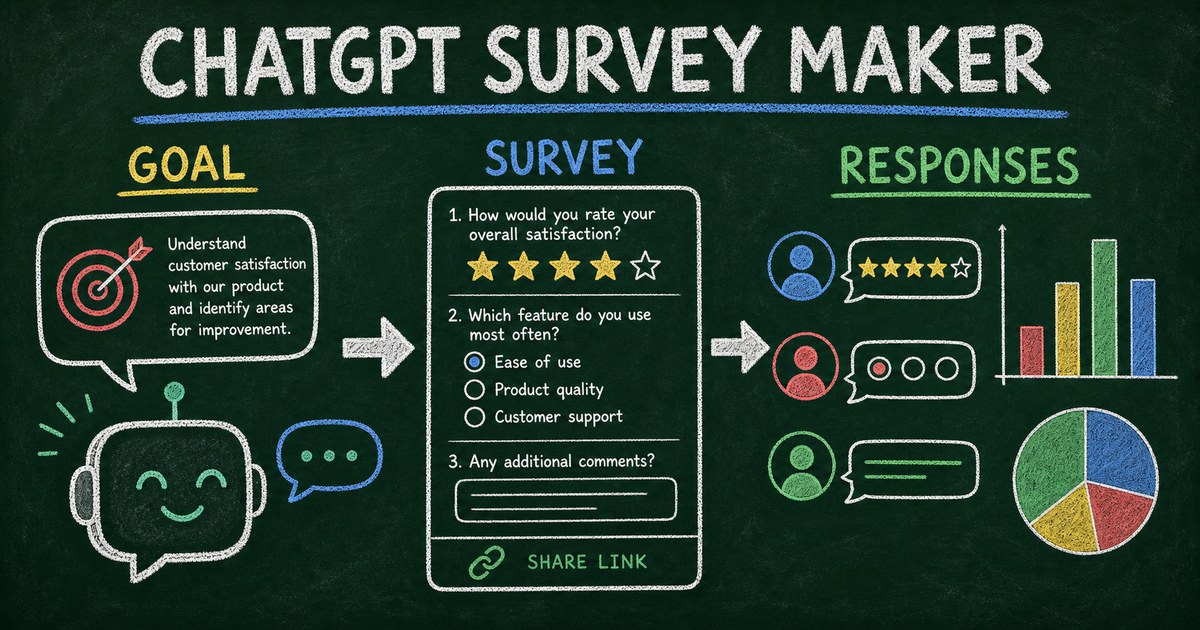
Using ChatGPT as a survey maker is more useful when the conversation and the survey backend are connected. ChatGPT can clarify the research goal, draft and refine questions, ask a form app to create the hosted survey, and help interpret structured responses afterward.
We tested this workflow with FormHug by moving from a one-sentence research goal to a shareable survey and then reviewing the resulting response structure. The strongest prompts specified the decision, audience, and length instead of merely requesting “a customer survey.”
TL;DR — A ChatGPT survey maker combines conversational survey design with a connected form platform that publishes the survey and stores structured responses.
- Start with the decision — tell ChatGPT what the survey should help you learn or choose.
- Generate a complete survey — include audience, length, question types, and constraints in the prompt.
- Publish through a connected app — a form backend supplies the public link and response storage.
- Works for: customer feedback, event follow-up, product research, employee pulse checks, and course evaluation.
- Review AI-generated wording before publishing; survey design still affects data quality.
What Is a ChatGPT Survey Maker?
A ChatGPT survey maker is a workflow in which ChatGPT helps design a survey and uses a connected survey or form app to turn it into a hosted response experience. ChatGPT handles conversation and reasoning; the connected app handles field structure, publishing, permissions, and submissions.
Without a connected backend, ChatGPT can still create an excellent questionnaire. It can suggest Likert scales, multiple-choice options, screening questions, and open-ended follow-ups. But the output remains text, code, or a specification until another system hosts it and stores responses.
That is the same boundary described in Can ChatGPT create a real online form?: content generation and form operation are different jobs.
OpenAI now presents connected workflows through its Plugin Directory. A plugin may include an underlying app, while availability depends on plan, workspace settings, role, region, and supported surface. Check the current OpenAI plugin guidance if a connection is not visible in your ChatGPT account.
The Decision-to-Question Framework
Weak survey prompts start with a topic: “Make a survey about our event.” Strong survey prompts start with the decision the responses must support.
We call this the Decision-to-Question Framework:
- Decision — what will change after you read the responses?
- Audience — who has the experience needed to answer?
- Signal — what behavior, preference, satisfaction, or constraint must be measured?
- Question — which answer format captures that signal with the least effort?
Suppose a team wants to improve a workshop. “Did you like the workshop?” produces a weak yes/no signal. A better survey separates content relevance, pacing, facilitation, and logistics, then asks one open-ended question about the most valuable change.
This framework also limits unnecessary questions. If an answer will not affect a decision, remove it. Shorter surveys are easier to complete and easier to analyze.
A Prompt for Creating a Survey in ChatGPT
Use a prompt that gives ChatGPT both research context and publishing instructions:
Create a post-event survey for people who attended our two-hour AI workshop.

Goal: decide what to improve before the next session.
Length: 7 questions and under 3 minutes.
Include: overall satisfaction, content relevance, pacing, confidence before and after, one multiple-choice improvement question, and one optional open comment.
Avoid leading questions and make demographic questions optional.

Create it as a hosted FormHug survey, then return the public link and a short explanation of what each question measures.
The same structure works for customer research, employee feedback, course evaluation, or product validation. Change the decision, audience, and signals; keep the constraints explicit.
For broader prompt design, the AI Survey Maker guide explains how to move from a research goal to answerable survey questions.
What ChatGPT Should Create for a Real Survey
A clear introduction
Respondents should know why the survey exists, how long it takes, and how their responses will be used. ChatGPT can draft this, but you should verify any promise about anonymity, confidentiality, or follow-up.
Field types matched to the signal
Use ratings for intensity, single select for one choice, checkboxes for multiple applicable options, and open text for explanations you cannot predict. Do not use open text when a fixed scale would produce cleaner comparison data.
Neutral wording and balanced choices
Questions should not imply the preferred answer. Include relevant negative and neutral options, avoid combining two ideas in one question, and make “not applicable” available when respondents may lack the necessary experience.
A response plan
Decide how responses will be segmented and what threshold triggers action. A customer satisfaction score without a follow-up plan is only a number. A survey becomes operational when someone owns the next decision.
How to Create a Survey with ChatGPT and FormHug
Step 1: Connect the FormHug workflow
Open FormHug through the available ChatGPT plugin or app connection and authorize access. If you prefer a standalone workflow, you can also start with the FormHug AI form builder outside ChatGPT.
Step 2: Describe the decision, audience, and constraints
Use the Decision-to-Question Framework. Specify the maximum question count, desired completion time, must-have signals, and sensitive topics to avoid or make optional.
Step 3: Review and test the hosted survey
Check every field type, choice list, required setting, and branching path. Submit a test response on mobile. We found that this final review catches issues that are hard to see in a question list, especially required open-text fields and overlapping answer choices.
Step 4: Collect and analyze responses
Share the public link or QR code. After responses arrive, ask for a summary organized around the original decision: key distributions, repeated themes, important outliers, and the next questions the data cannot answer.
Ready-Made Survey Templates
If the research goal is standard, adapting a tested structure may be faster than generating from zero:
- Customer Satisfaction Survey — measure satisfaction and the reason behind the score.
- Product Idea Validation Survey — test demand and audience fit before building.
- Product Feedback Form — collect structured feedback after a feature or beta release.
- Course Topic Validation Survey — learn whether an audience wants a course, workshop, or webinar topic.
- AI Tools Usage Survey — understand adoption, use cases, and blockers.
Ask ChatGPT to adapt one template to your audience and decision rather than adding questions without a clear purpose.
How to Analyze Survey Responses with ChatGPT
Start analysis with the survey’s original decision. Ask ChatGPT to separate direct evidence from inference and to preserve counts or percentages when summarizing closed questions.
A useful analysis request is:
Analyze these survey responses for our decision about the next workshop.
Report: response count, distributions for each rating question, repeated themes in open text, important minority views, contradictions, and three recommended changes.
Do not invent percentages or treat missing answers as negative responses.
For a deeper workflow, see How to Analyze Survey Results with AI. Do not paste sensitive personal data into a model or workspace that your organization has not approved.
Frequently Asked Questions
Can ChatGPT create a survey for free?
ChatGPT can draft survey questions within the limits of your ChatGPT plan. Publishing and response limits depend on the connected form platform. FormHug’s free plan includes unlimited forms and up to 3,000 submissions per month.
How do I make a survey using ChatGPT?
Describe the decision, audience, signals, question count, and desired answer types. Review the draft, then use a connected form app to publish it as a hosted survey and store responses.
Can ChatGPT send me a survey link?
ChatGPT needs a connected survey or form app to create a persistent public link. Without that connection, it can provide questions or code but does not supply the hosted survey backend by itself.
Can ChatGPT analyze survey responses?
Yes. It can summarize distributions and themes, compare segments, and suggest follow-up questions when it has access to the response data. Verify calculations and avoid sharing sensitive data outside approved systems.
What questions should I include in a customer survey?
Include only questions tied to a decision. A compact customer survey often covers overall satisfaction, the main reason for the score, the job the customer was trying to complete, the biggest obstacle, and one requested improvement.
Is a ChatGPT survey anonymous?
Not automatically. Anonymity depends on the form’s fields, access settings, tracking, and the surrounding workflow. Do not promise anonymity unless you have verified that identifying data is not collected.
Can I create quizzes as well as surveys in ChatGPT?
Yes. The workflow is similar, but quizzes need verified answer keys, scoring rules, feedback, and result settings. See the ChatGPT Quiz Maker guide.
How do I start a FormHug survey in ChatGPT?
Connect FormHug through the available plugin or app workflow, describe the survey using the Decision-to-Question Framework, review the created form, and ask for its public link.
Related
- AI Survey Maker: Create Better Surveys From a Prompt — design better questions from a research goal.
- Can ChatGPT Create a Real Online Form? — understand the hosting and response-storage boundary.
- How to Create a Form in ChatGPT — follow the broader prompt-to-form workflow.
- How to Analyze Survey Results — turn structured responses into useful findings.
Every copied question adds setup work and another chance to misconfigure the survey. Keep the research goal inside the same workflow from prompt to response analysis. Create a survey with FormHug →

Written by
FormHug TeamProduct, research, and form automation team
The FormHug Team brings together product builders, workflow researchers, and form automation practitioners who study how people collect, route, and act on information online. Our guides are based on hands-on product testing, template analysis, customer workflow patterns, and deep experience with forms, surveys, quizzes, AI-assisted creation, integrations, and results sharing.