How to Create a Conference Participant Center That Guides Every Attendee to the Right Next Step
Create with AI
Describe the workflow and get a form draft
Use FormHug to create forms from prompts, then share, automate, and reuse the structured responses.
One conference can create eight different participant destinations before the closing survey is even sent. Delegates apply. Speakers propose sessions. Confirmed attendees submit travel details. Workshop guests reserve seats. People ask questions during a session, then leave session-level and event-level feedback.
When those destinations are scattered across emails, chat threads, QR codes, and web pages, the participant has to remember where each link lives. The organizer becomes the navigation system, answering the same question repeatedly: “Where do I go next?”
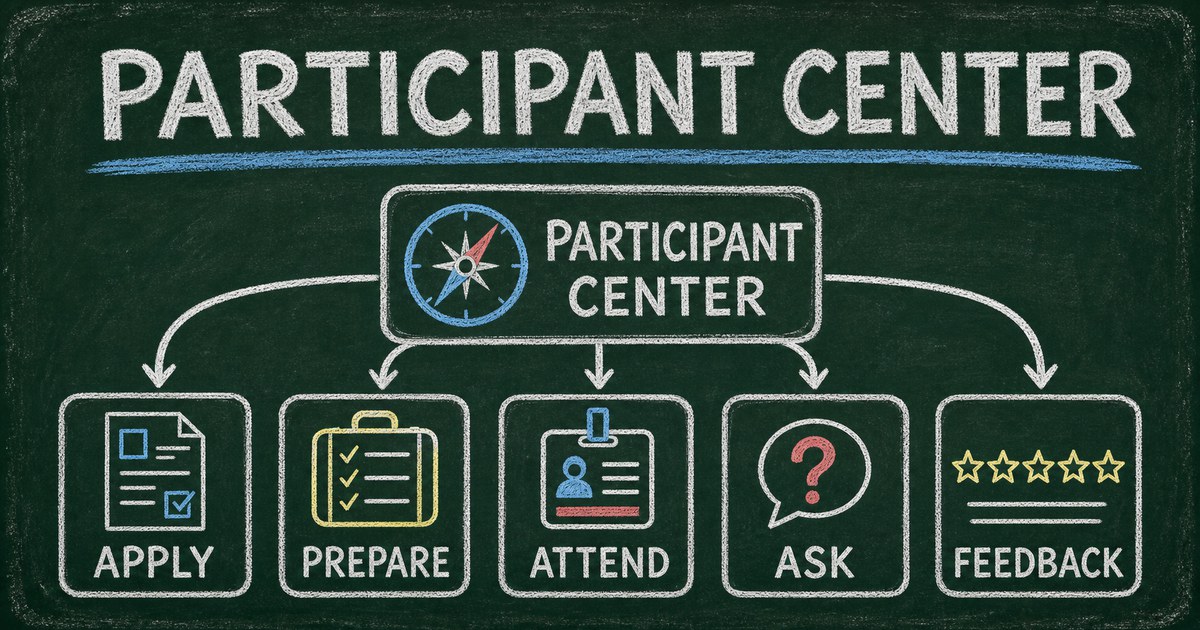
A conference participant center replaces that link hunt with one trusted starting point. This article explains how to design the center, route each choice to the correct destination, and keep the experience useful before, during, and after the event.
TL;DR — A conference participant center is a lightweight navigation page that gives attendees one entry point and routes each person to the correct next action.
- One trusted link — participants return to the same place instead of searching old messages.
- Role → Stage → Next Step — organize destinations around who the person is, where they are in the journey, and what they need to do now.
- Conditional routing — one required choice can redirect each participant to a different registration, preparation, interaction, or feedback page.
- Works for: conferences, forums, workshops, training programs, community events, and multi-stage applications.
- It is a navigation layer, not a replacement for a full event-management platform or participant CRM.
What Is a Conference Participant Center?
A conference participant center is a lightweight, branded navigation page that connects attendees to the forms, resources, and actions relevant to their current stage of the event.
It is deliberately smaller than a participant portal. A portal usually implies accounts, stored profiles, dashboards, permissions, and a unified attendee record. A participant center can work without any of that infrastructure. It gives people one public link, asks where they want to go, and sends them to the right destination.
That distinction matters. If the immediate problem is “participants cannot find the correct link,” building a full portal creates a much larger project than the problem requires.
| Experience | Primary job | Best used when |
|---|---|---|
| Registration form | Collect one signup or application | Everyone is completing the same initial action |
| Conference participant center | Route people to different next steps | Roles and actions change across the event journey |
| Full participant portal | Provide accounts, profiles, and persistent records | The event genuinely requires authenticated self-service |
The center does not need to contain every event detail. Its job is to answer one question quickly: What does this participant need to do next?
Why One Large Conference Form Usually Breaks Down
Combining every conference task into one form looks efficient from the organizer’s side. The participant experiences something different: irrelevant questions, unclear timing, and a long page that mixes actions they need today with actions they may need weeks later.
Different roles have different jobs
A delegate application asks about professional background and participation goals. A speaker proposal needs a session title, abstract, biography, headshot, and recording permission. A live question needs only a session, a concise question, and an optional name.
Those are three different jobs. Putting them into one form creates branching complexity and makes each response table harder to use.
The same participant changes needs over time
Before the conference, someone may need to apply or register. After confirmation, they may need to share arrival details or reserve a workshop. During the event, they may want to ask a question. Afterward, they may leave feedback or retrieve a resource.
The participant center can stay in the same place while its destinations follow the event lifecycle.
Separate destination forms keep each dataset focused
Registration, speaker review, networking requests, live questions, and post-event evaluation produce different kinds of data for different teams. Separate forms keep those responses focused while the participant center provides a unified front door.
This is also why a participant center should not be described as a cross-form CRM. It connects experiences; it does not automatically turn every destination into one shared participant record.
Use the Role → Stage → Next Step Framework
Before building the page, map every destination through three filters:
- Role: Who is this for?
- Stage: When will they need it?
- Next step: What specific action should they take?
We used this framework when building the fictional HugAI Conference 2026 Participant Center. Its eight destinations cover the event from application through final evaluation.
| Role or moment | Stage | Next step shown to the participant |
|---|---|---|
| Prospective delegate | Before confirmation | Apply as a delegate |
| Prospective speaker | Program planning | Submit a speaker proposal |
| Confirmed participant | Before arrival | Submit participant preparation details |
| Workshop attendee | Before the session | Register for a workshop |
| Participant seeking connections | Before or during the event | Request a networking introduction |
| Session attendee | During the event | Ask a live session question |
| Session attendee | Immediately after a session | Give session feedback |
| Conference attendee | After the event | Complete the post-event evaluation |
The wording is action-first. “Apply,” “Submit,” “Register,” “Request,” “Ask,” “Give,” and “Complete” tell participants what will happen next. Labels such as “Speaker form” or “Feedback page” describe the organizer’s asset instead of the participant’s task.
Use your event registration questions to decide what belongs in each destination, but keep the center itself minimal. It should route people, not collect the information that belongs downstream.
How Conditional Redirects Turn One Choice Into Navigation
The core interaction is simple:
- The participant chooses one destination.
- They select Continue.
- A redirect rule evaluates the selected option.
- The participant opens the corresponding public page.
This is different from conditional field display. Show/hide logic changes which questions appear inside the current form. A conditional redirect changes where the participant goes after completing the navigation step. Both are forms of conditional logic, but they solve different problems.
In FormHug, the participant center can use a required radio question such as “Where would you like to go?” Each option receives its own post-submission redirect URL. The live HugAI example uses one question and eight destinations rather than placing eight hyperlinks in the description.
That interaction has three advantages:
- The choice is explicit. The organizer can see which destination was selected.
- The experience is mobile-friendly. A short list of radio choices is easier to scan than a paragraph of links.
- The routing can change. A destination URL can be updated without asking participants to learn a new central link.
Use button copy such as Continue or Go to next step. “Submit” makes the center feel like a data-collection form, while “Open selected form” exposes the implementation instead of the participant journey.
What to Include—and What to Leave Out
A useful participant center usually needs only four content elements.
A clear event identity
Use the event name, year, and visual identity so participants can immediately confirm that the page is official. Keep the introduction short and explain that the center is the place to find the next action.
One required navigation question
Ask a direct question such as:
- Where would you like to go?
- What do you need help with today?
- What is your next step?
Use a single-select field when each click should produce one destination. A checkbox field is a poor fit because multiple selected destinations cannot all open after one submission.
Action-oriented choices
Write each option as a verb plus an object: “Register for a workshop,” not “Workshops.” If two actions sound similar, add the stage or audience: “Give session feedback” versus “Complete the post-event evaluation.”
A short expectation-setting note
If the center is a demonstration, say so. If some options are available only to confirmed attendees, explain that before they continue. Avoid turning the description into an agenda, help center, or link directory.
Event schedules, venue maps, sponsor information, policies, and long instructions belong on dedicated pages. The center should remain fast enough to use from a phone in a conference hallway.
How to Create a Conference Participant Center in FormHug
The build is easier when the destinations already exist. Treat the participant center as the last navigation layer, not the first form you design.
Step 1: Map the participant journey
List every action participants may need before, during, and after the event. Group the list by role and stage, then remove organizer-only tasks.
A practical first version often includes four to six destinations. Add more only when each option represents a genuinely different participant job.
Step 2: Build the destination forms
Create the application, registration, preparation, live interaction, and feedback forms separately. Give each one a clear purpose and public URL.
If registration is the first destination, decide the required fields before building the center. The best registration form templates article explains how registration differs from an application or booking workflow.
Step 3: Create the one-question center
Create a short classic-layout form with:
- The conference name
- A two- or three-sentence description
- One required radio question
- One action-oriented option for each destination
- A continuation-style button label
Use the same event identity across the center and destination forms. Participants should feel that they are moving through one conference experience even though each task has its own page.
Step 4: Add redirect rules and test every path
Create one conditional redirect rule per choice. Then test the live public page—not only the editor preview—using every option.
Check four things for each route:
- The option opens the intended destination.
- The destination title matches the selected action.
- The destination works on mobile.
- The participant can understand what happens after that form is completed.
After the route works, add the center link to confirmation and reminder messages. The guide to sending confirmation and reminder emails after form submission shows how to keep the next action visible without resending a collection of separate links.
Ready-Made Destination Forms
The participant center itself is intentionally simple. Most of the work belongs in the destination forms. These FormHug templates can provide starting structures:
- 2026 AI Workshop Registration — collect attendee experience, topic interests, and workshop preferences.
- Training Registration Form — organize professional learning or multi-session training signups.
- Conference Hotel Booking Form — collect stay dates, hotel choices, and room preferences for conference logistics.
- Event Feedback Form — gather ratings and open-text feedback after a session or event.
Start with the closest structure, remove fields you do not need, and give every destination one clear outcome.
Frequently Asked Questions
What is a conference participant center?
A conference participant center is a lightweight navigation page that gives attendees one trusted link and routes them to the correct registration, preparation, interaction, feedback, or resource page.
How do I organize multiple conference forms in one place?
Create one navigation form with a single-select question listing each participant action. Add a conditional post-submission redirect for every option so the selected action opens the corresponding form or page.
Can one form redirect to different URLs based on an answer?
Yes. A conditional redirect rule can evaluate the selected choice and send the respondent to a specific URL after submission. This is useful when one conference entry point needs to serve delegates, speakers, workshop attendees, and general participants.
Should I use one long conference form or several short forms?
Use separate forms when the actions happen at different stages, serve different roles, or produce data for different teams. Use one form only when every respondent completes the same task at roughly the same time.
Is a participant center the same as a participant portal?
No. A participant center provides navigation. A portal usually includes authenticated accounts, persistent profiles, dashboards, and stored participant records. Do not promise portal capabilities when the experience is only routing between public pages.
Can the same participant center work before, during, and after an event?
Yes. Keep the central link stable and update its destinations as the event progresses. Before the event it may emphasize applications and preparation; during the event it can emphasize live questions and feedback; afterward it can emphasize evaluation and resources.
Does a participant center replace event-management software?
No. It can simplify forms, participant actions, and link distribution, but it does not replace venue management, seating, exhibitor operations, complex agenda tools, on-site equipment, or a full CRM.
Can I create a conference participant center in FormHug?
Yes. Create a short form with one required radio question, add action-oriented choices, and configure a conditional redirect URL for each choice. Test the rules on the live public form before sharing the center with participants.
Related
- How to Use Conditional Logic in Forms to Ask Smarter Questions — learn when to show fields, stop a flow, or route respondents based on answers.
- Event Registration Questions to Ask Before Someone Attends — choose fields that support confirmation, logistics, accessibility, and follow-up.
- Best Event Registration Software for Small Events in 2026 — compare form-first workflows with dedicated event platforms.
- How to Send Confirmation and Reminder Emails After Form Submission — keep the participant center and next step visible throughout the event journey.
When eight conference links live in eight different messages, every stage creates another chance for participants to get lost. Create a participant center with FormHug →

Written by
FormHug TeamProduct, research, and form automation team
The FormHug Team brings together product builders, workflow researchers, and form automation practitioners who study how people collect, route, and act on information online. Our guides are based on hands-on product testing, template analysis, customer workflow patterns, and deep experience with forms, surveys, quizzes, AI-assisted creation, integrations, and results sharing.