Best Registration Form Templates for Events, Classes, Camps, and Memberships
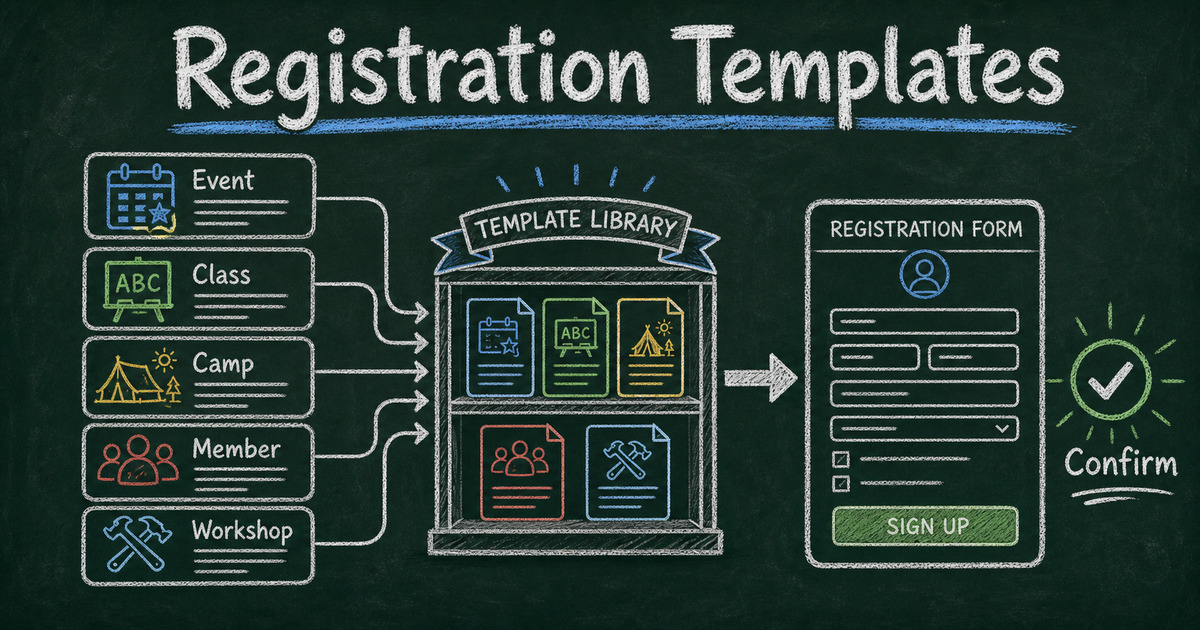
Start from a template
Use a ready-made form structure
Pick a registration, booking, intake, application, or order template and customize it for your workflow.
Registration forms look interchangeable until the first real signup arrives incomplete. An event needs dietary details. A class needs student background. A camp needs guardian information. A membership form needs eligibility, payment, and agreement fields. One generic signup form rarely covers all of those jobs well.
The right registration form template saves time because the field structure already matches the workflow. You still customize the wording, but you do not have to decide from scratch whether to ask about attendee preferences, emergency contacts, session tracks, consent, or payment.
This guide covers the best registration form templates for events, classes, camps, workshops, webinars, memberships, and recurring programs, plus a practical framework for choosing the right one.
TL;DR - FormHug registration form templates help you collect signups for events, classes, camps, memberships, webinars, and programs without starting from a blank form.
- Choose by post-submit outcome - registration confirms participation; application requires review; booking coordinates time.
- Ask for logistics early - preferences, dietary needs, guardian details, and session choices are easier to collect at signup than by follow-up email.
- Keep registration forms lean - required fields should support confirmation, attendance, payment, safety, or communication.
- Works for: events, classes, summer camps, memberships, workshops, webinars, trainings, and community programs.
- Start from a template, then remove fields before adding new ones.
What Is a Registration Form Template?
A registration form template is a pre-built online form structure for collecting signups. It usually includes contact information, participant details, event or program selection, preferences, consent, and optional payment fields.
The defining feature is the outcome: a registration form confirms someone’s place in something. That makes it different from an application form, where a team must review and approve the submission, and different from a booking form, where the main job is scheduling.
Use a registration template when the person submitting the form is joining, attending, enrolling, or becoming a member. Use an application form when you need to evaluate them first. Use an online booking form when time selection is the main workflow.
How to Choose the Right Registration Form Template
Use the Confirm -> Prepare -> Follow Up framework:
- Confirm: What must you know to confirm the registration?
- Prepare: What information helps you run the event, class, camp, or program?
- Follow up: What information helps you contact, remind, segment, or support the registrant later?
Every required field should fit one of those three jobs. If a field is merely interesting, make it optional or remove it.
In our testing, registration forms become harder to complete once they move beyond 8-12 fields unless the registrant clearly understands why the extra information is needed. Camps, classes, and memberships can justify more fields because safety, eligibility, or payment may require them. Lightweight event signups usually cannot.
Event Registration Form Templates
Event registration forms are best for conferences, meetups, networking events, community gatherings, product demos, and in-person sessions. They should capture the attendee’s identity, contact details, attendance choice, preferences, and any logistics that affect planning.
Useful fields include:
- Full name
- Email address
- Organization or role
- Ticket or attendee type
- Session preference
- Dietary or accessibility needs
- Consent to receive event updates
- Optional question for expectations
Start with the Event Registration Form Template when you need a general signup flow. For virtual sessions, use the Webinar Registration Form Template. For hands-on events, use the Workshop Registration Form Template.
If you are still deciding which fields to include, see event registration questions. If the event is invitation-based rather than open signup, use how to create an RSVP form.
Class and Course Registration Templates
Class registration forms need more context than a simple event signup. The organizer may need to understand experience level, prerequisite knowledge, age group, scheduling constraints, or guardian details.
Good class registration questions include:
- Which class or session are you registering for?
- What is your current experience level?
- What goal do you have for this class?
- Do you need any accommodations?
- Are you registering yourself or someone else?
- Who should receive reminders and updates?
Use the Course Registration Form Template for structured programs and the Training Registration Form Template for internal or professional development sessions.
For software and process selection around classes, see class registration software. If your class includes graded checks or certificates, pair the form with a mini exam.
Camp and Youth Program Registration Templates
Camp and youth program registration forms need a wider safety and logistics layer. They often collect guardian information, emergency contacts, age or grade, medical notes, pickup permissions, and consent.
The main risk is asking for sensitive information without a clear reason. Keep safety-related fields grouped together, explain why they are needed, and avoid collecting details that staff will not actually use.
Common sections include:
| Section | Fields to consider |
|---|---|
| Participant | Name, age, grade, preferred name |
| Guardian | Parent or guardian name, email, phone |
| Emergency | Emergency contact, relationship, phone |
| Logistics | Camp week, pickup person, shirt size, dietary needs |
| Consent | Photo permission, waiver acknowledgement, rules agreement |
For smaller programs, start from a general event or course registration template and add only the guardian and safety fields you need. If your program collects payment at signup, see how to create a payment form before deciding where payment belongs in the flow.
Membership Registration Templates
Membership registration forms are used by clubs, associations, communities, gyms, nonprofits, alumni groups, and local organizations. They often need to collect contact details, member type, eligibility, preferences, agreement terms, and payment status.
Use the Membership Registration Form Template when membership begins immediately after signup. If membership requires approval, references, or eligibility review, use an application form instead.
Strong membership forms answer four questions:
- Who is joining?
- Which membership level or type do they need?
- What communication preferences should the organization respect?
- What agreement, payment, or eligibility detail must be recorded?
Avoid turning a membership form into a full profile. You can collect preferences and interests later with a survey maker or member feedback form.
How to Create a Registration Form in FormHug
Step 1: Choose the registration outcome
Decide whether submission confirms a place, requests approval, or starts a scheduling conversation. If submission confirms participation, you need a registration form. If not, choose an application or booking workflow instead.
Step 2: Start from the closest template
Open FormHug and choose the template closest to your workflow: event, webinar, workshop, course, training, student, or membership registration. Starting close is faster than starting generic.
Step 3: Remove unnecessary required fields
Review every required field and ask whether it supports confirmation, preparation, or follow-up. If it does not, remove it or make it optional. This keeps the registration form easier to complete.
Step 4: Add reminders, payment, or follow-up only when needed
Some registration forms need confirmation emails, reminder emails, payments, or attendee lookup. Add those workflows after the form structure is clear. For reminders, see appointment reminder email templates. For payment, use a payment form only when collecting money at signup is truly part of the registration.
Frequently Asked Questions
What should a registration form include?
A registration form should include the registrant’s name, contact information, the event or program they are joining, required preferences, logistics, consent, and any payment or eligibility details needed to confirm participation.
What is the best registration form template?
The best registration form template is the one that matches what happens after submission. Use an event template for attendance, a course template for learning programs, a camp template for youth logistics, and a membership template for organizations or communities.
What is the difference between a registration form and an application form?
A registration form confirms participation. An application form asks for review before approval. If every qualified person can join after submitting, use registration. If someone must decide whether they qualify, use an application form.
How many fields should a registration form have?
Simple event registration forms often work best with 5-8 fields. Classes, camps, and memberships may need 10-15 fields because they collect safety, eligibility, guardian, or payment details. Keep required fields tied to a real operational need.
Can I collect payment on a registration form?
Yes, if the registration requires a fee, ticket, deposit, membership dues, or class payment. Keep payment near the end, after the registrant understands what they are signing up for.
Can FormHug create registration forms?
Yes. FormHug can create registration forms with AI, templates, share links, embeds, payment-friendly workflows, and response collection. You can start from a template and customize it for your event, class, camp, or membership.
Related
- Event Registration Questions - choose the right fields before an event
- How to Create an RSVP Form - collect attendance for invitation-based events
- Class Registration Software - manage classes, courses, and small programs
- How to Create a Payment Form - collect fees, deposits, and paid signups online
A registration form should confirm a place, prepare the organizer, and make follow-up easier. Start from the closest template, remove fields before adding new ones, and make signup feel like a clear next step. Create your registration form ->

Written by
FormHug TeamProduct, research, and form automation team
The FormHug Team brings together product builders, workflow researchers, and form automation practitioners who study how people collect, route, and act on information online. Our guides are based on hands-on product testing, template analysis, customer workflow patterns, and deep experience with forms, surveys, quizzes, AI-assisted creation, integrations, and results sharing.