How to Create a Quiz for Employee Training and Learning Checks
Create the assessment
Turn this into a scored assessment
Build an assessment with scoring, result pages, feedback, and records you can review later.
Training often ends with a quiet assumption: people attended, so they must have understood.
A short learning check makes that assumption visible. It shows which concepts participants can recall, where the group is confused, and what needs another explanation. The goal is not to turn every training session into an exam. It is to create a quick feedback loop while the material is still fresh. The same distinction matters when choosing between a knowledge quiz and a personality quiz: training checks usually need answer keys, explanations, and score thresholds.
FormHug’s quiz templates include examples such as AI Literacy and workplace assessments. The AI Literacy Quiz template uses ten questions about mental models, bias, privacy, prompt sensitivity, and responsible use—topics that can reveal where a team needs more than a polished introduction.
TL;DR — An employee training quiz turns a lesson into a measurable learning check with questions, explanations, thresholds, and follow-up actions.
- Start with learning objectives — do not generate questions from a transcript alone.
- Use explanations — a quiz should reinforce the lesson, not only mark answers wrong.
- Choose the right threshold — a low-stakes check and a compliance assessment need different rules.
- Works for: onboarding, product training, policy review, AI literacy, and workshop follow-up.
- Use human review for high-stakes assessments and sensitive decisions.
What is an employee training quiz?
An employee training quiz is a short assessment used before, during, or after training to check understanding and guide follow-up learning.
It can be formative, helping a trainer adjust the next session, or summative, recording whether someone met a pass threshold. The same question format can support both; the stakes and workflow are different.
Start with objectives, not the transcript
Training material often contains stories, examples, context, and repeated explanations. A quiz should focus on what people need to remember or apply.
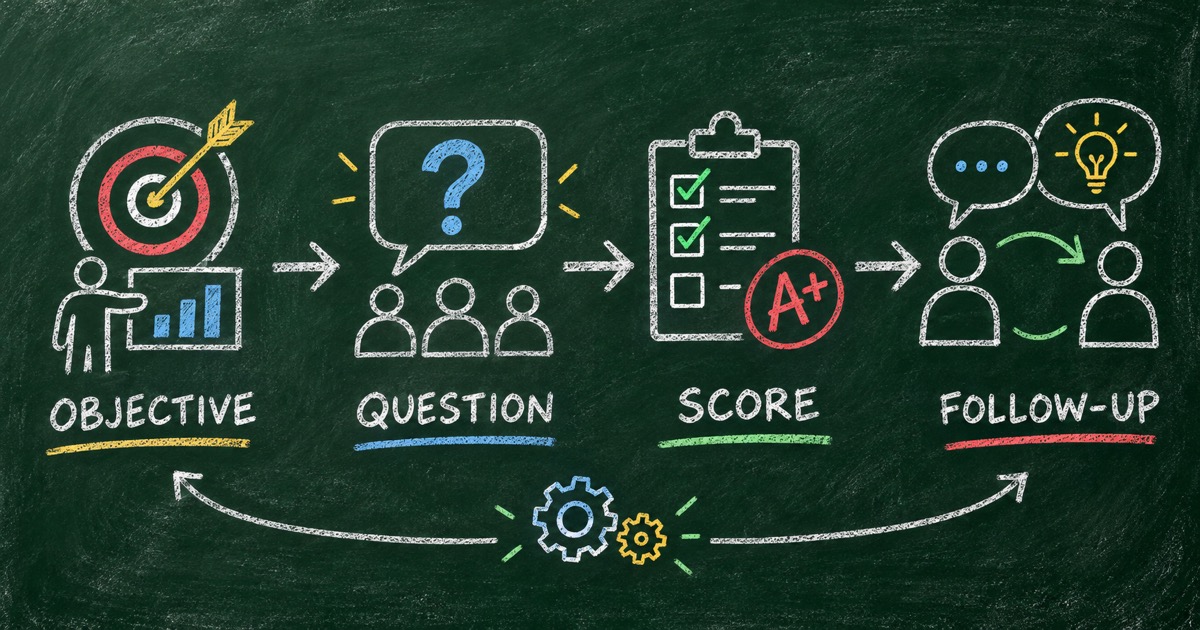
Use the Objective → Evidence → Action framework:
- Objective: What should the learner be able to understand or do?
- Evidence: What answer would show that understanding?
- Action: What will happen if the learner misses it?
For an AI literacy session, an objective might be “recognize that a confident AI answer can still be wrong.” Evidence could be a scenario question about verifying an unsupported claim. The action might be a short follow-up module, not a penalty.
Choose the training quiz format
Pre-training baseline
Use a short quiz before a workshop to reveal the starting point. Keep the feedback private or aggregate it for the facilitator.
In-session knowledge check
Use a few questions to slow the session down and test one concept before moving on.
Post-training review
Use a scored quiz after the lesson. Add answer explanations and a clear next step for missed concepts.
Certification or compliance assessment
Use a pass threshold only when the organization has defined what passing means. Keep an audit trail and involve the right subject-matter or compliance reviewer.
Write questions that test application
Recall questions are useful, but scenario questions often reveal whether someone can apply the lesson.
Instead of:
What is a hallucination?
Try:
An AI assistant gives a confident answer with no source for a policy decision. What should you do next?
The second question tests judgment. It also creates a natural explanation after the answer.
Mix question types, but keep the intended behavior clear. For a short ten-question quiz, three or four scenario questions can make a large difference.
Prompt for an employee training quiz
Create a 10-question employee training quiz from the learning objectives below.

Audience: new team members who completed a 30-minute workshop.
Objectives:
1. Recognize the three most common mistakes in this workflow.
2. Choose the correct next step when an exception appears.
3. Know when human approval is required.

Use multiple-choice and scenario questions. Include one correct answer, a short
explanation, and 10 points per question. Create three results: Needs Review,
Ready to Apply, and Strong Understanding. Recommend one follow-up action for
each result. Avoid trick questions and flag any claim that needs a subject-
matter expert to verify.
Build the quiz with FormHug
Step 1: Prepare the learning objectives
Write three to five outcomes in plain language. If the objective cannot be observed in an answer, rewrite it.
Step 2: Generate and review the draft
Use FormHug’s AI quiz maker or start from the AI Literacy Quiz template. Compare each generated question to an objective and remove questions that only test trivia.
Step 3: Set feedback and thresholds
Choose whether the quiz is a baseline, a learning check, or a pass/fail assessment. Add explanations for wrong answers and a clear follow-up action.
Step 4: Run a pilot
Ask one trainer and one representative learner to take the quiz. Look for confusing wording, missing context, and results that do not match the learning objective.
Read the results as training data
The overall score is only one signal. Review the question-level pattern:
- Which question did most people miss?
- Did the error come from a concept, a term, or an ambiguous option?
- Which team or cohort needs additional support?
- Did the explanation correct the misunderstanding?
An agent can help summarize these patterns after responses arrive. The agent workflow essay describes why creation is only the first step and how a form can become part of a recurring analysis workflow.
Keep high-stakes boundaries clear
Do not use a lightweight AI-generated quiz as the sole basis for employment, safety, medical, or compliance decisions. For high-stakes training, involve a qualified reviewer, document the answer key, and tell participants how results will be used.
Frequently Asked Questions
How do you create an employee training quiz?
Start with learning objectives, write questions that provide evidence of understanding, add answer explanations, set an appropriate threshold, and define the follow-up action for each result.
How many questions should an employee training quiz have?
Use 5 to 10 questions for a short learning check. Add more when the training includes several independent objectives and each question measures something different.
Should employee training quizzes be pass or fail?
Only when a pass threshold represents a real requirement. For most learning checks, a score with explanations and targeted follow-up is more useful than a simple pass/fail label.
Can AI create a training quiz from a document?
AI can turn lesson material into a first draft, but the questions should be checked against the learning objectives and reviewed by a subject-matter expert when the topic is important.
Can FormHug create an employee training quiz?
Yes. FormHug can generate training questions, answer keys, scoring, result ranges, explanations, and a shareable quiz page.
Related
- Employee Training Quiz — explore training quiz formats and examples
- How to Create a Scored Quiz with AI from One Prompt — add answer keys and score ranges
- Knowledge Check Quiz — create a short post-lesson check
Make the learning gap visible while there is still time to act. Create a training quiz with FormHug’s AI quiz maker →

Written by
FormHug TeamProduct, research, and form automation team
The FormHug Team brings together product builders, workflow researchers, and form automation practitioners who study how people collect, route, and act on information online. Our guides are based on hands-on product testing, template analysis, customer workflow patterns, and deep experience with forms, surveys, quizzes, AI-assisted creation, integrations, and results sharing.