Knowledge Check Quiz: Templates for Onboarding and Compliance Training
Create the assessment
Turn this into a scored assessment
Build an assessment with scoring, result pages, feedback, and records you can review later.
Training is not complete when someone reaches the last slide. It is complete when they can recall the important idea and apply it in the situation where it matters.
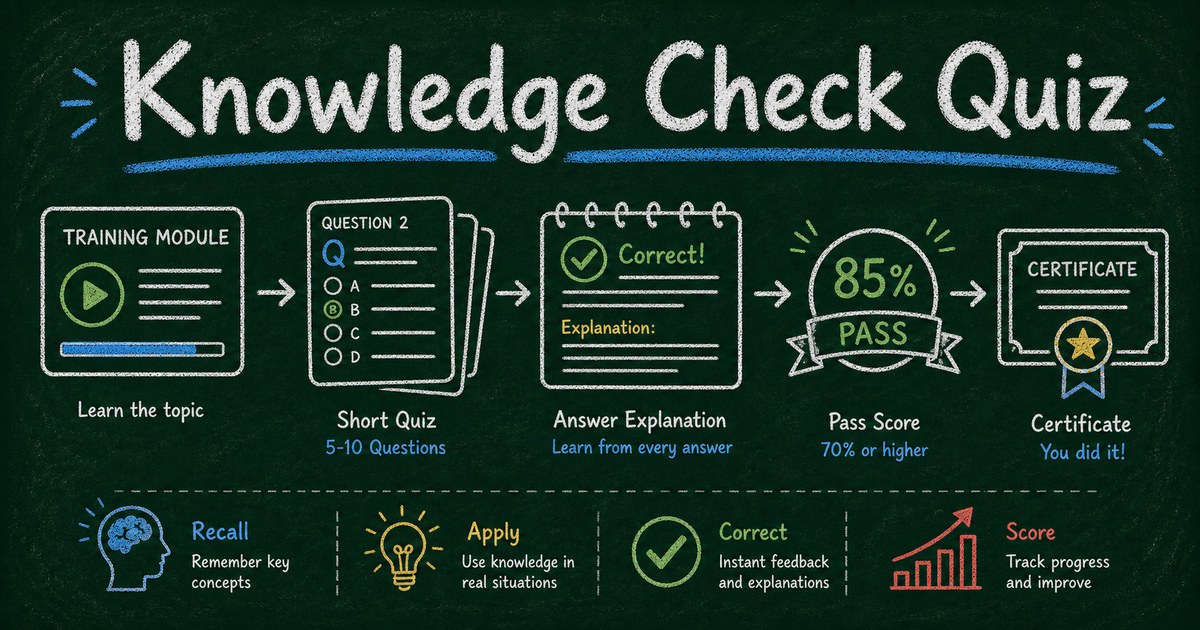
A knowledge check quiz makes that visible. It gives learners a short set of questions after onboarding, compliance training, product education, or a course module, then shows what they understood and what needs review.
This guide explains how to create a knowledge check quiz for onboarding and compliance training, with templates, question patterns, scoring, and feedback.
TL;DR - A knowledge check quiz is a short scored quiz used after training to confirm understanding and reinforce the most important points.
- Keep it focused - test one lesson, policy, module, or workflow at a time.
- Explain every answer - feedback is where learning improves.
- Use proof only when needed - certificates matter for required training, not every practice check.
- Works for: onboarding, compliance, security awareness, product training, customer support, sales enablement, and course modules.
- FormHug can generate knowledge checks with AI, automatic scoring, answer explanations, and certificates.
What Is a Knowledge Check Quiz?
A knowledge check quiz is a short online quiz used to verify understanding after training or instruction. It usually has 5 to 12 questions, automatic scoring, and answer explanations.
It is lighter than a full exam and more structured than a reflection form. Its job is to answer: did the learner understand the key point well enough to use it?
For a closely related format, see how to create a mini exam online. Knowledge checks are often even lighter and more frequent.
The Recall, Apply, Correct Framework
Use three question types:
| Type | Purpose | Example |
|---|---|---|
| Recall | remembers the fact | What is the first step in the escalation process? |
| Apply | uses the rule | A customer asks for restricted data. What do you do? |
| Correct | fixes a misconception | Which statement about password reuse is false? |
This framework keeps the quiz from becoming a trivia list. The best knowledge checks include at least one scenario question because work rarely arrives as a definition.
Knowledge Check Templates
Start from these templates and adapt the topic:
- AI Literacy Quiz - useful for AI adoption and responsible use.
- Cybersecurity Awareness Quiz - useful for security refreshers and compliance training.
- Product Sense Quiz - adapt the structure for product enablement and sales training.
- Customer Service Skills Assessment - useful when knowledge and behavior both matter.
- Prompt Engineering Quiz - useful for AI tool training.
For a broader list, browse free quiz templates.
How to Create a Knowledge Check Quiz
Step 1: Choose one training objective
Write:
After this quiz, we will know whether learners can _____.
Examples:
- Identify a phishing attempt.
- Follow the refund policy.
- Choose the correct escalation path.
- Explain the product’s main use case.
Step 2: Generate a short quiz
Use FormHug AI with a prompt like:
Create an 8-question knowledge check for new-hire onboarding about data privacy. Include multiple choice, true/false, scenario questions, correct answers, explanations, and an 80% passing score.
Keep the draft short. For most onboarding and compliance checks, 8 to 10 questions is enough.
Step 3: Add explanations
Every answer should teach:
- Why the correct answer is right
- Why the common wrong answer is risky
- What to remember next time
This is especially important for compliance training. A score without explanation only records failure. Explanation corrects behavior.
Step 4: Decide whether to use certificates
Use certificates when you need proof of completion:
| Use case | Certificate? |
|---|---|
| required compliance | Yes |
| informal onboarding practice | Optional |
| product training | Optional |
| classroom review | Usually no |
| customer education | Usually no |
For employee-specific setup, see employee training quiz.
Knowledge Check Question Examples
Onboarding
- Which tool should you use for process documentation?
- What is the correct first step when you are blocked?
- Which update is clearest for a project handoff?
Compliance
- Which example contains personal data?
- When should an incident be reported?
- Which action follows the approved data-sharing process?
Product training
- Which customer is the best fit for this feature?
- Which limitation should be explained before the demo?
- What is the correct next step after a qualified trial request?
Customer support
- Which response acknowledges the customer issue best?
- What information belongs in an escalation?
- Which internal note helps the next teammate?
Frequently Asked Questions
How do I make a knowledge check quiz for new hires?
Choose one onboarding objective, write 5 to 10 questions, include scenario questions, add correct answers and explanations, then publish the quiz as a link or embed.
What is the difference between a knowledge check and a quiz?
A knowledge check is a short quiz used immediately after learning to verify understanding. A quiz can be broader, more entertaining, or more formal.
How many questions should a knowledge check have?
Most knowledge checks should have 5 to 12 questions. Use fewer for quick reinforcement and more for required onboarding or compliance topics.
Should knowledge checks be graded?
Yes, if the result matters for completion or compliance. For practice, show a score but focus more on explanations and review.
Can I create knowledge checks with AI?
Yes. FormHug can generate quiz questions, answer options, correct answers, and explanations from a training objective or topic.
Is FormHug free for knowledge check quizzes?
Yes. You can create and publish knowledge check quizzes with FormHug on the free plan.
Related
- Employee Training Quiz - build training quizzes with scoring, explanations, and certificates
- How to Create a Mini Exam Online - use focused exams for classrooms and training
- Mini Exam Questions - use ready-made question patterns for short tests
Every training session fades unless people retrieve what matters. Use a knowledge check to make the important part stick. Create your knowledge check quiz →

Written by
FormHug TeamProduct, research, and form automation team
The FormHug Team brings together product builders, workflow researchers, and form automation practitioners who study how people collect, route, and act on information online. Our guides are based on hands-on product testing, template analysis, customer workflow patterns, and deep experience with forms, surveys, quizzes, AI-assisted creation, integrations, and results sharing.