FormHug Is Now Available in Claude Connectors

Use FormHug in Claude
Turn the conversation into an interactive form
Install the FormHug connector, describe the workflow, and review the live form without leaving Claude.
Today, we’re excited to announce that FormHug is now available in the Claude Connectors Directory, with Interactive support.
Until now, using FormHug inside Claude meant adding the remote MCP server manually: open the custom connector settings, name the connection, paste the FormHug MCP URL, and authorize your account. It worked, but you had to know that the integration existed—and know where to configure it.
Now you can find FormHug directly in Claude. Search for FormHug, or use broader searches such as form, survey, or quiz, then connect it from the directory. There is no MCP URL to copy and no custom connector to configure.
For us, being included in the Connectors Directory is more than a shorter setup flow. It is a meaningful form of ecosystem recognition: FormHug is now discoverable where Claude users look for tools, at the moment a conversation needs to become a real form, survey, quiz, registration, or assessment.
Once connected, you can ask Claude to create a form in natural language and see the result as an interactive MCP App inside the conversation.
From manual MCP setup to direct discovery
The manual MCP route still works and remains useful for custom agent setups. The directory listing makes the everyday path much simpler: find FormHug, connect your account, and start asking Claude to build.
Install FormHug from Claude Connectors →
FormHug can be discovered by its product name and through the jobs people are trying to do. Searches for form, survey, and quiz can all lead to the connector, so users do not need to know the FormHug name before they begin.
After connecting your FormHug account, Claude can use the tools you allow for that conversation. The connector separates interactive, read-only, and write/delete capabilities, so you can review what Claude is able to do instead of treating the connection as one undifferentiated permission.
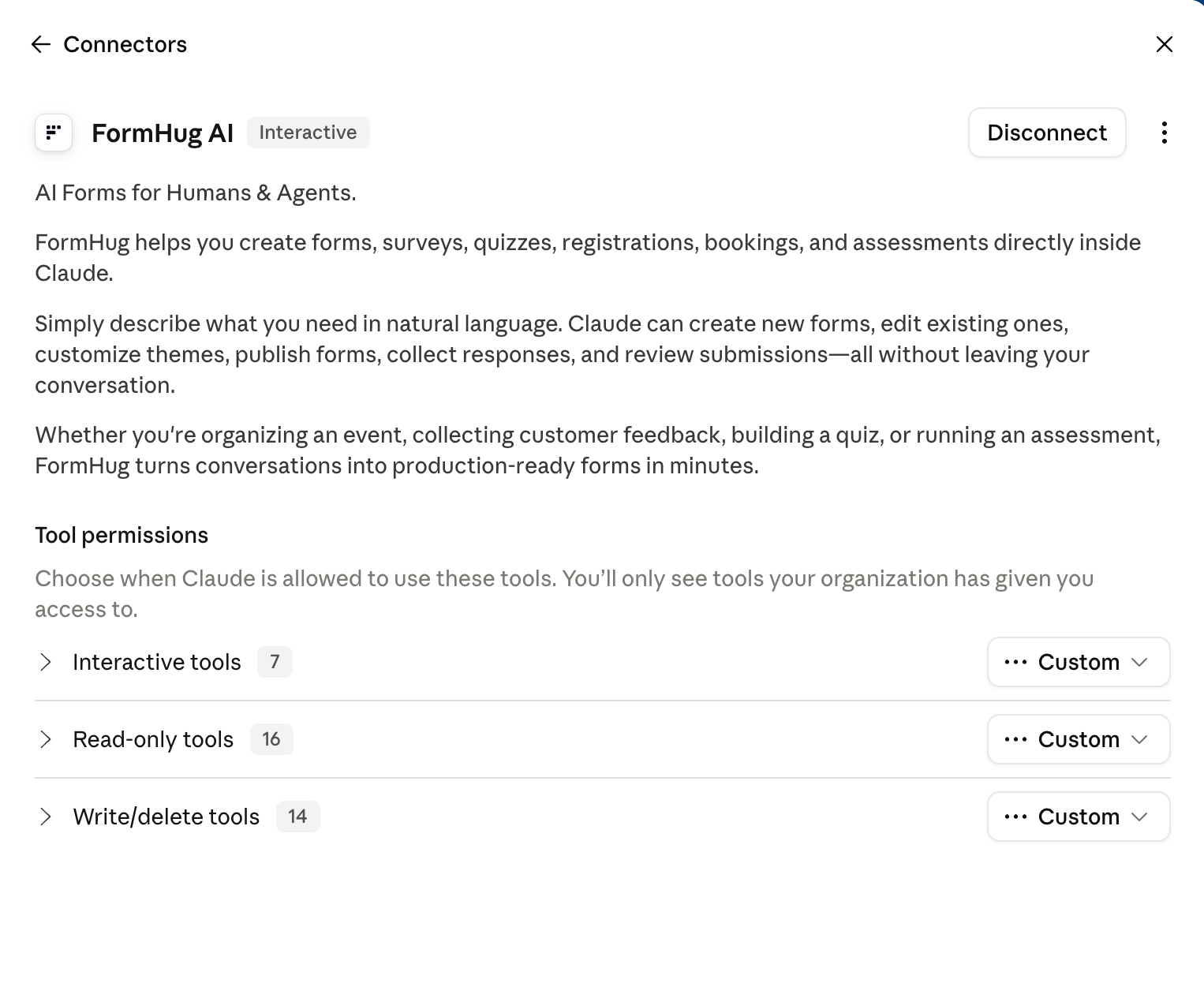
This directory listing also makes the relationship easier to understand: Claude is the conversational workspace, while FormHug provides the form structure, publishing, sharing, and submission layer.
Interactive means more than returning a link
FormHug is marked Interactive in Claude. In practical terms, Claude can render the FormHug experience as an MCP App directly inside the conversation instead of only returning a text description or URL.
Anthropic describes interactive connectors as live interfaces that appear inline or in a fullscreen view and can be used without leaving the chat. For FormHug, that means the form Claude creates can appear in the same thread where you described it. You can inspect the result, expand it, open it in FormHug for further editing, or share the form with respondents.

That changes the handoff. A prompt no longer ends with a list of suggested fields. It can end with a real form that has a public experience for respondents and a structured backend for the agent.
The form remains designed for people to complete. The workflow around it becomes agent-ready.
How it works
1. Install the connector
Open the FormHug page in Claude Connectors, connect it, and authorize your FormHug account. You can review and adjust tool permissions from the connector settings.
2. Describe the outcome
Tell Claude what the form is for, who will fill it out, and which details matter. For example:
Use FormHug to create a running club registration form. Collect contact details, running experience, preferred distances, T-shirt size, emergency contact information, medical notes, and waiver agreement.
The best prompt describes the workflow, not every UI choice. Claude can translate the goal into field types and a usable form structure.
3. Review the interactive result
Claude can render the created form in the conversation. Check the title, description, required fields, choices, and overall respondent experience. Ask Claude to make changes, or choose Edit in FormHug when you want direct visual control.
4. Share it and continue the workflow
Use Share Form to send the public form to participants. After responses arrive, you can ask Claude to work with authorized submission data: summarize feedback, prepare a follow-up list, identify patterns, or move the next action into another connected tool.
For a fuller walkthrough with example prompts and troubleshooting, use the FormHug + Claude setup guide.
Who this helps
The connector is useful whenever a Claude conversation reaches the point where information needs to come from other people:
- Community and event teams can turn a planning conversation into a registration or RSVP form.
- Teachers and trainers can create quizzes, assessments, and course feedback forms without rebuilding the questions elsewhere.
- Product and research teams can launch interviews, surveys, waitlists, and customer feedback workflows from the same context where the research plan was developed.
- Operations teams can collect structured requests, intake details, and approvals before routing the data into the next system.
- Builders using Claude as a working environment can add a real form backend instead of stopping at generated HTML or a question draft.
We tested the launch workflow with a running club registration form because it makes the boundary visible: Claude understood the brief, FormHug created the real form, and the MCP App rendered the result back inside Claude.
How to use FormHug in Claude: the reading path
This product note is the launch overview. The rest of the Claude article cluster goes deeper by intent:
- Claude Form Builder: Create Forms Inside Claude — the practical guide to creating forms, reading submissions, and analyzing results in Claude.
- FormHug MCP Server for AI Agents — the MCP capability and setup reference for Claude, Cursor, and other compatible agents.
- MCP Form Builder: Give AI Agents a Way to Create and Read Forms — the category explanation for why agents need a structured form layer.
- Maybe Your AI Feature Should Be an MCP Server — our product perspective on why the user’s agent may be a better starting point than another embedded AI panel.
Together, these articles cover the launch, the hands-on Claude workflow, the underlying MCP model, and the product idea behind agent-ready forms.
Start in Claude
When the next conversation produces a signup list, survey plan, intake questionnaire, or assessment outline, you do not need to rebuild it in another tool. Install FormHug from Claude Connectors →

Written by
FormHug TeamProduct, research, and form automation team
The FormHug Team brings together product builders, workflow researchers, and form automation practitioners who study how people collect, route, and act on information online. Our guides are based on hands-on product testing, template analysis, customer workflow patterns, and deep experience with forms, surveys, quizzes, AI-assisted creation, integrations, and results sharing.