FormHug vs Jotform (2026): The Best Free Jotform Alternative
Compare your options
See how FormHug fits the workflow
Compare FormHug against other form builders when AI creation, quizzes, payments, templates, or agent workflows matter.
Jotform has been around since 2006. In nearly two decades, it has accumulated over 10,000 templates, 1,000+ integrations, and more features than most teams will ever need. That accumulation is exactly the problem.
What started as a straightforward form builder has become a product where finding the right setting means clicking through multiple panels, conditional logic requires significant investment to master, and simple forms load slowly on mobile because the editor is heavy with JavaScript. The free tier — 5 forms, 100 submissions per month, and a 500-submission total storage cap — runs out faster than most users expect. When it does, the first paid tier jumps to $34/month. There’s no graceful middle ground.
FormHug takes the opposite approach. It’s an AI-native form builder built to be fast, clean, and generous — starting with a free tier of unlimited forms and 3,000 submissions per month, and extending to AI generation, quiz scoring with certificates, and Public Query for respondent self-service. This comparison covers the specific differences that matter when you’re evaluating your options in 2026. For a shorter product-page comparison, see FormHug’s Jotform alternative overview.
Why People Look for a Jotform Alternative
The most common moment is hitting the free plan ceiling. Jotform’s free tier limits you to 5 forms, 100 monthly submissions, and a cumulative cap of 500 total stored submissions. The cumulative cap catches users off guard — you can clear your submission inbox, but old data still counts against the total. Teachers who send a quiz to 120 students hit the limit mid-process and have to upgrade immediately. Small business owners running a basic contact form find 100 submissions gone in weeks.
Beyond the free tier, the pricing structure itself creates friction. Jotform doesn’t limit just one metric — plans simultaneously cap forms, monthly submissions, and users. You can hit any one of those three limits and be forced to upgrade, even when the other two are barely used. Users on G2 describe the tier jumps as arbitrary and the plan structure as “not flexible.” Jumping from the free plan to $34/month is steep; the gap between $34 and $99 is steeper.
The interface compounds the problem. Jotform is genuinely powerful — 15+ years of features are built in — but that power comes at the cost of clarity. The editor is “complex and cluttered,” simple edits require “too many steps,” and forms with many conditions or fields slow down significantly during both editing and submission. Multiple user reviews describe “conditionals randomly stopping working” and “fields breaking until the page is refreshed.” For a tool people rely on for critical data collection, that instability erodes trust.
TL;DR: FormHug vs Jotform at a Glance
| Feature | FormHug | Jotform |
|---|---|---|
| Free forms | ✅ Unlimited | ⚠️ 5 forms only |
| Free submissions | ✅ 3,000/month | ⚠️ 100/month + 500 total cap |
| AI form creation | ✅ AI-native — natural language | ⚠️ AI assist, limited depth |
| Design quality | ✅ Frosted glass, auto-theming | ⚠️ Functional but dated |
| Classic & card layout | ✅ One-click switch | ❌ Fixed layout |
| Public Query (respondent lookup) | ✅ Unique to FormHug | ❌ Does not exist |
| Quiz scoring & certificates | ✅ Full engine + radar charts | ⚠️ Basic scoring, no certificates |
| Multi-user collaboration | ✅ Yes | ⚠️ Enterprise plan only |
| Use inside Claude / Cursor (MCP) | ✅ | ✅ |
| Integrations | ⚠️ Growing | ✅ 1,000+ native |
| HIPAA compliance | ⚠️ | ✅ Enterprise |
What Is FormHug?
FormHug is an AI-native form builder covering registrations, surveys, quizzes, assessments, booking forms, and Public Query for respondent self-service. The core experience is generating a complete, styled form from a plain-language description — fields, logic, score-range messaging, and conditional branches included. Every form uses a frosted glass design system with automatic theme adaptation, so what you publish looks designed without manual styling effort.
What Is Jotform?
Jotform launched in 2006 and became one of the earliest web-based form builders. It now serves over 25 million users with a feature set that spans drag-and-drop form creation, payment collection, conditional logic, 1,000+ integrations, and a template library with 10,000+ entries. Its breadth is genuine — but the product’s age shows in the interface complexity, the multi-limit pricing tiers, and the performance issues that appear as forms grow in complexity.
Feature-by-Feature Comparison
Free Tier and Pricing
This is the sharpest difference. Jotform’s free plan allows 5 forms, 100 monthly submissions, and 500 submissions in total storage — meaning old data counts against the cap even after you’ve cleared it. For any form with real traffic, 100 submissions per month disappears in days. FormHug’s free tier gives you unlimited forms and 3,000 submissions per month with no cumulative storage cap.
The paid tier jump is also steeper on Jotform. Moving from free to Jotform’s Bronze plan costs $34/month. FormHug’s paid plans scale proportionally from a lower starting point, with significantly higher submission ceilings at every tier.
Verdict: FormHug wins on free tier generosity and pricing transparency at every level.
Interface and Learning Curve
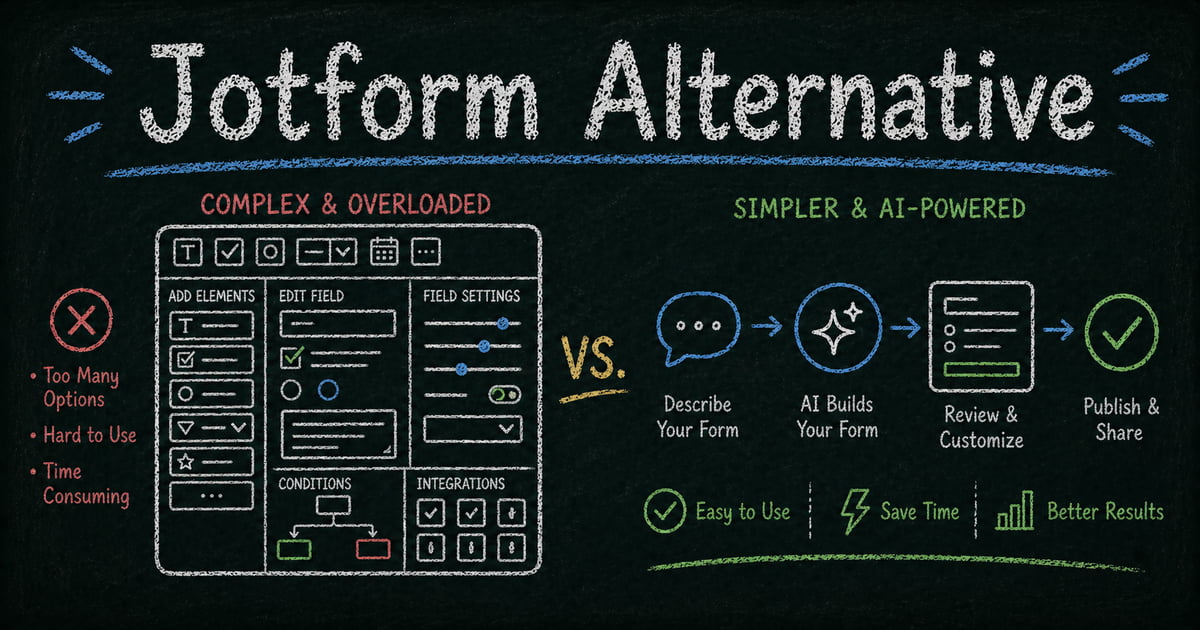
Jotform’s editor is powerful but shows its age. Reviewers consistently describe it as “clunky,” “cluttered,” and requiring too many clicks to accomplish simple tasks. Conditional logic — one of Jotform’s strongest features — takes significant time to learn and can behave unpredictably in complex forms. Forms with hundreds of conditions or thousands of fields load slowly and are prone to freezing during editing. The editor is JavaScript-heavy, and mobile editing in particular struggles with performance.
FormHug’s interface is built around drag-and-drop with AI generation at the center. Describe what you need, get a working draft, adjust from there. The field panel and live preview follow the pattern most form builders use, without the accumulated complexity of a 15-year-old codebase.
Verdict: FormHug for ease of use and modern interface. Jotform for teams already familiar with its editor who need its deepest features.
AI Form Creation
FormHug generates complete forms from a plain-language description — fields, logic, scoring, and conditional branches in a single step. Jotform offers AI-assisted form creation that produces a basic draft, but the depth is limited compared to a product where AI is built into the core workflow. Jotform’s AI sits at the front door; FormHug’s AI participates throughout editing and optimization.
Verdict: FormHug — AI is native to the product, not added on.
Design, Branding, and Layout
FormHug forms use a frosted glass design system where swapping the header image automatically adapts the full visual tone — color palette, typography, and character shift to match. Brand colors, logo, and custom domain support mean every form looks like yours.
More distinctively, FormHug lets you switch between Classic layout (multiple questions per page) and Card layout (one question at a time, full-screen) with a single click. Same content, different experience — Card layout drives higher completion rates on surveys and quizzes.
Jotform’s design is functional. It supports custom CSS and themes, which gives technical users flexibility — but the default output looks like a 2018 form. Jotform Apps, the product’s page-building feature, produces layouts that reviewers describe as “dated and blocky.”
Verdict: FormHug for design quality and layout flexibility. Jotform for teams who want deep CSS control.
Quiz and Assessment Features
FormHug’s quiz engine supports per-question scoring, correct answer explanations, multi-dimensional radar charts, certificates of completion, and a dynamic end page with score-range feedback — different messages for high, mid, and low scorers, generated automatically by AI when you build the quiz. This is a quiz as a complete experience, not just a form with right answers marked.
Jotform supports basic quiz-style forms with scoring, but there are no certificates, no radar charts, no score-range messaging, and no AI-generated feedback. It’s a checkbox feature compared to FormHug’s built-out quiz engine.
Verdict: FormHug for any quiz or assessment built for engagement or certification.
Public Query — Respondent Self-Service
Public Query lets respondents look up their own submission — enter an email or ID, retrieve their specific result — without seeing anyone else’s data or contacting your team. Exam organizers use it for score lookup. Event managers use it for registration confirmation. Competition hosts use it for placement results.
This feature is unique to FormHug in the form builder space. Jotform has no equivalent — responses are visible only to the form owner.
Verdict: FormHug — this feature does not exist in Jotform.
MCP Integration (Claude and Cursor)
Both FormHug and Jotform support MCP. FormHug connects to Claude, Cursor, and any MCP-compatible AI agent via its MCP server — create a form, read submissions, and manage responses through a natural language conversation. Jotform also has MCP support. For teams building with AI agents, both tools are valid choices.
Verdict: Both support MCP — not a differentiator between the two.
Integrations and Enterprise Features
Jotform’s strongest card. Its 1,000+ native integrations — covering CRMs, payment processors, project management tools, Google Workspace, and enterprise platforms — represent 15+ years of ecosystem development. Teams already embedded in specific tools (Salesforce, HubSpot, ServiceNow) will find Jotform’s integration library significantly broader than FormHug’s.
HIPAA-compliant forms are available on Jotform’s paid plans, making it a viable option for healthcare organizations. FormHug does not currently offer HIPAA compliance.
Verdict: Jotform for teams with deep integration requirements or healthcare compliance needs.
Multi-User Collaboration
Jotform’s free and standard paid plans are single-user. Multi-user access requires the Enterprise plan — the most expensive tier. Teams where more than one person needs to create or manage forms hit this ceiling quickly.
FormHug supports collaboration without requiring enterprise-tier pricing.
Verdict: FormHug for teams that need shared access without enterprise costs.
Pricing Comparison
| Plan | FormHug | Jotform |
|---|---|---|
| Free | Unlimited forms, 3,000 submissions/month | 5 forms, 100 submissions/month, 500 total |
| Entry paid | — | ~$34/month (Bronze) |
| Pro | 30,000 submissions/month | ~$39/month (Silver, 1,000 submissions) |
| Business | Unlimited | ~$99/month (Gold, 10,000 submissions) |
| Enterprise | Custom | Custom |
The submission gap at mid-tier is significant: FormHug’s Pro offers 30,000 submissions per month, while Jotform’s comparable Silver plan gives 1,000. For any form with real traffic, that difference is decisive.
Who Should Switch to FormHug?
- Anyone on Jotform’s free tier who’s hit the 5-form or 100-submission limit — FormHug’s free tier is an order of magnitude more generous
- Teams who want AI throughout the form workflow — not just at the draft stage, but through editing, optimization, and quiz configuration
- Professionals who want great design without manual effort — frosted glass aesthetic, auto-theming, and one-click layout switching
- Anyone building quizzes for engagement or certification — scoring, certificates, radar charts, and score-range feedback are all included
- Teams that need respondents to access their own results — Public Query is unique to FormHug
- Teams needing multi-user access — FormHug includes collaboration without enterprise pricing
Who Should Stay on Jotform?
- Teams with deep integration dependencies — if your workflow depends on specific native Jotform integrations that FormHug doesn’t yet support, migration friction is real
- Healthcare organizations requiring HIPAA compliance — Jotform’s compliance infrastructure is mature; FormHug doesn’t currently offer it
- Enterprise teams with established Jotform workflows — for organizations where Jotform is already embedded in complex approval routing and automation, the switching cost may outweigh the benefits
- Teams that need the deepest conditional logic — Jotform’s logic engine, despite its complexity, handles multi-variable branching scenarios that most other tools don’t match
Final Verdict
Jotform built its market position by being comprehensive. After 15 years of development, it has more features, more integrations, and more templates than almost any competitor. For large enterprise teams with compliance requirements and deep integration needs, that breadth is genuinely valuable.
For everyone else — small teams, educators, professionals, and builders who want their form tool to work with their AI stack — the equation has shifted. The free tier restrictions are punishing by modern standards: 5 forms and 100 submissions per month in 2026, when FormHug gives 3,000, is a positioning choice that prioritizes upsells over user success. The interface complexity that accumulated over 15 years isn’t a temporary problem — it’s structural.
FormHug is built for where form builders are going: AI-native creation, modern design, generous pricing, and Public Query for respondent self-service. Both tools now support MCP — that’s no longer a differentiator. What is: FormHug’s free tier gives you 30x the submissions of Jotform’s at no cost, the interface doesn’t require a learning investment to use, and the quiz and assessment engine is built for real engagement rather than bolted on. The forms look better, cost less per submission, and do more after the respondent clicks submit. For teams choosing a form builder today rather than in 2010, FormHug is the more forward-looking investment.
Frequently Asked Questions
Is FormHug’s free tier actually better than Jotform’s?
Yes — significantly. FormHug’s free tier includes unlimited forms and 3,000 submissions per month with no cumulative storage cap. Jotform’s free tier caps at 5 forms, 100 monthly submissions, and 500 total stored submissions. The cumulative cap is the part that surprises most users: old submissions count against the limit even after you’ve cleared your inbox.
Does Jotform have AI form generation?
Jotform offers AI-assisted form creation that produces a basic draft from a description. FormHug goes further: AI is available throughout form editing and optimization, and for quizzes, AI automatically generates score-range feedback messages during the build process. For Jotform, AI is a starting point. For FormHug, it runs through the workflow.
Which is better for quizzes — FormHug or Jotform?
FormHug. It supports per-question scoring, answer explanations, certificates of completion, multi-dimensional radar charts, and dynamic end pages with score-range feedback. Jotform supports basic quiz-style forms with scoring but lacks certificates, radar charts, and score-range messaging. If you’re building anything beyond a simple test, FormHug handles the full use case.
What is Public Query and does Jotform have it?
Public Query is a FormHug feature that publishes a self-service lookup page where respondents enter their own ID or email to view their specific submission. Exam takers check their score, event registrants confirm their session, competition participants look up their placement — all without contacting your team. Jotform has no equivalent. Responses are visible only to the form owner.
Can I use FormHug inside Claude or Cursor?
Yes. FormHug has an MCP server that connects to Claude, Cursor, and any MCP-compatible AI agent — you can create forms, read submissions, and manage responses through a natural language conversation. Jotform also supports MCP. Both tools work inside AI agent workflows.
Does Jotform support multiple users without an enterprise plan?
No. Jotform’s standard paid plans are single-user. Adding team members requires upgrading to the Enterprise plan. FormHug supports multi-user collaboration without requiring enterprise pricing.
Related
- 7 Best AI Form Builders in 2026 (Tested & Ranked) — see how FormHug and Jotform rank across the full field
- FormHug vs Fillout (2026) — how FormHug compares to another well-rounded form builder
- FormHug vs Google Forms (2026) — how FormHug compares to the default free option

Written by
FormHug TeamProduct, research, and form automation team
The FormHug Team brings together product builders, workflow researchers, and form automation practitioners who study how people collect, route, and act on information online. Our guides are based on hands-on product testing, template analysis, customer workflow patterns, and deep experience with forms, surveys, quizzes, AI-assisted creation, integrations, and results sharing.