FormHug vs Typeform (2026): The Best Free Typeform Alternative
Compare your options
See how FormHug fits the workflow
Compare FormHug against other form builders when AI creation, quizzes, payments, templates, or agent workflows matter.
Typeform changed how forms look. The one-question-at-a-time card layout, the smooth animations, the full-screen takeover — it was genuinely beautiful when it launched, and it inspired an entire generation of form builders. If you’ve ever filled out a Typeform, you remember it.
But something shifted. Typeform recently restructured their pricing again, and the numbers are hard to justify for anyone without an enterprise budget. The Basic plan costs $39/month - and includes just 100 responses. Hit that cap and your form stops collecting submissions entirely. To get 1,000 responses, you’re paying $79/month. Ten thousand responses costs $129/month. Every tier also advertises “add-ons available,” meaning the listed price isn’t the ceiling.
This post compares FormHug vs Typeform across pricing, layout flexibility, quiz features, AI, and unique capabilities — and gives you a clear picture of who should switch and who should stay.
For a shorter product-page version of the comparison, see FormHug’s Typeform alternative overview. If your alternative search is more about page-like forms, payments, and templates than card-style surveys, compare the Paperform alternative guide as well.
Why People Look for a Typeform Alternative
The response cap is the breaking point for most users. Typeform positions itself as a premium product, but 100 responses per month at $39/month isn’t a product — it’s a trial with a monthly bill. Any form with real traffic, a real campaign behind it, or a real event attached will blow past 100 responses in days. At that point, you’re looking at $79–$129/month before you’ve done anything unusual.
Beyond pricing, Typeform’s design philosophy creates genuine constraints. The card-by-card layout is beautiful for certain scenarios — conversational surveys, NPS, branded market research — but it’s a poor fit for registration forms, booking flows, and any situation where users need to review their answers before submitting. Single-question-per-screen means more clicks, more chances to drop off, and less context for respondents who want to scan the full form before they start. Typeform doesn’t offer a traditional multi-question layout, so if your use case needs one, you’re stuck.
The quiz situation is similarly limited. Typeform has quiz-like features, but assessment is not a primary use case for the product. There’s no radar chart output, no certificate generation, no score-range personalized feedback — the things that make a quiz worth sharing and worth completing again. And for newer AI-driven workflows, Typeform has no MCP integration, meaning AI agents can’t create or manage Typeform forms without custom code.
Looking for Typeform, but With More Free Responses?
If your search is basically “Typeform but better with more free responses,” the main difference is simple: Typeform charges $39/month for 100 responses on its Basic plan, while FormHug starts with 3,000 free submissions per month. That is not a small pricing detail. It changes whether you can launch a real survey, quiz, registration form, or lead form without watching the response counter every day.
That 3,000-versus-100 gap is the reason this comparison is not only about price. A form builder with more free responses lets you test a campaign, run an event registration page, publish a quiz, or collect feedback without deciding in advance whether the audience is “worth” a paid upgrade.
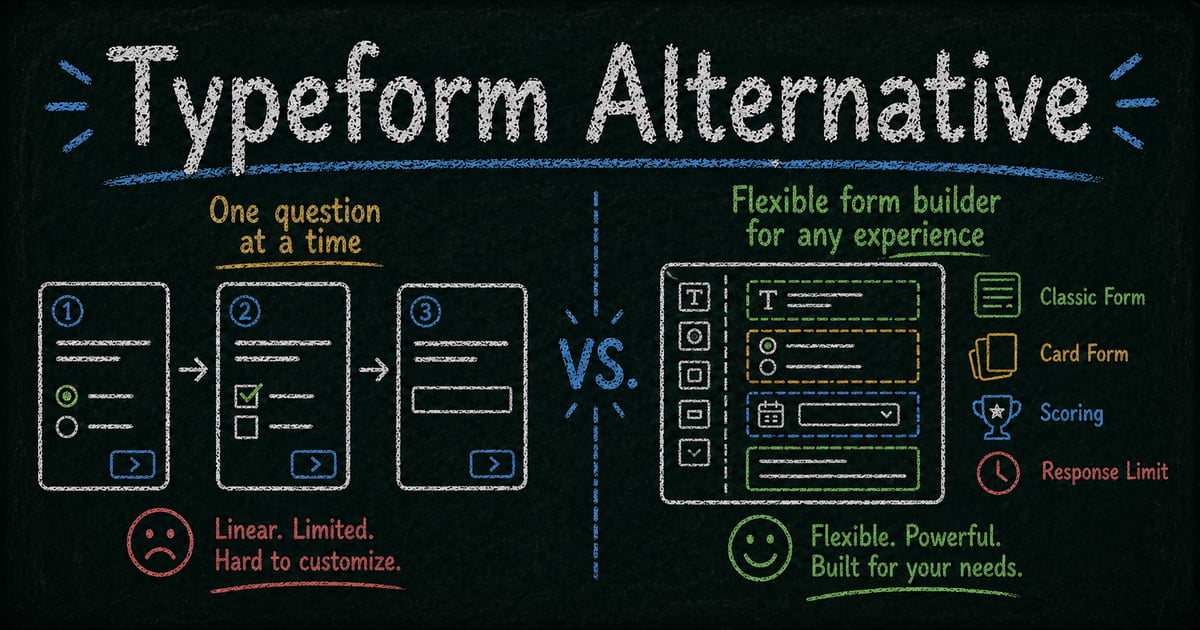
The closest Typeform-like experience in FormHug is Card layout: one question per screen, designed for conversational forms and quizzes. The difference is that FormHug also lets you switch the same form to Classic layout when the use case needs a full-page form. You get the engaging card flow when it helps and the practical multi-field layout when the form needs scanning, review, payment, or registration details.
For users leaving Typeform because of response limits, the best fit is usually a form builder that keeps the polished experience but removes the early ceiling: more free responses, more layout control, better quiz outputs, and AI-native creation from the first draft.
TL;DR: FormHug vs Typeform at a Glance
| Feature | FormHug | Typeform |
|---|---|---|
| Free responses/mo | ✅ 3,000/month | Very limited (trial-level) |
| Entry paid plan | ✅ Generous free tier | $39/mo - 100 responses |
| Layout options | ✅ Classic + Card (switchable) | ❌ Card only |
| AI form creation | ✅ Native, natural language | Added feature, not native |
| Quiz engine | ✅ Full — scores, charts, certs, feedback | Basic scoring only |
| Public Query (respondent lookup) | ✅ Unique to FormHug | ❌ Does not exist |
| MCP integration (Claude / Cursor) | ✅ | ❌ |
| Design quality | ✅ Frosted glass, auto-theme | ✅ Iconic card design |
| Best for | Small–mid teams, quizzes, AI workflows | Enterprises, branded surveys |
What Is Typeform?
Typeform is a form builder that became famous for its conversational, card-by-card design. Founded in 2012, it pioneered the full-screen single-question format that hundreds of form tools have since imitated. Typeform targets mid-to-large businesses and positions itself as a premium product for branded data collection, research surveys, and lead generation. Its latest pricing reflects that positioning: the entry paid plan starts at $39/month for 100 responses, with higher tiers scaling to $79 and $129/month.
What Is FormHug?
FormHug is an AI-native form builder built for teams who need more than a form that looks good. The free tier includes 3,000 submissions per month — thirty times more than Typeform’s entry paid plan. Natural language AI generates your form from a prompt. You can switch between Classic (multi-question, one page) and Card (one question at a time) layouts with a single click, on the same form. The quiz engine produces radar charts, certificates, and AI-generated score-range feedback. Public Query lets respondents look up their own results by entering an identifier — no portal, no login, no code. And FormHug supports MCP integration, meaning AI agents in Claude and Cursor can build, edit, and analyze forms through natural language.
Feature-by-Feature Comparison
Pricing and Response Limits
Typeform’s Basic plan costs $39/month for 100 responses. Their Plus plan is $79/month for 1,000 responses. Business is $129/month for 10,000. Each tier lists add-ons as available, meaning these numbers represent the floor, not the ceiling.
FormHug’s free tier includes 3,000 responses per month with no cap on forms. For most small teams, solo builders, and professional users, the free tier never runs out. When it does, paid plans scale proportionally — not by charging a premium for the first 100 submissions.
Verdict: FormHug wins decisively. Typeform’s pricing model makes sense for enterprises that can absorb it without noticing. For everyone else, it’s prohibitive.
Layout: Card-Only vs. Classic + Card
Typeform’s defining innovation was the card-by-card layout: one question fills the entire screen, the respondent answers and advances, and the next question appears with a smooth transition. It’s genuinely engaging. For conversational lead capture, brand surveys, NPS, and any scenario where the form experience itself is part of the brand — this format works well.
The limitation is that it’s the only format Typeform offers. For event registration, appointment booking, intake forms, job applications, and payment flows, single-question-per-screen increases friction. Users in these contexts want to scan the full form, understand what’s required, and fill it top to bottom. Multi-field classic layout reduces clicks, reduces drop-off at the “how long is this going to take?” decision point, and generally produces higher completion rates for transactional use cases.
FormHug defaults to Classic layout — a polished, frosted glass aesthetic with auto-theming. But with one click, you can switch the same form to Card layout. You don’t maintain two versions. You don’t rebuild anything. The layout switch is a single setting, and both layouts pull from the same fields and logic.
Verdict: Typeform wins on card design polish. FormHug wins on layout flexibility — it covers everything Typeform can do, and then some.
Design and Aesthetics
Typeform’s design has been widely copied. If you’ve seen a form that takes over the full screen with one question at a time and smooth transitions, there’s a good chance it was inspired by Typeform or trying to replicate Typeform. The aesthetic is clean, modern, and opinionated.
FormHug’s design language is different, not derivative. The frosted glass style, auto-theming, and layout adaptability produce forms that look premium without looking like Typeform. It’s a distinct visual identity, not a clone.
Verdict: Tie — both produce forms that stand out. The right choice depends on whether you want the card-format Typeform aesthetic or a distinct design with more layout flexibility.
AI Form Creation
FormHug was built AI-native from the start. Describe your form in plain language and it generates field types, question order, conditional logic, and — for quizzes — scoring ranges and feedback messages. The AI runs throughout the product, not as a bolt-on feature.
Typeform added AI features more recently. You can generate a form from a prompt, but the output is card-format only, and the AI layer doesn’t extend into quiz feedback, score-range logic, or form optimization. It generates a starting point; the rest is manual.
Verdict: FormHug. AI is core to the product, not an add-on.
Quiz and Assessment Features
Typeform has a Quiz mode. It can assign scores to answers and show a total at the end. For basic knowledge tests, that’s sufficient.
For anything more serious — training assessments, certification quizzes, personality tests, skills evaluations, viral personality quizzes meant to be shared — Typeform’s quiz capabilities fall short. There’s no radar chart output to visualize multi-dimension scores, no certificate generation, no per-range personalized feedback that changes based on how well (or how poorly) someone scored.
FormHug’s quiz engine is purpose-built. Score ranges trigger different feedback messages, generated by AI if you want them. Radar charts let you visualize performance across multiple categories. Certificates can be generated and downloaded. The result page is shareable, which is what makes quiz results spread on social. See how the quiz engine works for a full walkthrough.
Verdict: FormHug. Typeform’s quiz is a checkbox feature; FormHug’s is a complete engine.
Public Query
Public Query is a FormHug feature with no Typeform equivalent. After someone submits a form — an exam, an event registration, a competition entry — they can look up their own result by entering an identifier (their name, email, participant ID, or any field you choose). No login. No portal. No backend required.
For schools publishing exam scores, race organizers sharing finish times, event coordinators confirming registrations, or coaches sharing assessment results — this changes what a form can do. Typeform collects data. FormHug can return it to the people it belongs to.
Verdict: FormHug, uniquely. Typeform has no equivalent.
MCP Integration
FormHug supports MCP (Model Context Protocol), the emerging standard for connecting AI agents to external tools. In Claude or Cursor, you can describe a form in natural language and the AI creates it directly — no interface, no copy-pasting, no manual field entry. For developers and teams who work inside AI tools, this removes the form creation step from the workflow entirely; the MCP integration docs cover the connector setup.
Typeform has no MCP support. Creating or managing Typeform forms from an AI agent requires custom API code.
Verdict: FormHug. MCP support is increasingly important for AI-native teams.
Integrations and Ecosystem
Typeform has been building integrations for years. HubSpot, Salesforce, Slack, Mailchimp, Intercom, Google Sheets — the list is long and the integrations are mature. For enterprises already embedded in a specific software stack, this depth matters.
FormHug covers core integrations — webhooks, Zapier, key productivity tools — but the ecosystem is newer and narrower. If you have a complex enterprise integration stack where every tool must connect natively to every other tool, Typeform’s years of integration work is an advantage.
Verdict: Typeform for deep enterprise integration requirements. FormHug for teams whose core workflow is covered by webhooks and Zapier.
Pricing Comparison
| Plan | FormHug | Typeform |
|---|---|---|
| Free | 3,000 submissions/month | Very limited (trial-level) |
| Entry paid | — | $39/mo — 100 responses |
| Mid tier | 30,000 submissions/month | $79/mo — 1,000 responses |
| High tier | Unlimited | $129/mo — 10,000 responses |
| Enterprise | Custom | Custom |
Who Should Switch to FormHug?
- Small teams and solo users who hit Typeform’s 100-response cap within days of launching anything real
- Educators, coaches, and trainers who need real quiz scoring, radar charts, certificates, and score-range feedback — not just a pass/fail total
- Event organizers and registration managers running sign-ups, bookings, and intake flows where classic multi-question layout reduces friction and improves completion
- Developers and AI teams working in Claude or Cursor who want MCP-native form management without writing API code
- Anyone sharing results with participants — exam scores, race times, assessment results — who needs respondents to self-serve their own data via Public Query
Who Should Stay on Typeform?
- Large enterprises with deeply embedded Typeform integrations — HubSpot workflows, Salesforce sync, Intercom triggers — where switching costs outweigh the pricing pain
- Brand-first survey teams for whom the Typeform card aesthetic is a deliberate design choice and card-only flow is non-negotiable
- High-budget teams where $79–$129/month is below the threshold of consideration and Typeform’s mature ecosystem solves real integration needs
Final Verdict
Typeform earned its reputation. The card format was genuinely innovative, the design raised the bar for what forms could look like, and the product has a mature integration ecosystem that took years to build. If budget is not a constraint and your use case specifically calls for card-by-card conversational flow, Typeform still does that well.
But the pricing model has moved Typeform squarely into enterprise territory. One hundred responses per month at $39 is not a product for small teams, professional users, or anyone operating on a real budget. And the product’s constraints — card-only layout, basic quiz features, no MCP support, no Public Query — compound the value question once you’re paying $79–$129/month.
FormHug covers Typeform’s core use case and adds what Typeform can’t offer: layout flexibility, a full quiz engine, Public Query for result sharing, MCP for AI workflows, and 3,000 free submissions per month. For the majority of users currently reconsidering Typeform, the switch is straightforward. For a side-by-side view of how FormHug compares across the broader market, see our comparison with Jotform and comparison with Fillout.
Frequently Asked Questions
Is there a free Typeform alternative?
Yes. FormHug’s free tier includes 3,000 submissions per month — significantly more than Typeform’s trial-level free access. Tally also offers a free tier with unlimited responses, though it lacks AI generation and advanced quiz features. For most small teams, FormHug’s free tier covers everyday form needs without a credit card.
Can FormHug match Typeform’s design quality?
FormHug uses a distinct frosted glass aesthetic with auto-theming rather than replicating Typeform’s card style. Both produce premium-looking forms. If you specifically want the Typeform visual identity, FormHug is different — but not lesser. If you want forms that stand out without looking like everyone else’s Typeform clone, FormHug’s design language is a strong alternative.
Does FormHug support card-style conversational forms?
Yes. FormHug supports both Classic (multi-question per page) and Card (one question per screen) layouts. You can switch between them with one click on the same form — no rebuilding required. Classic is the default; Card is available when the conversational format fits the use case.
What happens when I exceed FormHug’s free response limit?
FormHug will notify you as you approach the limit. You can upgrade to a paid plan or wait for the monthly reset. Unlike Typeform, which stops collecting submissions when you hit the cap on a paid plan, FormHug’s limits are designed to scale proportionally — 3,000 free, 30,000 on mid-tier, unlimited on high-tier.
Does FormHug integrate with Zapier and other tools?
Yes. FormHug supports webhooks, Zapier, and key productivity integrations. For teams with deep enterprise stacks (Salesforce, HubSpot, Intercom), Typeform’s mature integration library still has an edge. For most teams whose workflow runs through webhooks and Zapier, FormHug covers the requirements.
Can I migrate my Typeform forms to FormHug?
There’s no one-click import from Typeform, but rebuilding in FormHug is fast. Describe your form to FormHug’s AI and it generates a version in seconds — then adjust fields and logic from there. Most simple Typeform surveys can be recreated in FormHug in under five minutes.
Related
- FormHug vs Jotform (2026) — How FormHug compares to Jotform on pricing, features, and free tier generosity
- FormHug vs Tally (2026) — Tally’s free-forever model vs FormHug’s AI-native approach
- FormHug vs Fillout (2026) — A detailed comparison of submission limits, quiz features, and AI depth

Written by
FormHug TeamProduct, research, and form automation team
The FormHug Team brings together product builders, workflow researchers, and form automation practitioners who study how people collect, route, and act on information online. Our guides are based on hands-on product testing, template analysis, customer workflow patterns, and deep experience with forms, surveys, quizzes, AI-assisted creation, integrations, and results sharing.