FormHug vs SurveyMonkey (2026): The Best Free SurveyMonkey Alternative
Start collecting responses
Turn this into a shareable survey
Draft the questions, publish a clean link, and keep every response organized in FormHug.
SurveyMonkey is the name many people remember first when they need a survey. That familiarity is useful until the project becomes real: you need more than a draft, more than a few visible responses, and more than a generic question list.
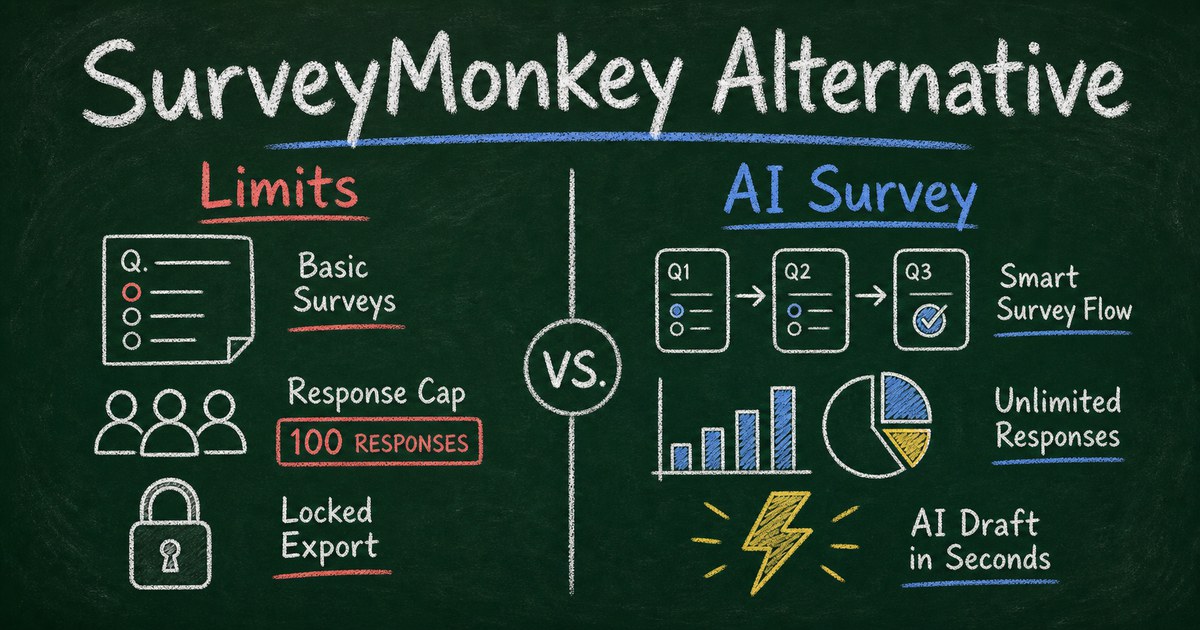
The search for a SurveyMonkey alternative usually starts when the free plan feels like a preview instead of a workflow. SurveyMonkey’s own pricing pages describe a free Basic plan with limited features, a 10-question limit, response visibility limits, and paid upgrades for features like exports, advanced logic, and reporting. For a school survey, customer feedback form, product research sprint, or event follow-up, those limits arrive quickly.
FormHug is built for the faster path: AI survey drafts, polished templates, clean respondent experience, 3,000 free submissions per month, and form workflows that can grow into quizzes, bookings, registrations, and Public Query pages. This comparison explains where SurveyMonkey still wins, where FormHug is the better free SurveyMonkey alternative, and who should switch.
Why People Look for a SurveyMonkey Alternative
SurveyMonkey is strongest when the buyer wants a mature research platform. It has brand recognition, enterprise features, panel services, and years of survey-specific infrastructure.
The problem is that many searchers are not enterprise research teams. They are small businesses, creators, educators, coaches, nonprofit teams, or product builders who want to publish a survey today and read the answers tomorrow. For that user, the pain points are predictable:
- The free plan lets you create and send surveys, but meaningful response access and reporting can require an upgrade.
- Free users are limited to 10 questions per survey, according to SurveyMonkey’s pricing page.
- Advanced logic, exports, custom reports, and quotas sit behind paid plans.
- The product is survey-first, so workflows like registrations, quizzes, bookings, and respondent lookup often need another tool.
That does not make SurveyMonkey bad. It makes it heavier than many everyday survey jobs require. If your goal is to create a polished online survey, send a link, collect real answers, and keep the workflow flexible, FormHug is often the simpler fit.
TL;DR: FormHug vs SurveyMonkey at a Glance
| Feature | FormHug | SurveyMonkey |
|---|---|---|
| Free survey creation | ✅ AI drafts + templates | ✅ Basic survey creation |
| Free response capacity | ✅ 3,000 submissions/month | ⚠️ Limited visible responses |
| Free question limit | ✅ Flexible form length | ❌ 10 questions on free plan |
| AI form creation | ✅ Native FormHug AI | ⚠️ Available, plan-dependent |
| Templates | ✅ Survey, quiz, booking, registration, payment | ✅ 500+ expert templates |
| Conditional logic | ✅ Built into form workflows | ⚠️ Advanced logic on paid plans |
| Quiz and assessment depth | ✅ Scores, outcomes, radar charts, certificates | ⚠️ Survey/quiz basics |
| Public Query lookup | ✅ Respondent self-service | ❌ No equivalent |
| Enterprise research features | ⚠️ Lighter | ✅ Stronger |
What Is SurveyMonkey?
SurveyMonkey is a long-running online survey platform known for survey creation, templates, research workflows, analytics, and enterprise survey programs. It is a good fit for teams that need mature survey infrastructure, panel responses, advanced research controls, and established procurement paths.
The tradeoff is plan structure. SurveyMonkey’s official help center says each plan has response limits, and its pricing page states that free users must upgrade to view responses beyond the response limit. Paid plans add exports, deeper reporting, advanced logic, quotas, randomization, and other research features.
What Is FormHug?
FormHug is a free AI form builder for surveys, registrations, quizzes, assessments, bookings, payment forms, and lookup pages. You can describe a survey in plain language and FormHug AI creates a working draft with fields, wording, and structure. The free plan includes 3,000 submissions per month, no credit card required.
The difference is scope. FormHug is not only a survey tool. A survey can become a lead form, a quiz, an event registration form, a booking flow, or a Public Query lookup experience without changing products.
Feature-by-Feature Comparison
Free plan limits
SurveyMonkey’s free plan is useful for trying the product, but it is easy to outgrow. The 10-question free limit is a hard constraint for customer research, employee feedback, market research, and student surveys. Response visibility limits also matter because a survey is not finished when it is published. It is finished when you can read and act on the answers.
FormHug’s free plan is built for real launches: 3,000 submissions per month, AI creation, templates, and shareable forms. In our testing, a 7-question customer feedback survey took under two minutes to draft with FormHug AI, then another few minutes to cut weak questions and publish.
Verdict: FormHug is the better free option for practical survey collection. SurveyMonkey’s free plan is better treated as a trial of a larger research platform.
Survey creation speed
Both products can help you create surveys. The difference is how much the tool understands the job.
FormHug AI works from a goal: “Create a 7-question product feedback survey for beta users that asks about activation, missing features, pricing comfort, and one open-ended improvement.” That prompt becomes a structured form you can edit. For adjacent workflows, FormHug can use the same creation model for quiz maker, registration forms, and booking forms.
SurveyMonkey has strong template coverage and survey-specific features, but the builder still feels optimized for users who already know they are building a survey, not for users turning a rough business question into a complete workflow.
Verdict: FormHug is faster for first drafts and mixed form workflows. SurveyMonkey is stronger when the survey program is already mature.
Logic, segmentation, and respondent paths
Good surveys do not ask every respondent every question. They branch.
The best pattern is the Segment -> Need -> Detail path:
| Step | Purpose | Example |
|---|---|---|
| Segment | Identify who is answering | Customer, prospect, employee, student |
| Need | Find the main issue or priority | Pricing, usability, content, support |
| Detail | Ask one relevant follow-up | ”What made that difficult?” |
FormHug supports conditional paths as part of the broader form workflow. SurveyMonkey also supports advanced logic, but important logic features are often plan-dependent.
Verdict: Both can support branching. FormHug is simpler for everyday conditional surveys; SurveyMonkey is stronger for advanced research controls.
Results and reporting
SurveyMonkey has deeper survey analytics, custom reports, benchmarks, exports, and research-oriented reporting features. If you are running a recurring enterprise survey program, that depth matters.
FormHug focuses on usable results for small teams: response tables, charts, form analytics, and the ability to route the same collected data into follow-up workflows. The differentiator is Public Query. If a respondent needs to look up a result, confirmation, registration status, or score later, FormHug can publish a lookup page. SurveyMonkey is built for owners analyzing responses, not respondents self-serving their own record.
Verdict: SurveyMonkey wins for research reporting depth. FormHug wins when the survey is part of an operational workflow.
Templates and use cases
SurveyMonkey has hundreds of survey templates. FormHug has fewer total templates, but covers more workflow types: surveys, quizzes, assessments, lead generation, applications, bookings, orders, payments, and RSVPs.
That matters when the project starts as a survey but becomes something more concrete. A product research survey may turn into a waitlist. A classroom survey may turn into a mini exam. A customer feedback form may turn into a follow-up workflow. A simple event survey may become a registration form with confirmations.
Verdict: SurveyMonkey has more survey depth. FormHug has broader workflow range.
Pricing Comparison
| Need | FormHug | SurveyMonkey |
|---|---|---|
| Try the tool | Free, no credit card | Free Basic plan |
| Free submission capacity | 3,000 submissions/month | Limited response visibility |
| Free question length | Flexible | 10 questions per survey |
| Exports and reports | Available by plan | Paid plans unlock stronger reporting |
| Enterprise research | Custom | Mature enterprise plans |
SurveyMonkey remains credible for teams buying a research platform. FormHug is stronger when the buyer wants a free survey maker that stays useful after publishing.
Who Should Switch to FormHug?
- Small teams launching real surveys who do not want the free plan to stop being useful after a handful of responses
- Creators, educators, and coaches who want AI survey creation, templates, and clean sharing without research-platform complexity
- Product teams testing an idea who may turn a survey into a waitlist, registration flow, or lead qualification form
- Teams that need respondent self-service through Public Query, such as result lookup, registration status, or confirmation lookup
- People who also build quizzes, assessments, bookings, or payment forms and do not want one tool per workflow
Who Should Stay on SurveyMonkey?
- Research teams that need advanced survey analytics, panel services, quotas, or benchmark workflows
- Large organizations with existing SurveyMonkey governance, templates, permissions, and reporting processes
- Teams running complex survey programs where a dedicated survey platform matters more than broader form flexibility
- Buyers who value brand familiarity and have budget for the paid plan that unlocks the features they need
Final Verdict
SurveyMonkey is still a serious survey platform. If your team needs enterprise research workflows, advanced reporting, and mature survey operations, it remains a reasonable choice.
But most people searching for a free SurveyMonkey alternative are not buying a research suite. They want to ask better questions, publish quickly, collect enough responses to learn something, and avoid an upgrade wall before the survey has done its job.
That is where FormHug is the stronger fit. It gives you AI survey creation, 3,000 free submissions per month, flexible templates, conditional workflows, and the ability to grow beyond surveys into quizzes, registrations, bookings, payments, and Public Query. For everyday survey work in 2026, FormHug is lighter, faster, and more generous.
Frequently Asked Questions
Is there a free SurveyMonkey alternative?
Yes. FormHug is a free SurveyMonkey alternative for people who want AI survey creation, shareable surveys, templates, and 3,000 free submissions per month. It is especially useful when the survey may grow into a form, quiz, booking, registration, or lookup workflow.
What is the best free alternative to SurveyMonkey?
The best free alternative depends on the job. FormHug is strongest when you want a practical survey maker with AI drafts, clean sharing, and generous free submission capacity. Google Forms is good for simple spreadsheet-first surveys. SurveyMonkey is stronger for advanced paid research programs.
Does SurveyMonkey have a free plan?
Yes. SurveyMonkey has a Basic free plan, but it includes limited features. SurveyMonkey’s pricing page says free users can add up to 10 questions per survey and must upgrade to view responses beyond the response limit.
Can FormHug replace SurveyMonkey for customer feedback surveys?
Yes, for most everyday customer feedback surveys. FormHug can create NPS, satisfaction, product feedback, event feedback, and open-ended surveys. For advanced enterprise research reporting or panel recruitment, SurveyMonkey may still be a better fit.
Which is better for AI survey creation?
FormHug is better if you want AI to generate a complete survey from a plain-language prompt and keep the workflow flexible. SurveyMonkey has AI and template capabilities, but its strongest advantages are in mature survey operations and reporting.
Can FormHug collect anonymous survey responses?
Yes. Leave out identifying fields such as name, email, phone, and company, then explain the anonymity promise in the intro. For the full workflow, see how to make an anonymous survey.
Related
- Free Survey Maker: Create an Online Survey People Actually Complete - choose a survey maker that can publish, collect, and review real responses
- How to Create an Online Survey for Free - plan a focused survey around one useful decision
- Google Survey Maker - when Google Forms is enough and when a survey-focused workflow helps

Written by
FormHug TeamProduct, research, and form automation team
The FormHug Team brings together product builders, workflow researchers, and form automation practitioners who study how people collect, route, and act on information online. Our guides are based on hands-on product testing, template analysis, customer workflow patterns, and deep experience with forms, surveys, quizzes, AI-assisted creation, integrations, and results sharing.