How to Build a Lead Gen Quiz That Qualifies Prospects Automatically
Make it interactive
Turn these questions into a scored quiz
Build a quiz with answer keys, result pages, explanations, and a shareable link.
A lead form asks for contact information. A lead gen quiz gives the prospect a reason to answer first. That small shift changes the experience from extraction to discovery.
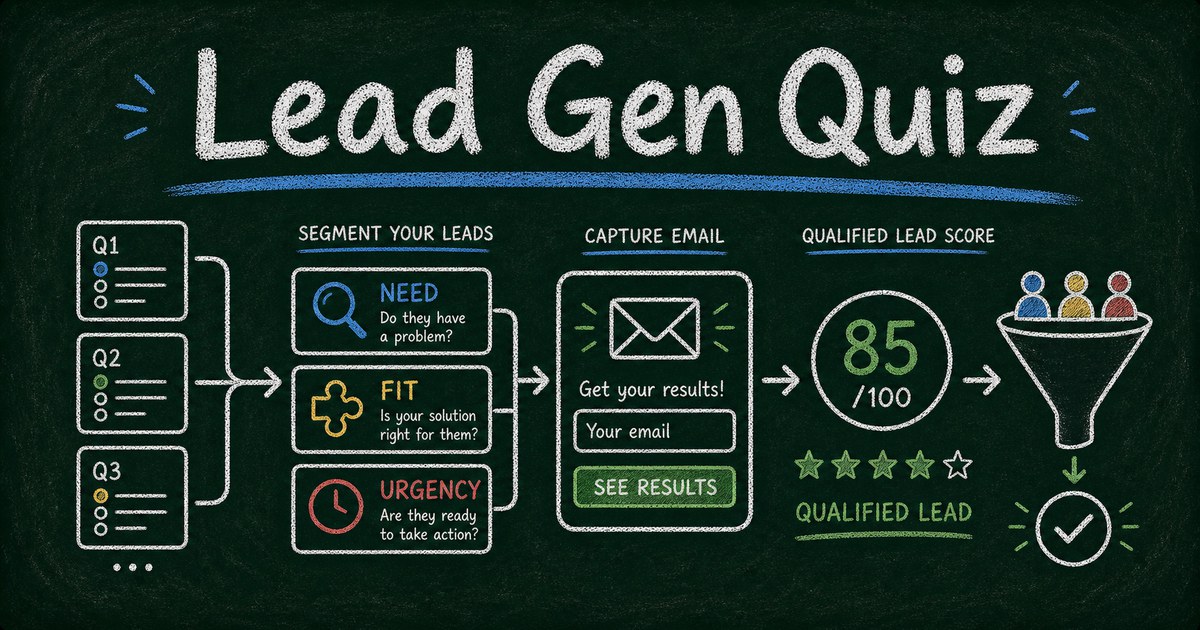
The best lead gen quizzes do not simply entertain people and ask for an email at the end. They qualify need, constraint, urgency, and fit while giving the respondent a useful result. The business gets segmentation. The prospect gets insight.
This guide shows how to build a lead gen quiz that qualifies prospects automatically, routes people into useful follow-up, and avoids the biggest quiz-funnel mistake: collecting leads without learning anything about them.
TL;DR - A lead gen quiz qualifies prospects by asking scored or segmented questions before recommending a result, next step, or offer.
- Qualify through value - the quiz should help the prospect understand themselves, not just help you score them.
- Use 5 to 8 questions - enough signal for segmentation, short enough to complete.
- Capture email at the right moment - after the quiz has created curiosity and before the deeper result or next step.
- Works for: agencies, coaches, SaaS products, course creators, consultants, real estate, and product recommendations.
- FormHug can build quizzes with outcomes, scoring, forms, and lead capture in one workflow.
What Is a Lead Gen Quiz?
A lead gen quiz is an interactive quiz designed to collect qualified leads. It asks questions that reveal the prospect’s situation, then returns a result, score, recommendation, or next step.
It is different from a normal lead capture form because the respondent gets value before submitting. It is different from a personality quiz because the business uses the answers to understand fit and follow-up.
For a form-first approach, see how to build a lead generation form. Use a quiz when the qualification process benefits from interaction.
The Need, Constraint, Urgency Framework
Most lead gen quizzes only ask preferences. Better quizzes ask three things:
| Layer | What it reveals | Example |
|---|---|---|
| Need | What problem are they trying to solve? | ”What is blocking growth right now?” |
| Constraint | What limits the solution? | ”What budget or team capacity do you have?” |
| Urgency | How soon do they need help? | ”When do you want this solved?” |
Add one fit question when needed:
Which best describes your business size?
That gives you enough context to score the lead without making the quiz feel like a sales intake form.
What to Include in a Lead Gen Quiz
Use this structure:
| Section | Questions |
|---|---|
| Hook | 1 question that feels easy and relevant |
| Need | 1 to 2 questions |
| Constraint | 1 to 2 questions |
| Urgency | 1 question |
| Fit | 1 question |
| Result | score, recommendation, or type |
| Capture | email, name, optional company |
For most lead gen quizzes, 6 to 8 questions is enough. If the quiz takes longer than three minutes, it starts to feel like a sales qualification call.
Lead Gen Quiz Examples
Agency quiz
Title: “Is Your Website Ready for Paid Traffic?”
Result types: Not Ready, Needs Fixes, Ready to Scale.
Use this to qualify whether the prospect needs strategy, landing page work, or campaign support.
SaaS quiz
Title: “Which Workflow Should You Automate First?”
Result types: Manual Follow-Up, Intake Bottleneck, Reporting Gap, Lead Routing.
Use this to segment product education and onboarding.
Course creator quiz
Title: “What Learning Path Fits Your Current Stage?”
Result types: Beginner Track, Practice Track, Advanced Track.
Use this to recommend the right course or cohort.
Product recommendation quiz
Title: “Which Plan Fits Your Team?”
Result types: Starter, Growth, Pro, Enterprise.
For a dedicated product workflow, see how to build a product recommendation quiz.
How to Build a Lead Gen Quiz in FormHug
Step 1: Define the result
Choose whether the quiz returns:
- A score
- A recommendation
- A readiness level
- A personality-style type
- A product or service match
The result determines the scoring model.
Step 2: Generate the quiz
Use FormHug AI with a prompt like:
Create a 7-question lead gen quiz for a marketing agency called “Is Your Website Ready for Paid Traffic?” Score prospects into Not Ready, Needs Fixes, and Ready to Scale. Include email capture before the detailed result.
We tested this pattern with service-business quizzes and found that result labels mattered more than question cleverness. Clear labels make follow-up easier.
Step 3: Add scoring and segmentation
Map answers to result types. For example:
| Answer pattern | Result |
|---|---|
| no analytics, slow site, unclear offer | Not Ready |
| traffic ready but conversion gaps | Needs Fixes |
| clear offer, fast page, tracking set | Ready to Scale |
Then use the result to personalize the next step.
Step 4: Capture email without killing trust
Do not hide all value behind the email wall. Show a short result first, then ask for email to send the full breakdown, checklist, or recommendation.
If the quiz is high-intent, ask for name, email, company, and website. If it is top-of-funnel, ask for email only.
How FormHug Compares for Lead Gen Quizzes
| Need | FormHug | Basic form builder |
|---|---|---|
| AI quiz draft | Yes | Usually no |
| Outcome scoring | Yes | Often limited |
| Lead fields | Same flow | Yes |
| Result pages | Personalized | Often no |
| Follow-up context | Stored with answers | Varies |
| Broader workflows | Forms, surveys, bookings, payments | Usually forms only |
Dedicated quiz funnel tools may offer deeper marketing analytics. FormHug is strongest when you want the quiz, lead form, result, and broader workflow in one place.
Frequently Asked Questions
Can a quiz replace a lead capture form?
Yes, when the prospect needs guidance before they are ready to talk. A quiz can qualify need, constraint, urgency, and fit while giving the prospect a useful result.
How many questions should a lead gen quiz have?
Most lead gen quizzes should have 5 to 8 questions. That is enough to segment the lead without making the quiz feel like a long intake form.
Should I ask for email before or after the quiz result?
Usually after a short result preview. Give enough value to build trust, then ask for email to send the full breakdown, checklist, or next step.
What should a lead gen quiz measure?
Measure the prospect’s need, constraint, urgency, and fit. Those four signals are more useful than generic preferences.
Can FormHug build lead gen quizzes?
Yes. FormHug can create quizzes with AI, map answers to outcomes, collect lead fields, and publish the quiz as a link or embed.
Is FormHug free for lead gen quizzes?
Yes. You can build and publish lead gen quizzes on the free plan.
Related
- How to Build a Lead Generation Form - use a form-first flow for direct qualification
- Personality Quiz Maker - build outcome quizzes people want to share
- How to Build a Product Recommendation Quiz - recommend products, plans, or offers from answers
Every generic lead form asks for trust before giving value. A lead gen quiz earns the next step by helping the prospect understand what they need. Create your lead gen quiz →

Written by
FormHug TeamProduct, research, and form automation team
The FormHug Team brings together product builders, workflow researchers, and form automation practitioners who study how people collect, route, and act on information online. Our guides are based on hands-on product testing, template analysis, customer workflow patterns, and deep experience with forms, surveys, quizzes, AI-assisted creation, integrations, and results sharing.