360 Feedback Form: How to Run a Peer Review Without Spreadsheets
Create the assessment
Turn this into a scored assessment
Build an assessment with scoring, result pages, feedback, and records you can review later.
The spreadsheet version of 360 feedback breaks almost immediately. Someone copies the wrong tab. Someone forgets to anonymize comments. Someone rewrites the scale. By the time feedback reaches the manager, the process has become more stressful than useful.
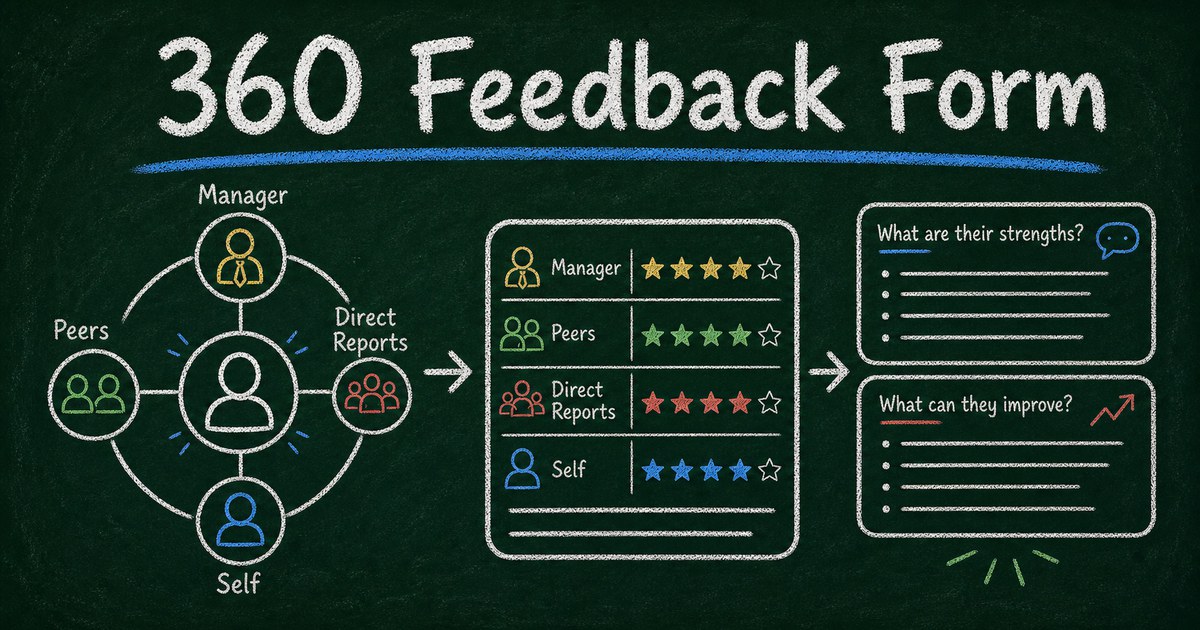
A 360 feedback form gives the process a cleaner shape. Everyone answers the same questions, the rating scale stays consistent, comments are collected in one place, and the review owner can summarize patterns without merging scattered files.
This guide shows how to run a small-team 360 peer review with a form, including what to ask, how to handle anonymity, and how to turn feedback into development actions.
TL;DR - A 360 feedback form collects structured feedback about one person from managers, peers, direct reports, and collaborators.
- Define competencies first - feedback should map to behaviors, not personality judgments.
- Separate ratings from examples - numbers show patterns; comments explain them.
- Decide anonymity before launch - trust depends on a clear rule.
- Works for: manager development, peer reviews, leadership programs, project retrospectives, and team coaching.
- FormHug can collect 360 feedback with rating scales, comments, routing fields, and assessment-style reporting.
What Is a 360 Feedback Form?
A 360 feedback form is an online form that collects feedback about one person from multiple perspectives. Reviewers might include the person’s manager, peers, direct reports, project partners, and sometimes customers or stakeholders.
The goal is not to create a popularity score. The goal is to show patterns: where behavior is consistent, where perception differs by group, and what development theme deserves attention.
For broader employee skill measurement, see skills assessment templates. A 360 feedback form is more relationship-based; a skills assessment is more competency-based.
The Behavior, Evidence, Action Framework
Use this framework for every section:
| Part | What it asks | Example |
|---|---|---|
| Behavior | What pattern do you observe? | Communicates priorities clearly |
| Evidence | What example supports it? | ”In the launch meeting, they clarified ownership…” |
| Action | What should continue or change? | Keep weekly written priorities |
The framework keeps feedback useful. “Great communicator” is nice but vague. “Clarifies priorities in writing before cross-functional meetings” is actionable.
What to Include in a 360 Feedback Form
Use 4 to 6 competencies:
- Communication
- Collaboration
- Decision making
- Ownership
- Coaching or support
- Prioritization
For each competency, ask one rating question and one evidence prompt:
How effectively does this person communicate priorities?
What is one example that supports your rating?
Then add two closing prompts:
- What should this person continue doing?
- What is one behavior that would make them more effective?
Anonymity: Choose One Rule
Anonymity is not a toggle to decide later. It changes how honest people feel and how specific comments can be.
Use this decision table:
| Model | Use when | Tradeoff |
|---|---|---|
| Anonymous | psychological safety matters most | harder to follow up |
| Named | coaching culture is mature | more accountability, less candor |
| Grouped | small teams need some privacy | comments may still be identifiable |
If the team has fewer than five reviewers, do not promise full anonymity casually. People can often infer who wrote what from context.
How to Create a 360 Feedback Form
Step 1: Define the review scope
Decide who is being reviewed, who will give feedback, and what the feedback will influence. A development review has a different tone from a promotion review.
For small teams, keep the first 360 simple: 5 competencies, 10 to 12 questions, and one open-ended section.
Step 2: Build the feedback form
In FormHug, create a form with:
- Reviewee name
- Reviewer relationship
- Competency rating questions
- Evidence prompts
- Continue/change prompts
- Optional follow-up permission
Use FormHug AI with a prompt like:
Create a 360 feedback form for small-team manager development. Include ratings for communication, prioritization, collaboration, coaching, and ownership, with one example prompt after each rating.
Step 3: Collect and summarize patterns
Look for alignment and gaps:
| Pattern | What it may mean |
|---|---|
| high ratings, strong examples | reliable strength |
| high ratings, weak examples | reputation may be vague |
| mixed ratings by relationship | behavior changes by audience |
| repeated comments | development theme |
For assessment-style reporting, adapt the dimension logic from online personality tests and skills assessments.
Step 4: Hold a development conversation
Do not send raw comments without context. Summarize themes, choose 1 to 2 strengths, choose 1 development area, and agree on one observable behavior to practice.
The best 360 review ends with a behavior, not a label.
360 Feedback Questions
Use questions like:
- How clearly does this person communicate priorities?
- How reliably does this person follow through on commitments?
- How well does this person make decisions with incomplete information?
- How effectively does this person collaborate across roles?
- How well does this person support others’ work?
- What should this person continue doing?
- What should this person do differently?
- What is one example of this person at their best?
Avoid questions like “Is this person a good leader?” They invite impressions instead of examples.
Frequently Asked Questions
How do I run a 360 review for a small team?
Choose 4 to 6 competencies, invite a small group of reviewers, collect ratings and examples through one form, summarize themes, and discuss 1 to 2 development actions with the reviewee.
Should 360 feedback be anonymous?
It depends on team trust and size. Anonymous feedback can increase candor, but small teams may not be truly anonymous. State the rule clearly before collecting responses.
What questions should a 360 feedback form ask?
Ask behavior-based questions about communication, collaboration, decision making, ownership, support, and prioritization. Pair each rating with an example prompt.
How many questions should a 360 feedback form have?
Most small-team 360 forms should have 8 to 12 questions. Longer forms reduce completion and can produce repetitive comments.
Can I use 360 feedback for promotions?
Use caution. 360 feedback is useful for development, but promotion decisions need clear role criteria, manager judgment, performance evidence, and fairness review.
Is FormHug free for 360 feedback forms?
Yes. You can create and publish 360 feedback forms with FormHug and collect responses on the free plan.
Related
- Skills Assessment Template - evaluate competencies with dimensions and scoring
- How to Create an Evaluation Form - build structured rating forms for people, programs, and services
- How Many Questions Should a Survey Have? - keep review forms short enough to complete
Every spreadsheet-based review adds another place for trust to leak. Put the questions, ratings, and examples in one clean form. Create your 360 feedback form →

Written by
FormHug TeamProduct, research, and form automation team
The FormHug Team brings together product builders, workflow researchers, and form automation practitioners who study how people collect, route, and act on information online. Our guides are based on hands-on product testing, template analysis, customer workflow patterns, and deep experience with forms, surveys, quizzes, AI-assisted creation, integrations, and results sharing.