Fan Surveys, Polls, and Quizzes: Form Ideas for Stan Store Creators
Start collecting responses
Turn this into a shareable survey
Draft the questions, publish a clean link, and keep every response organized in FormHug.
Creator stores work because they meet fans where attention already exists. A follower sees a post, clicks the bio link, and lands somewhere that can hold offers, courses, bookings, digital products, and community links.
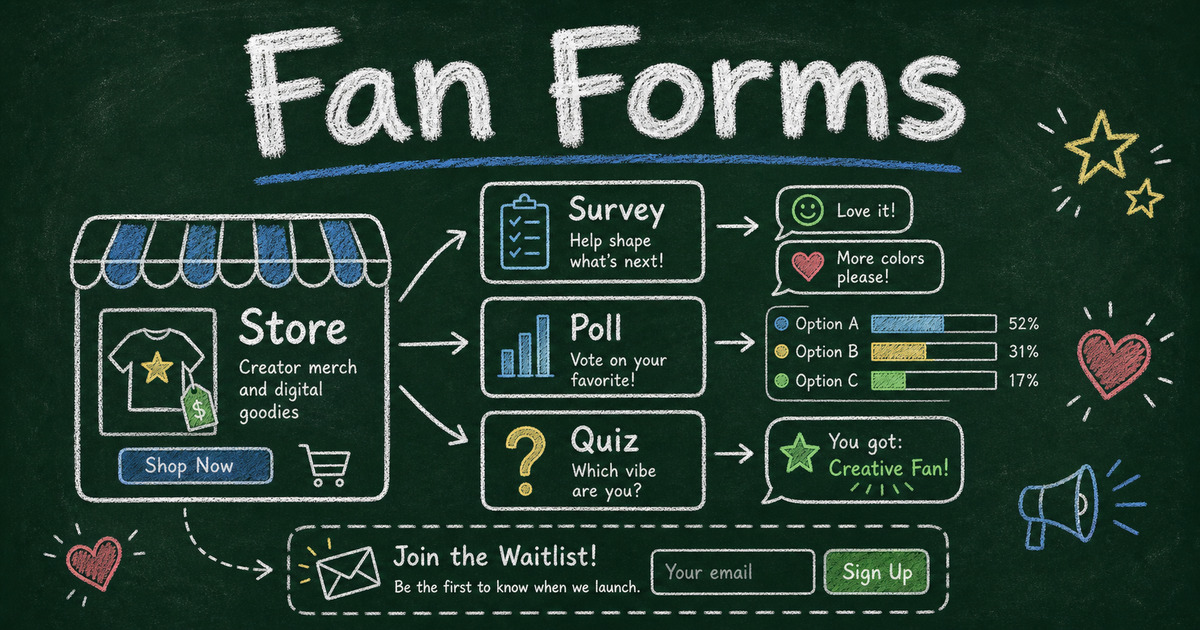
But not every fan interaction should be a purchase. Sometimes the better next step is a poll, survey, quiz, waitlist, application, giveaway signup, or product feedback form. Those interactions turn followers into participants before they become buyers.
That is the useful role for FormHug around a Stan Store. Stan Store remains the creator storefront. FormHug can be the interaction layer creators link to when they want to learn from fans, qualify interest, run playful campaigns, or collect structured responses.
TL;DR - Stan Store creators can use FormHug forms as fan surveys, polls, quizzes, applications, waitlists, and post-purchase intake flows around their existing creator store.
- Do not replace the store - keep Stan as the link-in-bio and commerce hub.
- Use forms for participation - ask fans what they want, which product they need, or which content should come next.
- Make the interaction useful - a poll can shape content; a quiz can recommend an offer; an application can qualify coaching leads.
- Works for: creators, coaches, course sellers, newsletter writers, template makers, podcasters, and fan communities.
- FormHug is strongest when the fan interaction needs questions, logic, scoring, or structured follow-up.
What Are Creator Engagement Forms?
Creator engagement forms are shareable forms that help a creator interact with fans beyond a simple link click. They can collect preferences, run polls, generate quiz results, qualify coaching applicants, validate product ideas, or gather feedback after a digital product sale.
Think of them as audience participation tools:
| Interaction | What it helps the creator learn |
|---|---|
| Fan survey | What the audience wants, likes, struggles with, or would pay for |
| Poll | Which topic, product, design, or content format should win |
| Quiz | Which result, recommendation, or personality type fits the fan |
| Waitlist | Who wants early access to a course, template, event, or offer |
| Application | Whether a fan is a good fit for coaching, consulting, or a paid program |
| Feedback form | What buyers thought after using a digital product or course |
Stan Store is built for creator monetization: digital products, courses, bookings, email capture, and link-in-bio commerce. A form adds the structured conversation around that monetization.
Why Forms Fit Around a Stan Store
Creators often know how many people clicked a link, bought a product, or watched a video. They do not always know why.
Forms answer the questions platform analytics cannot:
- What topic should I teach next?
- Which product idea feels most useful?
- Why did someone hesitate before buying?
- What kind of fan is this person?
- Which free resource should I build first?
- Who is serious enough for a coaching application?
- What did buyers find confusing after purchase?
This is why the best form is not always a long survey. Sometimes it is a one-question poll. Sometimes it is a five-question quiz that gives a useful result. Sometimes it is a short application that saves a creator from unqualified sales calls.
The point is not to add another tool for its own sake. The point is to give fans a clear way to participate.
8 Form Ideas for Stan Store Creators
1. Fan content preference survey
Use this when you are deciding what to post, teach, record, or write next.
Ask:
- Which topic do you want more of?
- What format do you prefer: short post, video, live session, template, or deep dive?
- What problem are you trying to solve right now?
- What have I explained well?
- What still feels confusing?
For a deeper version, use the creator survey templates guide.
2. “What should I make next?” poll
Polls are perfect when you already have options and want the audience to choose.
Examples:
- Which template should I release first?
- Which video should become a full course?
- Which cover design feels more useful?
- Which live workshop topic would you attend?
- Which free download should I create next?
This is a simple way to make fans feel involved in the roadmap. It also gives the creator a better signal than comments alone.
3. Personality or recommendation quiz
Quizzes work especially well for creators because they give the fan a result, not just a question.
Examples:
- What type of creator are you?
- Which productivity system fits your work style?
- Which course should you take first?
- What kind of digital product should you launch?
- What is your marketing instinct?
A quiz can end with a helpful recommendation, then point the fan back to the right resource, product, or store link. For examples, see the free quiz templates collection.
4. Digital product waitlist
Before launching a course, template pack, ebook, or paid community, use a waitlist to collect early interest.
Ask only what you need:
- Email address.
- What problem they want solved.
- Which version they want.
- Whether they want early access.
- What price range feels reasonable.
This works well when the creator is not ready to sell yet but wants proof that the idea has demand.
5. Coaching or consulting application
If a creator sells coaching, consulting, audits, or done-with-you services, a form can qualify leads before a call.
Ask:
- What are you trying to accomplish?
- What have you already tried?
- What is your budget range?
- What timeline are you working with?
- What would make this support successful?
For more structure, see how to create an online application form.
6. Giveaway or challenge signup
Giveaways, challenges, and short campaigns often need more than a name and email. A creator may need to collect social handle, eligibility, preference, or consent.
Good fields include:
- Name.
- Email.
- Social handle.
- Which challenge track they want.
- What they hope to win or learn.
- Permission to receive updates.
Keep these forms short. The campaign is supposed to feel fun, not administrative.
7. Post-purchase feedback form
After someone buys a digital download, course, template, or paid resource, send a short feedback form.
Ask:
- Did the product solve the problem you expected?
- What part was most useful?
- What was confusing?
- What should be added?
- Would you recommend it?
This helps creators improve the next version, write better sales copy, and decide which products deserve more promotion.
8. Community onboarding form
For paid communities, private groups, cohorts, or fan clubs, an onboarding form can make the first experience more personal.
Ask:
- Why did you join?
- What are you working on?
- What kind of support do you want?
- Which topics should we cover?
- Do you want accountability, feedback, networking, or resources?
That data helps the creator welcome members, group people by interest, and plan programming around real needs.
A Simple Stan Store Plus FormHug Workflow
Here is one clean way to connect the two:
- Add the published FormHug URL as a regular link in your Stan Store, framed as a resource, poll, quiz, or application.
- Mention the form in your social post, newsletter, video description, or community update.
- Send fans to the Stan Store link they already know.
- Let the form collect structured answers, not just clicks.
- Use the responses to choose content, qualify leads, improve products, or segment follow-up.
This gives fans a familiar path: social post -> creator store -> form interaction -> useful next step.
When to Use a Form Instead of a Store Product
Use a store product when the fan is ready to buy, book, download, or join.
Use a form when you need to ask before sending them somewhere:
| If you need… | Use… |
|---|---|
| A direct purchase | Store product |
| Early interest before launch | Waitlist form |
| Audience input | Survey or poll |
| A personalized recommendation | Quiz |
| Lead qualification | Application form |
| Buyer improvement ideas | Feedback form |
| Community context | Onboarding form |
Creators often lose conversions by asking people to buy before they understand what the fan actually wants. A form can slow the path down just enough to make the next step better.
How to Build a Fan Survey, Poll, or Quiz in FormHug
Step 1: Choose the interaction type
Start with the decision you want to make.
If you need a content direction, use a poll. If you need product insight, use a survey. If you want a fun result, use a quiz. If you need to screen people, use an application.
Step 2: Keep the first version short
Creators are often tempted to ask everything at once. Resist that.
For most fan forms:
- Poll: 1 to 3 questions.
- Survey: 5 to 8 questions.
- Quiz: 5 to 10 questions.
- Application: 6 to 10 questions.
- Feedback form: 4 to 6 questions.
Short forms are easier to share repeatedly.
Step 3: Add logic or scoring when the answer should change the result
Use conditional logic when different fans need different follow-ups. Use quiz scoring when the fan should receive a result type or recommendation.
Examples:
- A beginner sees beginner resources.
- A course-ready fan sees the course waitlist.
- A coaching lead sees the application follow-up.
- A quiz respondent gets a creator type result.
For branching examples, see conditional logic forms.
Step 4: Start from a creator-friendly demo or template
You can build from scratch, but a ready-made demo or template is usually faster for the first version. Pick the interaction closest to the fan moment you want to create:
| Demo or template | Best creator use |
|---|---|
| Audience Content Preference Survey | Ask fans which topics, formats, and publishing cadence they want next |
| Content Format Preference Poll | Let fans vote on short videos, deep dives, lives, templates, or newsletters |
| What Type of Creator Are You? | Run a playful quiz that gives fans a shareable creator-type result |
| Product Idea Validation Survey | Test a course, template pack, or paid resource before launch |
| Giveaway Entry Form | Collect entries for a fan giveaway, challenge, or launch campaign |
The best template is the one that matches the promise in your store link. If the link says “vote on my next drop,” use a poll. If it says “find your creator type,” use a quiz. If it says “help me build the next product,” use a short survey.
Step 5: Put the form where fans already click
Add the FormHug link to your creator store, newsletter, pinned post, video description, or community channel. The best distribution is usually not a new place. It is the place fans already trust.
Frequently Asked Questions
Can I use FormHug with a Stan Store?
Yes. Create a form in FormHug, publish it, and add the share link to your Stan Store or any creator bio link. Fans can open the form from the store and submit surveys, polls, quizzes, applications, or waitlists.
Is FormHug a Stan Store alternative?
No. Stan Store is a creator storefront and monetization hub. FormHug is useful around that store when the creator wants structured fan interaction, audience research, quizzes, polls, or applications.
What forms should creators share with fans?
The most useful forms are content preference surveys, product waitlists, fan polls, personality quizzes, coaching applications, giveaway signups, post-purchase feedback forms, and community onboarding forms.
Are quizzes useful for creator engagement?
Yes. Quizzes give fans a result, which makes the interaction feel more personal than a regular survey. They work well for recommendations, personality results, course placement, and playful fan campaigns.
Should I put a survey in my bio link?
Yes, if the survey has a clear purpose and a short completion time. A long generic survey can feel like homework. A focused poll, quiz, or product feedback form is more likely to get answered.
Can a fan survey help with product ideas?
Yes. A fan survey can reveal which problems your audience cares about, what they would pay for, and which format they prefer. That is more useful than building a product only from comments or platform analytics.
How long should a creator survey be?
Most creator surveys should be 5 to 8 questions. If you need more detail, split the research into multiple smaller forms so each one has a clear purpose.
Related
- 18 Best Creator and Solopreneur Survey Templates for 2026 - collect audience, product, monetization, and creator wellbeing data.
- Fun Survey Questions for Work, Events, Classrooms, and Social Polls - use playful prompts to increase participation.
- Free Quiz Templates for Creators, Educators, Marketers, and Teams - turn fan interactions into result-based quizzes.
- How to Build a Lead Generation Form That Converts - qualify interest before sending people into a sales flow.
Your creator store is where fans find your offers. A good form is where they tell you what they want next. Create a fan survey or quiz ->

Written by
FormHug TeamProduct, research, and form automation team
The FormHug Team brings together product builders, workflow researchers, and form automation practitioners who study how people collect, route, and act on information online. Our guides are based on hands-on product testing, template analysis, customer workflow patterns, and deep experience with forms, surveys, quizzes, AI-assisted creation, integrations, and results sharing.