NPS Survey Best Practices: How to Send One People Actually Answer
Start collecting responses
Turn this into a shareable survey
Draft the questions, publish a clean link, and keep every response organized in FormHug.
Most NPS surveys get a response rate in the single digits. Not because people don’t have opinions — they do — but because the survey arrives at the wrong time, asks too much, or feels like a formality no one is reading.
A well-designed NPS survey takes 45 seconds to complete, arrives when the experience is still fresh, and asks one follow-up question that actually helps you understand the score. When those three conditions are met, response rates climb into the 20–40% range and the data becomes something you can make decisions from.
This guide covers how to design, time, and analyze an NPS survey that works — and how to set one up in FormHug in under five minutes.
TL;DR — An NPS survey measures customer loyalty with one 0–10 recommendation question plus one focused follow-up.
- Keep it to two questions — the rating tells you the score; the follow-up tells you what to fix or repeat.
- Send it at a meaningful moment — post-interaction timing beats generic quarterly blasts.
- Segment follow-ups by score — Promoters, Passives, and Detractors need different prompts.
- Works for: SaaS feedback, post-support surveys, onboarding feedback, product research, customer success check-ins.
- Track the trend over time; one isolated NPS number is less useful than movement by segment or quarter.
If you want to start from a finished structure, use the NPS Survey Template and customize the product name, follow-up prompts, and trigger timing. For broader feedback workflows, browse the surveys and feedback templates.
What Is an NPS Survey?
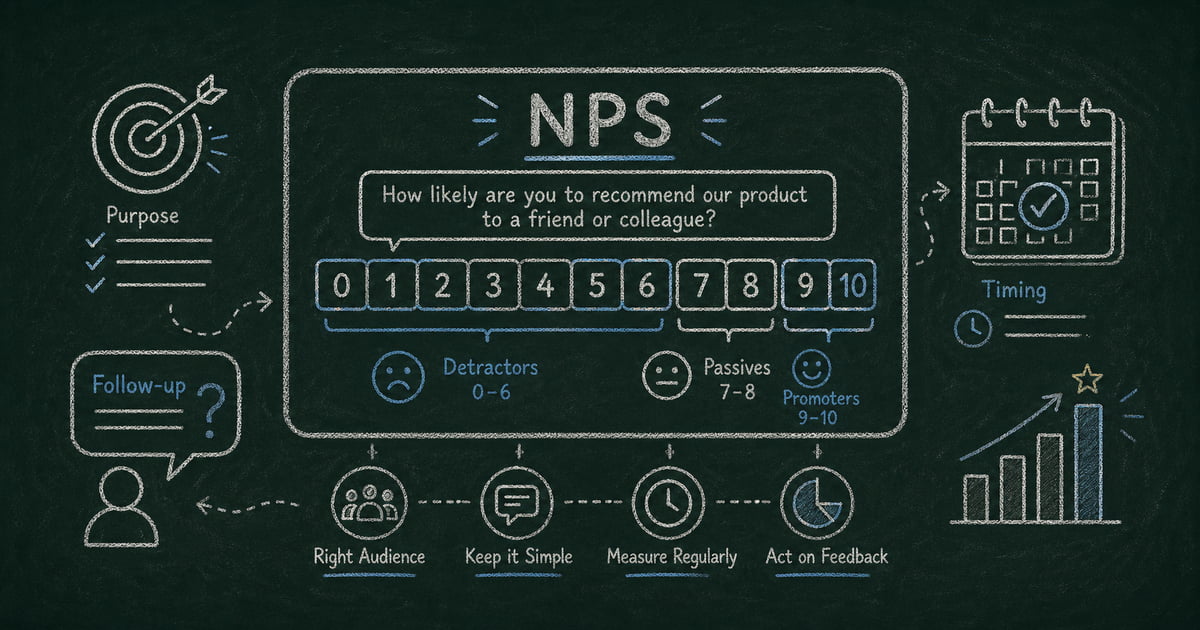
Net Promoter Score (NPS) is a one-question customer loyalty metric introduced by Bain & Company in 2003. The question is always the same:
“How likely are you to recommend [Company/Product] to a friend or colleague?”
Respondents answer on a 0–10 scale. The responses fall into three groups:
- Promoters (9–10): Loyal enthusiasts likely to refer others
- Passives (7–8): Satisfied but not actively promoting
- Detractors (0–6): Unhappy customers who may discourage others
NPS is calculated as: % Promoters − % Detractors. The result ranges from −100 to +100. A score above 0 means more promoters than detractors. Above 50 is considered excellent in most industries.
What makes NPS useful isn’t the number itself — it’s the trend over time and the follow-up responses that explain why respondents gave the score they did.
Keep It Short: Two Questions Maximum
The standard NPS survey has two questions:
- The rating question — “How likely are you to recommend [X] on a scale of 0–10?”
- The open-ended follow-up — “What’s the main reason for your score?”
That’s it. Two questions. Every additional question you add reduces your response rate.
The follow-up question is more valuable than it appears. It’s where you find out what Promoters love (so you can emphasize it), what Detractors are frustrated by (so you can fix it), and what Passives are waiting on (so you can convert them).
Use conditional logic to customize the follow-up based on the score group:
- Promoters (9–10): “What do you value most about [Product]?”
- Passives (7–8): “What would make you more likely to recommend us?”
- Detractors (0–6): “What went wrong? What can we do to improve your experience?”
Three tailored versions of the same question — but respondents only see the one that matches their score. FormHug’s conditional logic handles this automatically.
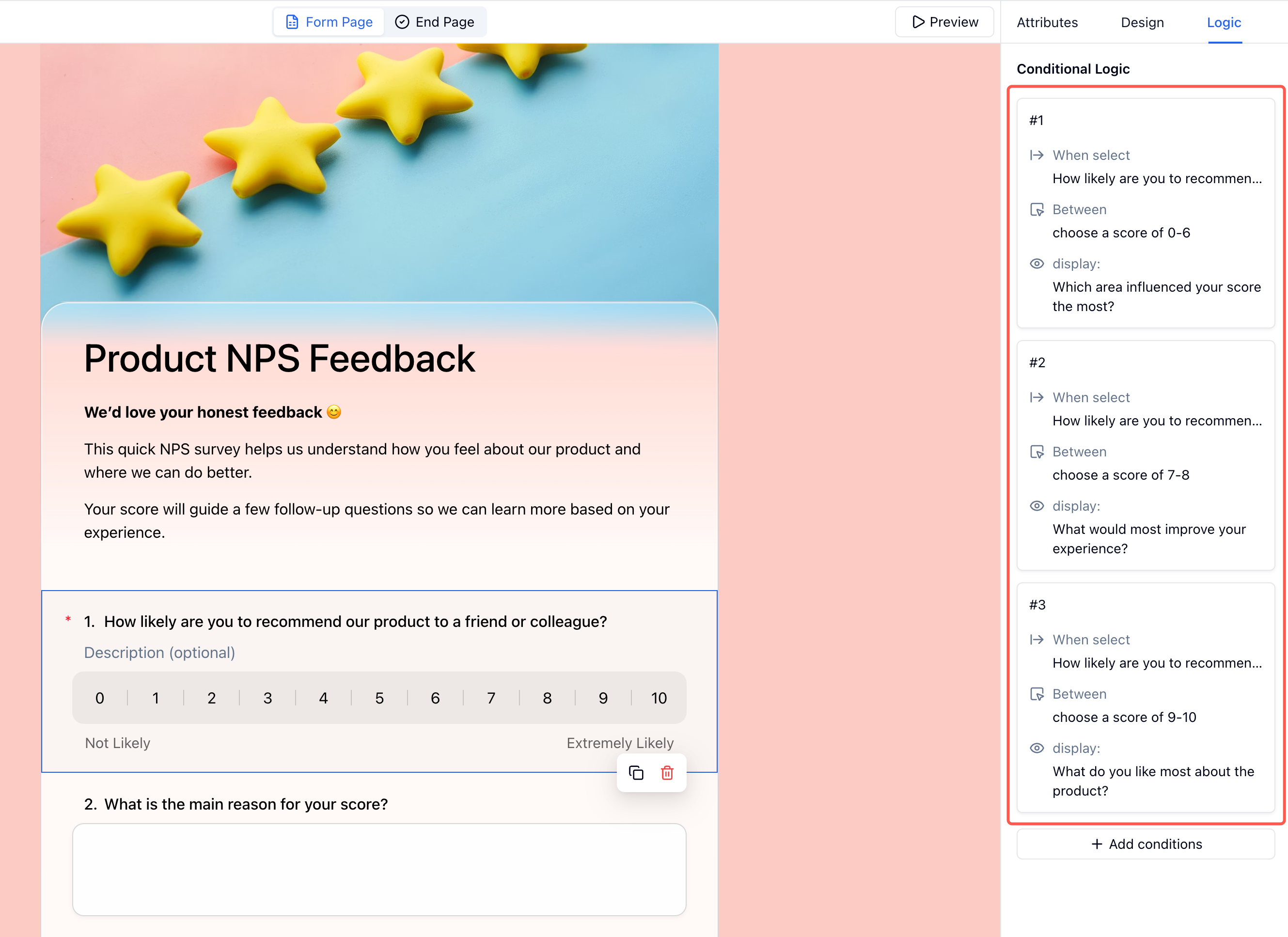 Three conditional follow-up rules in the Logic panel — each score range triggers a different question so every respondent gets a relevant prompt.
Write the Question Clearly
Small wording changes significantly affect NPS scores. A few rules:
Use “recommend to a friend or colleague” — not “recommend to others” or “recommend to your network.” The original phrasing is deliberate: it forces respondents to think of a real person, which produces more honest scores than abstract questions.
Name the specific product or feature — “How likely are you to recommend FormHug’s quiz builder?” gets more actionable data than “How likely are you to recommend FormHug?” If you run multiple products, survey each one separately.
Avoid embedding assumptions — “How likely are you to recommend our excellent service?” is not NPS. Remove any adjectives that telegraph the expected answer.
Keep the scale anchor labels neutral — Label 0 as “Not at all likely” and 10 as “Extremely likely.” Nothing else. Don’t add labels to middle values.
Time It Right
Timing is the single biggest factor in NPS response rates. The survey should arrive when the experience being measured is still recent and vivid.
After a completed interaction
The highest-converting NPS trigger is immediately after a meaningful event: a purchase completed, a support ticket resolved, a project delivered, or an onboarding flow finished. Response rates for in-moment NPS surveys are 3–5× higher than batch surveys sent on a schedule.
The 24–48 hour window
For longer interactions — a product used over a session, a class attended, a service rendered — send the NPS within 24–48 hours. Long enough that the experience is complete, short enough that it’s still fresh.
Avoid survey fatigue cadences
Sending NPS monthly to the same users produces diminishing returns quickly. A contact who has already submitted an NPS score in the last 90 days should be excluded from the next batch. Repeat surveys to the same audience signal that you’re not reading the responses — which undermines the whole purpose.
A reasonable default cadence: survey each customer once per quarter at most, triggered by a meaningful interaction if possible.
Choose the Right Channel
In-product / in-form: The highest response rates come from NPS embedded directly in the product experience — a short form that appears after a key action. Users are already engaged, and the survey feels contextual rather than intrusive.
Email: Good for relationship NPS (measuring overall loyalty rather than a specific interaction). Keep the email short: one sentence of context, the rating question visible in the email body if possible, and a clear link. Avoid attaching the survey to a newsletter — it gets lost.
SMS: High open rates but only appropriate if users have explicitly opted in to SMS communication. Short surveys (two questions) work best.
Avoid pop-up banners mid-session. Interrupting users while they’re trying to accomplish something else produces low response rates and inflated Detractor scores.
Set a Response Rate Baseline
Before drawing conclusions from your NPS data, you need enough responses to make the score statistically meaningful. A few rules of thumb:
- Under 30 responses: Treat the score as directional only. A single Detractor can swing the score significantly.
- 30–100 responses: Useful for trend tracking, not benchmarking.
- 100+ responses: Score becomes reliable enough to compare over time and against industry benchmarks.
For small teams, achieving statistical significance takes longer. Segment your audience and survey the most active users first — they’re more likely to respond and produce the most actionable feedback.
How to Build an NPS Survey in FormHug: Step by Step
Step 1: Create your form
Open FormHug and create a new form. Use the AI builder: “Create a two-question NPS survey for [your product] with a conditional follow-up question based on the score.”
FormHug will generate the rating field, the score groups, and three conditional follow-up versions in one pass.
Step 2: Configure the rating field
Select the rating field and set it to a 0–10 scale. Label the endpoints: “Not at all likely” (0) and “Extremely likely” (10). Leave middle values unlabeled.
Check that the question reads exactly: “How likely are you to recommend [Your Product/Company] to a friend or colleague?” — substitute your specific product name.
Step 3: Set up conditional follow-ups
Add three Short Text fields with the tailored follow-up questions:
- “What do you value most about [Product]?” — visible only when rating is 9 or 10
- “What would make you more likely to recommend us?” — visible only when rating is 7 or 8
- “What went wrong? What can we do to improve?” — visible only when rating is 0–6
Set conditional display rules on each: the first appears when the rating field value is greater than or equal to 9, the second when it’s between 7 and 8, the third when it’s less than or equal to 6.
Step 4: Configure the close-the-loop moment and publish
Go to Settings → After Submission and write a short, genuine thank-you message. Something like: “Thanks for your feedback — we read every response.” If you plan to follow up with Detractors, you can add: “If you’d like us to reach out, reply to your confirmation email.”
Generic thank-you messages (“Your response has been recorded”) signal that you’re running a mechanical process, not actually listening. Personalized messages improve the perception of the survey.
Copy the form URL and set up the trigger in your product, email tool, or CRM. For post-interaction NPS, this is typically a Zapier workflow or webhook that fires when a specific event completes (ticket closed, onboarding step finished, order delivered).
For batch email NPS, paste the link into your email campaign with one sentence of context.
How FormHug Compares to Dedicated NPS Tools
Dedicated NPS platforms like Delighted and Satismeter are built specifically for score collection — automated follow-up sequences, CRM integrations, and team-level benchmarking are their core use case. FormHug is a general form builder with strong NPS support: conditional follow-ups by score group, a real-time dashboard, and no response limits on the free plan.
The practical difference: if NPS is your primary feedback program and you need automated close-the-loop workflows connected to Salesforce or HubSpot, a dedicated NPS tool earns its monthly fee. If NPS is one of several feedback types you collect alongside intake forms, event registrations, and surveys, FormHug handles all of them in one place — without the per-response fees that dedicated tools typically charge at scale.
Analyzing NPS Results
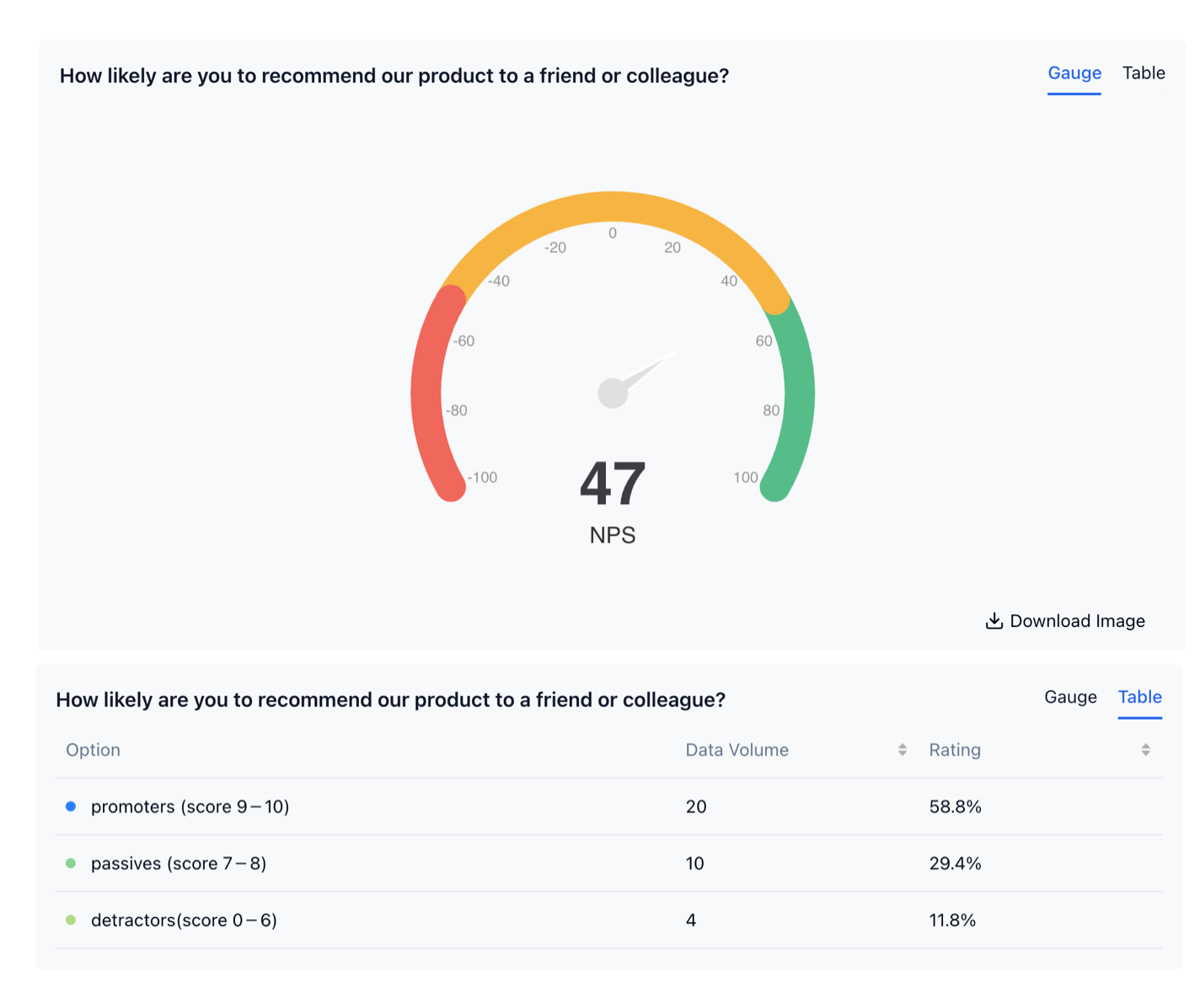 FormHug’s NPS dashboard shows your score on a gauge and breaks down the three respondent groups by volume and percentage.
Track the trend, not just the number
A single NPS score is almost meaningless in isolation. What matters is movement over time: is your score improving quarter over quarter? Did a product release or support change affect it?
Run NPS on a consistent cadence and track the score as a time series. Sudden drops tell you something changed. Steady climbs confirm that improvements are landing.
Segment Promoters, Passives, and Detractors separately
The aggregate score hides the story. Read Detractor responses first — they tell you what’s broken. Then read Promoter responses — they tell you what to double down on. Passive responses often surface the feature requests and friction points that convert neutral users into advocates.
FormHug’s results dashboard lets you filter responses by rating range. Filter for 0–6 and read all open-ended responses before each product planning cycle. If those follow-ups are too vague, use the patterns in open-ended survey questions or the broader feedback form questions guide to ask for a more specific reason.
For a fuller reporting workflow beyond NPS, use how to analyze survey results to connect scores, segments, themes, and actions.
Close the loop with Detractors
The highest-value action you can take with NPS data: personally reach out to every Detractor. A short email — “We saw your feedback and wanted to understand more about your experience” — converts more Detractors into satisfied customers than any product change, and produces specific, actionable detail about what went wrong.
Frequently Asked Questions
How often should I send an NPS survey?
Survey each customer at most once per quarter, and ideally trigger it after a meaningful interaction rather than on a fixed schedule. Sending NPS more frequently than quarterly to the same users produces survey fatigue and lower response rates without meaningfully better data.
What’s a good NPS response rate?
Industry benchmarks vary, but 20–40% is achievable for in-product or post-interaction NPS. Email NPS typically lands at 10–20%. Below 5% suggests timing or channel issues — the survey is arriving at the wrong moment or through a channel where users aren’t engaged.
What’s a good NPS score?
Benchmarks vary significantly by industry. As a rough guide: above 0 means more Promoters than Detractors, above 30 is good, above 50 is excellent, above 70 is world-class. More useful than a single benchmark: track your own score over time and compare against prior quarters.
Should I include more than two questions in my NPS survey?
Rarely. The standard two-question format (rating + open-ended follow-up) produces the best combination of response rate and actionable data. Adding additional questions — company attributes, product dimensions, demographics — reduces response rates meaningfully. If you need deeper segmentation, run a separate research survey rather than appending it to NPS.
Can I customize the follow-up question based on the score?
Yes. Using conditional logic, you can show different follow-up questions to Promoters, Passives, and Detractors. This produces more useful responses than a single generic “why did you give this score?” question, and FormHug supports this on the free plan.
How do I calculate NPS?
Take the percentage of respondents who scored 9 or 10 (Promoters), subtract the percentage who scored 0–6 (Detractors). The result is your NPS. Example: 60% Promoters − 20% Detractors = NPS of +40.
Is FormHug’s NPS survey free?
Yes. NPS surveys, including conditional logic for score-based follow-ups, are available on FormHug’s free plan with no response limits. For more on what FormHug’s plans include, see Best AI Form Builders in 2026.
Related
- How to Use Conditional Logic in Forms — set up score-based follow-up questions that show different text to Promoters vs. Detractors
- Open-Ended Survey Questions — improve the “why did you give that score?” follow-up
- How to Build a Lead Generation Form — pair NPS with lead qualification in a single form flow
- Best AI Form Builders in 2026 — how FormHug compares to other tools for survey and NPS use cases
Every NPS survey that arrives too late or asks too much turns real customer signal into noise. Keep it short, trigger it at the right moment, and make every score explain itself. Create your form →

Written by
FormHug TeamProduct, research, and form automation team
The FormHug Team brings together product builders, workflow researchers, and form automation practitioners who study how people collect, route, and act on information online. Our guides are based on hands-on product testing, template analysis, customer workflow patterns, and deep experience with forms, surveys, quizzes, AI-assisted creation, integrations, and results sharing.